Notifications in IFS Cloud Web
IFS Cloud Web facilitates notifications to notify the user regarding messages.
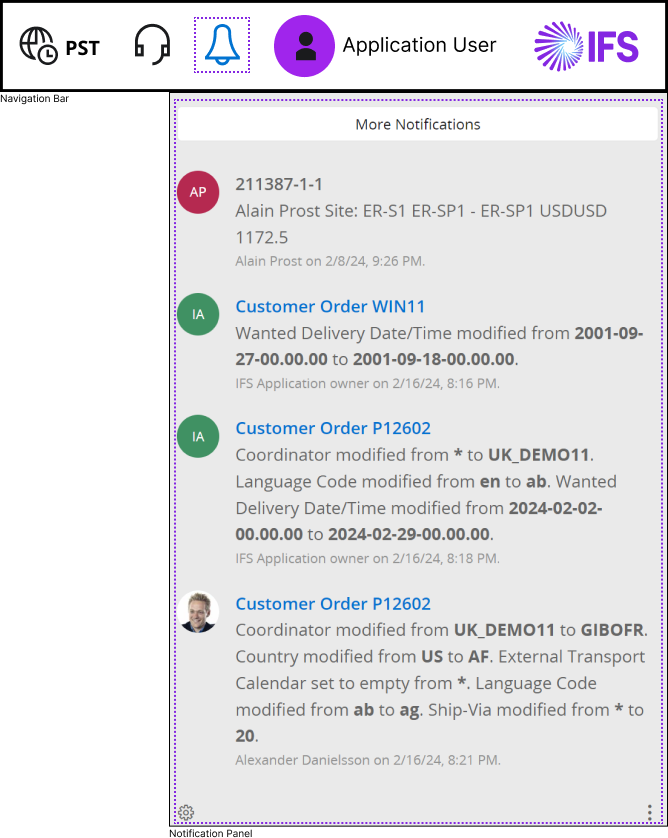
 Click
the notification icon in Navigation Bar to access Notification Panel.
Notification Panel displays messages related to the updates / changes you
configured within the IFS Cloud Web application Pages
Click
the notification icon in Navigation Bar to access Notification Panel.
Notification Panel displays messages related to the updates / changes you
configured within the IFS Cloud Web application Pages
 If
you receive a notification, the notification icon will display the number of
notifications you have received by showing a red dot above the icon,
indicating the number of notifications within the red dot.
If
you receive a notification, the notification icon will display the number of
notifications you have received by showing a red dot above the icon,
indicating the number of notifications within the red dot.
Properties of the Notification Tile
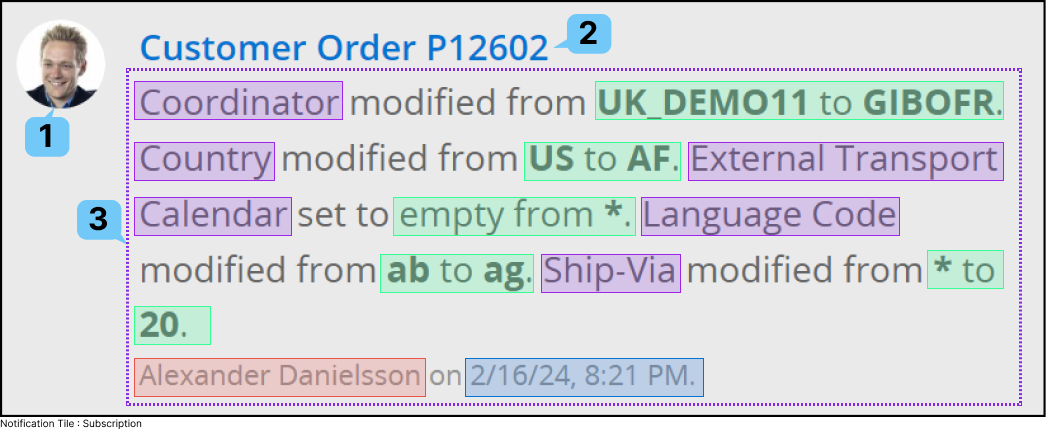
| Label | Description |
| 1 | Profile picture of the user who initiated the notification trigger. |
| 2 | Notification Title. |
| 3 |
Notification Details - For this
example we are using a subscription type notification: Field applied to change.
 Change of the value.
 Date//Time of the change.
 User who made the change
 |