About Contractor Management
- What is Service Contractor Management?
- Service Contractor Onboarding
- Service Contractor Agreements
- Contractor Execution and Reporting
- Purchasing and Invoicing
- Contractor Selection Rules and Selection Rules Criteria
- Access Control
- Material Handling
- Manage Contractor Resources
- Request Bundle Tasks for Contractors
- Default Resource
- Contractor Portal
What is Service Contractor Management?
Service Contractor Management is designed to support the effective administration of external service providers. It enables organizations to register, organize and manage service contractors in a structured and compliant manner.
The functionality addresses common challenges related to contractor integration, such as fragmented processes, limited visibility and regulatory compliance. By standardizing how contractors are defined and managed, organizations can improve operational efficiency, reduce costs and maintain high service quality.
Service Contractor Management connects contractors with suppliers, tracks active agreements, monitors resource availability and maintains key contact information. This enables organizations to:
- Define service contractors and understand their capabilities and roles.
- Manage supplier connections to ensure clear communication and collaboration.
- Access a comprehensive view of contractor agreements, qualifications and capacity.
- Allocate contractors to service needs efficiently based on contractual and resource criteria.
- Ensure compliance with legal and organizational requirements.
By maintaining accurate contractor data and supporting contractor-related processes, Service Contractor Management helps improve service delivery, optimize resource planning and build stronger contractor relationships.
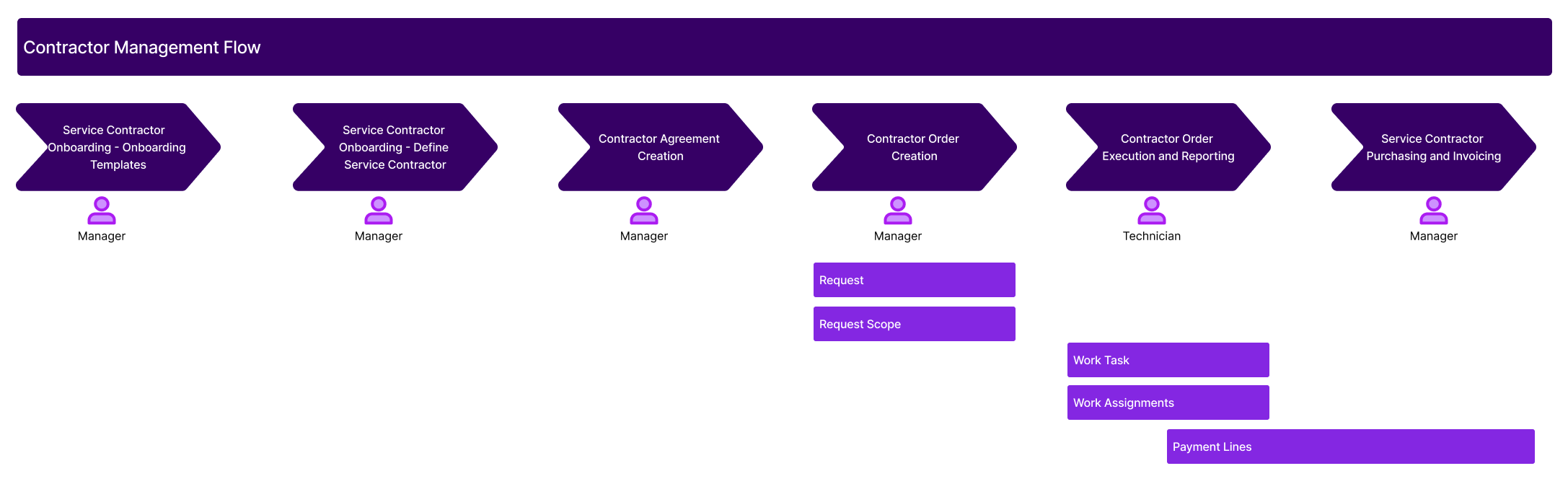
Key Concepts
- Service Contractor: An external organization contracted to perform services on behalf of a service provider. A Service Contractor may be linked to a Supplier and can be assigned to deliver work through Contractor Orders.
- Contractor: A general term referring to an individual or organization engaged to perform specific services.
- Supplier: A business entity defined in IFS that provides goods or services. Suppliers can be linked to Service Contractors to enable procurement, invoicing, and agreement management.
- Contractor Agreement: A formal agreement between a Service Contractor and the service provider, outlining services to be delivered, pricing terms, and cost limits. Used to govern subcontracted work and support payment and procurement processes.
- Supplier Agreement: An agreement defined for a Supplier, detailing parts, pricing, and procurement terms. In the context of subcontracting, it may be linked to a Contractor Agreement to apply consistent part pricing.
- Request Contract: A customer-facing agreement that defines service terms, pricing, and commitments for a specific customer. It can be linked to Contractor Agreements to align subcontracted work with customer obligations.
-
Resource Types: Classifications used to represent different kinds of service delivery
capacity. Resource types include: Person Resource: An individual with defined skills and availability.
- Crew Resource: A group of individuals working together as a unit.
- Bucket Resource: An anonymous capacity resource, often used for flexible allocation.
- Nominee: A named individual associated with a contractor who may be assigned to work but does not have full system access.
- Cost Rule: A set of definitions used to determine how costs are calculated and invoiced for contractor work. Cost Rules define which cost types are included in fixed prices and how different charges are handled.
- Purchase Parts: Non-inventory items linked to cost types and used to define the procurement components for subcontracted work. Each cost type may have one or more associated purchase parts used in payment and Purchase Order creation.
- Contractor Orders: Instructions issued to a Service Contractor to perform work on a Request Scope or Task. Contractor Orders track assigned work, reported costs, and payment lines, and integrate with agreements and purchasing.
Service Contractor Onboarding
Service Contractor Onboarding provides a structured process for introducing external contractors into the organization. It ensures that each contractor meets predefined requirements before being allowed to perform work.
The onboarding process addresses the common challenges of fragmented procedures and inconsistent compliance by standardizing how service contractors are introduced. It supports transparency, accountability and readiness by providing a consistent experience tailored to contractor roles.
Through the Service Contractor Onboarding process, users can:
- Define Contractor Types to categorize contractors based on business needs.
- Create Onboarding Templates linked to specific Contractor Types or used independently.
- Define and register individual Service Contractors.
- Track onboarding progress using predefined statuses:
- Onboarding Not Started
- Onboarding In Progress
- Onboarding Completed
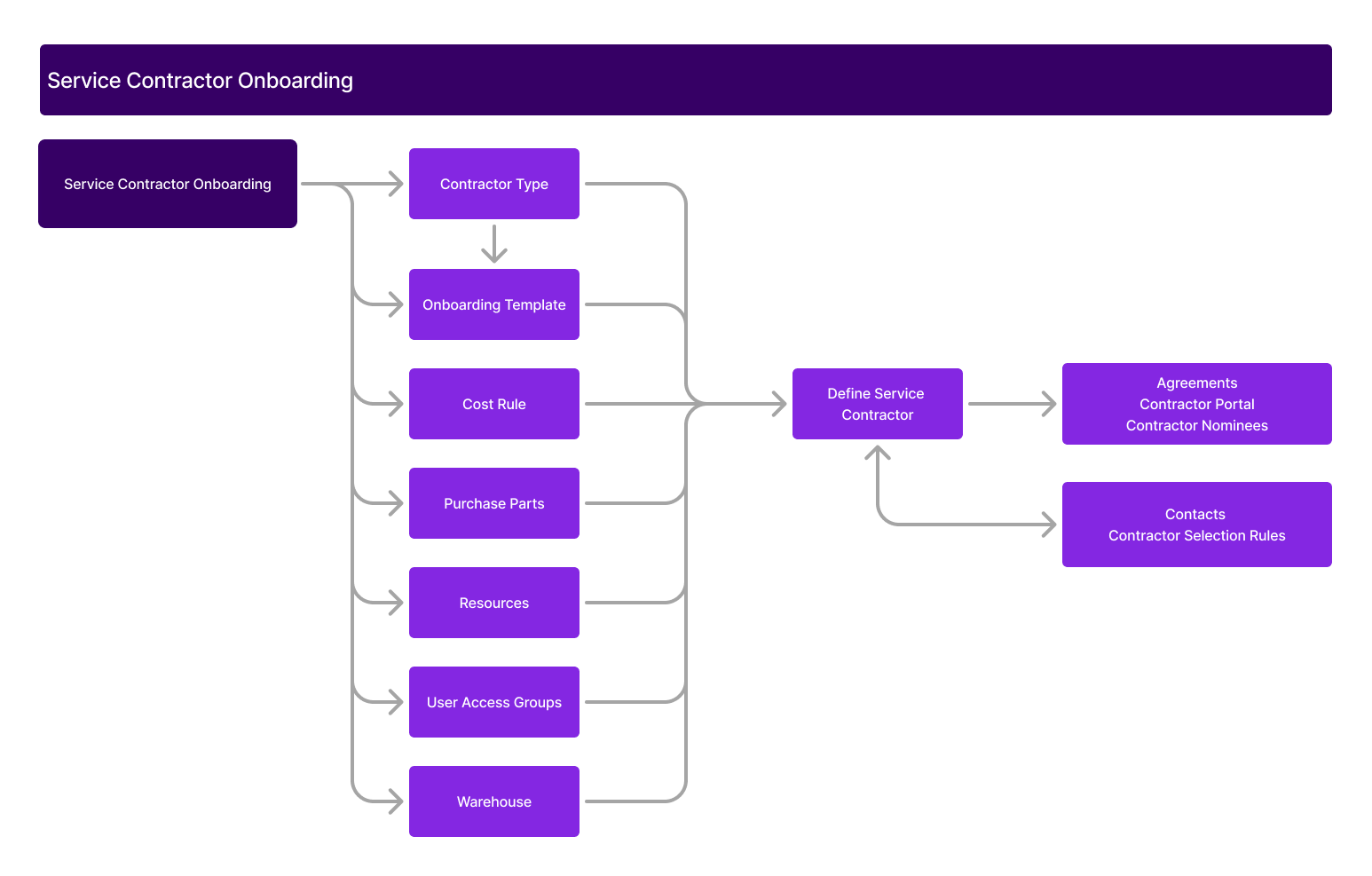
Service Contractor Onboarding: Onboarding Templates and Checklists
Service Contractor Onboarding with Templates and Checklists provides a structured approach for integrating external contractors into the organization. Work can be awarded to a contractor even if no onboarding template is associated. However, when onboarding checklists are connected, they must be completed before work can proceed.
In many organizations, inconsistent or unclear onboarding procedures can delay operations and lead to miscommunication. Contractor Onboarding addresses this by offering standardized, yet configurable, onboarding processes tailored to the contractor type.
The onboarding process includes onboarding templates and checklists that define required steps, ensure accountability and provide transparency. Checklists can also be shared externally, giving contractors clear visibility into what is expected of them before work can begin.
- Onboarding Templates
Onboarding Templates define the structure of onboarding for a specific Contractor Type. Each template outlines a predefined set of onboarding steps and can be reused across multiple contractors. One template per type can be designated as the default.
When a new contractor is created, the onboarding steps from the selected template are automatically applied but can be adjusted if needed. Completion of all onboarding steps results in the contractor being flagged as Onboarding Completed, enabling them to receive and perform work.
- Onboarding Checklists
The Onboarding Checklist defines the specific tasks or documentation required to complete the onboarding process. Each item in the checklist includes details such as a task description, sequence order, mandatory flag and visibility control.
Checklist items can be configured to be visible to external contractor users, ensuring transparency and clear communication of onboarding expectations. Only when all mandatory checklist items are marked as completed is the contractor considered fully onboarded.
Service Contractor Onboarding: Define Service Contractor
A Service Contractor represents an external party that delivers services on behalf of the company. A contractor can be registered and optionally linked to a Supplier. This connection supports procurement, payment and order tracking processes. Contractors can be categorized by type and associated with cost rules, purchase parts, resources and contact persons. They also support planning, execution and reporting of contracted work.
Linking a contractor to a supplier is required for downstream processes such as Contractor Orders, Purchase Orders and Finance integration. Contractors without supplier connections are primarily used for capacity and workforce scheduling where financial transactions are not involved. Supplier associations must be defined during creation and cannot be modified afterward, while Contractor Types can be edited later.
A list of contractor agreements is maintained to track validity periods and current statuses.
- Contractor Type
Contractor Types are used to classify service contractors based on business requirements or operational roles. They provide structure and consistency in reporting, filtering and assignment. Each Contractor Type includes a description and a validity.
- Supplier
Suppliers represent the commercial entity associated with the contractor. When a contractor is linked to a supplier, it enables cost tracking, payment processing and billing. This connection is necessary for managing contractor agreements and recording actual costs through purchase transactions. A supplier must be defined before contractor creation or can be added during the contractor registration process. When connected, supplier contacts, purchase parts and related procurement data become available to the contractor record.
- Cost Rule
Cost Rules control how contracting costs are calculated and invoiced. Each rule defines which cost types—such as personnel, materials or tools—are included in fixed prices and which are invoiced separately.
Cost Rules are evaluated in a defined order during contractor order processing:
- Agreement Line
- Service Catalog
If a match is found at a higher level, subsequent levels are ignored. Cost Rule Lines specify the applicable cost types, purchase groups and purchase parts. Any payment line for a cost type included in a fixed price is assigned an invoice percentage of 0%, while the fixed price line receives 100%.
Cost Rule in Service Catalog: Cost Rules can also be configured per service in the Service Catalog. When no contractor- or agreement-specific cost rule is defined, the rule from the Service Catalog serves as the default. These rules are automatically applied to Work Tasks, Contractor Orders and Payment Lines, ensuring consistent and accurate costing.
- Purchase Parts
Purchase Parts define which non-inventory items are used when a contractor reports work for specific cost types. Each cost type can be associated with a default purchase part, which is used to convert planning lines into payment lines in contractor orders.
The availability of the Purchase Parts tab depends on whether the contractor is connected to a supplier. The parts must also be linked to the supplier via Supplier for Purchase Part. The pricing comes from the supplier’s purchase part pricing.
- Resources
Resources represent the workforce capacity offered by the contractor. These can be individual named resources or bucket resources.
- Individual Resources: Identified individuals linked to the contractor, used for scheduling, planning and execution.
- Bucket Resources: Resource groups defined by capacity metrics (e.g., hours, tasks). Buckets are used for flexible planning without linking to specific individuals.
- Contractor Nominees: Contractor Nominees represent named individuals who may perform work on behalf of a Service Contractor but do not have full user access. These resources are intended for operational visibility and assignment purposes, offering basic information without requiring user credentials or licenses. Contractor Nominees are managed directly from the Service Contractor’s Resource tab, where they are displayed in a dedicated section separate from regular resources such as named persons, crews or buckets. IFS Users and Contractor Portal users with appropriate permissions can create, update and deactivate Contractor Nominees as needed. This supports scenarios where coordinators need to allocate work to specific individuals without adding them as full resources in Resource Management. Contractor Nominees provide flexibility in assigning tasks and tracking who is expected to perform work, even when those individuals are not regular system users.
Resources are maintained via Resource Management and cannot be edited directly on the contractor page. Additional details such as skills, regions, shifts and rules are accessible through the resource record.
- Contacts
Contacts are available only when a supplier is connected to the contractor. The Contacts tab displays persons linked to the supplier and provides a comprehensive view of contact roles and responsibilities. These contacts can also be managed through the Supplier pages.
- Settings
The Settings tab on the Service Contractor page defines key behavioral configurations that affect how Contractor Orders are managed and processed.
- Acceptance Period: Specifies the time window allowed for a contractor to accept a Contractor Order. The period is defined in days, hours and minutes. This setting ensures timely responses from contractors and supports automated order tracking workflows.
- Include in Dynamic Selection Rule: This toggle determines whether the contractor is considered during automated contractor selection processes. When enabled, the contractor becomes a candidate in dynamic evaluations based on criteria defined in the selection rules.
- Auto Accept: When enabled, this setting allows the system to automatically accept Contractor Orders on behalf of the contractor. This supports streamlined operations for trusted or high-volume contractors where manual confirmation is not required.
These settings provide fine-grained control over how service contractors participate in automated processes and interact with assigned work.
- Warehouse Access
Warehouse Access enables the visibility and tracking of contractor stock for supply chain planning. Contractors can be connected to one or more warehouses based on their linked B2B supplier users and their site associations.
Each contractor can have multiple warehouse connections, with the option to define a default. This ensures that contractor-held stock is visible for planning and replenishment processes. The Warehouse Access tab lists all accessible warehouses based on connected user sites, and the records can be updated or deleted as needed.
This connection also supports future integration with APIs and portals for stock availability and ordering workflows.
Service Contractor Agreements
Service Contractor Agreements are used to define the scope of services, terms and compensation for subcontractors working on behalf of a service provider. These agreements ensure alignment between internal processes and external delivery partners by detailing what services a contractor is authorized to perform, under what conditions, and at what cost.
A Service Contractor can be linked to agreements that span the full contract scope of a customer, a subset of services, or specific tasks. Agreements support structured negotiation, revision handling and integration with both Request Contracts (customer-facing) and Supplier Agreements (procurement-facing). Contractor Agreements are critical for:
- Managing scope, cost limits and deliverables for subcontracted services.
- Ensuring contractual compliance and payment control.
- Supporting downstream processes such as Contractor Orders and Purchase Orders.
The agreement must be linked to a Service Contractor that is also connected to a valid Supplier. The agreement fetches the currency from the linked supplier and optionally connects to an existing Request Contract. When services are copied from a Request Contract, the agreement lines are populated accordingly.
Agreements follow a status-driven lifecycle including Planned, Negotiated, To Accept, Active and Closed. Revision control ensures compliance and traceability of changes. The agreement is enforced when activating Contractor Orders, triggering payment and invoicing mechanisms for the Service Contractor.
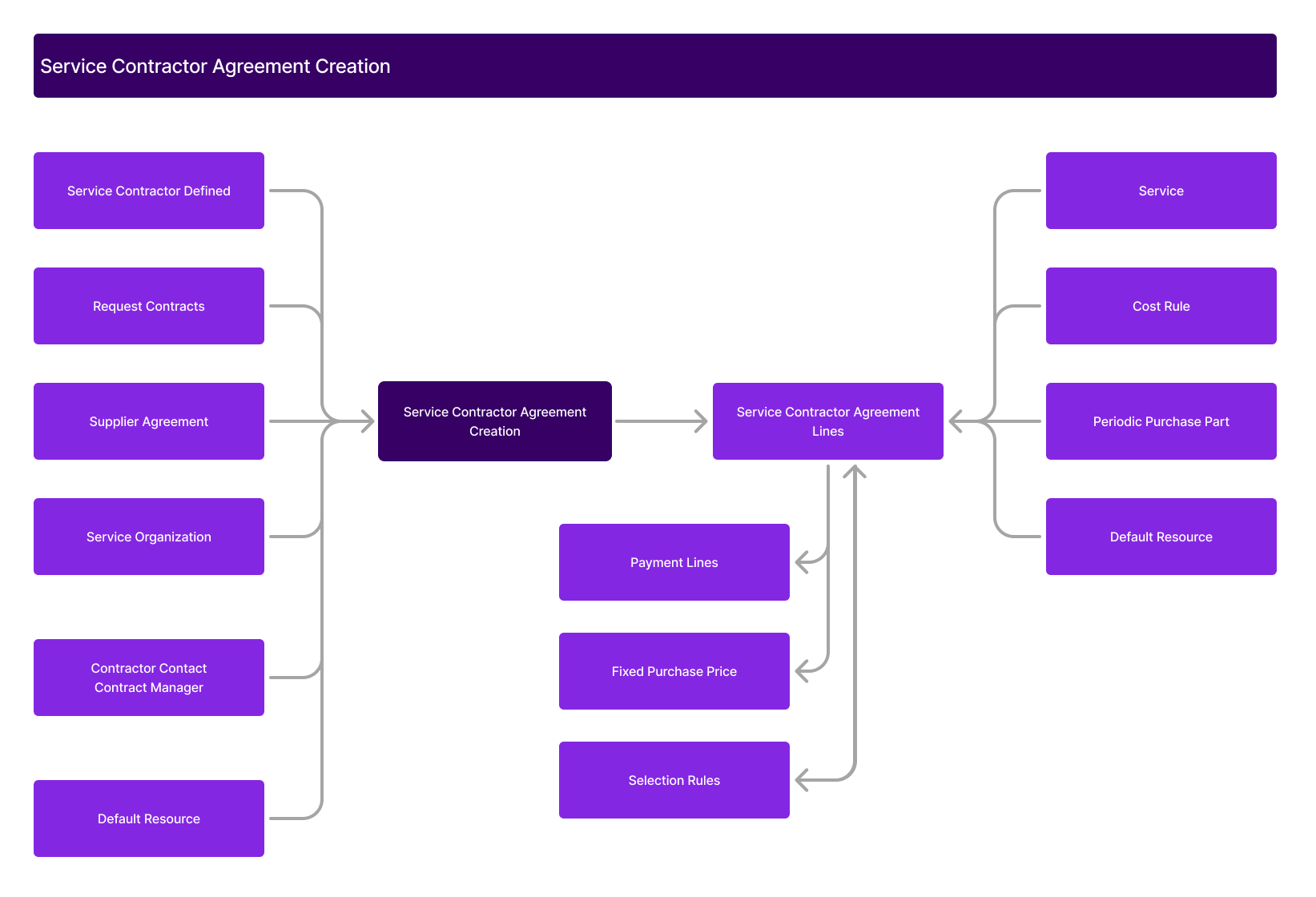
- Agreement Types
Agreement Types are used to categorize contractor agreements based on business needs. These types help group agreements for reporting, validation and filtering purposes. Each Agreement Type is user-defined and can be modified or removed unless already in use by active agreements.
- Contacts and Managers
Each Contractor Agreement includes defined points of contact:
- Contractor Contact: Typically the primary representative from the contractor organization.
- Contractor Manager: The internal user responsible for managing the agreement and overseeing performance.
These roles help maintain accountability and ensure that all communication and follow-up is directed to the appropriate individuals.
- Agreements
Agreements can be connected to both Request Contracts and Supplier Agreements.
Request Contracts: A Contractor Agreement can be linked to a Request Contract to define the work a contractor is allowed to perform under customer service agreements. When enabled, users can copy specific services from the Request Contract to the Contractor Agreement. These services are then available for use in Contractor Orders and downstream processes.
Request Contract connection supports:
- Alignment between customer and contractor scopes.
- Automatic population of validity dates.
- Synchronization with future renewals.
Supplier Contracts: Contractor Agreements can also reference one or more Supplier Agreements. These define parts and pricing structures agreed upon with the contractor's supplier. Linking these agreements allows consistent application of pricing rules and part availability across Contractor Agreement Lines. Supplier Agreements must belong to the same supplier linked to the Service Contractor.
- Revision Control
Revision control supports the creation of new versions of an agreement while preserving the history of prior terms. The Renew function allows users to generate a future-dated revision with updated validity and terms.
Each revision is tracked individually, allowing comparison between versions and enforcing validation rules to ensure active agreements remain compliant.
- Agreement Lines
Agreement Lines define the specific service scope and cost details under the contractor agreement. Each line can include:
- Service Description: The services that the contractor is allowed to deliver.
- Fixed Cost Details: Associated rates or lump sums for the service.
- Not To Exceed Limit: A cap on the total cost that can be approved without additional validation.
Payment lines created during work execution reference the applicable agreement line. When the Not To Exceed Limit is reached, additional payments are blocked unless manually authorized.
Each agreement line can inherit terms from a connected Request Contract or Supplier Agreement. Overrides are supported for both service-level and pricing-specific adjustments.
- Contractor Agreement Status Handling
| Status | Explanation | Available Next Status |
| Planned | Initial status when the agreement is created. | Cancelled, In Negotiation, Active |
| In Negotiation | Status used when the agreement is under review or being modified before activation. | To Be Accepted, Active, Cancelled |
| To Be Accepted | Indicates the agreement has been negotiated and is pending formal acceptance. | Active, Rejected |
| Active | The agreement is approved and in use. | Closed |
| Closed | The agreement has been completed or deactivated. It is no longer used for new contractor orders. | Active |
| Cancelled | Agreement is manually cancelled before it becomes active. | - |
| Rejected | The agreement has been reviewed and formally rejected, typically during the acceptance phase. | Cancelled, In Negotiation |
Contractor Execution and Reporting
Contractor Execution and Reporting enables you to manage the operational lifecycle of subcontracted work. It covers contractor assignment, work tracking, cost reporting and payment authorization. The process is driven by Contractor Orders, which acts as the operational and financial foundation for managing subcontractor engagement.
This area includes capabilities for:
- Creating Contractor Orders manually or automatically.
- Managing and reporting Payment Lines.
- Handling ad-hoc costs.
- Tracking work progress and status transitions.
- Authorizing payments and generating Purchase Orders.
- Managing contractor-related reasons for rejection or reassignment.
Each Contractor Order reflects the agreed scope of work, assigned service contractor, and associated costs. It is tightly integrated with Contractor Agreements, Request Scopes, and Selection Rules.
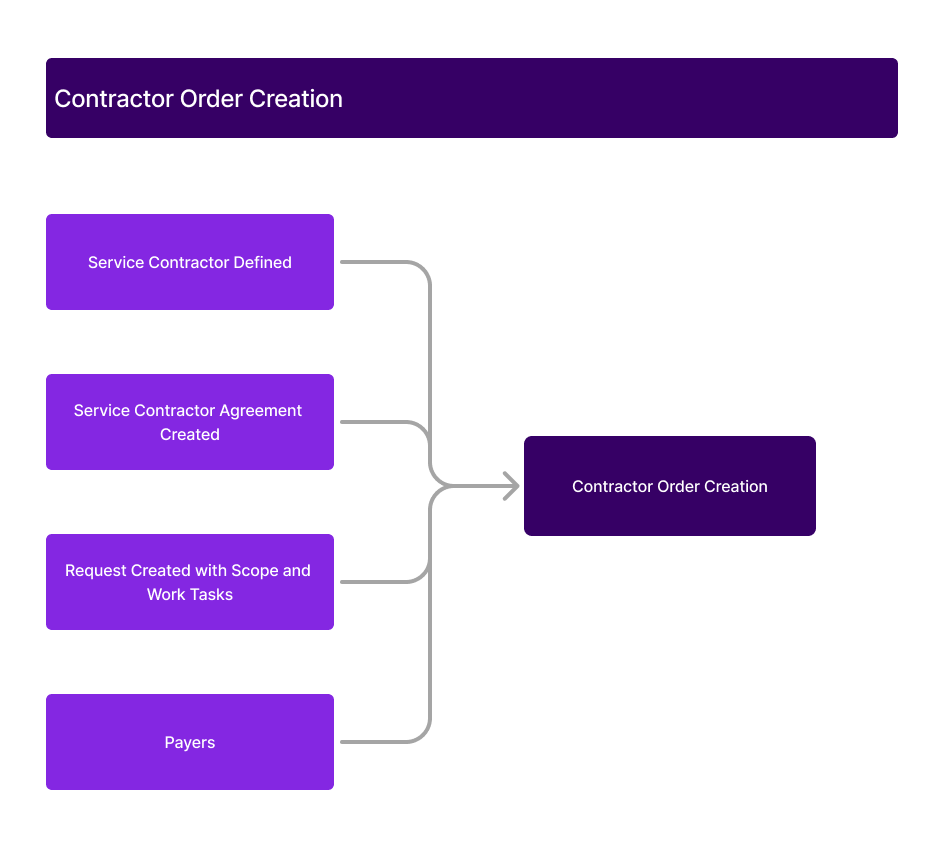
Contractor Orders
Contractor Orders are used to manage the assignment, execution, and payment of subcontracted work. They represent a formal instruction to a Service Contractor to perform work and serve as the foundation for tracking progress, reporting costs and issuing payments.
Contractor Orders can be created in three ways:
- Manually: Created directly from a Request Scope or Work Task by selecting a Service Contractor and optionally linking a Contractor Agreement and Agreement Line.
- Automatically via Selection Rules: Based on dynamic selection rules that evaluate contractor suitability and assign the optimal contractor and agreement line. When triggered, the system sets the order to Sent to Contractor and monitors acceptance using the defined Acceptance Window.
- Automatically via Assigned Contracted Resource: When a contractor or bucket resource is assigned directly to a Work Task—via manual planning, PSO, or integration—the system automatically generates a Contractor Order. This method ensures that when planning is driven by a specific resource, the subcontracting process is initiated without additional input.
Contractor Orders can apply to:
- A Request
- Selected scopes within a request
- Individual Work Tasks
When the same contractor is assigned to multiple scopes or tasks, orders can be consolidated into a single Contractor Order to streamline communication and invoicing.
Each Contractor Order includes:
- The assigned Service Contractor.
- An optional link to a Contractor Agreement Line, defining pricing terms, cost limits and default resources.
- A Cost Rule determining how services and materials are charged.
- Payment Lines for tracking fixed-price services, resource time, material use or ad-hoc costs.
- Statuses that reflect progress from creation to work authorization and completion.
Orders integrate with selection rules, contractor agreements, resource planning and financial processes, supporting a fully automated subcontracting flow. Visual indicators, such as subcontracted badges and event logs, provide full traceability across the lifecycle of subcontracted work.
- Payment Lines
Payment Lines represent the specific tasks, costs and deliverables for which the contractor is compensated. These are generated based on Planning Lines from Work Tasks or added manually as Ad-hoc Payments.
Lines can include fixed-price services, usage-based charges or part-specific costs. Each line supports change tracking and changes are logged in the system’s history.
- Ad-hoc Payments
Ad-hoc Payment Lines are used to report work or costs that were not part of the original planning. These can be manually added to a Contractor Order and follow the same authorization and validation flows as planned payment lines.
- Authorize Payments
Payment Lines must be authorized before contractor payments can proceed. Authorization can be:
- Automatic, if toggles are enabled on the Service Contractor or Contractor Agreement Line.
- Manual, by a user with appropriate permissions.
Automatic authorization validates that:
- Payment lines remain consistent with confirmed values. When the Contractor Order has an Agreement Line with Automatically Authorize Payment Lines set to ON, the system checks all confirmed attributes against their corresponding Payment Line attributes. If they match, the system sets the Payment Lines to Authorized and the Contractor Order to WorkAuthorized, provided the total amount does not exceed the Agreement Line’s Not-To-Exceed limit.
- If edits are made to Payment Lines, the total price must not exceed the previously confirmed total price.
- NTE (Not-To-Exceed) thresholds are not breached—or are explicitly approved.
Once authorized, lines may trigger automatic Transfer to Purchase, generating Purchase Orders for payment.
- Contractor Order Status
The Contractor Order Statuses can be found here.
- Work Reporting
Contractors report work by logging time, material usage or progress updates on assigned tasks. These inputs populate Payment Lines. Once all work is reported, users set the status to Order Reported, allowing the authorization process to begin.
- Transfer to Purchase
Authorized Payment Lines can be transferred to Purchase Orders. The system supports:
- Consolidated POs: All lines from a single Contractor Order are grouped into one PO.
- Automatic PO Creation: If enabled, a PO is created immediately upon authorization.
- Batch PO Creation: As a Service Administrator, you can define a process to create one Purchase Order per Service Contractor for all authorized Contractor Orders up to a specified date, or when a scheduled batch process is executed. This ensures that the service provider receives a single invoice per defined period, rather than multiple invoices across many Purchase Orders.
Transferring to Purchase finalizes the Contractor Order and enables supplier payment through the created Purchase Orders.
- Contractor Reasons
Predefined Contractor Reasons are used to standardize the causes for order or agreement rejection or cancellation. These include:
- Manual rejection reasons provided by the contractor.
- Automatic rejection due to expired acceptance periods.
- Cancellation due to changes in scope or reassignment.
Each reason includes a unique ID and description, and is used for reporting and audit purposes. Only one reason can be flagged as the default for automatic rejections.
- Not-To-Exceed (NTE) Limit Handling
The Not-To-Exceed (NTE) Limit is a cost control mechanism used in Contractor Orders to cap the maximum amount that can be approved for a specific scope of work. It ensures that contractor payments remain within agreed financial boundaries unless explicitly approved otherwise.
NTE Limits are defined at the Contractor Agreement Line level and are enforced during the Payment Line Authorization process. When authorizing payment lines, the system compares the total confirmed cost with the defined NTE Limit.
If the total cost exceeds the NTE Limit:
- The system prompts the user to approve the overage.
- If approved, the NTE Approval Status is set to Approved, and the over-limit amount is authorized.
- If not approved, payment lines remain unauthorized until manually adjusted.
The NTE Approval Status reflects the system’s evaluation of each order:
- Approved: The NTE Limit was exceeded and the overage was accepted.
- Not Approved: The NTE Limit was exceeded but not approved.
- Not Applicable: No NTE Limit was defined or exceeded.
The system also logs a visual badge on the Contractor Order when authorization above the NTE Limit is approved, providing clear visibility for tracking and auditing purposes.
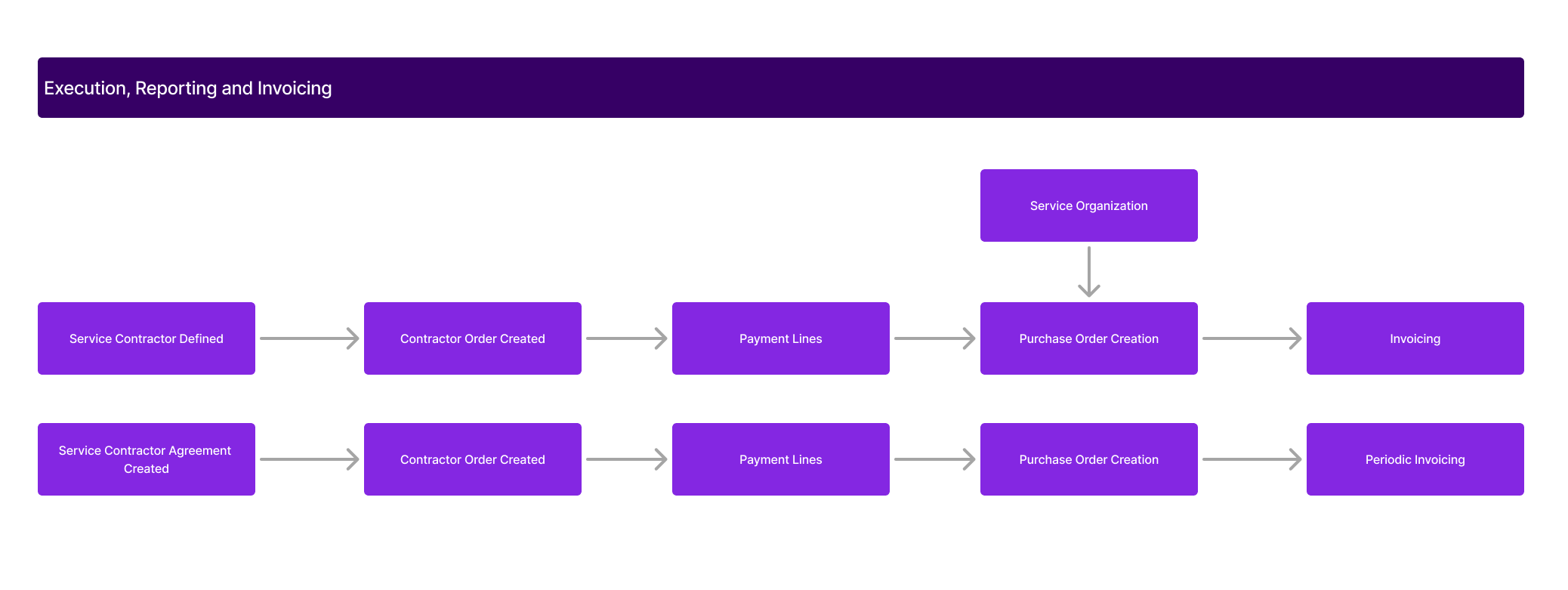
Purchasing and Invoicing
Service Contractor Purchasing and Invoicing supports a structured process for managing subcontractor payments, generating purchase orders and handling invoicing activities. This process ensures that contractor payments are executed transparently, in alignment with contractual terms and procurement standards. Managing subcontracted services follows the same purchasing principles as internal procurement. Payments are based on confirmed work—either fixed-price or usage-based—and require review and authorization prior to purchase order creation and invoice matching.
Through Purchasing and Invoicing, users can:
- Manage Contractor Order Payment Lines.
- Authorize reported work and related costs.
- Create and track Purchase Orders.
- Configure and manage periodic invoicing schedules.
- Transfer service transactions to financial systems.
This functionality promotes financial control, operational efficiency and traceability across the subcontracting process.
- Contractor Order Payment Lines
Contractor Order Payment Lines represent the work and cost details for which the subcontractor is to be paid. These lines form the foundation for approval, purchase order generation and financial posting.
Payment Lines can be created:
- Automatically from Planning Lines and Cost Rules when a Contractor Order is generated.
- Manually by users entering cost type, purchase part, quantity and pricing details.
- Ad-hoc for unplanned costs incurred during execution.
Each Payment Line includes values such as unit price, quantity, discount and invoice percentage. The system calculates the Total Amount.
Payment lines are confirmed before authorization. Confirmed lines reflect validated quantities, pricing and totals, ready for approval. Payment lines can also be cancelled if they are no longer relevant.
Authorize Payments: Authorized payment lines allow contractor costs to be progressed to purchase orders and invoicing.
Authorization can be:
- Automatic, based on Service Contractor or Agreement settings, and triggered when the required conditions are satisfied (which may include unchanged line values or other defined criteria).
- Manual, with validation against contractual rules and Not-To-Exceed (NTE) limits.
Once authorized, the status of the Contractor Order is updated to Work Authorized, enabling the next steps in the financial process.
Not-To-Exceed (NTE) Limit: The NTE Limit is a cap on contractor charges, defined at the agreement line level. During authorization, the system compares the total value of payment lines to the NTE Limit. If exceeded, user approval is required. Status indicators track if the overage is approved, rejected or not applicable. This ensures controlled spending within agreed boundaries.
- Purchase Order Creation
Purchase Orders (POs) are created from authorized payment lines and are used to match supplier invoices submitted by the contractor. PO creation can be:
- Automatic, triggered immediately after authorization if enabled.
- Manual, initiated by the user from the Contractor Order.
- Batch-based, using predefined criteria for multiple Contractor Orders.
Each PO line references the originating task and contractor payment line, maintaining full traceability. Upon PO creation, the system automatically receives the order and marks it as ready for invoicing.
Two batch processes support PO generation:
- Create Purchase Orders by Contractor: Consolidates authorized lines into grouped POs by contractor.
- Create Purchase Orders by Charge Period: Aligns PO generation with defined invoicing schedules in the Contractor Agreement.
- Periodic Invoicing
Invoicing follows predefined billing cycles based on contractor agreements. Users can:
- Define invoicing frequency and charge periods.
- Generate Invoice Plans tied to these periods.
- Create payment lines and POs aligned with scheduled billing.
Tools include:
- Invoice Plan Generation: Outlines billing periods and triggers automated processing.
- Remove Planned Periods: Allows users to clear outdated or unnecessary invoice cycles.
- Generate Agreement Payment Lines: Produces payment lines based on periodic terms for upcoming or past periods.
- Transfer Transactions
After authorization and PO creation, contractor-related service transactions can be transferred to the financial system for final posting and reconciliation.
Key functionalities include:
- Transfer Service Transactions: Moves financial data into IFS/Accounting Rules and prepares for general ledger posting.
- Check and Update Accounting: Refreshes posting values based on current rules.
- Rerun Erroneous Accountings: Corrects and reposts failed transactions due to rule or data errors.
Transfer options allow users to generate:
- One voucher per date.
- One consolidated voucher across a defined period.
Status updates track the transition of transactions through Authorized, Transferred or Error states.
Contractor Selection Rules and Selection Rule Criteria
Contractor Selection Rules automate the assignment of service contractors during Contractor Order creation. Rules can be static (fixed contractor) or dynamic (based on supplier evaluation). Optional fallback logic ensures continuity if the primary contractor rejects an order. Region-based matching supports hierarchical structures to increase rule flexibility. Rules are selected based on scoring, using defined criteria weights.
Contractor Selection Rule Criteria define the scoring system used to evaluate and prioritize matching rules. Each criterion—such as Service, Region or Customer—has a weighted score that determines rule precedence. This supports flexible and precise contractor selection during order creation.
Access Control
Access Control governs user permissions and visibility within the context of managing service contractors, contractor agreements and contractor orders. It ensures that only authorized users can view or modify data related to external service providers and their associated documents.
Access Control can be configured in the following areas:
- Service Contractor: Manage which users can view or manage contractor records.
- Contractor Agreement: Control who can create, edit or approve agreements with contractors.
- Contractor Orders: Define which users can access, assign or update contractor orders and related tasks.
These controls help protect sensitive information and enforce organizational policies on contractor engagement and operations.
Material Handling
Material Handling for Contractors supports sourcing and tracking of materials used in subcontracted service work. It enables organizations to distinguish whether materials are provided by the contractor or sourced through the service provider’s supply chain.
Material handling can be configured per service contractor using a Material Sourcing Model. When a contractor is flagged as Contractor Sourced, material usage is reported directly by the contractor and not managed through the inventory. This allows the contractor to supply materials independently and ensures accurate financial tracking without affecting service provider stock levels.
The sourcing model is defined on the Service Contractor record and is inherited by material lines in associated work tasks and contractor orders. If contractor-supplied, the system sets the supply code on the material line to “Contractor Sourced,” disabling automated procurement or inventory issuing processes.
Additionally, Warehouse Access can be defined for contractors to allow visibility into contractor stock levels, support supply chain planning and enable future integrations for stock replenishment or job-based ordering.
- Material Handling for Contractors integrates with:
- Service Contractors and Contractor Orders
- Work Tasks and Material Lines
- Supply Codes and Warehouse Management
- Purchase Order and Payment Line generation for contractor-supplied materials
This functionality supports greater flexibility in managing external service delivery while ensuring clarity in sourcing responsibilities and material cost control.
Manage Contractor Resources
Manage Contractor Resources enables you to define, organize and maintain contractor resource profiles in IFS Cloud and the Contractor Portal. This functionality supports a wide range of contractor resource types, including named individuals, crews, capacity-based buckets and Contractor Nominees. It provides the tools required to assign, track and manage work execution across external contractor teams while maintaining visibility and control over who performs specific tasks.
You can manage four distinct types of contractor resources:
- Person Resources: Named individuals with full system profiles.
- Crew Resources: Group-based resources used for coordinated assignments.
- Bucket Resources: Capacity-based resources without named individuals, used for auto-scheduling.
- Contractor Nominees: Individuals with limited contact information who may be assigned to work but are not full IFS Cloud users.
Contractor Nominees can be added, edited or deactivated from both IFS Cloud and the Contractor Portal. These profiles include essential details such as name, phone number, and email. Contractor Nominees are especially useful when assigning specific tasks to individuals who do not require full access to the system.
To support efficient onboarding, a bulk upload feature is available in IFS Cloud, allowing users to import multiple Contractor Nominees using a downloadable Excel template. Contractor Coordinators using the Contractor Portal can view all resource types in a centralized resource page and assign Contractor Nominees to specific tasks after accepting contractor orders. The system supports task allocation tracking, including allocation status and details visible through the Contractor Order – Task tab.
Related Functionalities: Manage Contractor Resources integrates with Contractor Orders, Task Management and Resource Scheduling. It supports secure assignment workflows and aligns with the broader contractor management process in IFS Cloud. All resources can be maintained from the Service Contractor Resource tab, which separates full-profile resources from Contractor Nominees to ensure clarity in operations.
Request Bundle Task for Contractors
Request Bundle Task for Contractors enables you to group multiple work tasks into a single bundle and subcontract the entire bundle to a service contractor. This functionality supports centralized planning, execution, reporting and financial tracking for bundled service work performed by external contractors.
You can create a Request Bundle Task by grouping related work tasks under a single schedulable structure. Once created, the bundle can be either scheduled for internal execution or outsourced to a contractor. When outsourced, the system automatically creates a Bundle Contractor Order (BCO) representing the contractor's engagement with the entire bundle.
Key features include:
- Automatic and manual creation of contractor orders for each task in the bundle when subcontracted.
- Centralized status control, where status changes on the BCO automatically update all associated contractor orders and tasks.
- Transactional reporting for time, materials and expenses, available both in IFS Cloud and the Contractor Portal.
- Payment line generation and distribution, supporting equal, percentage-based or manual allocation across tasks.
- Access control based on contractor-linked user groups, applied to the bundle for consistent permission management.
- Purchase order generation, consolidating all authorized payment lines from the bundle into a single purchase order.
The system ensures accurate contractor engagement, visibility and cost tracking—even when tasks are added or removed from the bundle—by dynamically creating or cancelling related contractor orders.
Request Bundle Task for Contractors integrates with Work Assignment, Contractor Orders, Payment Lines, Purchase Orders, Contractor Portal and Access Control.
Default Resource
The Default Resource defines which contractor resource is used during downstream processes such as Contractor Order creation and task planning. It acts as both a source of data and a control point for resource assignment.
When a Contractor Order is generated—either manually or automatically via selection rules—the system checks for a Default Resource in the following order:
- Agreement Line
- Agreement Header
- Service Contractor
The first available Default Resource found is assigned to all resource demands on tasks linked to the Contractor Order. This assignment occurs even if the resource does not belong to the predefined Resource Group specified on the task.
During scheduling, the assigned Default Resource is sent to the Planning and Scheduling Optimization (PSO) engine. The Fixed Resource flag is set to prevent reassignment by the optimizer. If no Default Resource is defined at any of the expected levels and a Scheduling Dataset ID exists on the task, the system automatically sets the “Exclude from Scheduling” flag to true. This prevents tasks from being scheduled without a valid resource.
Contractor Portal
The Contractor Portal brings together coordination and execution. Coordinators use it to manage tasks, orders, resources, stock, agreements, and compliance, while technicians use it to accept, perform, and report on jobs. Together, the two roles ensure work is completed efficiently, contractors are paid accurately, and service providers maintain transparency and control over operations.