Purchasing of Kits
The Kits purchased from external suppliers are referred to as OEM kits.
Purchasing of Kits workflow.
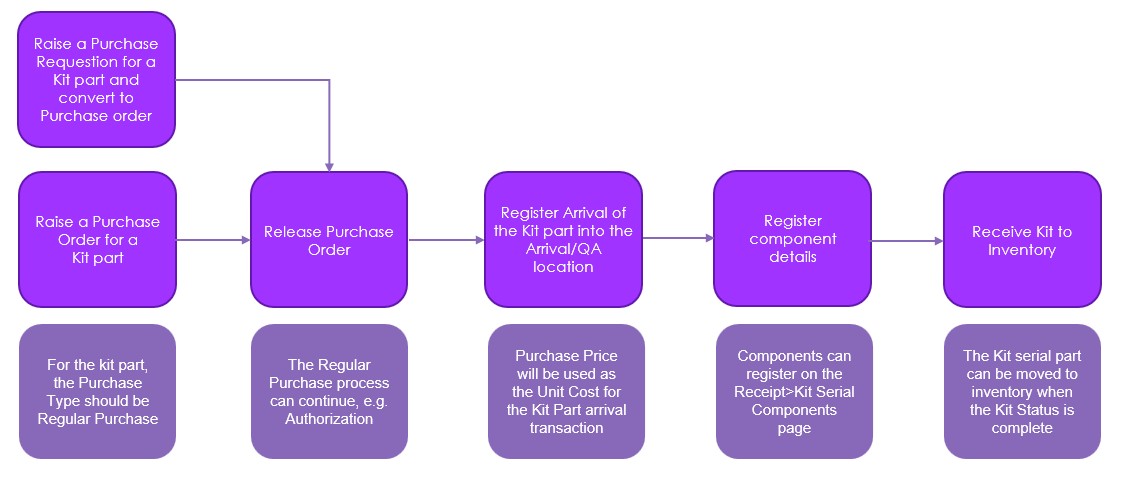
The OEM Kits are supported in the existing IFS cloud regular Purchasing process. The Purchase Requisition and Purchase Order can be used to purchase Kit parts.
The external supplier purchases empty Kit part serial upon receiving; it cannot be received or moved into locations other than Quality Assurance or ARRIVAL. But this restriction does not apply to the empty or incomplete kit received from another site (inter-site scenarios).
Rent-In (purchase rental part) functionality is not available for Kits.
The purchase price will be the OEM Kit unit cost. Therefore, we do not need to update the Kit part unit cost with the sum of the costs of the registered component parts.
A user can register Kit Serial Components by using the ‘Kit Serial Components’ command and it becomes available when a Kit Serial line is selected on the Details tab of the Receipt page. Selecting this command opens a new standalone page, where the full Kit definition is automatically displayed under the Content Summary tab. The Content Summary tab shows a snapshot of the current connected content vs. the kit definition.
On the Content Details tab, component parts, serial numbers, lot batch numbers, and quantities can be entered. This is permitted because the full contents of the Kit are known at this stage, as provided by the supplier. If the user needs to delete the registered component record before the Kit Part serial number is moved to inventory. In that case, this is possible when the Component Quantity is set to zero and saved.
If the component part is serial tracking, the serial numbers are entered on the Kit Serial Components page under the Content Details tab at the same time the part serial record is created. If the component part is a lot/batch tracking, the lot batch numbers are entered on the same page and tab. At the same time, the part lot bath record is created. If the component part is non-tracked, the part records are simply entered on the Kit Serial Components page under the Content Details tab.
The Kit Status will be set as Complete once all components align with the kit definition. Once the kit status is complete, then only be able to move the kit part serial into the inventory.
The Kit Serial Components page is accessible from the Kit Serials Components, Part Serial, Part Serials and Inventory Parts In Stock pages. If the kit serial is assembled in-house, content details are visible but cannot be modified.
Additionally, once the Purchase Kit Serial has been moved into inventory, its content details cannot be edited.
Note: Insert and modify commands on the Content Details tab are enabled based on the Kit Serial Components header settings. These commands become available when the kit part serial is in 'In Inventory' status, the location type is 'Arrival' or 'Quality Assurance', and the serial is linked to an open purchase receipt.
The Transactions tab shows the Kit Part Serial correspondence transactions that occurred during the origin and usage kit process.