About Configuring MWO Security Groups and Entities
In IFS Mobile Work Order (MWO), Security Groups and Entity Configuration
defines how access, data synchronization, and mobile functionality operate in
IFS Mobile Work Order (MWO). These elements determine what data is available
on mobile devices, which features and workflows are accessible, and how efficiently
the system performs. Together, they ensure a stable, predictable, and optimized
mobile experience within IFS Cloud.
Audience
This content applies to System Administrators, Solution Consultants, and
technical roles responsible for configuring MWO access, data synchronization,
and mobile capabilities.
Overview
In MWO, Security Groups and Entities operate as coordinated components that control:
- Data availability on mobile devices
- Access to pages, actions, and workflows
- Behavior of online and offline functionality
Correct configuration ensures:
- Stable mobile functionality
- Predictable synchronization behavior
- Optimized performance through controlled data volume
Key Concepts
Security Groups in MWO
Security Groups are functional groupings that define both
data synchronization and feature availability within the mobile application.
They control:
- Data synchronization, by defining which entities are synchronized
- UI and functional availability, by enabling pages, actions, and workflows in the mobile app
If required Security Groups are missing:
- Relevant pages may not be visible
- Required data may not synchronize
- Certain workflows or actions may fail
Security Groups are granted through Permission Sets rather than being assigned directly to end users.
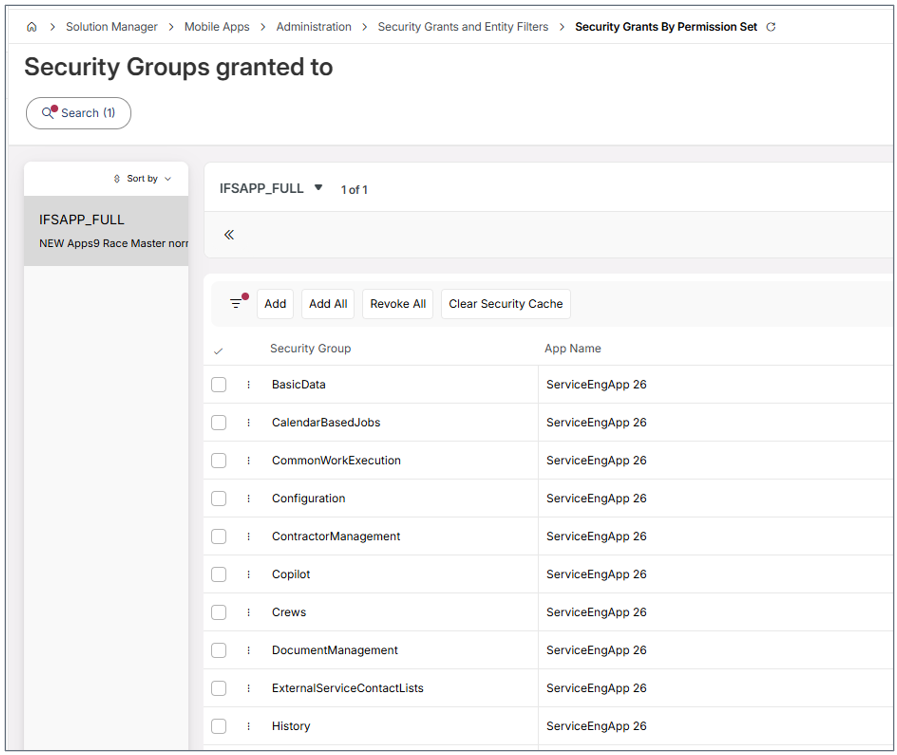
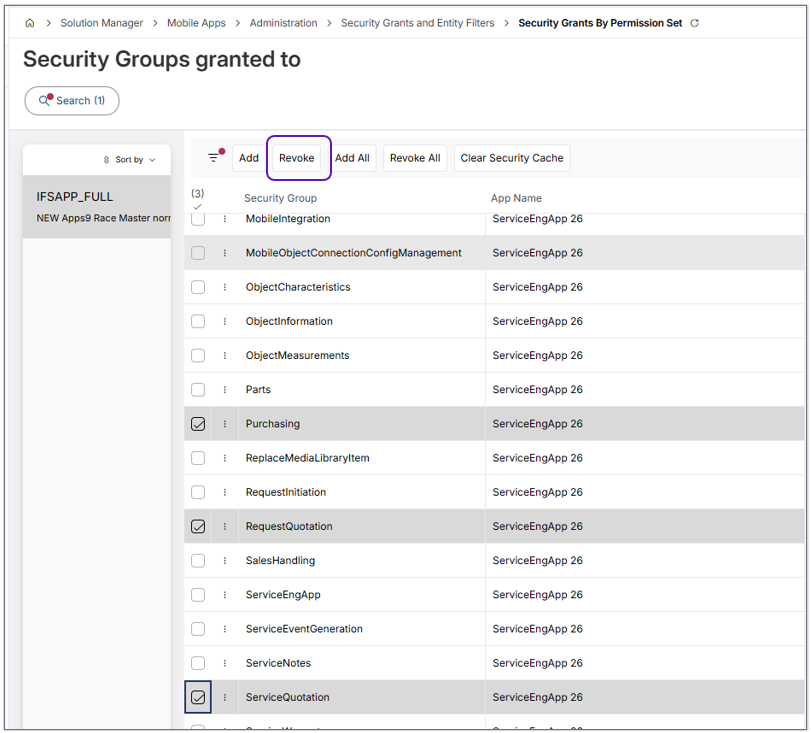
Security groups that are no longer required can be revoked to reduce unnecessary access and minimize synchronization overhead.
For example, security groups related to unused functionality such as Request Quotation , Service Quotation or Purchasing can be removed to streamline the configuration.
Entities in MWO
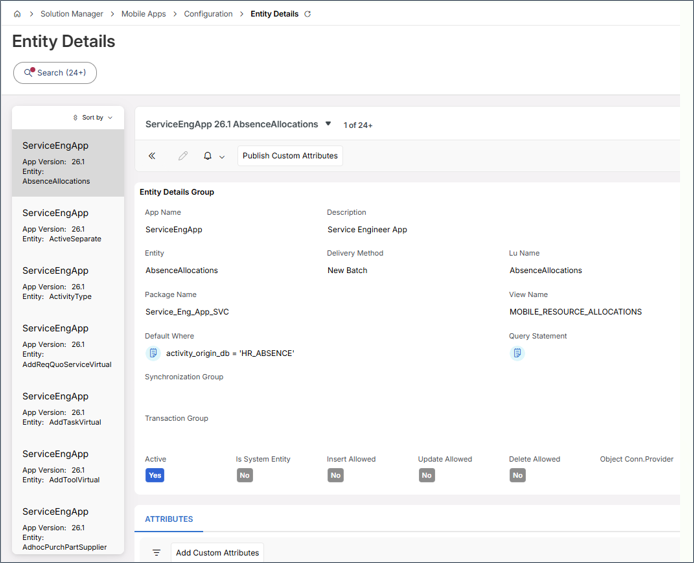
Entities represent the data objects that are synchronized between IFS Cloud and the mobile application, such as tasks, activity types, and materials.
Each entity:
- Belongs to a Security Group
- Is included in Synchronization Rules
- Can have filters applied to restrict data or limit data volume
Entities determine:
- What data is available on the device
- Whether workflows and UI components function correctly
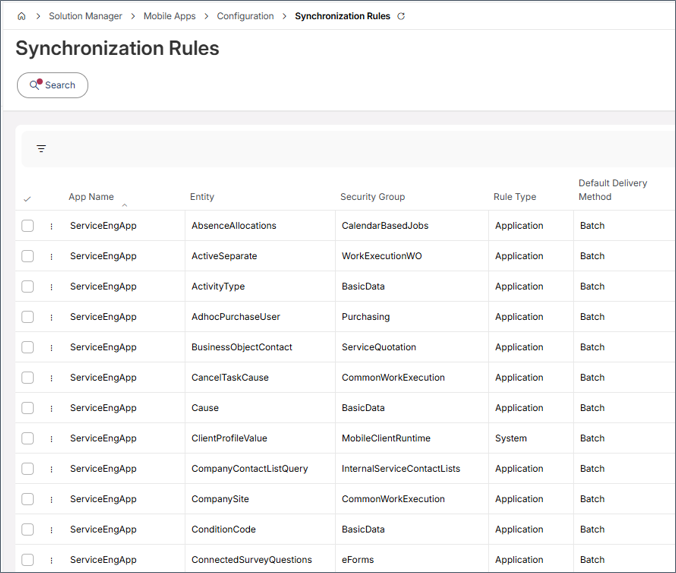
Entities assigned to Security Groups can be reviewed under
Synchronization Rules.
Note: Online-only
entities are not included in Synchronization Rules.
Permission Sets
A Permission Set in IFS Cloud :
- Grants Security Groups to users
- Grants the required projection access for MWO transactions
- Is assigned to mobile users (Service Engineers/ Maintenance Technicians)
Without a Permission Set:
- Access to MWO is not possible
- Mobile transactions cannot be sent to the server
Configuration Setup
The configuration process connects Security Groups, Entities, and Permission Sets to establish a complete setup.
This flow includes the following steps:
- Create or Review Permission Sets
- Grant Security Groups through Permission Sets
- Ensure required Entities are assigned to those Security Groups
- Configure Synchronization Rules
- Apply Entity Filters (Recommended)
- Clear cache and re sync MWO
These elements work together to ensure that the correct data and functionality
are available to mobile users.
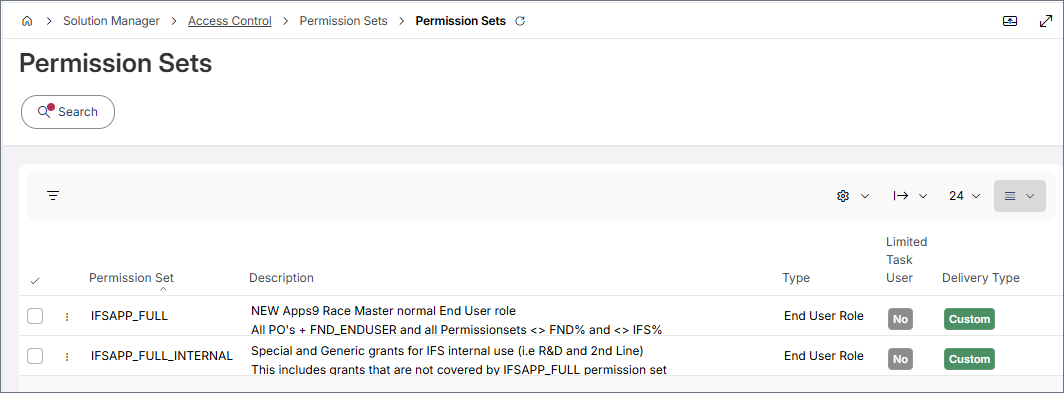
Step 1: Create or Review Permission Sets
Navigate to: Solution Manager / Access Control / Permission Sets
(see above Permission Sets )
Note : This is typically the
LTU permission set granted to MWO end users. It is also possible
to create a Permission Set to grant access to IFS Service MWO and/or IFS Maintenance
MWO features and functions.
Ensure the Permission Set:
- Includes all MWO projections (component: MWO) . This is granted through Permission Set / Projections.
- Has the functional role permission set: MOBILE_APP_RUNTIME . This is granted through Permission Set / Grant Structure.
- Is intended for the correct MWO app (e.g. MaintEngAppXX or ServiceEngAppXX)
Projection access is mandatory for sending mobile transactions to the server.
Note : Administrators can manage IFS Cloud Mobile apps from the IFS Cloud Web using the MOBILE_APP_ADMIN permission set, which grants full access to Solution Manager / Mobile Apps features.
Step 2: Grant relevant Security Groups
Navigate to: Solution Manager / Mobile Apps / Administration
/ Security Grants and Entity Filters / Security Grants by Permission Set
For the Permission Set:
- Set App Name to MaintEngApp<ReleaseYear> or ServiceEngApp<ReleaseYear>
- Add the required MWO Security Groups
Missing Security Groups are a common cause of missing pages in MWO.
IFS Service MWO app supports both Work Order based and Request based service solutions. If the customer uses only the Work Order based service process , it is important to avoid granting Request‑specific Security Groups, as they provide no functional value in that scenario. Excluding unnecessary Security Groups can also improve client performance by reducing the amount of irrelevant data synchronized to the mobile device.
Security Groups required only for the Request‑based service solution
These can be ignored when using the Work Order–based service solution:
- RequestInitiation
- RequestQuotation
- ServiceNotes
- WorkExecutionRequest
- SalesHandling
- ExternalServiceContactLists
- ServiceWarranty
Security Groups required only for the Work Order–based service solution
These can be ignored when using the Request‑based service solution:
- ServiceQuotation
- WorkExecutionWO
Step 3: Configure Entities and Synchronization Rules
Navigate to: Solution Manager / Mobile Apps / Configuration / Synchronization Rules
For each synchronized entity:
- Security Group assignment and Entity View Name can be viewed.
- Default Where clause and Filters can be validated.
Note : Depending on how frequently the entity data changes, the schedule can be adjusted accordingly.
Security Groups act as containers for entities, making it easier to:
- Manage synchronization
- Apply consistent filtering
- Understand data dependencies
Step 4: Configure Entity Filters (Recommended)
Entity Filters reduce data volume and improve performance.
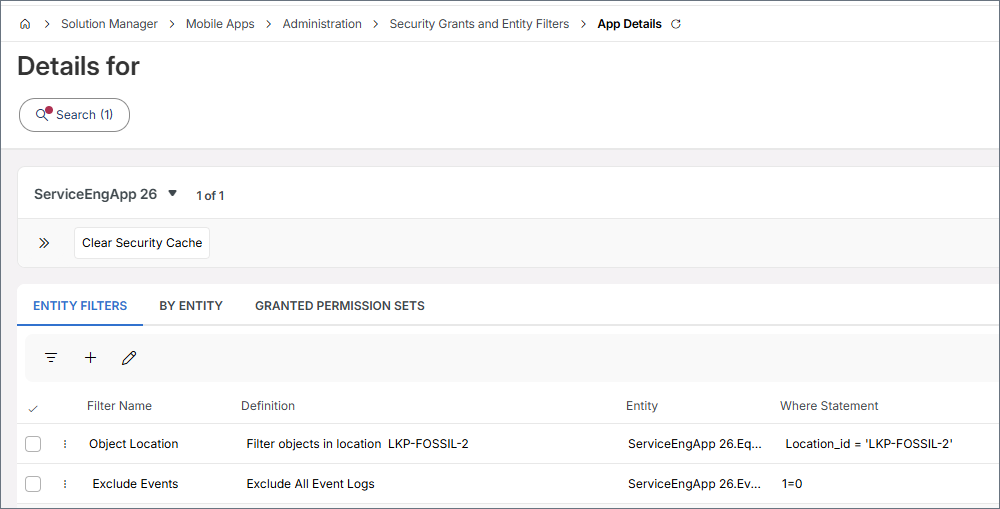
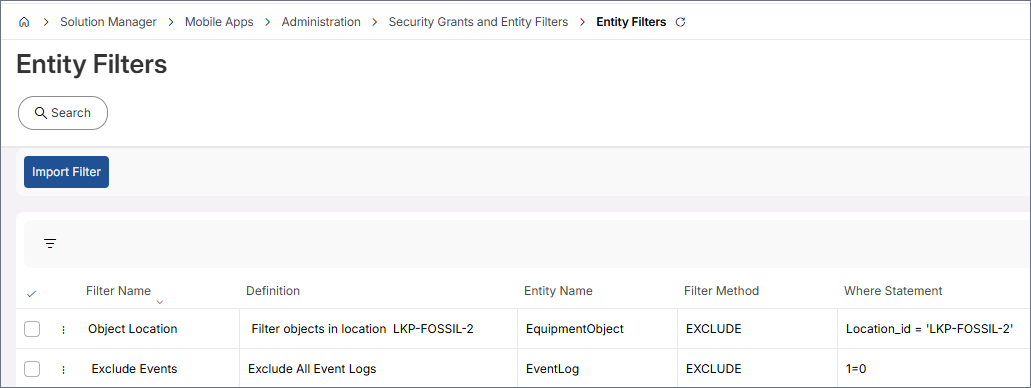
Navigate to: Solution Manager / Mobile Apps / Administration / Security Grants and Entity Filters / Entity Filters
It is possible to:
- Apply filters per Security Group
- Filter by Site, Resource, Status etc.
Examples:
- Only sync objects in certain location
- Only sync tasks of certain Work Type
Filters apply at the row level, not at the UI level.
Note : If entity synchronization is not required , it can be fully restricted by applying a filter such as 1=0
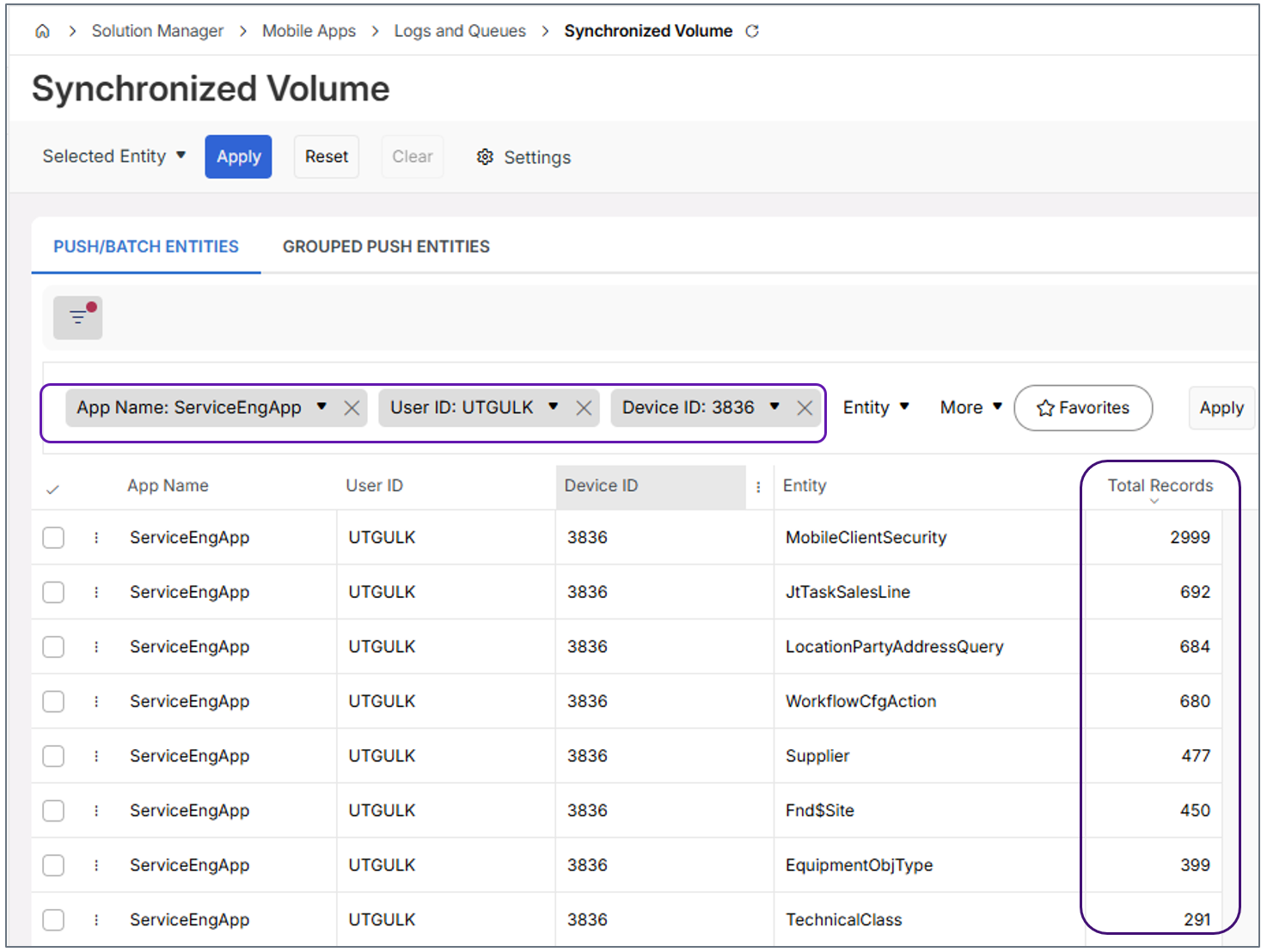
The Synchronized Volume indicates which entities sync the largest volumes
of data. Filter by App Name and end‑user Device ID
(avoid using a super user) to view real‑time data load.
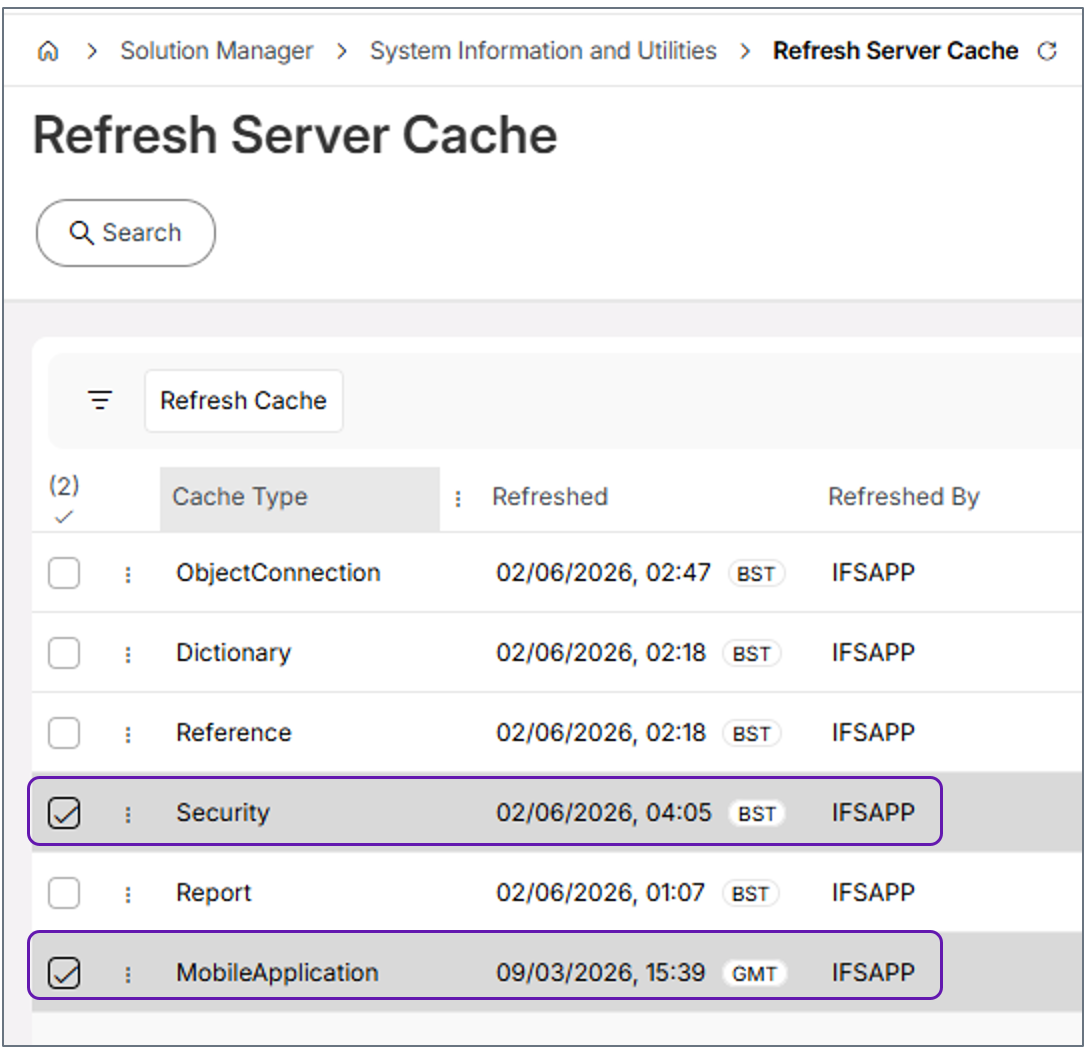
Step 5: Apply Changes and Re Sync
After making changes:
- Refresh Security Cache
- Initialize MWO app
Summary
Correct configuration of MWO Security Groups and Entities ensures:
- Stable mobile experience
- Correct data availability
- Better performance and shorter sync times
- Predictable behavior for workflows and UI
Security Groups define what, Entities define which data, and Permission Sets define who gets access.
Quick Checks
- Revoke Security Groups for unused applications (for example, ServiceEngApp vs. MaintEngApp)
- Revoke any security groups that are no longer used by workflows
- If certain entities are not required, use Entity Filters instead of broad Security Group removal. Use Synchronized Volume to identify entities that sync the largest volumes of data.
- Always review entity usage before revoking Security Groups or applying filters
- Adjust the sync schedule in Synchronization Rules to match how frequently the entity data changes.