Enter Project Pre-posting
Explanation
Use this activity to define project pre-posting data that determines how expenses are tracked for a project. Pre-posting defines a default code string where the required code parts are specified in IFS/Accounting Rules. This code string is used in IFS Financials so that the project and its related transactions can be pre-posted.
Pre-posting is defined on the Pre Postings tab in Project Setup and can be applied at both the project and sub project levels. If the same code string should be used for all sub projects under a project, enter an asterisk (*) in the Sub Project ID field. You can also create a hierarchy where a sub project overrides the project’s code string with its own.
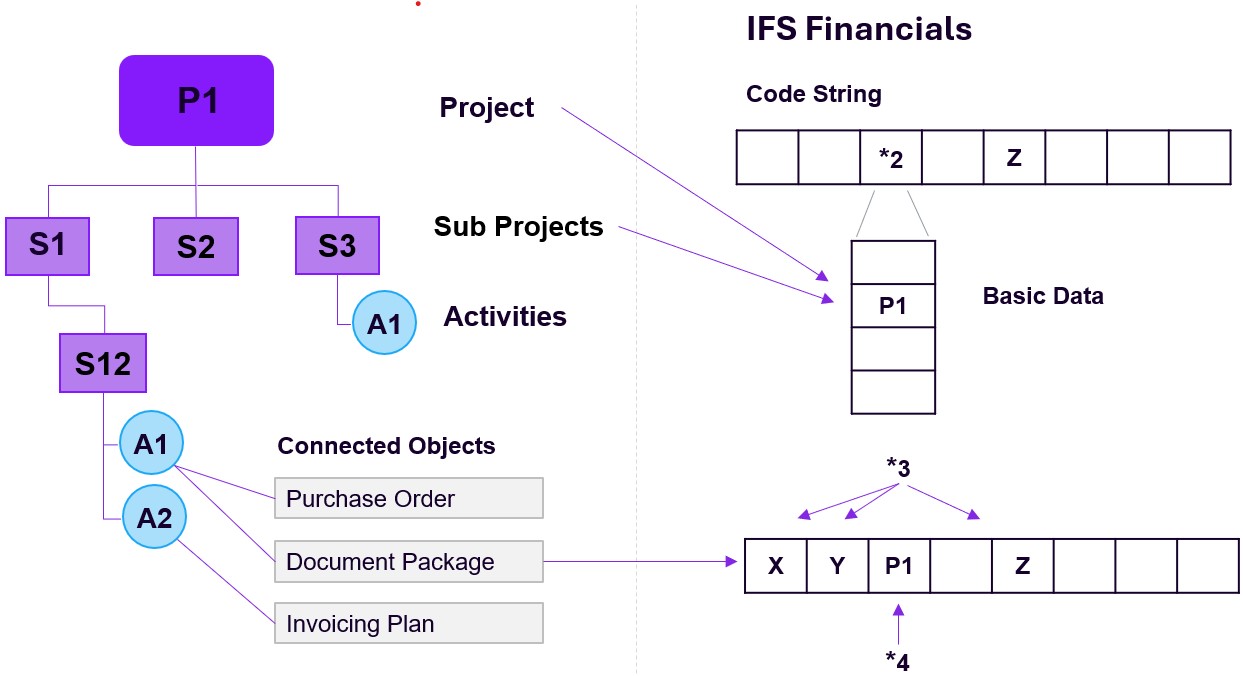
As shown in the illustration, the system inserts the first available sub project’s code string when an object is connected to a project. If no matching sub project value is found, the project’s code string is used instead. Before defining pre-posting, companies and any required alternative code parts must be registered in IFS Financials. Once this is done, you can enter the necessary values for each code part to build the code string used for project or sub project pre-posting. All objects connected to a project use this project-specific code string information.
When manually connecting a project activity to an object, any existing pre-posting values on that object are replaced with the project pre-posting values. If the project pre-posting has no value for a particular code part, the existing value on the object remains unchanged. The project ID and activity sequence are also posted.
When the project connection is automatic, the child object inherits the parent object’s pre-posting values instead of retrieving them again from the project pre-posting definitions. For example, if a demand originates from a project, the Purchase Requisition retrieves its code part values from the project pre-posting. When the requisition is converted into a Purchase Order, the Purchase Order inherits those values from the requisition rather than fetching them again from the project.
Workflow
- Defining: Pre-posting data is defined on the Pre Postings tab in Project Setup. All data entered, except for the project and sub project identifiers, can be changed later.
- Viewing: In Project Basic/Company Pre-posting, you can view a read-only list of the pre-posting data for all projects in the company.
- Modifying: Pre-posting information for a running project can be edited on the Pre Postings tab in Project Setup. Any changes made will affect the results in IFS Financials.
- Removing: Before removing a code string, ensure that the affected data in IFS Financials is obsolete and that the code string is not in use by an active project.
Prerequisites
- Company finance information must be registered in IFS Financials.
- Required code parts must be defined in IFS/Accounting Rules.
System Effects
- The defined code strings are used in IFS Financials to enable pre-posting of projects and sub projects.
- Connected business objects will use these code strings during financial transactions.