About Service Commercial Rule
Service Commercial Rule is a feature that enables configuring a set of rules that determines how costs and prices are calculated for service transactions on cost lines and sales lines. The framework enables dynamic determination of commercial values based on defined conditions and calculation logic rather than static pricing.
Examples:
- Different prices and costs based on the locations of different customers.
- Offering different prices for the same sales part for different customers based on different attributes of the transaction
Further to this, a commercial rule can be used to provision different configurations for Contract Benefit Plans and Contract Entitlements for different scenarios based on the same contract.
Below figure outlines the user flow for using the service commercial rule:
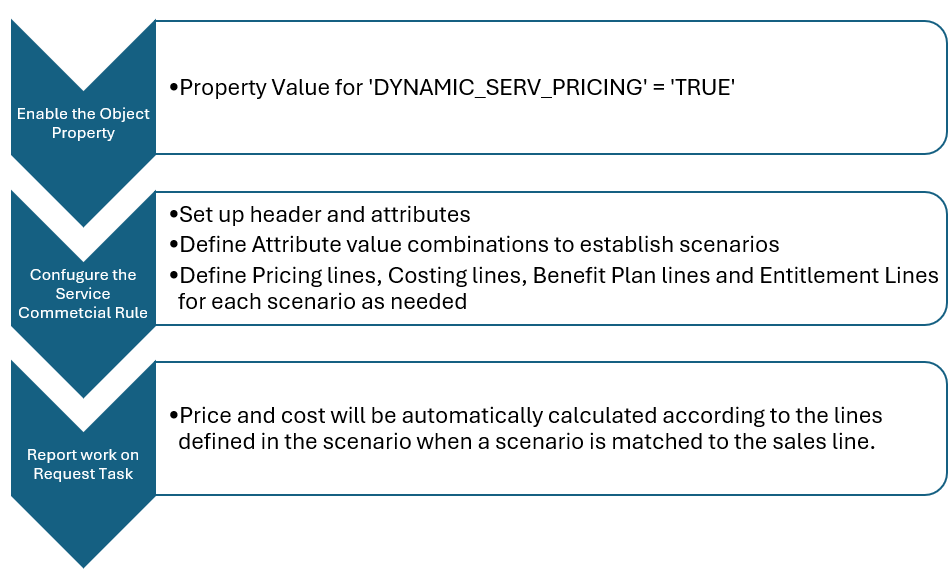
Configuring a Service Commercial Rule
A Service Commercial Rule can be defined with the following information:
Header:
Consists of the identity and description of the service Commercial Rule along with the ‘Search Order’
which will be used to determine the order in which the service commercial rules are prioritized in order to handle
duplicate scenario offering different pricing/ costing/ benefits or entitlements.
Attributes:
Parameters in the system that should be checked for the sales line to see if the scenario is applicable can be set
as attributes.
Rule Scenarios:
Each column in the scenarios chat will represent an attribute defined on the rule. Attribute value combination has
to be set up to define a rule scenario. When a Sales/Cost line is created, the attribute value on the sales line
will be checked against the attribute value in the scenario and the operation defined against the attribute to make
sure if the sales line is falling under the scenario.
Calculation Logic:
Cost and Price calculation logic can be defined using multiple lines in the cost and price tabs.
Cost calculation logic can be defined in cost lines as a unit cost amount or a cost adjustment.
Price calculation logic can be defined in price lines as a price override, a price, price adjustment or a cost
based adjustment.
Example Case:
You want to define different costs and prices for ‘Customer A’ and ‘Customer B’ for all
sales parts that has an ID starting with ‘ABC’.
Attribute configuration must be as below:
- Attribute 1 - Sales Part Number
- Attribute 1 Operation – Starts with
- Attribute 2 – Customer ID
- Attribute 2 Operation – Is equal to
Rule Scenarios can be set as below:
- Scenario 1:
- Attribute 1 value = ABC
- Attribute 2 value = Customer B
- Scenario 2:
- Attribute 1 value = ABC
- Attribute 2 value = Customer B
After setting up the scenarios above, Prices, Costs and any applicable Benefit plans and Entitlements can be defined under each scenario.
Applying a Service Commercial Rule
Cost Calculations
When a cost line is created in the system while commercial rule is enabled, IFS cloud will first check the commercial rules to see if the cost line matches any active commercial rule scenarios.
- This check will be ordered by the search order on the service commercial rule. If a matching scenario is found with a cost calculation line, the cost will be calculated according to it.
- Unit cost – Each unit on the cost line in task will be equal to the defined unit cost in the cost calculation line.
- Unit cost adjustment – A cost adjustment is always applied on top of a unit cost that is defined in the same rule scenario or on the cost retrieved from the general costing logic outside the commercial rules.
- Only one unit cost calculation line and one unit cost adjustment calculation will be applied on a single cost line. If there are multiple lines present in the scenario found, the one that has the closest effective from date will be applied as long as it is within the validity period.
- If a currency is defined on the line, the line will only be applicable if it is the same as the invoicing currency of the price line.
- Costs defined on commercial rule are applicable on sales line are applicable only on personnel and
tool/equipment cost lines. If a cost type is selected for the line, it will only be limited to that.
Price Calculations
When a sales line is created in the system while commercial rule is enabled, IFS cloud will first check the commercial rules to see if the sales line matches any active commercial rule scenarios.
- This check will be ordered by the search order on the service commercial rule. If a matching scenario is found with a cost calculation line, the cost will be calculated according to it.
- Price – The sales line (the total quantity on sales line) in task will be equal to the defined price in the price calculation line.
- Price Adjustment – A price adjustment is always applied on top of a price that is defined in the same rule scenario or on the price retrieved from the general pricing logic outside the commercial rules.
- Price Override – The sales line (the total quantity on sales line) in task will be equal to the defined price in the price calculation line. This will act as a fixed price and will not be impacted by the available price adjustments defined in the calculation lines.
- Cost Based Price – Price calculation will happen based on the cost and the calculation information provided on the price calculation line.
- If there are a mix of Price, Cost Based Price and Price Override types present in the scenario, the one that has the closest effective from date will be applied as long as it is within the validity period.
- If there are multiple Price Adjustment lines in the scenario, the one that has the closest effective from date will be applied as long as it is within the validity period.
- If a currency is defined on the line, the line will only be applicable if it is the same as the invoicing currency of the price line.
- Prices defined on the commercial rule are applicable on sales line of any cost type.