Using Active Directory
The user credentials to logon to the Scheduling Workbench can be supplied by using the Active directory. To do this the following steps must be followed.
- Logon to the Scheduling Workbench as Administrator.
- Create the users as normal; ensuring the user ID matches that in the Active Directory. A password will still be required but this will not be used if Active Directory is being used.
- Once all the users have been defined, set the parameter ActiveDirectoryDomain to the active directory domain to use. This tells the Scheduling Workbench to use Active Directory. For example, this is typically the domain part of the Windows user login, e.g. .
Warning
Make sure you give one of the users administrative rights before switching to Active Directory. The default Administrator user will not work unless you are logged into your computer as Administrator on the selected domain. Also make sure you have permissions to see the Administration workspace on the Scheduling Workbench.
Note
Once in 'Active Directory' mode, if the domain user is not set up as a user then the automatic logon (without a password) will fail and it is not currently possible to then logon as a normal user (supplying the password). To logon in the normal way, with a password, you have to switch Active Directory mode off (unset the parameter value). To do this, you may send in the "Reset ActiveDirectoryDomain.xml" file which is included in the Setup Files directory of the distribution.
Note
Active Directory mode is not supported in a multi-tenant system. The IIS changes required for Active Directory mode affect the whole web site. If that web site supports multiple tenants, all tenants or none must use Active Directory mode.
PSO Workbench
If using IIS 7 then the steps below must be followed for the PSO Workbench:
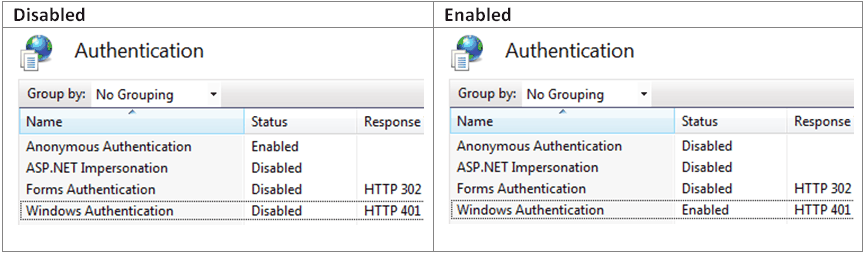
- Change the authentication settings in IIS.
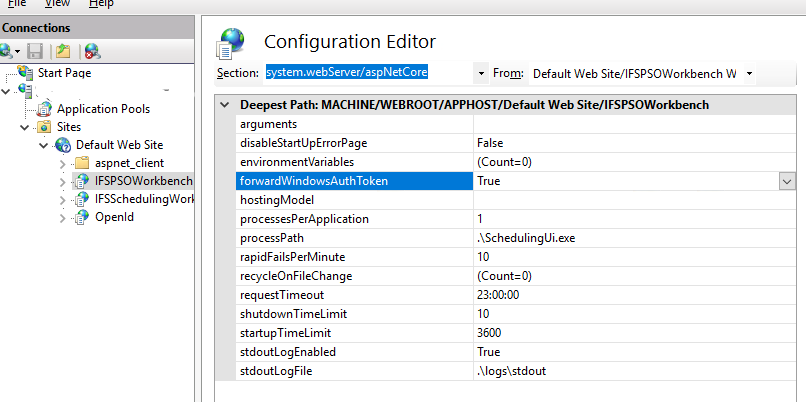
- Change the PSO Workbench web.config file. The ForwardWindowsAuthToken property must be True for Active Directory mode enabled and False for Active Directory mode disabled.