Cloud Architecture
PSO may be deployed to the Azure platform - for further details please consult the Installation Guide. When deployed in Azure, PSO uses the Azure Resource Manager deployment model. This section focuses on the architecture and infrastructure components used by PSO when it is deployed to Azure.
Deploying PSO in Azure
When deploying PSO to Azure, the default configuration is to deploy instances of VM "roles" of type DSE and Interface; DSE machines primarily handle optimisation whereas Interface machines host the remaining services. Details of the default role configuration can be found in the Installation Guide. Additionally, PSO Azure deployments can be configured to use auto-scaling of VM instances and database performance by enabling the AutoScale setting. Auto-scaling is handled by the Scheduling Machine Manager (SMM) and cannot run without Role Cache rules, which are best set up through the installer.
Azure Infrastructure
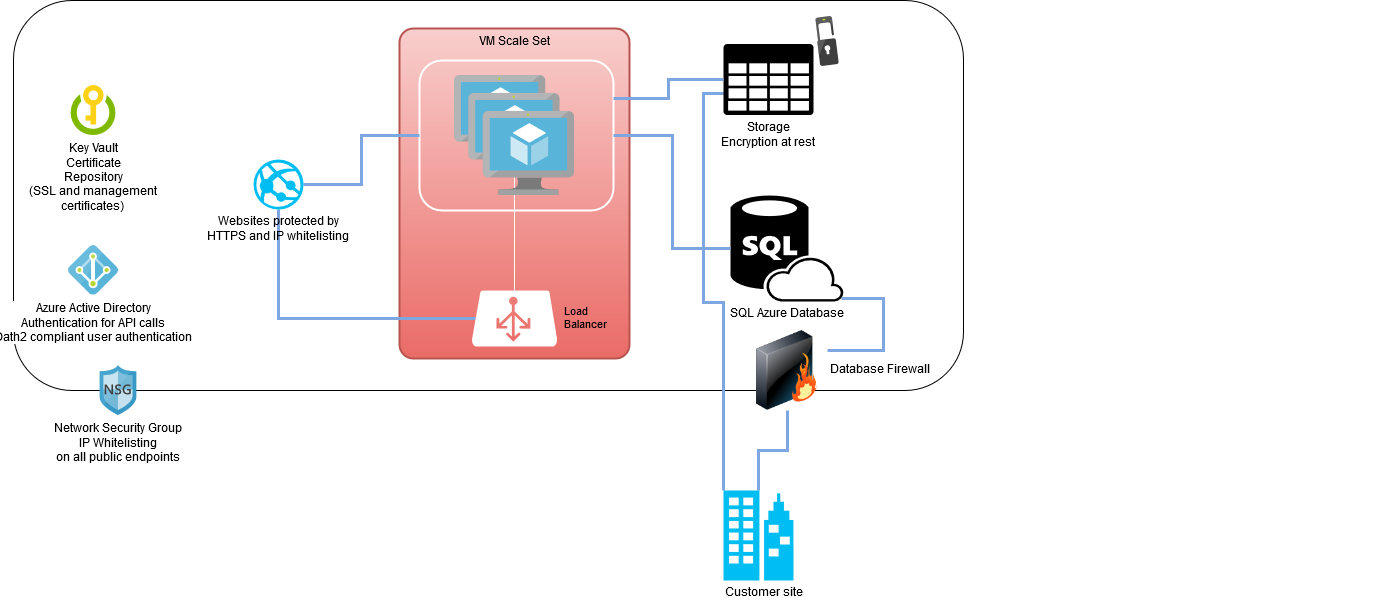
The diagram above shows the Azure infrastructure utilised for a Standard PSO deployments. The components that make up the system are:
- Azure Active Directory (AAD): this is not an explicit part of the PSO deployment, however, an AAD registry is required so that a Service Principle account can be created. The Service Principle is essentially an "application user" that the Installer and SMM use to communicate with the Azure API.
- Resource Group: this is the "box" within which a PSO deployment resides and can be thought of as the PSO cloud service.
- Virtual Network (VNET): within the ARM deployment model, compute resources must reside within a virtual network. For PSO, we create a single VNET with a single subnet, within which all of the compute resources reside. Address allocation is handled internally by Azure.
- Network Security Group (NSG): the NSG allows inbound and outbound traffic to be controlled and can, for example, be used to allow only a specific list of permitted IP addresses. The NSG is attached to VNET, therefore acting as a firewall for inbound traffic to the compute part of the PSO deployment.
- Virtual Machine Scale Set (VMSS): A VMSS is a grouping of identical VMs and therefore, within the various deployment models of PSO, is a natural fit for having an easily scalable set of VM instances. The VMSS is defined by the Installer and then additional configuration is performed by a Custom Script Extension following VM startup.
- Load balancer: inbound traffic is balanced across the VMs via a Load Balancer. For example, port 80 for HTTP, port 443 for HTTPS and port 8744 for the Scheduling Gateway.
- Key Vault: The SSL certificate used to secure a HTTPS binding is stored in an Azure Key Vault. The certificates from the Key Vault are injected into the VMs local certificate stores.
- Storage Account: a blob storage container is used to store the PSO software and additional configuration files. When the VMs start-up, bootstrap scripts download this data and configure the VM. The storage account uses encryption at rest to protect stored data and requires private key access.
- Database: PSO uses SQL Azure database(s) when deployed to Azure. This typically consists of a database server and a single child database with all of the scheduling schemata. (It is possible to split the various PSO schemata across separate databases, however, you are charged per database on SQL Azure therefore it is more cost effective to use a single database). The login credentials for the database(s) are dynamically, and internally, handled by the Installer, thus providing a managed deployment process. The connection string details can be found in the ConnectionDetails folder following an install - see the Installation Guide for further details.
- Database Firewall: The permitted IP range(s) for calls to the SQL Azure Database can be controlled using a database firewall.
Note
All of the features listed above are configurable via the IFS Scheduling Installer during the deployment process - please see the Installation Guide for further details.
Sizing Recommendations
The virtual machine size and Azure database size required will depend upon the size of the scheduling problem and number of workbench users. However, for a production environment we recommend using a minimum of an S3 SQL Azure database, and 4-core virtual machines. For larger scheduling problems and/or multiple datasets it may be advisable to use a higher performance database and/or more powerful virtual machines.
It is recommended that a detailed sizing exercise is carried out in collaboration with IFS prior to an initial system go-live. This should also be reviewed regularly, and especially if any significant changes to data volumes and / or system usage are expected.
Note
The virtual machine size should be configured via the PSO installer. The SQL Azure database size can be configured either via the installer or via the Azure portal.
Note
See the appendix 'Azure Sizing Metrics' for details of Azure performance benchmarking analysis. This covers both single tenant and multi-tenant systems.
Note
For HTM database sizing, please see the Architecture and Sizing Guide — Hierarchical Travel Matrix.
Note
Please note that for reasons of service resiliency, Azure deployments should always include at least two virtual machine instances. These can however be split between different PSO roles, since instances are capable of temporarily performing multiple roles when necessary. Please see the Installation Guide for further details.
Flowchart
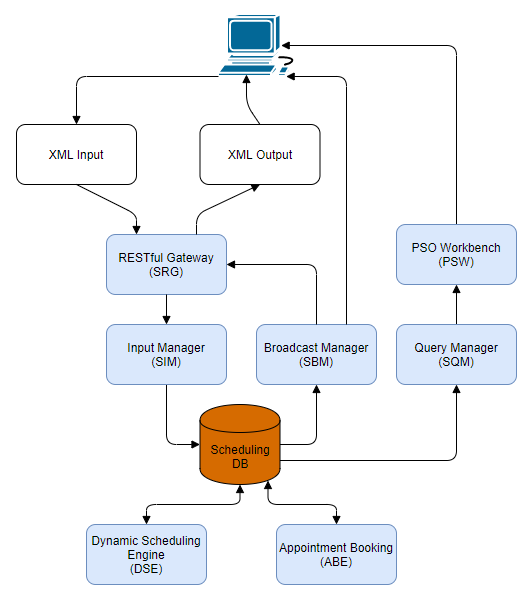
For a PSO deployment in Azure, the parts of the system exposed to the internet are the UI and the port used by the Gateway service. The above diagram shows the flow of data through the PSO system; it is primarily XML input and XML output for communications to the backend accompanied by the Scheduling Workbench which provides the UI. Note that the above diagram shows a representative PSO deployment where a number of services have been omitted to allow a simpler presentation. XML data sent to the system is received by the Gateway service which uses session based authentication to validate connections. Valid data is then passed on to the Input Manager where it is processed and then input into the database. The majority of the PSO services follow a Service-Oriented Architecture whereby they watch the database for a trigger to act upon and then perform a task and write back results. The exception is the UI which is driven by the user interaction. Note that the server-side of the UI utilises the Query Manager service which is the middleman for data queries - by adding this additional service layer we can easily scale out the services to cope with additional load.