Hardware Configuration
Hardware Sizing
This section provides general guidelines for the hardware size required to run the scheduling software.
General Guidelines
For most installations where automatic scheduling is required the typical hardware requirements for a live system would consist of three servers:
- Optimisation server: primarily hosting the DSE
- Application server: hosting the remaining services
- Database server: A server running either SQL server or Oracle
The required capability of the servers depends on the size of the scheduling problem and would be as follows, per server:
- less than 15,000 activities: 4 core Zeon CPU @ 2GHz or equivalent, 16GB RAM
- 15,000 - 20,000 activities: 8 core Zeon CPU @ 2GHz or equivalent, 32GB RAM
- more than 20,000 activities: please contact IFS for implementation guidance to ensure an optimal setup
Note
Disk space on the Optimisation and Application servers is not crucial as the services are stateless and therefore only require sufficient disk space for Input History and Broadcasts (if they are configured to write to disk). However, disk space is important for the Database server and we recommend of the order of 1TB of disk space.
Note
We strongly recommend that the Optimisation server instance is given dedicated cores - where virtualization of a single physical server has been leveraged - or, ideally, run on a separate physical instance. This is because the Dynamic Scheduling Engine which runs on this server is very CPU intensive. Typically this instance would be allocated at least half of the total available cores.
Note
Additional consideration should be given to the number of users expected to be viewing schedules via the PSO Workbench at any one time. A single SQM can support 25 concurrent users of the workbench. If there is a need for a higher user population viewing the schedules then additional SQM services will be needed. The SQM may be able to support more than this number of users depending on the data. Benchmarking and testing should be done with actual data to ensure the SQM performs as required. See also the section on Bandwidth below.
Note
Where automatic scheduling is not required (for example in an ARP only environment) smaller servers would normally be sufficient.
Large Installations
For systems consisting of multiple datasets, further instances may be required. In this case a rough rule of thumb will be to add a new instance for every 15,000 activities to be scheduled dynamically, and for every 30,000 activities to be scheduled statically.
For very large scheduling problems, we advise to consult with IFS to decide the most appropriate system setup. See also the guidance on using the Appointment Booking window and the Schedule Distribution Service in the Data Sizing section.
Using the WISE
Please be aware that when using the WISE this will be running static schedules in addition to any other (e.g. dynamic) schedules that are usually running. This needs to be allowed for when determining the hardware size required since running the WISE could impact the scheduling performance on standard datasets.
There are a number of potential solutions to this:
- Ensure that the WISE is only used outside of core operating hours.
- Use the WISE on a separate system, e.g. a test system.
- Ensure that the live system has enough capability to handle any extra demand from WISE schedules without impacting the performance of the regular datasets. This could be achieved for example by adding an extra standby optimisation server to the live system.
Azure Installations
Please see the 'Cloud Architecture' section for Azure sizing recommendations.
Component Architecture
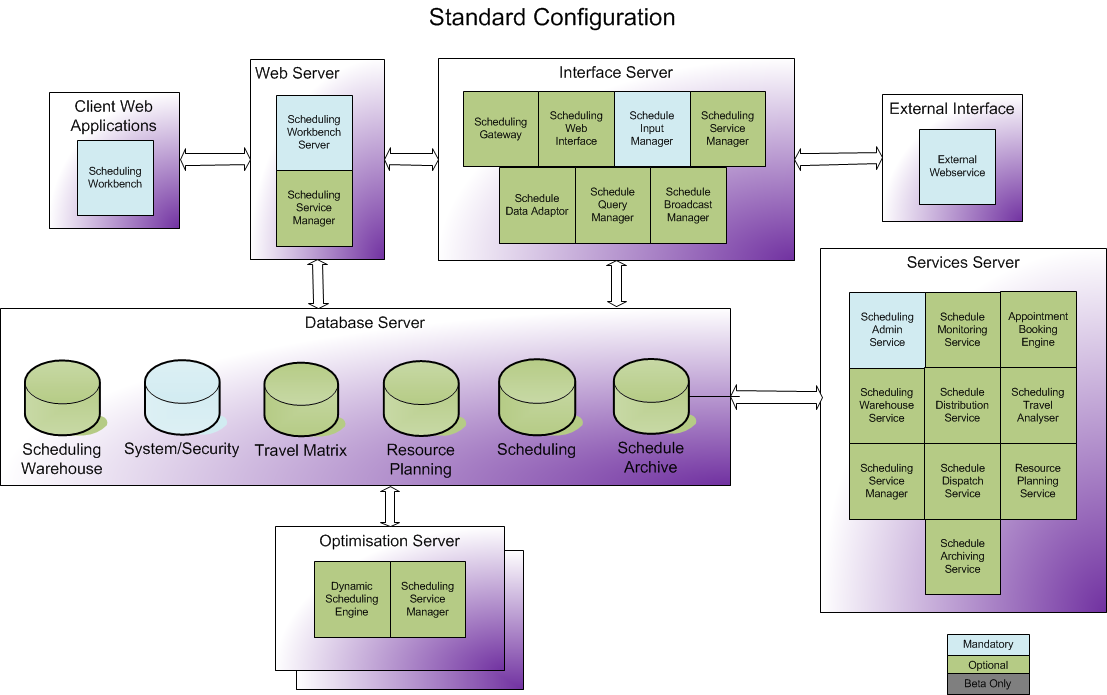
The diagram below is a schematic representation of a typical production architecture where the software components are split across a number of tiers and within each tier the components may be duplicated horizontally.
Note
Note that the components on the web server, interface server and services server may all be combined to run on a single server if required, and depending on data volumes.
Implementation Configuration
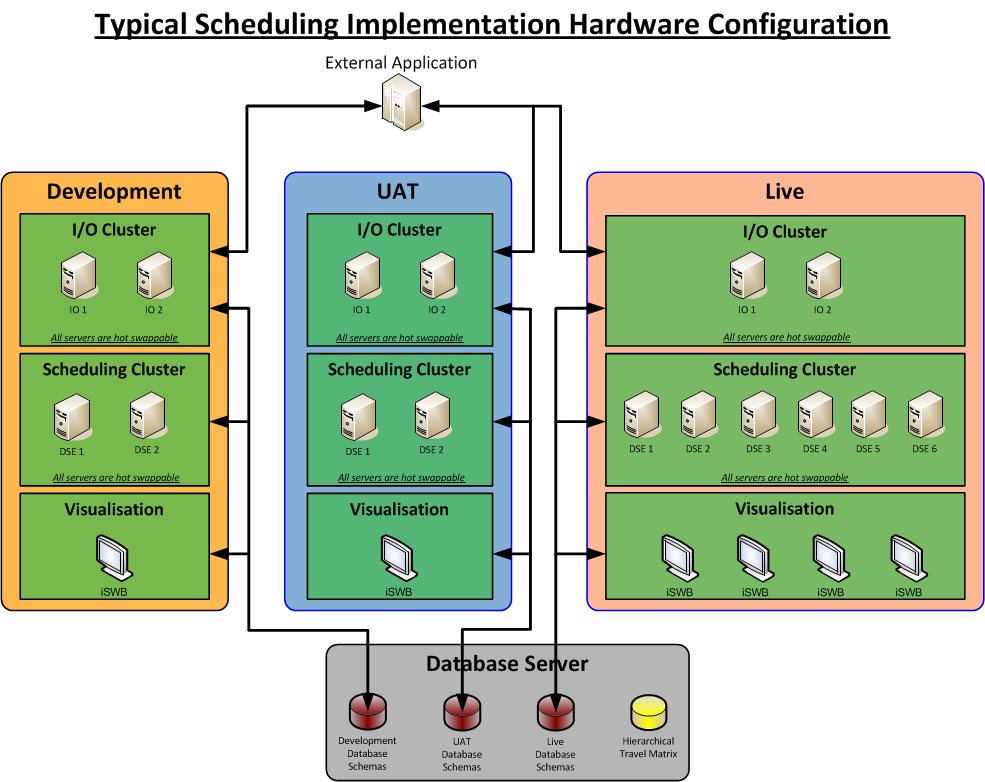
During implementation three environments must be configured to support the development, user acceptance testing and operation of the scheduling system. Such a configuration would be similar to that detailed below. In addition a standby / failover environment should be established for the live system.
This infrastructure should be maintained post implementation to enable the testing of new versions of software, alterations in the external application, configuration alterations and staff training.
Bandwidth Requirements
Due to the volumes of data which can be displayed on the Scheduling Workbench it is very important that there is high network bandwidth between the Scheduling Workbench server and the clients.
The Scheduling Workbench can be configured to refresh automatically at predefined intervals from 10 seconds to several minutes. The more frequent the refresh rate the higher the bandwidth usage over time.
On each refresh the data returned will contain only the changes compared to the previous update. Please be aware however that for larger datasets this can still involve significant amounts of data being transferred. We would advise that the refresh rate is at least 30 seconds and in production systems 1 minute or more may be adequate.
The following steps should be taken to reduce the bandwidth usage and increase the application responsiveness.
- Set the Scheduling Workbench refresh rate to a level which matches the needs of the business and the speed at which the scheduling system is generating new schedules. There is no point in attempting a refresh every 10 seconds if the DSE is only updating the plan every minute.
- During the implementation be aware that the inclusion of additional attributes for activities, resources and locations to be displayed on the Scheduling Workbench screen will increase the amount of data to be transported to the Scheduling Workbench. Each attribute has to be transmitted for each object displayed. If further data is needed for an object consider using the URL links instead.
- In large installations no one person will be interested in all resources and their schedules. During the implementation using the object group security will filter what resources and activities a user will be allowed to see on the Scheduling Workbench.
- Where large numbers of Scheduling Workbenches are to be deployed or there is limited network bandwidth application terminal servers should be considered as the main method of deployment.
- Network bandwidth usage tests need to be undertaken as part of the implementation especially if Scheduling Workbenches are to be deployed to locations with limited connectivity.