Kubernetes Architecture
Services and Ingress
Two front-end services are available within the cluster namespace:
- PSO Workbench: http://ifs-pso-psw:80
- Scheduling Restful Gateway: http://ifs-pso-srg:80
These services are exposed externally to the cluster by an ingress controller (Ingress NGINX or Traefik). The ingress controller takes care of handling the https TLS encryption and routing the traffic to the above services over http. If encryption between services inside the cluster is required a service mesh can be used (For example: linkerd).
- PSO Workbench is exposed at https://[host]/pso/workbench
- Scheduling Restful Gateway is exposed at https://[host]/pso/gateway
Note
See the Installation Guide — Kubernetes Installation for more information on setting up the ingress resource.
Deployments
Each application gets its own deployment allowing easy scaling by changing the number of replicas.
Auto-scaling is supported by the use of KEDA. When enabled a KEDA ScaledObject is created in the cluster for each relevant deployment. To allow auto-scaling, some applications need metrics to be provided to KEDA. These metrics are provided by the ifs-pso-smm-service backed by the ifs-pso-smm deployment.
Note
See the Administration Guide — Auto-scaling for more information.
The pods within a deployment are given an app name label. For example the PSO Workbench is given 'app.kubernetes.io/name: ifs-pso-psw'. This is used by the Kubernetes services to find the pods which are hosting the required application.
Each deployment is given resource requests and limits which specify the CPU, memory, and ephemeral storage requirements for each application. These details are used by Kubernetes to distribute the deployments pods across multiple nodes. These can be changed by specifying the resources in the installer values.yaml.
Default deployment requests and limits
The default resource requests and limits that come with the PSO installer have been crafted so that each service can handle a very basic 15,000 activity schedule under normal loads. This schedule was around 16Mb of XML and had no skills, parts, activity groups, additional attributes etc.
The container limits have been set higher than the requests to allow the container to continue to work if there is enough resource available on the machine rather than just being limited straight away (Burstable QoS class).
Every application requests 1024 Mi of ephemeral storage and limits it to 2048 Mi by default. These values can be changed in the installer values.yaml.
| Application | CPU Request | CPU Limit | Memory Request MB | Memory Limit MB |
|---|---|---|---|---|
| ABE | 1 | 2 | 4096 | 16384 |
| ADM | 0.1 | 2 | 256 | 1024 |
| ARC | 0.1 | 2 | 2048 | 4096 |
| DSE | 3.5 | 8 | 4096 | 16384 |
| DSP | 0.1 | 2 | 2048 | 4096 |
| DST | 0.25 | 2 | 4096 | 8192 |
| GWY | 0.25 | 2 | 1024 | 2048 |
| PSW | 0.8 | 2 | 2048 | 4096 |
| RPL | 0.1 | 2 | 2048 | 4096 |
| SBM | 0.25 | 2 | 2048 | 4096 |
| SES | 0.1 | 2 | 2048 | 4096 |
| SIM | 0.25 | 2 | 2048 | 4096 |
| SML | 0.1 | 2 | 1024 | 2048 |
| SQM | 0.8 | 2 | 2048 | 4096 |
| SRG | 0.25 | 2 | 2048 | 4096 |
| TRA | 1.1 | 8 | 10240 | 16384 |
| Total | 9.05 | 44 | 43264 | 99328 |
Choosing requests and limits
The exact amount of memory resources needed by the PSO applications can vary greatly depending on the data that they are processing. For that reason it is a good idea to benchmark with production loads to find good request values.
Requests are the amount of resources that Kubernetes will guarantee the container will get. If there are not enough resources in the cluster to guarantee the requests then the container pod will not be scheduled / started. Limits are the amount of resources at which Kubernetes will throttle the CPU or reject memory requests (causing out of memory issues).
There exists this burstable region where the container is using between the requests and the limit. In this case the container will be allowed the usage if nothing else on the machine is using it. If a container is using above the requests on memory then there is the potential that Kubernetes will kill the container if another container on the machine needs memory - especially if the other container is within its requests.
Ideally the PSO containers should have the requests set so that they are high enough that they are not exceeded during normal operation and the containers don't need to enter this burstable region. Though, allowing the containers to enter this burstable region can lead to less wasted resources in a cluster allowing load to be balanced within a machine. For a production system the containers should be monitored and configured so that they are not using above 70% of the memory requests under normal use.
If the Kubernetes cluster has lots of applications installed with pods coming and going at different times the requests and limits can be set the same to move the container into the Guaranteed QoS class and reduce pods being moved around / killed.
Note
See the Pod Quality of Service Classes and Configure Quality of Service for Pods Kubernetes documentation for more information.
Secrets
The following secrets are installed into the cluster:
- ifs-pso-db-secrets: Contains database connection strings for the applications. Attached to the deployments using a volume.
- ifs-pso-image-secrets: Container image pull secrets.
- ifs-pso-tls-secrets: Ingress TLS secrets.
Cluster Architecture Diagram
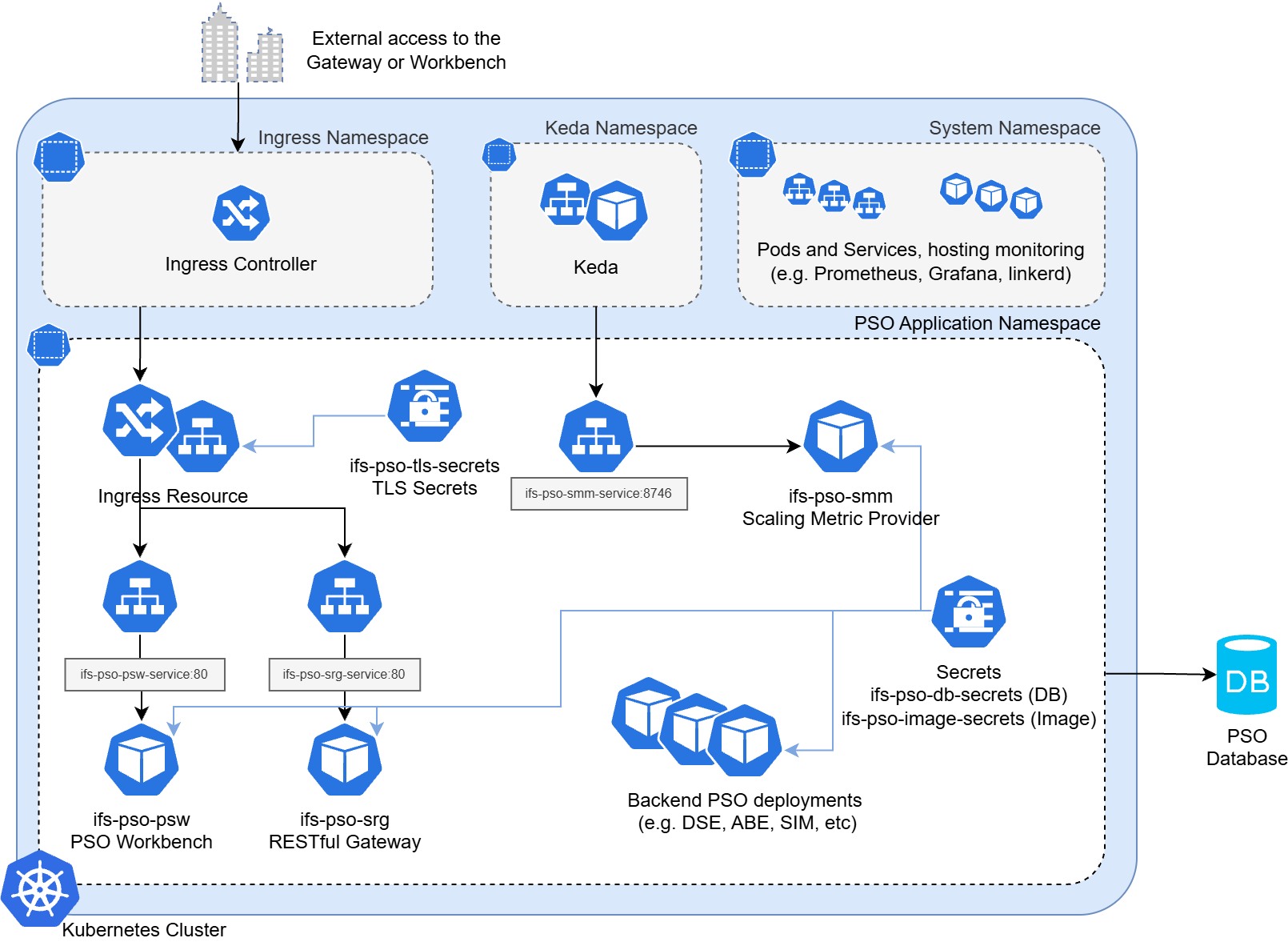
Shown above is an architecture diagram of a PSO installation setup by the IFS PSO Installer with Helm.
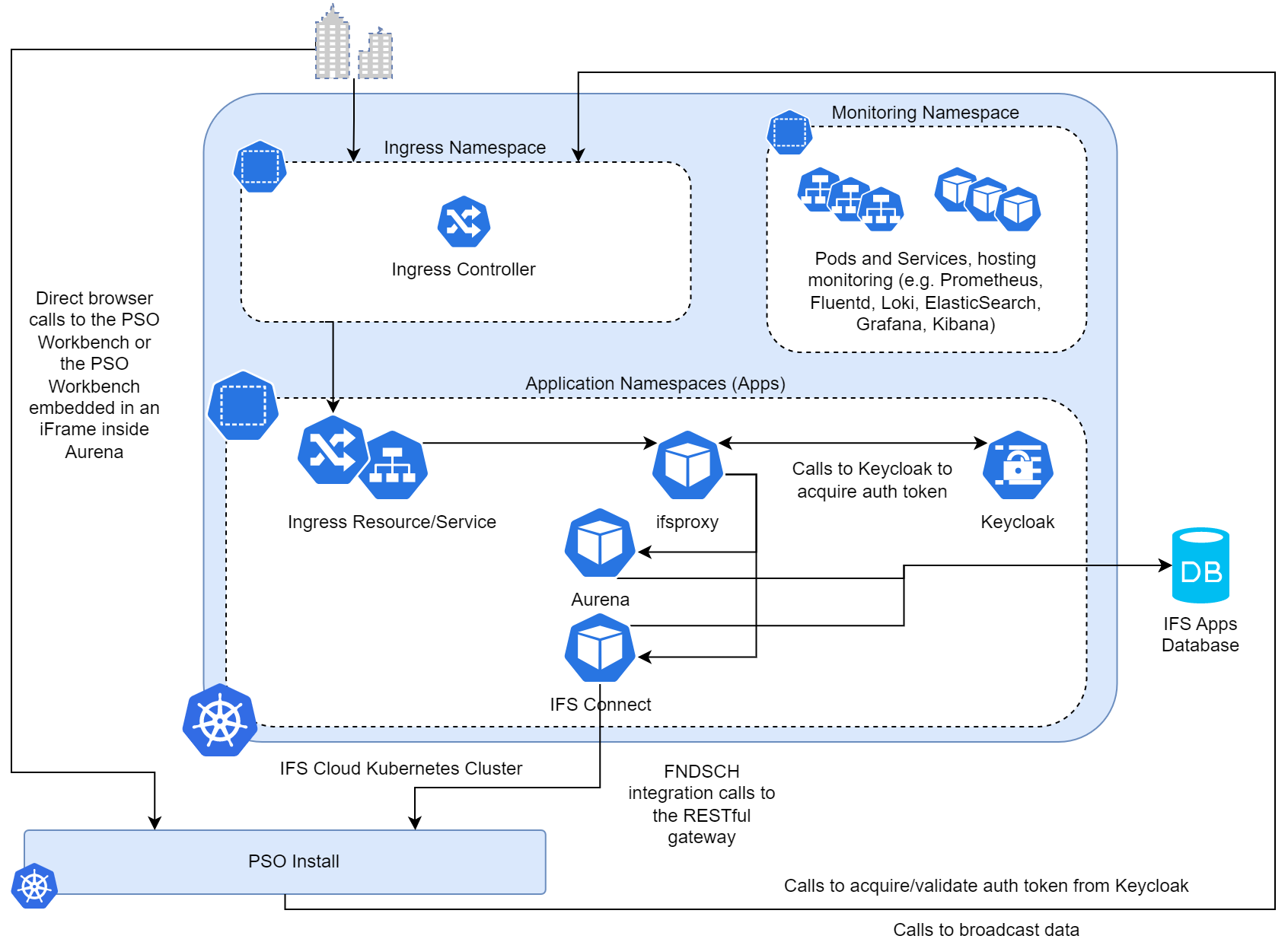
Shown above is an architecture diagram of an IFS Cloud install linked to a PSO install.
Multi-Installation Systems
In a multi-installation system, multiple instances of the application are installed across different clusters. This setup can be used to ensure high availability, load balancing, and disaster recovery. They can also be used to implement blue / green deployments for the Kubernetes infrastructure. All installations still connect to the same database, which is a key aspect of this architecture. Network connectivity between installations is not needed. Each installation has a unique name and a role. The roles define the function of each installation as follows:
- Active: Receives general workbench and gateway traffic and actively processes datasets.
- Passive: Keeps replica datasets in-memory ready to take over processing when converted to Active (when DatasetAvailability is at least 2).
- Standby: A minimal installation scaled down to reduce resource usage. No datasets are processed.
See the Administration Guide — Dataset Load Balancing for more information on how datasets are processed in a multi-installation system.
Note
There needs to be at least one Active installation in the system for it to function correctly. If all installations are set to passive or standby, integral system functionality will not happen including dataset load balancing and data clean-up routines.
The role of each installation can be specified at install time via the values.yaml input. It can also be changed dynamically either through the RESTful Gateway API or by using the Installations screen in the workbench.
Due to the nature of a multi-installation system all software upgrades must be done online since other installations are still running while the upgrade is in progress. If there is only one installation in the system then offline upgrades are supported.
Applications running within the system will be marked as belonging to a specific installation. The application instance ID will be prefixed with the installation name to ensure uniqueness across the system.
Version Compatibility
Starting with 6.16 applications will be compatible to run alongside other applications that are one minor version different. E.g. an application running on 6.17 can run alongside an application running on 6.16 or 6.18. But 6.16 will not be compatible with 6.18. To upgrade a system from 6.16 to 6.18 all installations must be upgraded to 6.17 first.
Once the database has been upgraded to a newer minor version then older minor installer versions will no longer be usable. E.g. once the database is upgraded to 6.17 then any installs using 6.16 can no longer be triggered against the system (though existing 6.16 applications in the cluster will continue to operate). Older patch versions of the same minor release can still be installed. E.g. 6.17.0.1 can be installed alongside 6.17.0.2.
Even though applications can run alongside each other with different versions, it is recommended to upgrade all installations to the same version to ensure compatibility and stability across the system.
Warning
There are database cleanup actions the installer takes that are only run when all installations are on the same version. If installations are on different versions then these clean-up actions will not be run. It is therefore recommended to ensure there is always an opportunity for this clean-up to happen. For example a system with two installations:
- A with 6.16.0.3 and B with 6.16.0.3
- B is upgraded to 6.16.0.4 (clean-up actions will not run due to A still being on 6.16.0.3)
- A is uninstalled leaving B on 6.16.0.4 (clean-up action will not be run for an uninstall)
- System is now left without the clean-up actions being run even though there is only one installation
- To ensure the clean-up actions are run B should then be re-installed with 6.16.0.4
Azure Multi-Region
A system can be setup to have installations across multiple regions in Azure. This can be useful for disaster recovery and high availability. In this setup, each installation can be in a different region, and they can still connect to the same database.
In Azure this can be configured as follows:
- Azure Front Door for routing traffic to either the primary installation or the secondary. The workbench health check endpoint can be used for the health probes.
- One cluster in each region with an installation of the application:
- Primary installation in role ACTIVE.
- Secondary installation in role PASSIVE or STANDBY depending on recovery time objective.
- One database in the primary region and a geo-replica in the secondary region.
- An Azure SQL failover group to allow the applications to use one connection string that can fail over to the secondary region.
Warning
The application performance is sensitive to the latency between the installation and the database. For that reason it is recommended not to run ACTIVE installations in a different region than the database.
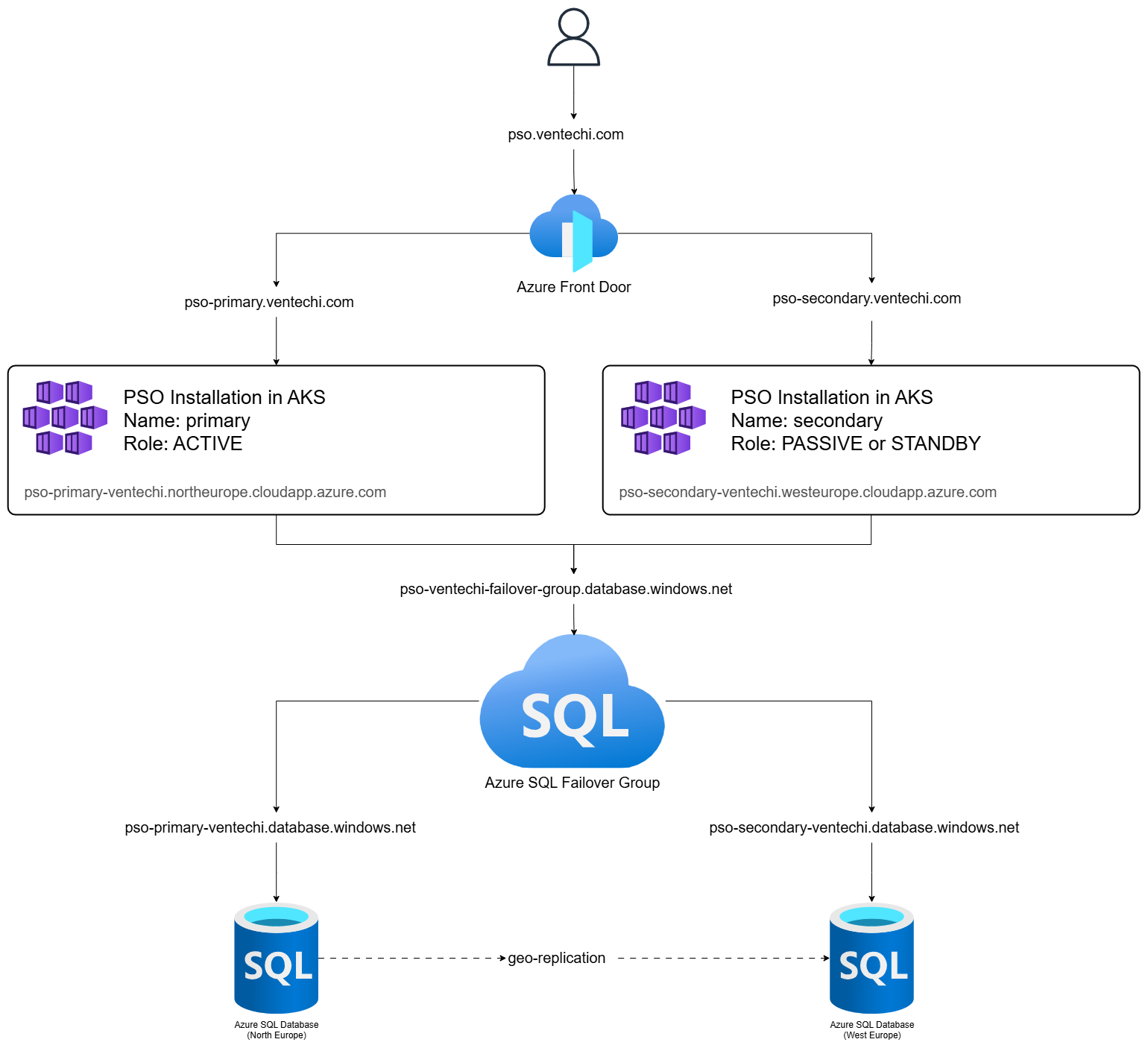
In the event of a disaster the following steps can then be taken:
- Failover the database to the secondary region using the Azure SQL failover group.
- Change the routing in Azure Front Door to point to the secondary installation. Azure Front Door's priority feature can be used to automatically fail over.
- Change the role of the primary installation to STANDBY or PASSIVE. Change the role of the secondary installation to ACTIVE. Either by the UI in the workbench or the API in the RESTful Gateway.
For software upgrades the process is similar to a single installation system, but care must be taken to ensure that the ACTIVE installation is upgraded first, followed by the PASSIVE or STANDBY installations. This can allow the secondary installation to take over in case of a failure during the upgrade process. All installations should be upgraded to the same version to ensure compatibility and stability across the system.
Blue / Green Deployment for Infrastructure
A multi-installation system can also be used to implement blue / green deployments for the Kubernetes infrastructure. In this setup, two installations are created, one for the blue cluster and one for the green cluster. The database remains the same throughout the process. The blue installation is the current active infrastructure, while the green installation is the new infrastructure.
The process for blue / green deployment is as follows:
- Deploy the application to the green cluster in role PASSIVE.
- Run tests to ensure that the new cluster is working correctly.
- Switch the routing in Azure Front Door to point to the green cluster.
- Change the role of the green cluster to ACTIVE and the blue cluster to PASSIVE or STANDBY.
- Monitor the system for any issues. If there are no issues, the blue installation can be uninstalled. The RESTful Gateway installation endpoint can be used to track if an installation is ready to be uninstalled. The IsIdle property is true when the installation is not being actively used to process a dataset and can be safely uninstalled.
Warning
This blue / green deployment process is intended for changes to the Kubernetes infrastructure and not for application version upgrades. E.g. upgrading Kubernetes to a new version or changing Helm chart values.
When using this for application upgrades there are limitations around version compatibility. Once the database has been upgraded to a newer minor version then the older minor installer versions will no longer be usable. E.g. if blue is running 6.17 and green is running 6.18 then the database will have been upgraded to 6.18 and the 6.17 installer will no longer be usable on the blue installation.
See the Version Compatibility section for more information.