Schedule Distribution Service
This service is optional and should only be used when required, based on the datasets to be scheduled. The purpose of the Schedule Distribution Service is to allow for the efficient scheduling of very large scheduling problems.
Warning
In order to use the Schedule Distribution Service the DSE parameter 'DatasetTypesToProcess' should be changed to 'SEGMENT'. This parameter change is always required when using the DST.
Note
See the section on data volumes for further recommended steps to take when submitting datasets with a very large number of activities.
Note
Multiple DST servers can be supported in a single system in the same way as DSEs and other components. Additional DST instances can be added or removed as required.
Modes of Use
The Schedule Distribution Service (DST) has two distinct modes of use: Segmentation mode and Feeder mode. These can be used independently or in combination.
In either mode, the Schedule Distribution Service will create internal 'SEGMENT' or 'ATOMIC' datasets which are then processed by one or more Dynamic Scheduling Engines (DSEs). The management of these internal datasets is handled internally by the DST and DSE(s). No changes are required to the external application, or to any other scheduling components.
Note
The Schedule Distribution Service can also be used to handle 'DISTRIBUTED' scheduling problems. This is a special process type that is primarily intended to allow for capacity planning over a long period of time, alongside dynamic scheduling of the current daily work. See the Scheduling Concepts — Distributed Scheduling guide for full details of this functionality.
Feeder Mode
Feeder mode is recommended when there are a large number of activities that can potentially be scheduled, but only a small percentage of the available activities are expected to be allocated in the plans produced. This is typically used where customers have a high volume of planned maintenance work with long time windows of availability, alongside some short term reactive work.
Note
To use the regular feeder mode the parameter 'FeedDynamicDatasetOption' should be switched on, and the parameter 'FeederMechanism' parameter should be set to 'EXCLUSION' (which is the default setting).
When using this mode, the DST will create a single internal dataset to be processed by the DSE. It will then intelligently select which activities to feed into this dataset to be processing by the DSE. It will then exclude from this dataset any activities which it considers are highly unlikely to be scheduled, so that the DSE views a much smaller subset of the total data.
The DSE will schedule the segment dataset as normal, and produce plans. The DST will then read the plan produced by the DSE, and review its decision about which activities should be included in the DSE dataset. Where appropriate activities are then be added and/or removed from this dataset.
When input changes are detected the DST will ensure the DSE dataset is also updated as appropriate.
Note
Please note that the intention when using feeder mode is to improve performance when scheduling problems of this type, by filtering out from the DSE dataset any activities which the DSE is highly unlikely to allocate anyway.
The intention is that this should make no difference to the final schedule produced by the DSE. In particular, feeder mode is not intended to limit the number of allocated activities.
Note
The DST feeder mechanism will only come into effect if a dataset has more than a minimum number of activities. This is determined by the parameter 'FeederMinimumActivities', which defaults to 1,000.
Note
Feeder mode can be used on its own, or alongside segmentation mode. When used on its own, the distribution service will only ever create a single DSE dataset.
When determining which activities to send to the DSE, the DST will assign each activity to one of three categories:
- Those which must be sent to the DSE.
- Those which will never be sent to the DSE.
- All other activities, which are sent depending on their level of 'importance'.
Must Send Activities
Activities will always be sent to the DSE if they have any of the following characteristics:
- Activities that must be scheduled, either because they are at status committed or higher, or because they are fixed to a resource and time.
- Activities which have the attribute 'reactive' set to true in the input data. This is an attribute on the Activity and Activity_Type entities - see the Scheduling Schema guide for details.
- Activities with a jeopardy deadline within a define period from the current time. This uses the parameter 'FeedActivityInJeopardyThreshold' which defaults to 4 hours.
- Activities of class DEPOT.
- Activities with no location.
- Activities with invalid data (to allow the DSE to raise the appropriate exceptions).
In addition, activities will always be sent to the DSE if they are linked (e.g via a co-requisite or pre-requisite) to another activity which is being sent to the DSE. The same applies to activities at the same location or locality.
Note
It is not necessary to set the 'reactive' flag on any activities, but it may be beneficial to do so.
Finally, any activities that are allocated in the current DSE plan will not be removed from the feeder dataset.
Must Not Send Activities
Activities will never be sent to the DSE if they are at status do no schedule, or if they have no availability (and if they do not fall into the previous category).
Note
Activities which are unallocated due to the DST deciding not to send them to the DSE will have the unallocated reason 'Activity not sent to DSE'.
Importance
For all other activities the decision is based on a measure of the importance of each activity. The importance is based on two primary factors:
- Value. This is a measure of the maximum value of scheduling the activity within the current scheduling window - allowing for variables such as ageing factor.
- Location. The importance of an activity is increased if it is near to other allocated activities.
The DST will then send the most important activities to the DSE. The number of activities sent depends on the number of activities that the DSE is able to schedule, and the value of the parameter 'FeedActivitiesMultiplier', which defaults to 0.5. This number represents the approximate target number of unallocated activities within the DSE dataset, relative to the number of allocated activities.
As an example, if the DSE has allocated 8,000 activities then using the default setting of 0.5 the DST would aim to have 4,000 unallocated activities in the DSE dataset, so 12,000 activities in total. If the setting is changed to 0.25 then the DST would send 10,000 activities to the DSE, with 2,000 expected to be unallocated.
Note
The intention here is to allow the DSE to consider scheduling the most valuable activities, and also those that are close geographically to other high value activities. The result should be that the DSE produces the same schedule as it would without using the DST feeder mechanism, but that it can do this in a much shorter time.
Note
The parameter 'FeederMaximumInitialActivities' limits the number of activities that will initially be sent to the DSE, by default to 10,000. After the DSE has produced an initial plan, the number of activities in the DSE dataset may be increased beyond this value, depending on the number of activities allocated and the parameter 'FeedActivitiesMultiplier'. It is recommended to update the value of this parameter to a value close to the final number of activities expected to be included in the DSE dataset.
Note
The parameters 'FeederActivityValueImportanceWeighting', 'FeederValuePerHourImportanceWeighting' and 'FeederProximityImportanceWeighting' can be used to adjust the relative importance of value and location in the distribution service feeder calculations. It is recommended that these are only updated in consultation with IFS.
Note
Object groups provide a useful way to limit the amount of data displayed on the client, avoiding performance issues and showing unnecessary data. All resources should be linked to an object group, along with all important activities. However, low importance activities do not need to be linked to any object groups. In this way, only those activities which are allocated, or those which are important, will be displayed on the client.
Feeder Aggregation Mode
The feeder aggregation mechanism uses a similar approach to the exclusion mechanism, except that:
- Activities are only considered to be important if scheduled in the dynamic scheduling window.
- Unimportant activities are aggregated instead of being excluded.
Note
To use the aggregation mode the parameter 'FeederMechanism' should be set to 'AGGREGATION'. Please note that it is not possible to use the Feeder and Segmentation modes together with this mechanism.
Note
When using aggregation, a split dynamic and appointment window should being used. An exact plan will be produced during the dynamic part of the window, and an aggregated plan during the appointment window. This is typically for high density scheduling problems such as meter reading, where there may be a need to have a rough schedule during the appointment window to aid appointment booking decisions.
Activities are only aggregated is certain conditions are satisfied:
- The dataset is large enough to require it, based on the parameter 'AggregationTargetActivityCount' (default 10,000).
- The activities to be aggregated share the same basic characteristics (skills and regions required and activity type).
- The activities to be aggregated have similar values, availabilities and SLA times.
- The activities to be aggregated are not too far apart, based on the parameter 'AggregationMaximumMergeDistanceMetres' (default 2,000).
- The aggregated activity duration would not be too long, based on the parameter 'AggregationMaximumActivityDuration' (default 2 hours).
The allocation of aggregated activities is returned in the plan output. In the Allocation rows the activity id will be the id of the aggregated activity, and the details of the aggregated activity as provided as Aggregated_Activity rows and Aggregate_Member rows. See the Scheduling Schema guide for details.
Note
Aggregated activities are only scheduled in the appointment part of the scheduling window. In the dynamic part all scheduled activities will be actual input activities.
Segmentation Mode
The DST segmentation mode is designed for use with very large scheduling problems. This is for problems which would be considered too large for a single DSE to schedule, and which are not appropriate for using other approaches such as the DST feeder mechanism.
Warning
To use this option the DST parameter 'SegmentDatasetOption' should be switched on.
In this case the DST will create multiple internal datasets to be scheduled by multiple DSEs. The number of DSEs required will depend on the size of the problem. The internal datasets will be distributed amongst the available DSEs in the same way as standard datasets, allowing for both the size of the dataset and the capability of the hardware each DSE is running on.
Warning
It will usually be required to have multiple DSE instances running when using the DST segmentation mode, even if there is only a single full dataset to be scheduled.
The DST will decide on an initial segmentation of the data, by evaluating the data and considering factors such as regions, availabilities, and the geographic distribution of the data. As input updates are sent to the system the DST will ensure the internal DSE datasets are also kept updated, and review the current segmentation. If substantial changes have accumulated which significantly change the distribution of data then the DST will change the segmentation accordingly.
The choice of segmentation method used is determined by the parameter 'PermittedSegmentation'. There are three methods of segmentation currently considered:
| Segmentation Method | Description |
|---|---|
| Temporal | The dataset will be segmented by time. The DST will aim to segment the dataset at times where no resources are working and where activities must be done either before or after the selected time but not both. This works well for longer scheduling windows where the majority of the work is appointed. |
| Spatial | The dataset will be segmented geographically. The DST will aim to segment the dataset into geographic clusters of resources and then balance the activities across the resource clusters. |
| Constraint Based | The DST will look to segment the scheduling problem based on skills, regions and other hard activity-resource constraints. This works well if the data is regionalised with hard boundaries, or resources have distinct skill sets. |
The DST can also consider multiple segmentations methods, and use the methods in combination. Simply select the options you wish it to consider, and it will use whichever combination is the most appropriate.
DSEs can be added or taken off line in a seamless manner to increase the computing power or reduce it for maintenance upgrade purposes. The computing load is re-distributed across the servers automatically, whilst maintaining the defined segments.
For 'STATIC' scheduling problems, the DST can also queue up the segment datasets to be processed. This means that a single DSE in combination with a DST can schedule a very large static problem, without the system being overloaded.
Update Handling and Re-segmentation
When the DST is running in segmentation mode and input updates are received, the DST will attempt to update the existing internal datasets. Occasionally it may be necessary to re-segment the data. This will be due to one of the following reasons:
- The changes to the data mean that the current segmentation is no longer valid. For example, if constraint segmentation is used and a change means that two or more segments need to be combined.
- The volume of schedulable activities in the input data has changed by more that the 'ResegmentationFactor' parameter (default 50%).
If re-segmentation is required, then once new segments have been determined, the DST will update the existing DSE segment datasets and/or send new load inputs for the datasets as appropriate.
Multiple modes
The DST can be set up to use both Feeder and Segmentation modes at the same time (though this option is not available with the Feeder aggregation mechanism). In this case the DST will first apply the feeder mode to exclude a number of activities. If the resulting dataset was still large, it would then consider the permitted segmentation options to try to split the data into multiple internal datasets.
Atomic Datasets
Sometimes for a given dataset the DST may determine that no feed or segmentation needs to be applied to the dataset, and the DSE can simply process the data directly. In this case the DST will create a single 'ATOMIC' dataset for the DSE to run against, which simply redirects the DSE to processing the parent dataset. The advantage of this is that the DSE can then process the data with virtually no overhead compared to running without the use of the Schedule Distribution Service.
Deployment
The following guidelines can be used to determine if the DST should be deployed on a system, and if so which mechanism should be used.
Performance Metrics - Feeder Mode
The graph below uses a dataset with 50,000 activities, of which around 6,000 will be scheduled, and compares the output from using DST feeder mode with that of using a DSE only.
The points on the graph represent where plans were returned. The horizontal axis shows the number of minutes since the problem was first submitted and the vertical axis the number of activities that were allocated in each plan.
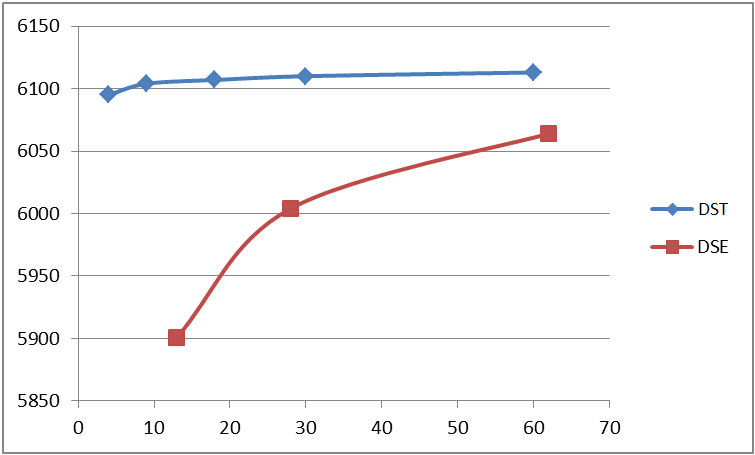
It is clear that the use of the DST feeder allows plans to be generated sooner and of a higher quality in this case.
Performance Metrics - Segmentation Mode
The graph below uses a number of datasets of varying sizes, and measures the time taken for a first plan to be produced. The graph compares performance with a standard DSE setup (the blue line) to that with a DST and a given number of DSEs in segmentation mode.
The points on the graph represent when the first plan was returned in each case. The horizontal axis shows the number of activities in the dataset used. The vertical line shows the time taken for the plan to be produced.
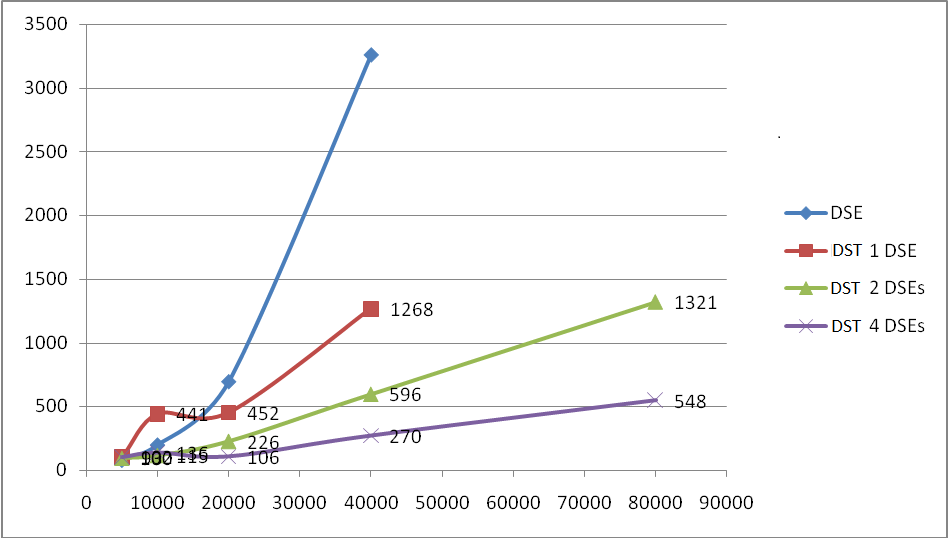
The graph shows that for datasets with more than 15,000 activities it will often be beneficial to use the DST in segmentation mode.
It should be noted that the relationship between problem size and number of DSEs becomes linear when using the DST segmentation mode, thus enabling the system to scale to very large scheduling problems.
Handling Large Datasets
15,000 activities is the recommended maximum size for a DYNAMIC dataset running on a high-spec server. This may be treated as an aggregate limit, so a Dynamic Scheduling Engine running on a high-spec server may process one 15,000-activity DYNAMIC dataset, or three 5,000-activity datasets, or six 2,500-activity datasets.
The Schedule Distribution Service may be used in various configurations to handle datasets larger than 15,000 activities in certain circumstances, as follows:
| Configuration | Dataset size (activities) | Description |
|---|---|---|
| Normal Dynamic Scheduling | up to 15,000 | Scheduling a typical dataset with some constraints, 5 to 10 activities per resource per day, and dynamic updates during the day |
| Static Scheduling | up to 50,000 | A one-off schedule, with no updates, that may take an hour or so to run. Maybe done overnight as a batch process. |
| Appointment Booking | up to 35,000 | Scheduling over a longer period, perhaps over several months. This uses a split window where the first part of the scheduling window (usually no more than one week) is fully optimised, and the remaining part is optimised in the background. This is typically used with appointment booking. |
| Feeder | 15,000 to 100,000 | Suitable when there is a large backlog of activities, most of which are not expected to be scheduled. This uses the Schedule Distribution Service, which passes only the most important activities to the Dynamic Scheduling Engine, along with enough low-importance activities to fill the schedule. From time-to-time, the Schedule Distribution Service tries sending different activities to the Dynamic Scheduling Engine, in place of any that could not be allocated. This option should only be used if the number of activities actually being processed by the Dynamic Scheduling Engine is less than 15,000. |
| Segment | 15,000 to 100,000 | This option is suitable when there is a large dataset, within which we expect to allocate most of the activities, but which cannot be split into smaller regional datasets by the customer's field service system. It uses the Schedule Distribution Service, which looks to break the schedule into smaller segments, by dividing it along geographical, regional, skills and time boundaries, according to which is most suitable. Please note that the Schedule Distribution Service is breaking up the dataset automatically, and it is often preferable to divide the data into segments at source, because the customer can do this along known regional boundaries, for instance. The segment datasets which are generated must then be processed by multiple instances of the Dynamic Scheduling Engine. The number of Dynamic Scheduling Engine instances required is the total number of activities divided by 15,000, rounded up. These should all be running on their own, separate, high-spec servers. |
| Feeder and Segment | 15,000 to 100,000 | A combination of the above two methods, using the Schedule Distribution Service, suitable when there are a large number of activities which are not expected to be allocated, and the number of activities that we expect to allocate is between 15,000 and 50,000. Activities are first filtered to remove the ones which are unlikely to be scheduled, and then the remainder are split into segments as described above. Sufficient Dynamic Scheduling Engine instances must be provided, as described above. |
| Aggregation | 15,000 to 100,000 | This option is suitable when there are large numbers of similar activities in a small geographical area. It uses the Schedule Distribution Service. The first days' activities are passed across individually across to the Dynamic Scheduling Engine, but later days' activities are aggregated into clusters, and these are then passed to the Dynamic Scheduling Engine. |
Deployment Decision Tree
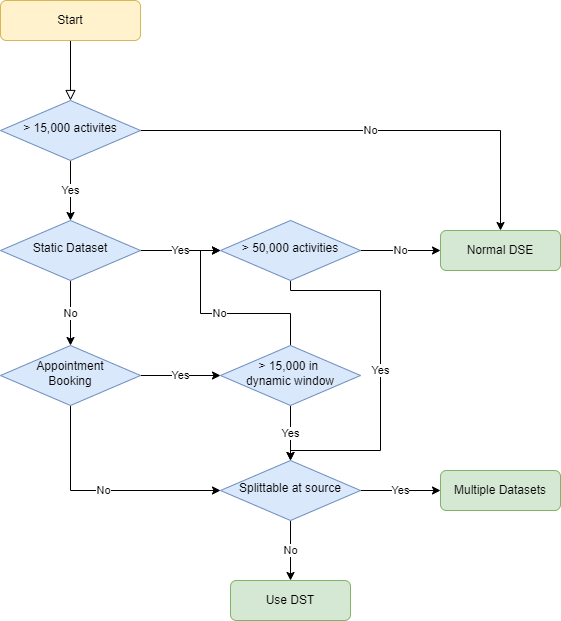
The diagram below shows the general guidelines that should be used when deciding is the DST is required. The assumption is that all activities are included in a single scheduling dataset.
If the DST may be required, see the sections above to determine which modes of operation should be used.