General Enhancements
The following general enhancements have also been made to the product:
Data Import and Export during Installation
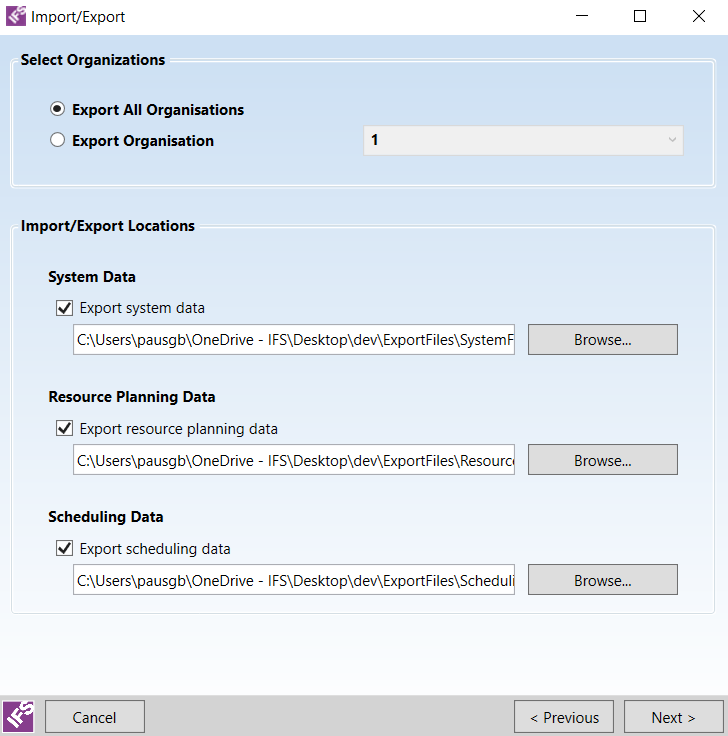
The installer now includes options to export and/or import data from the system as part of the update process.
- Set-up: All set-up files can now be loaded into the system via the installer.
- System: All organisational data (users, parameter settings etc.) can be exported and imported. This is equivalent to using the Workbench => Administration => Import / Export screen.
- Resource Planning: All planning datasets can be exported and imported. This is equivalent to using the Workbench => Planning => Admin => Import / Export screen.
- Scheduling: All saved schedules, plus the current live schedule for each dataset, can be exported and imported.
For details please see the Installation Guide.
Azure Cloud Deployment Improvements
Deployments to the Azure cloud have been switched to use the 'Azure Resource Management' (ARM) deployment model. This provides a number of benefits.
- Virtual Networks: All ARM deployments use a VNET to restrict access to both the cloud instances and the database.
- Network Security Groups: This is essentially a firewall to prevent unauthorised access to the system. Cloud systems can now be configured via the installer to only allow access to a selected range of IP addresses.
- At Rest Encryption: All ARM storage accounts are encrypted at rest by default.
A new Cloud Architecture section has been added to the Architecture and Sizing Guide.
Multiple HTMs
Components that require the use of an HTM can now be configured to use multiple HTM databases, so that different datasets can use different HTM connections.
For details please see the Installation Guide.
Improved Resiliency
Additional transient fault and retry handling has been added to all database interactions.
In addition, the mechanism for monitoring individual components on the system has been updated to improve resiliency. The new method relies on services updating an entry in the database, instead of using remoting calls.
Local Web Interface Installation
The installer now includes an option to install only the Scheduling Web Interface and configure it to point to a full PSO system. This is intended primarily for use with cloud hosted systems which do not support the use of a web interface directly. The web interface can be configured to send data to a specific organisation on a multi-tenant cloud system.
For details please see the Installation Guide.
Licensing
The licensing model has been adjusted for the PSO 6.0 version, and as a result customers upgrading from an earlier version will need to request a new licence file from IFS. The new licence model allows for organisation specific licensing on multi-organisation systems.
External Monitoring
The Scheduling Gateway now includes methods to fetch system events and schedule usage statistics for monitoring purposes.
Organisation Events
When running in a multi-organisation environment it is now possible for admin users to view the events relating to their own organisation.