Scheduling Enhancements
Electric Vehicle Scheduling
Electric vehicles are now the preferred option for many field service companies, due to the environmental and economic advantages they can bring. One concern when using electric vehicles is that they tend to have lower range than other vehicles, and the time needed to refuel can be significant. This is especially true if there is limited availability of recharging stations.
The scheduling system now supports a new explicit model for handling vehicle recharging, in addition to the existing implicit model. In this new model, the range of the vehicle is represented as a type of part that is consumed while travelling. Vehicles can be scheduled to visit depots to recharge, and the range can be updated in real time as the vehicle is travelling. Recharging can also take place while the resource is working on an activity, if this is available.
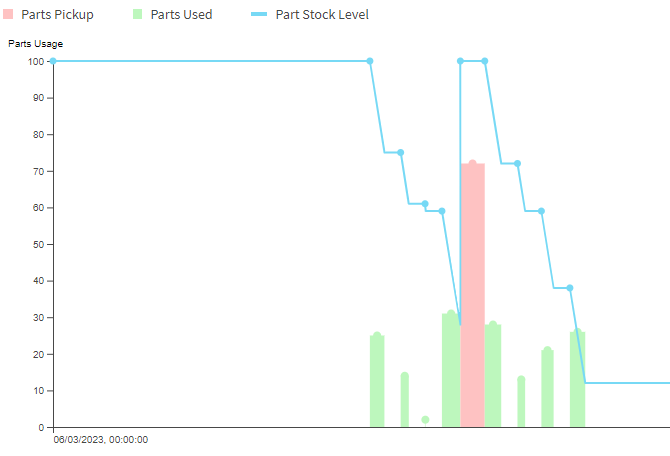
See Scheduling Concepts - Parts and Scheduling Concepts - Travel for more details.
Parallel Resources
A new resource class has been added for parallel resources. Parallel resources can carry out multiple activities at the same time as each other. Rules can be defined to place limitations on the number of activities being carried out at once, or on which activities can be processed at the same time as each other by the same resource. Travel is not supported for parallel resources.
Parallel resources could be used in manufacturing scenarios, with a parallel resource representing a machine that is capable of working on multiple jobs at the same time. Capacity limitations can be put in place for the resource, and the activities can have their own contributions to this limit (via custom metrics), to ensure that the machine is not overloaded. Exclusivity constraints can also be put in place if needed so that the machine is only working on one kind of job at any one time.
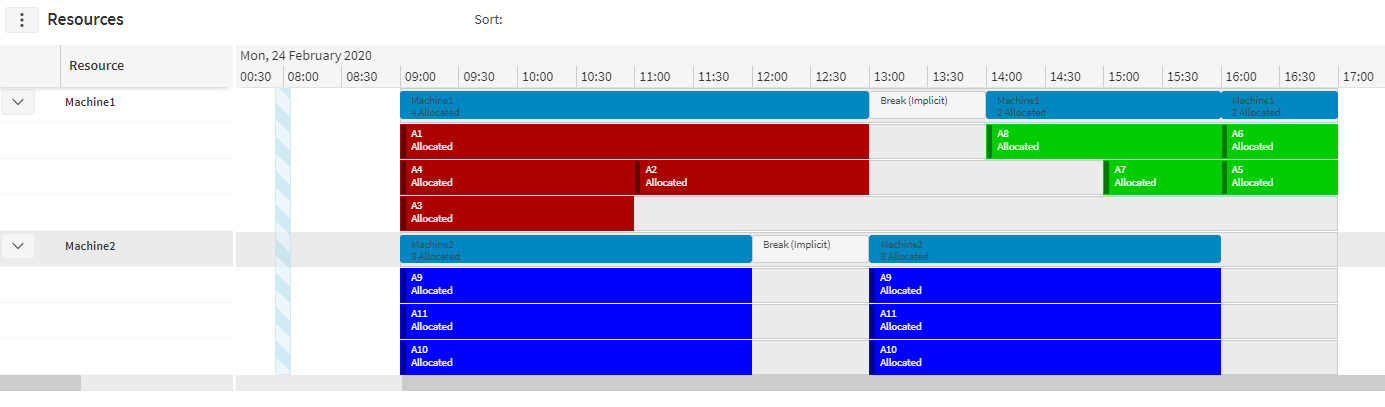
See Scheduling Concepts - Resource Capacity Management for more details.
Co-Requisite Shared End Times
A new option has been added to an activity group to allow co-requisite activities to share end times. The end time can be calculated using a number of different methods, including latest, earliest and parent.
The latest end time calculation method will set the end time of the activity group to the latest end time of the activities in the group. The earliest end time calculation method will set the end time of the activity group to the earliest end time of the activities in the group. The parent end time calculation method will set the end time of the child activity (activity_id1) to the end time of the parent activity (activity_id2).
See Scheduling Concepts - Linking Activities for more details.
Activity Group SLAs
It is now possible to associate a delay SLA model to a pre-requisite activity group. This enables the scheduling of the dependent activity to be value-based in relation to the pre-requisite. For example, a model could be used to prefer that both activities are completed on the same day, but allow the dependent activity to be completed on a later day if necessary.
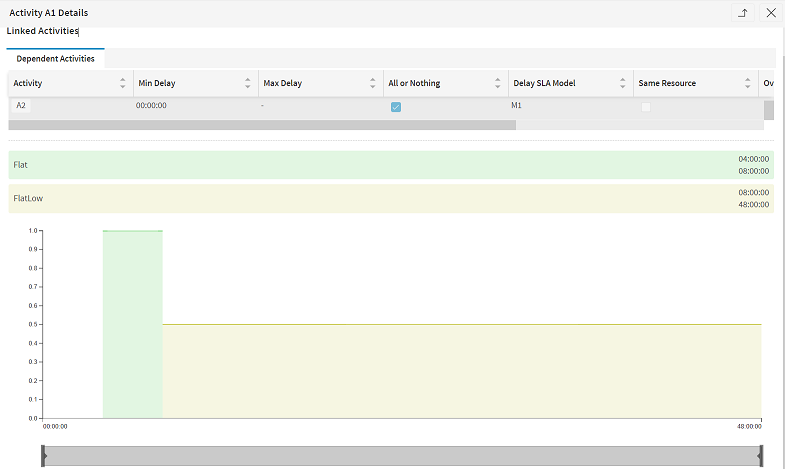
See Scheduling Concepts - Linking Activities for more details.
On Location Duration Factor
The total expected duration of multiple activities can be reduced when using this factor in the Activity_Type row. In order for the factor to take effect, two or more activities will need to meet the following conditions:
- They have the same location id
- They are of the same activity type
- They are scheduled for a visit by a single resource to a location
- There are no other activities of different types in between; breaks will not stop the factor from taking effect
Note
Activities must have locations, i.e. the factor will not apply to location-less activities.
Note
Activity's duration must not be overridden.
Note
Activities do not need to have the same duration.
The factor can be specified on the Activity_Type row using the 'on_location_duration_factor' column with a value between 0.001 and 1 (inclusive). A value of 1 has no effect. The lower the value, the higher the reduction for the total expected duration of activities. The factor is applied to a group of activities, as long as they meet the conditions stated above, as follows:
- If all activities in a group have the same duration, then we do not apply the factor to the first one. Otherwise, if all activities in a group have different durations, then we do not apply the factor to the activity with the largest duration
- The factor is then applied as follows: New activity duration = original activity duration * 'on_location_duration_factor' value
Note
For example if we had 'on_location_duration_factor' set to 0.5 and we had two activities: A1 with a duration of one hour and A2 with a duration of two hours. Assuming that both activities meet the conditions for the factor to apply, then the DSE will schedule A2 with its original duration of two hours and A1 with a new duration of 30 minutes (1 hour * 0.5 = 30 minutes).
See Scheduling Concepts - Linking Activities for more details.
Shift Based Resource Pool Memberships
A new option has been added to allow resources to join resource pools for the durations of a single shift. This can be specified by setting the 'shift_id' column on the Resource_Pool_Item row. The resource will be treated as a member of the specified resource pool for the duration of the shift. This removes the resource from any other pools in the same resource pool set, while memberships of pools in other resource pool sets are maintained.
Slot Usage Rule Enhancements
Several improvements have been made around applying slot usage rules for appointment bookings.
- In many cases it is preferable for the rules to be applied consistently throughout each day. To allow for this, it is now possible to specify a base time (e.g. the start of the current day), which is then used to calculate which rule should apply on any given slot.
- Rules can now be applied against both the slot window and a separate slot usage window. This not only ensures capacity within the day, but also does a second check to ensure that they aren’t overloading in any specific appointment slot being offered.
- A distance threshold can now be specified to restrict which resources are considered for the activity, without the need to set up slot usage rules. This is achieved by setting a distance threshold either against the appointment template record, or directly against the appointment request.
- Customers may want to restrict which resources are considered for an appointment request and which resources are considered when checking slot usage utilization. This can be done by setting a Resource Pool Set against the Slot Usage Rule Set. The slot usage check is carried out against all of the pool’s resources, regardless of the other hard constraints or distance thresholds applied. Resource can now also be linked to resource pools at shift level, so the pool the resource belongs to can change over time. Appointment offers are only made for resources who are part of a valid pool.
See Scheduling Concepts - Appointment Booking for more details.
Shift Capacity Rule Enhancements
Shift capacity rules are used to restrict how many activities are allocated to a resource. This can be achieved by allowing the user to set rules to measure and place limits on metrics for the resource. Rules can be set over a reference period or a set NumberOfShifts parameter. If the number of shift parameter is set, it indicates that the rule is validated across the set number of consecutive shifts.
A rule collection can either be linked directly to a resource (in which case it is applied to the entire resource schedule), or can be set at resource shift level to validate rules on a shift-by-shift bases. A rule defined at shift level will override a rule at resource level if certain criteria are met. Specifying the rule at shift gives flexibity on when and what rule should be applied. This feature is available for all the rule types with some exceptions like 'TOTAL_PRODUCTIVE_TIME' and 'NON_PRODUCTIVE_TIME_MULTI'.
See Scheduling Concepts - Resource Capacity Management for more details and examples.
Distributed Static Process Type
A new process type called DISTRIBUTED_STATIC has been added. This operates similarly to the DISTRIBUTED process type, allowing very large datasets to be handled in such a way that they can be both scheduled and viewed in a performant manner. Unlike DISTRIBUTED, which expects a single dynamic child dataset, for DISTRIBUTED_STATIC all child datasets must be of type STATIC. For each child dataset, a single plan will be produced each time a new LOAD is sent.
See the Scheduling Concepts — Distributed Scheduling guide for more details.
Private Activities
Users can now seamlessly create and delete private activities within the workbench by simply filling in the required details. Once the necessary permissions have been granted and the corresponding option is made available, users will find context menu buttons that serve as intuitive shortcuts to access these specialized windows. In all instances, any changes made will be immediately reflected on the workbench as pending changes. This means that as soon as a user create or delete any private activity, the workbench will promptly display the pending change status. The pending state will persist until the change is officially confirmed in the DSE plan update.
Note
This feature is only available if the integration supports it.
See the PSO Workbench User Guide for more details.
Minor Enhancements
- Introduced a new scheduling exception 'Invalid Committed Route' which is raised when a resource has at least one route where the committed activities in the route cannot be validly scheduled. The exception will record the first invalid route for the resource.
- We have defaulted the parameter 'CommittedActivitiesConstraintsOption' to true (all time constraints applied)
- Improved handling of low value activities with a hard do on location and/or do in locality constraint when there is a committed activity at the same location.
- Improved handling of low value activities when there is a committed activity, with a soft do on location incentive and/or a soft do in locality incentive, at the same location.