Scheduling Enhancements
Activity Pools
Activity pools provide a way of grouping together multiple activities. Availabilities and resource preferences can then be applied to the pool, as a way of applying the availability/preference en masse to all activities within the pool.
Activity pools can also be scheduled as a block, which means that all of the activities within the pool must be scheduled subsequently to the same resource. The block is allowed to be scheduled over breaks or across multiple shifts. This is useful if there is a large group of work that should all be carried out together before moving on to a different kind of work. For example, in a manufacturing scenario it may be better to complete all work that requires the same drill bit in a machine, before moving on to work that needs the bit to be changed.
Activity blocks can be linked, so that one block should be carried out before the other, without any interruption in between the two blocks by other work.
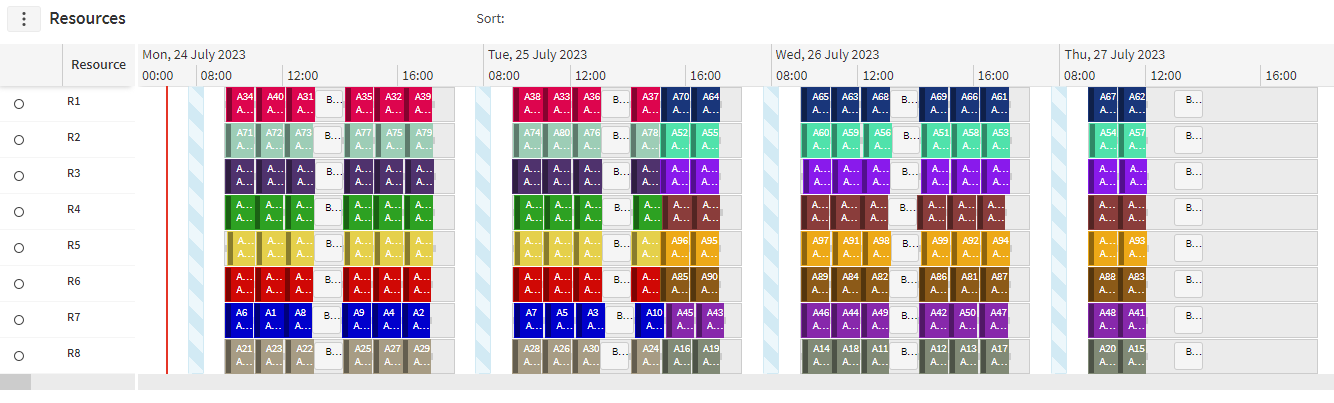
See Scheduling Concepts - Linked Activities for more details on activity pools.
Schedule Exception Data Filtering
The data that is provided for each schedule exception type can now be configured via the Schedule Exceptions screen in the administration section of the Scheduling Workbench.
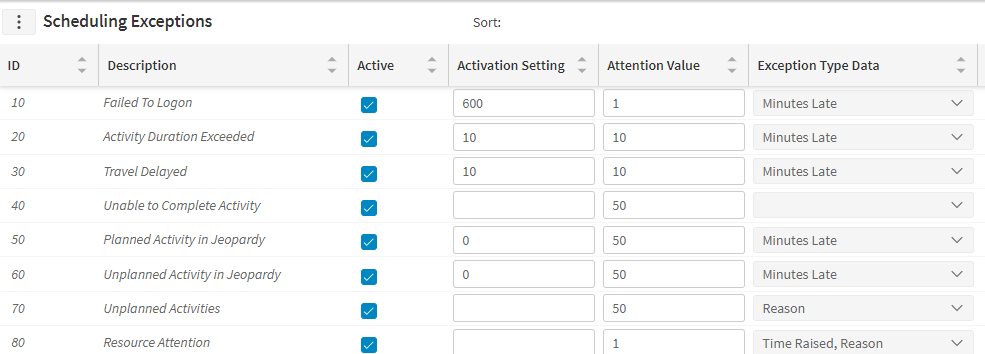
In addition, for exception data which represents a delay up to the current schedule time, an 'activation_datetime' will be set by default instead of the 'value' on the Schedule_Exception_Data record.
The RESTful Gateway endpoints to retrieve schedule exception type settings will now also return the schedule exception type data settings if requested.
Finally, the exception types 'Activity Open Period' and 'Acceptance Time Exceeded' have been switched off by default, and some exception data has also been switched off by default. These can be reinstated if necessary via the Schedule Exceptions screen in the administration section of the Scheduling Workbench.
This is all aimed to reduce the amount of data included in plan updates.
Note
If the integration requires the 'value' on the Schedule Exception Data to be set, then the parameter 'ScheduleExceptionUseActivationDateTime' can be switched off to achieve this.
See the Scheduling Schema Guide, the Interface Guide and PSO Workbench User Guide for further details.
Minor Enhancements
- Introduced a new activity exception 'Broken Activity Link' which is raised when an activity that is linked to another activity is fixed or committed and violates the activity group rules.
- Improvements have been made to how updates are handled when running in segmentation mode. This is firstly to reduce the frequency with which re-segmentation is required, and secondly to continue with the existing segment datasets after re-segmentation where possible. The default value for the parameter 'ResegmentationFactor' has been changed to '50'.
- Improved DSE reloading of previous plans when running in segmentation mode.
- Improved DSE handling of large numbers of unallocated activities in starter and appointment booking algorithms.
- The DST will now output a CHANGE plan after restarting if the ReloadLastPlanSinceLoad parameter is set.
- Improved the DST performance when merging child plans.
Performance Comparison
The general scheduling performance of the 6.13 version has been measured and verified against the 6.12 version, and this shows an improved performance in the 6.13 version. Performance and responsiveness are significantly improved when running larger schedules over longer scheduling windows. Appointment Booking performance has also been measured and verified. Benchmarking results are included in an appendix to the Architecture and Sizing Guide — Performance Metrics.