Workbench Enhancements
For full details of these enhancements see the PSO Workbench User Guide.
Previewing External Status Changes
It is now possible for a user to preview external pending activity status changes. This includes any activity status change not made by the current user, and which has not yet been reflected in the schedule. This could be a manual status change made by a different Workbench user, by a resource carrying out the activity, or an automated change.
This functionality can be enabled via the permission 'ViewExternalPendingStatusChanges'. The user can toggle on or off the display of external pending changes from the 'Manual Changes' panel, or from the 'Manual Change History' panel.
Shift Imports from Excel
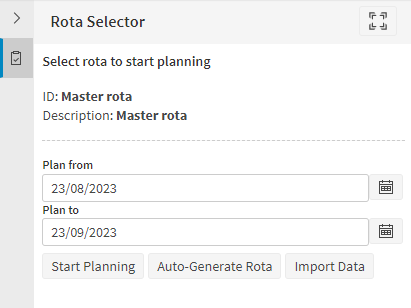
The shift import functionality in the resource planner has been updated to allow the importing of Excel files in a particular format. Importing Excel files will go through extra steps of validation to ensure they are in the correct format for importing. Any validation failures which are raised on an import will now be displayed in a datagrid similar to how validation results are displayed in the Data Viewer page.
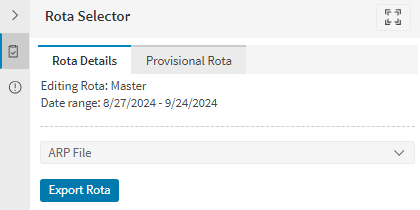
In the resource planner the user is now able to export the rota they are currently planning as either an ARP file or an Excel file.
Daylight Saving Handling
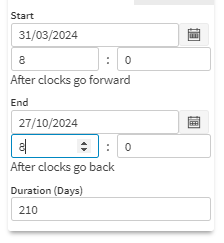
When entering a date and time, the selection control will make clear if the day chosen has a daylight savings change. This will be according to the timezone selected in the Workbench. It will also make clear if the time selected is before or after the change. The time will automatically roll over the clock change when incrementing the hour.
Persistence of Settings
Improvements have been made to the persistence of user settings in the Workbench, so that an individual user's configurations on some pages will not need to be re-entered after navigating away from the page.
For example, options such as Select a Resource or Activity, Match Region or Skills, Max Travel Time, Only display unallocated activities and Show absent resources in the Schedule Assistance page will now be persisted for each user. A 'Reset' button has been added to the assist page. This will restore the settings on this page to the defaults. In the Scheduling Resources and Activities pages the position of the Gantt splitter is persisted.
Minor Enhancements
- When making a manual change to an activity, users can now validate changes to the duration of an activity, including both base and override durations.
- When manual changes are made on the Workbench and the data has a Workbench broadcast setup, a new “CHANGE_REQUEST” audit type record will be written to the audits table.
- The find box in the exception data panel will now search for any text in the exception.
- Improvements have been made to current day and current time filtering.
- Various improvements have been made to keyboard navigation in the Workbench.