Scheduling Enhancements
Remote Fulfillment Activities
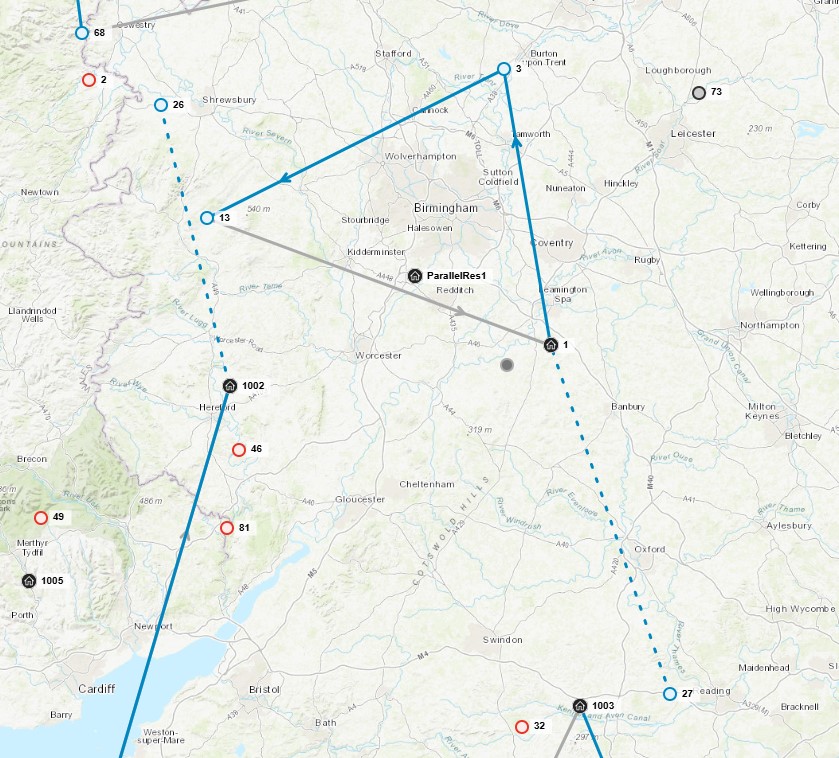
It is now possible to specify that an activity can be fulfilled remotely, via an attribute on the activity or activity type. For such activities it is still possible to specify a customer location, but the resource will not be required to visit to location to carry out the work.
The location can still be used to set region and availability constraints. Do on location incentives can also be used to encourage the work to be carried out on location, if a resource is attending the location for another call. The location is also visible on the workbench, which can be useful for dispatchers.
For more information see the Scheduling Concepts - Constraints and Preferences guide.
Incremental Scheduling
A new static process type has been added called 'INCREMENTAL'. This process type can be used when scheduling a large number of activities that can be divided into groups with a defined ordering or sequence to them. The DSE can then process each pool of activities in sequence, so as not to be processing the entire set of activities at once, thus reducing the overall processing time.
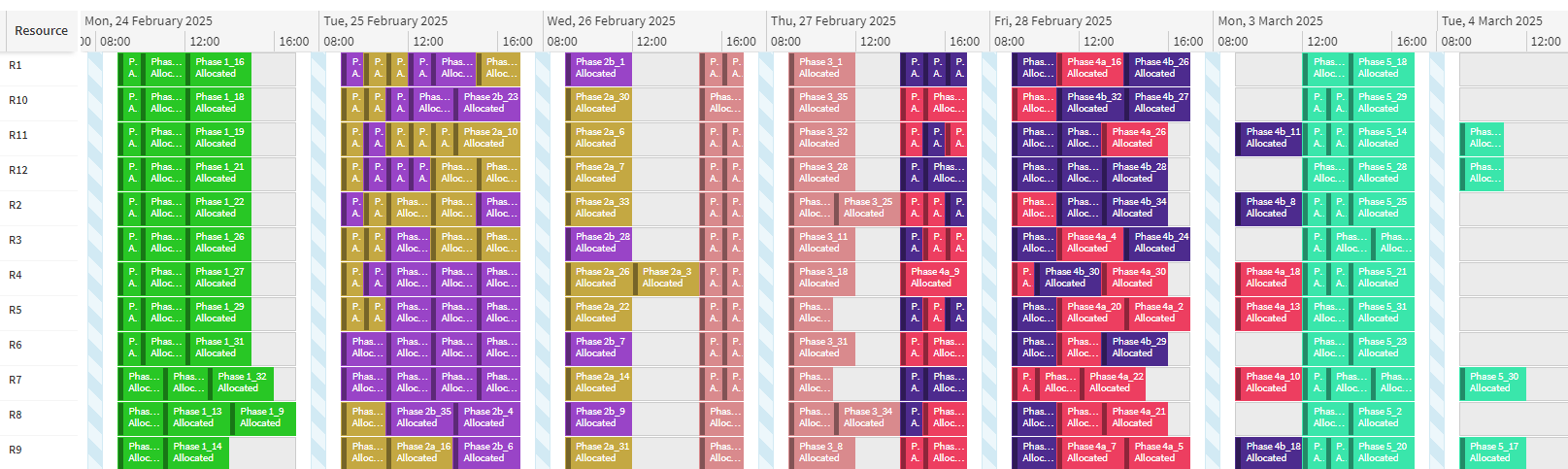
For example, incremental scheduling could be used in a scenario where maintenance is to be carried out on a machine, requiring the machine to be decommissioned, then to have the maintenance work carried out, and then to be recommissioned. These three phases of work can be processed separately, but with dependencies obeyed so that maintenance work cannot begin until the decommissioning work has been completed first.
For more information see the Scheduling Concepts — Incremental Scheduling guide.
JSON Format Changes
The format of JSON schema data has been changed to be consistent across the applications (RESTful Gateway and Broadcasts) and to make better use of JSON types. Documentation for the JSON and XML format is available in the Interface Guide — Schema Definition.
A JsonFormatVersion parameter is available for both the RESTful Gateway and the Broadcast Manager. Setting this to 'Version 1' will use the old format. 'Version 2' will use the new. For the RESTful Gateway, this parameter only applies for responses that return schema data. When sending schema data to the RESTful Gateway, both 'Version 1' and 'Version 2' are accepted.
Notable changes:
- Data is wrapped in a ScheduleData node rather than the existing dsScheduleData XML name
- The xmlns property is no longer included
- Empty entity arrays are no longer included reducing data
- Entities are always output as an array even if there is only one entity
- Null values are no longer included reducing data
- Values are output as the correct JSON type rather than a string
- Date times are always output in ISO 8601 Date Time format UTC
- Time spans are always output in ISO 8601 Duration format
Warning
The new JSON format is not compatible with the existing format. For environments that are upgraded to 6.15 or later, the JsonFormatVersion parameters will be set to 'Version 1' as part of the upgrade to maintain backwards compatibility. New environments will have the parameters set to 'Version 2' by default.
Gateway Permission Changes
Additional permissions have been added to the Gateway to allow for more granular control over the data that can be sent into the system. These permissions are: GatewaySubmitSchedulingData, GatewaySubmitSystemData, and GatewaySubmitModellingData. These permissions are required to submit scheduling, system, or modelling data.
A new user group called IntegrationUsers is now created by default. This group has the following permissions allowed: GatewaySubmitData, GatewaySubmitSystemData, GatewayQuerySystemData and ViewAllDatasets. This group is intended for integrations that need to submit data into the system.
Warning
The current Gateway permissions are too permissive and allow all users to submit data into the Gateway. It is recommended to disallow the following permissions for all users: GatewaySubmitData, GatewaySubmitSystemData, GatewaySystemManagement, GatewayQuerySystemData. Integration users should be added to the IntegrationUsers group to allow them to submit data.
These permissions will be updated to be disallowed by default in a future release. It is recommended to update current users to ensure they have the correct permissions before this upcoming change.
Minor Enhancements
- New input tables called Allocation_Hint and Split_Resource_Order_Hint have been introduced to enable the DSE to reload or utilise an existing plan for further optimisation or simulation.
- Allocation_Part rows will now indicate the time at which a part change occurs.
- An option has been added to allow the disabling of cascading deletes. This can be done by either changing the cascade column in each Object_Deletion, or by changing the CascadeSchedulingObjectDeletions parameter.
- The default for the HstsMaxAge parameter has been changed to 365 days.
- For activities which allow split visits, a change has been made to improve how invalid committed visits are handled. Previously, if any one of the follow on visits was invalid, the DSE would unsplit all visits and leave the activity as a single visit. This could cause unwanted gaps in the schedule, and so this has now been changed so that if any visit is invalid, it will instead unsplit back to the last valid visit. See the Scheduling Concepts - Split Activities guide for more information.

Performance Comparison
The general scheduling performance of the 6.15 version has been measured and verified against the 6.14 version. Appointment Booking performance was also remeasured. Benchmarking results are included in an appendix to the Architecture and Sizing Guide — Performance Metrics.