Time Constraints
The following constraints all affect the time at which activities may be allocated.
The Scheduling Window
This defines the period of time over which we want to produce a schedule. It normally starts at the current time. No activities will be scheduled outside this time window.
The example below shows that no activities are scheduled outside the scheduling window - between the red and blue vertical lines - even though there are unallocated activities and unused shifts.

Service Level Agreements (SLAs)
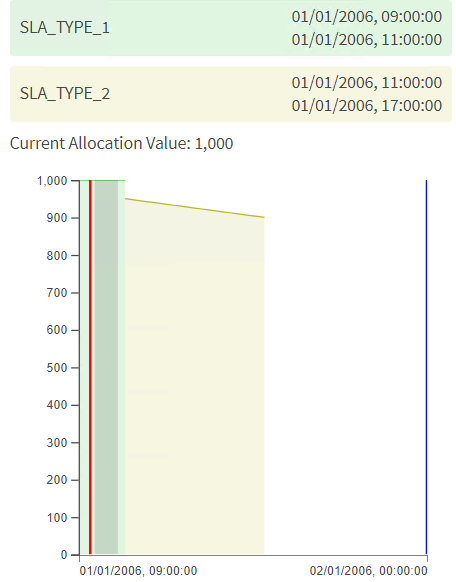
SLAs define the time window within which we would like to allocate the activity, and also any additional time periods when we may allocate the activity if the primary SLA may not be achieved. If there is any time that is not covered by any SLA, then the activity may not be scheduled at those times. For this reason, all activities must have at least one SLA defined.
An example is shown below. The green and yellow areas show the periods when the SLA is defined, but there is a period after the end of the second SLA, but before the end of the scheduling window (the blue line) where there is no SLA, and the activity will therefore not be scheduled.
Availabilities
An Availability constraint may be used to restrict the time at which an activity may be allocated. Several of them may be used to define multiple periods where the activity may be scheduled. If no Availability constraints are specified for an activity, then it may be scheduled at any time.
The example below shows an activity that has been given an Availability of 12:00 to 14:00, along with the same SLA as the example above. The two constraints are combined: the activity may only be scheduled at a time that meets the SLA constraint AND the Availability constraint, which in this case means that it gets scheduled at 12:00.

Multiple availability periods may be more easily specified using an Availability Pattern, which allows an availability such as "every weekday morning between 10:00 and 12:00" to be specified.
Availabilities may be applied directly to activities, but they can also be applied by various other means:
- They may be specified against a location to represent access hours for the location.
- They may be specified against an activity type or a location type, or to an activity pool, to handle restrictions that apply to many activities or locations.
- They may be used to specify appointment slots to be considered with an appointment request.
- They may be linked to resource skills and regions to limit when the resource is available in a region, or limit when the resource can use a skill.
- They may be linked to resource preferences to constrain when the preference applies.
Note
Availability constraints are always optional. If no availability applies then there is no availability restriction. If only periods of unavailability are defined, the activity (or location etc.) will be considered available outside these times. If any periods of availability are defined (either through use of Availability or Availability_Pattern), then the activity (or location etc.) will only be considered available at the times specified.
Note
If both an activity and the location for the activity have availability constraints, then by default the activity is only available where both the activity and location are available. There is also an option to override the location availability on the activity (using the LOCATION_OVERRIDE availability type).
The 'start_based' flag on both Availability and Availability_Pattern determines whether the availability applies only to when an activity can be started, or to the entire duration of the activity. For example, suppose an 30 minute activity has an availability set for 10am-11am. If start_based is set to true then the activity can be started any time between 10am and 11am. If start_based is set to false, the activity must be started between 10am and 10:30am, so that it is expected to complete by 11am.
By default (if start_based is not specified), availability will be considered to be start based only, though this can be switched to full duration via the parameter 'EnforceConstraintsOnCallEnd'.
Note
Note that if a mixture of start based and full duration availability is used (i.e. start_based set to true on some Availability and false on others), the activity can only be scheduled where it is fully available. For example, if a start based availability is set for Monday, and a full duration availability for Tuesday, then the activity could only be scheduled on the Tuesday, since it is not fully available on Monday.
It is also possible to specify periods of unavailability. This is done by setting the 'available' flag on the availability row to false.
Shifts
Shifts are the periods of time when a resource is planning to work. Future activities will only be allocated to resources within their defined shifts, and they must completely fit within the shift (unless they are activities which may be split). If specified, it may be permitted to start travelling to an activity before the start of a shift, or travel home from an activity beyond the end of a shift.
Shifts may also include an overtime period, at the end of the shift, where additional activities may be allocated, albeit with a greater cost.
Shifts may be defined individually, or by defining a Shift Pattern, which allows many shifts to be defined at once.