Different Ways of Linking Activities
Activity Groups
Activity Groups may be used to link activities together in a number of different ways. These are described separately in the sections below. See the Activity_Group section of the Scheduling Schema Guide for full details.
Pre-requisites
It is possible to specify that one activity must be scheduled before another one. For instance, in the following example, there is one resource (1000) and we have specified that activity 1 must happen before activity 2, and activity 2 before activity 3, etc. The resultant schedule obeys this constraint, even though this increases the amount of travel that must be done.
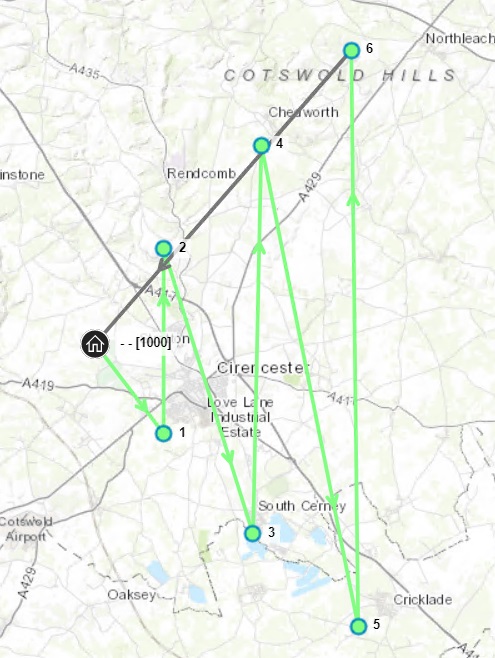
This constraint was defined by adding a number of Activity_Group constraints, each one linking two activities together, to form a chain. This first one looks like this:
<Activity_Group>
        <activity_id1>2</activity_id1>
        <activity_id2>1</activity_id2>
        <pre_co_req>PRE</pre_co_req>
        <same_resource>false</same_resource>
        <all_or_nothing>false</all_or_nothing>
</Activity_Group>
Note the following points:
- pre_co_req=PRE is what defines this as a pre-requisite constraint
- activity_id2 is the activity that must come first
- If same_resource is true, then both activities must be done by the same resource. If false, then they may be done by the same resource or different resources. See examples below.
- It is also possible to specify a min_delay and/or a max_delay between the start times of the two activities.
- If all_or_nothing is true, then either both activities must be scheduled, or neither of them. If false, then it is permitted to schedule just the activity listed as activity_id2
- Another parameter, overlap_allowed, defines whether or not activities may overlap, when being done by different resources.
- An activity may have several pre-requisites; and an activity may be the pre-requisite of several other activities.
Here is the same example, but with two resources in the same location:

Now, if we specify overlap_allowed, then the activities may overlap, but they must all start in the correct order:

Here is the same data with a min_delay of 10 minutes between each pair of activities:

The min_delay and max_delay can be configured to apply once a certain proportion of the pre-requisite activity has been completed. This is controlled by setting the min_delay_start_proportion and max_delay_start_proportion on the Activity Group as values between 0 and 1. This will take into account the actual length of the activity (including adjustments from the base duration made by resource proficiencies or status changes). Splits will also be considered.
For example, the dependent activity can be set to begin once the pre-requisite is 50% complete by setting min_delay to 0 seconds and min_delay_start_proportion to 0.5.
Or, the dependent activity could be set to begin an hour after the pre-requisite activity has completed. This would be achieved by setting the min_delay to 1 hour and the min_delay_start_proportion to 1.
Note
For a min or max delay start proportion value between 0 and 1, the value will be considered to be met once this proportion of the base duration of the activity has been completed. This may not correspond exactly to the proportion of the scheduled duration of the activity, due to duration overheads and other factors.
Note
If a max_delay_start_proportion is set and the pre-requisite activity needs to be split, the DSE will not delay any follow on activities to satisfy the max delay constraint.
Note
A max_delay_start_proportion will not be applied if the dependent activity is committed but the pre-requisite is not.
Pre-requisite Delay SLA Models
It is also possible to associate a value based model to the delay between pre-requisite activities. This allows for a preferred delay period to be set, but without forcing the activities to be carried out within this period. For example, a model could be used to prefer that both activities are completed on the same day, but allow the dependent activity to be completed on a later day if necessary.
The delay model is created by using the Activity_Group_SLA_Model and Activity_Group_SLA tables. Each activity group SLA row defines a start and end delay, and an SLA type to apply during this period. This SLA type sets the value proportion that should apply during this delay period, in much the same way as when using an SLA type for an activity SLA.
The delay model can then be linked to a pre-requisite activity group via the 'activity_sla_model_id' attribute.
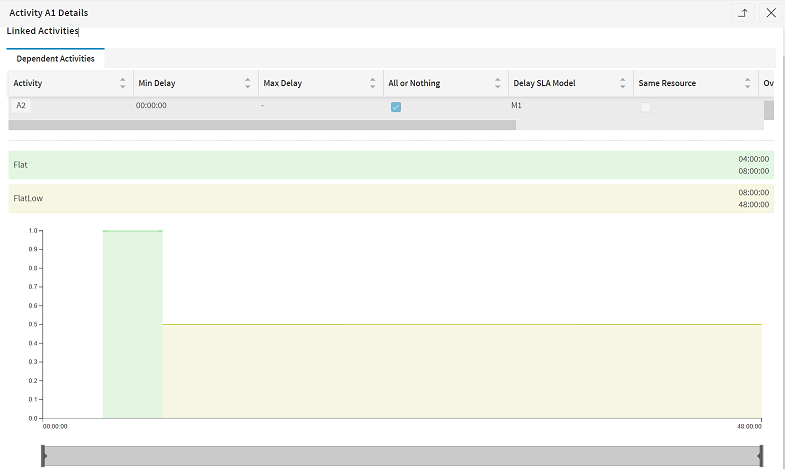
The delay will be applied as a multiplier on the value of the dependent visit. This value is calculated in the normal way, taking into account the base value and SLA model associated directly to the activity.
For example, suppose the dependent visit has a base value of 1000. Suppose the DSE chooses to schedule the activity at a point where the activity SLA returns a value proportion of 0.9, and the activity group delay SLA model return a value proportion of 0.5. Then the value of the visit would be 1000 * 0.9 * 0.5 = 450. Of course, other factors such as resource preferences could also apply here.
Note
SLA models can only be applied to pre-requisite activity groups.
Note
If an SLA model is defined, then the dependent activity can only be scheduled during delay periods specified by the model. This is in addition to the min_delay and max_delay specified on the Activity_Group row.
For example, suppose the activity group has a min_delay of 1 day and no max delay, and an SLA model with delay periods specified from 0 hours to 2 days. Then the dependent activity would have to be completed between 1 and 2 days after the pre-requisite.
Note
If there is a min_delay_start_proportion specified on the Activity_Group, then the SLA model will take effect from this point. For example, if the min_delay_start_proportion is set to 1, then a delay of 0 hours would mean immediately after the end of the pre-requisite activity.
Co-requisites
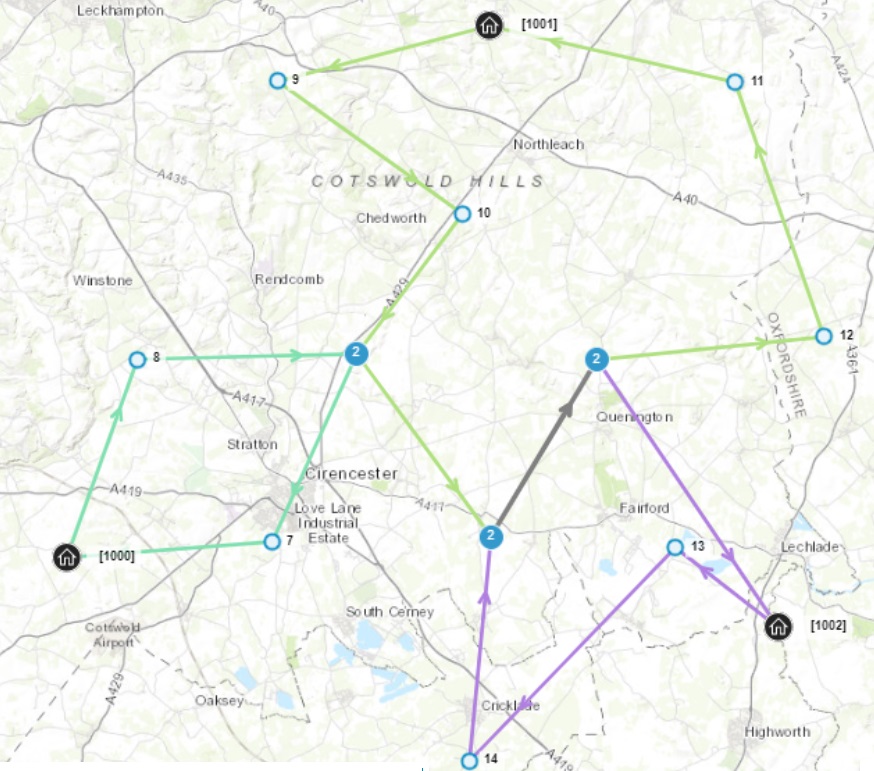
A co-requisite constraint specifies that two activities must be scheduled at the same time. A typical example would be a two-person job, which would be defined as two co-requisite activities, so that one may appear on each resource's timeline.
An example is given below. The three middle jobs require two resources, so two co-requisite activities have been created for each of these. The other activities require just a single resource.
When there are co-requisite activities, there may be delays when one resource is waiting for another. Here is the Gantt view of the above schedule, which illustrates this (the co-requisite activities are 1 and 2, 3 and 4, 5 and 6):

Co-requisites are specified in pairs, like this:
<Activity_Group>
        <activity_id1>1</activity_id1>
        <activity_id2>2</activity_id2>
        <pre_co_req>CO</pre_co_req>
</Activity_Group>
Note
Although each Activity_Group links just two activities, it is possible to link any number of activities together as co-requisites, using more than one Activity_Group record. For instance, a four-person task could be represented by four co-requisite activities A, B, C and D. It is not necessary to provide Activity_Groups for all combinations of links: if you specify a co-requisite link from A to B; B to C and C to D, then all four activities must be done at the same time: it is not necessary to additionally specify links from A to C; A to D and B to D.
Note
For splittable co-requisite activities, it is possible to specify that the visits to each activity should happen at the same time. This is achieved via the 'keep_splits_together' attribute on the Activity_Group row.
If this is set, the DSE will aim to ensure that the resources carrying out each co-requisite activity are only working at the same time. Thus if the shift of one resource ends sooner than the other(s), or if one resource has a little further to travel than the other(s), the resources will still all finish working on the activity at the same time. Likewise, the resources will be expected to start working at the same time for each subsequent visit.
When using keep_splits_together with co-requisites, it is recommended that the minimum split is the same for each activity, and that the activities have the same expected duration. If the durations are not the same then 'keep splits together' will no longer apply once the shorter activity is expected to have finished.
If 'keep splits together' is not set, then only the first visit to each co-requisite activity will be required to start at the same time.

Combined Activities
Combined activities are similar to co-requisite activities, except that they may also be scheduled, one after the other, to a single resource. So they are like a piece of work that could be done by one person, but it would be done in half the time if two people did it.
Combined activities are specified like this:
<Activity_Group>
        <activity_id1>1</activity_id1>
        <activity_id2>2</activity_id2>
        <pre_co_req>COMBINED</pre_co_req>
</Activity_Group>
Ordered Activities
It is possible to specify that two activities must be done together, one immediately after the other, if they are scheduled. This is useful if there is a sensible order in which to do a number of activities that are at the same location e.g. in a block of flats.
In the following example, we have specified that activity 2 must be done immediately after activity 4:
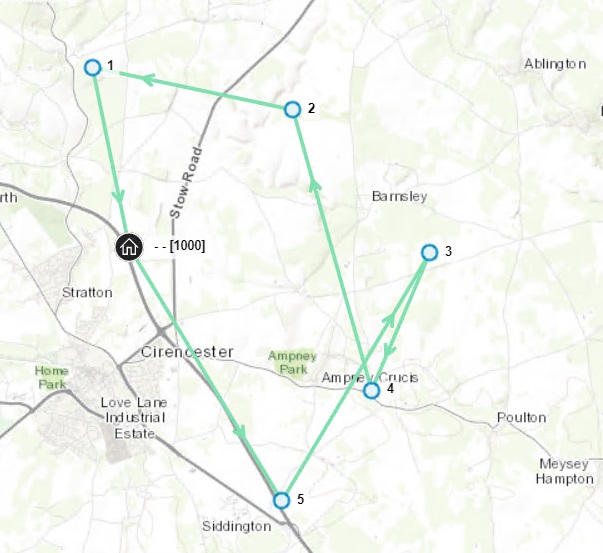
This is how the above constraint is specified. Note that the activity specified as activity_id2 is the one which will be done first:
<Activity_Group>
        <activity_id1>2</activity_id1>
        <activity_id2>4</activity_id2>
        <pre_co_req>ORDER_ONE_WAY</pre_co_req>
</Activity_Group>
It is also possible to specify two-way constraints: the two activities must be done one immediately after the other, but either activity may come first. In the following example, activities 1 and 3 must be done together, and also activities 2 and 4.
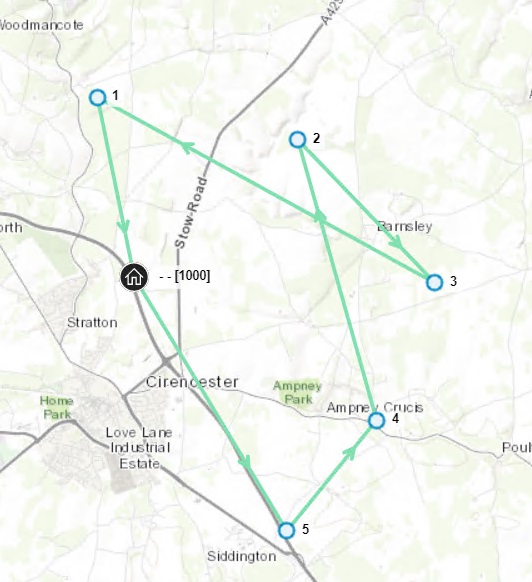
This is how the above constraint is specified:
<Activity_Group>
        <activity_id1>2</activity_id1>
        <activity_id2>4</activity_id2>
        <pre_co_req>ORDER_TWO_WAY</pre_co_req>
</Activity_Group>
<Activity_Group>
        <activity_id1>3</activity_id1>
        <activity_id2>1</activity_id2>
        <pre_co_req>ORDER_TWO_WAY</pre_co_req>
</Activity_Group>
Note
ORDER_TWO_WAY activities may be scheduled in parallel with each other to a parallel resource.
There might be a situation where you want two activities to be ordered together, but they do not fit in a single shift. Using the allow_ordered_across_shifts parameter allows ordered activities to be scheduled across two consecutive shifts.
<Activity_Group>
        <activity_id1>2</activity_id1>
        <activity_id2>4</activity_id2>
        <pre_co_req>ORDER_ONE_WAY</pre_co_req>
        <allow_ordered_across_shifts>true</allow_ordered_across_shifts>
</Activity_Group>
Resource Pools
Resource Pools allow you to define different resource options for a set of activities. For instance, you may want a set of activities to be done by resources A, B and C; or alternatively, by D, E and F. But you don't want a mixture of these two i.e. some of the set of activities to be done by A and others by E. In this case we can define resources A, B and C to be a resource pool, and D, E and F to be another pool. Different pools can be given different preferences, for instance, you may prefer to use the ABC pool rather than the DEF pool.
Here is an example. There are various sets of five-person activities, i.e. 5 activities which are defined as co-requisite. These are numbered e.g. A1,B1,C1,D1 and E1 are one set of co-requisites, and A2,B2,C2,D2 and E2 are another. The resources are named after the resource pools that they are in: there are three pools, and each set of five activities must be done completely in one pool: they must not be mixed across pools. Here is the result:
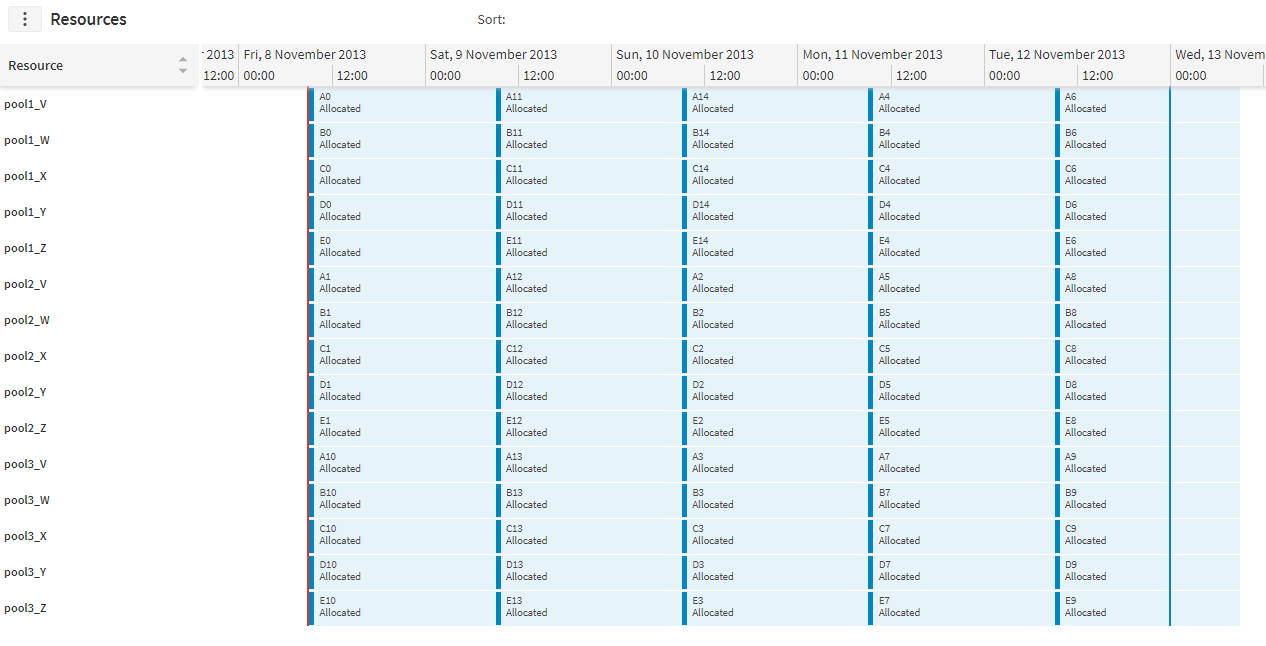
The XML necessary to produce this is as follows. Firstly we define each of the three resource pools and the preference for that pool (the pool_multiplier). They are grouped together into a Resource_Pool_Set.
<Resource_Pool_Set>
        <id>MyPools</id>
</Resource_Pool_Set>
<Resource_Pool>
        <id>48900ff262ff4e09b80e85c84a63ec7f</id>
        <resource_pool_set_id>MyPools</resource_pool_set_id>
        <pool_multiplier>1.5</pool_multiplier>
</Resource_Pool>
<Resource_Pool>
        <id>a98c9cc29f644b13b94a4259371bab22</id>
        <resource_pool_set_id>MyPools</resource_pool_set_id>
        <pool_multiplier>1.2</pool_multiplier>
</Resource_Pool>
<Resource_Pool>
        <id>c38bf03bcb374f818c62a1b10be44b2b</id>
        <resource_pool_set_id>MyPools</resource_pool_set_id>
        <pool_multiplier>1</pool_multiplier>
</Resource_Pool>
Then we define which resources are in which pools, using Resource_Pool_Items, for example:
<Resource_Pool_Item>
        <id>b68a54b99cc24e4794183d435d18a811</id>
        <resource_pool_id>48900ff262ff4e09b80e85c84a63ec7f</resource_pool_id>
        <resource_id>pool1_V</resource_id>
</Resource_Pool_Item>
Then we need to define the groups of activities that must be scheduled in a single group. Here is an example for one group of five activities: note that they all have a chain of 0. All activities with the same chain will be grouped into a single resource pool.
<Activity_Resource_Pool_Set>
        <activity_id>A0</activity_id>
        <resource_pool_set_id>MyPools</resource_pool_set_id>
        <chain>0</chain>
</Activity_Resource_Pool_Set>
<Activity_Resource_Pool_Set>
        <activity_id>B0</activity_id>
        <resource_pool_set_id>MyPools</resource_pool_set_id>
        <chain>0</chain>
</Activity_Resource_Pool_Set>
<Activity_Resource_Pool_Set>
        <activity_id>C0</activity_id>
        <resource_pool_set_id>MyPools</resource_pool_set_id>
        <chain>0</chain>
</Activity_Resource_Pool_Set>
<Activity_Resource_Pool_Set>
        <activity_id>D0</activity_id>
        <resource_pool_set_id>MyPools</resource_pool_set_id>
        <chain>0</chain>
</Activity_Resource_Pool_Set>
<Activity_Resource_Pool_Set>
        <activity_id>E0</activity_id>
        <resource_pool_set_id>MyPools</resource_pool_set_id>
        <chain>0</chain>
</Activity_Resource_Pool_Set>
Activity Pools
Activity pools provide a way of grouping together multiple activities. Activity pools are defined via the Activity_Pool table, with activities included in the pool through the Activity_Pool_Item table. Availabilities and resource preferences can then be applied to the pool, as a way of applying the availability/preference en masse to all activities within the pool.
Note
Availabilities defined against the pool will intersect with any other availabilities defined for the activity. For example, if the pool has an availability from Monday to Tuesday, and the activity has an availability from Tuesday to Wednesday, then the activity is only available on Tuesday.
Note
Resource preferences defined for the activity pool will be applied with any other resource preferences that are defined for the activity. The way of applying preferences A and B is to take the preference with the higher override priority, or if the override priorities are equal, then the formula "(A * B) / (((1 - A) * (1 - B)) + (A * B))" will be used.
Activity Blocks
An activity pool may be defined as a block (by setting the schedule_as_block property on the Activity_Pool). This means that all of the activities within the pool must be scheduled subsequently to the same resource. The block is allowed to be scheduled over breaks or across multiple shifts. This is useful if there is a large group of work that should all be carried out together before moving on to a different kind of work. For example, in a manufacturing scenario it may be better to complete all work that requires the same drill bit in a machine, before moving on to work that needs the bit to be changed.
In the example below, activities of the same colour are in the same block. The order of the activities within the blocks is not specified, so the DSE is able to rearrange the activities within the block, while keeping them all together.
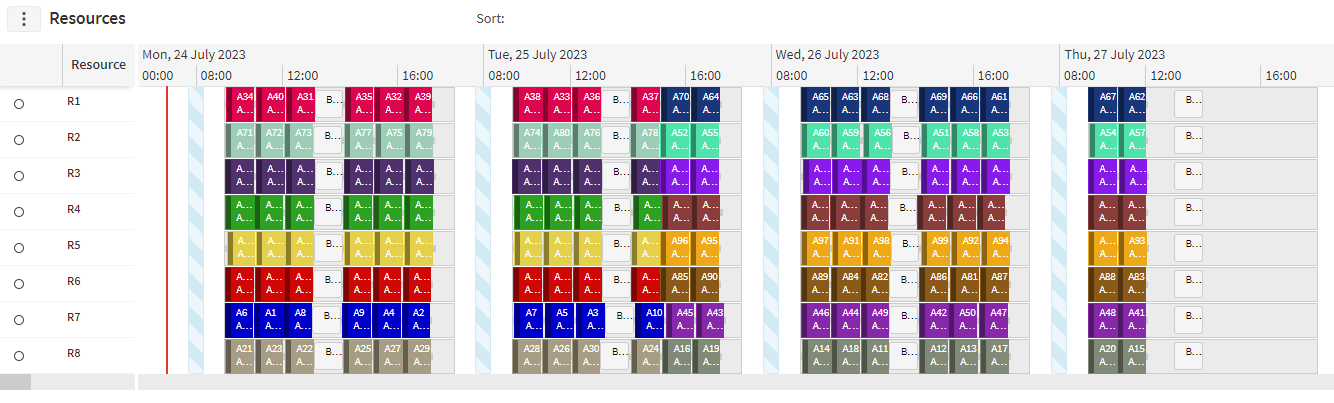
An ordering to blocks may be specified, by setting the previous_activity_pool_id on a pool. For this to take effect, both pools must have schedule_as_block set to true.
If a block has a previous block defined, then it must be scheduled to the same resource as the previous block and without any other activities being scheduled in between. There may be breaks or gaps in shifts between the two blocks.
Note
Activities may only belong to a single block.
Note
Depot and repeatable activities are not permitted to be included in a block.
Note
It is not a requirement that all activities in the block must be scheduled.
Note
All activities from the block that are scheduled must be scheduled to the same resource.
Note
If the constraints of a block are broken by committing or fixing some of the activities, any schedulable activities remaining in the block will not be scheduled.
Note
In a parallel resource, all scheduled activities within a block must finish before work can begin on something else, even if the resource has spare capacity in parallel with the final activities in the block.
Note
For bucket resources, blocks will be scheduled exclusively within any single shift. This means that the block may be scheduled over multiple shifts, but if the shift contains work from a block, then no other work will be scheduled into this shift.
Warning
Activity blocks are not supported in the ABE.
Wrapper Activities
If work needs to be carried out before or after a group of related tasks (for example, to do some initial setup), then wrapper activities can be used. A wrapper activity can be scheduled multiple times if required, if the related work is scheduled in multiple batches. This means that individual instances of the setup work does not need to be directly linked to each individual activity (as would need to be the case if using pre-requisite activities).
An activity can be defined as a wrapper activity through its activity_class_id. It can then be linked to a pool of activities via the Activity_Pool_Wrapper table. Whenever an activity from the pool is scheduled, the wrapper activity will also be scheduled accordingly.
Whether the wrapper needs to be scheduled before or after the activities in the pool is defined with the link_type. This can be set to PRE, POST or BOTH. If the activities require setup work and work to wind things down afterwards, but the same wrapper does not apply (say, if the setup work takes longer than the wind down activity would), then separate wrappers could be linked to the same pool (one with a PRE link and one with a POST link).
The timeframe over which the wrapper activities need to be scheduled can be changed by setting the time_context. Setting SHIFT means that a wrapper activity would need to be scheduled within the same shift as the related pool activities. Setting WINDOW means that the wrapper activity would need to be scheduled within the same availability window as the pool activities, defined by linking an availability set to the activities (this could be done by linking directly to the activities, to the activity types, or to the activity pool).

The example above uses a SHIFT time context, so the setup and wind down wrapper activities are scheduled before and after the work being carried out in the shift. In the example below the WINDOW time context is being used, linked to an availability set that spans both shifts, so the wrapper activities are only need to be scheduled once each (at the beginning of the window and at the end of the window).

If the wrapper activities are only required for some resources but not all, exceptions can be created using the Resource_Wrapper table. Through this table, particular resources or resource types can be made exempt from requiring the wrappers. This is achieved through the is_required column in the Resource_Wrapper table. The default for is_required can be set on the Activity_Pool_Wrapper row, allowing the Resource_Wrapper table to either be used to specify which resources do not require wrappers, or to specify which ones do.
The Resource_Wrapper rows can also be used to provide a duration override if the wrapper is scheduled to a particular resource.
The example below shows how wrapper activities can be used in an aviation context to schedule the moving of planes in and out of hangars to carry out maintenance work on the plane. The maintenance work must be surrounded by the wrapper activities, and the wrappers must be scheduled around each visit to the particular airport (with the time at the airport defined through the availability set). The second hangar is set to have a different duration for moving the planes in, and the maintenance being carried out on the line does not require any moving of the planes at all. Note that the timescales used in the example are not realistic, and have been shown as they are for the purposes of demonstrating the feature effectively in a single image.
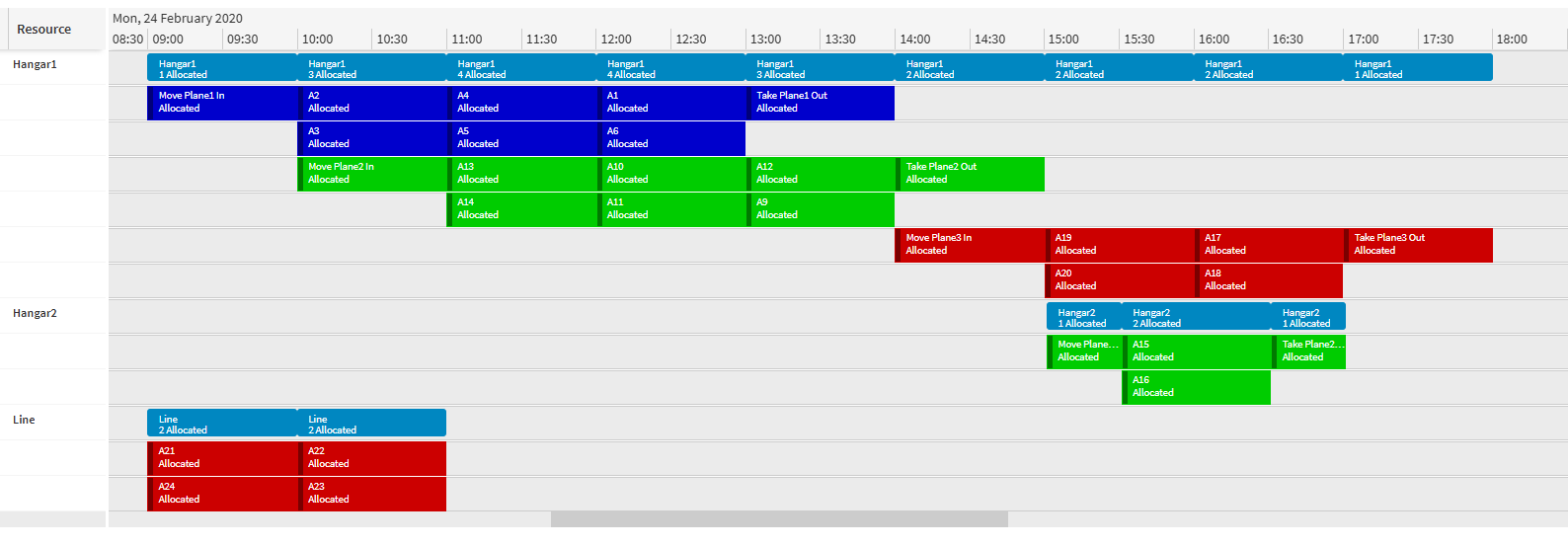
A delay cost can be added to wrapper activities to remove unnecessary gaps between activities requiring a wrapper. When this is applied, the delay is defined as either the time between the end of the wrapper activity and the end of the last activity requiring it (where a PRE link_type is defined), or the time between the start of the first activity requiring a wrapper and then start of the corresponding wrapper activity (where a POST link_type is defined).
For example, if an opening wrapper activity finishes at 10:30, and there are two activites in the pool, one allocated at 11:00-12:00, and another at 13:00-14:00, the total delay cost will be 3.5 hours.
Activity Separation
It is possible to specify that different sets of activities must be separated by a certain amount of time. This is done by putting activities into separation_groups and resources into separation_models, which may then define how much separation is required, including a minimum or a maximum separation.
Here is an example: all of the activities are specified to have a 30 minute minimum separation. If an activity cannot be scheduled within the constraints, it will be unallocated, as job 1 is here:

The XML necessary to produce this is as follows. The activities are all of type JOB, and the separation model defines a minimum separation of 30 minutes between activities of separation group SG1, which is the group for activity type JOB.
<Separation_Group>
        <id>SG1</id>
        <description>SG1</description>
</Separation_Group>
<Separation_Model_Item>
        <separation_model_id>SM</separation_model_id>
        <separation_group_id_from>SG1</separation_group_id_from>
        <separation_group_id_to>SG1</separation_group_id_to>
        <minimum_separation>PT30M</minimum_separation>
</Separation_Model_Item>
<Separation_Model>
        <id>SM</id>
        <description>SM</description>
</Separation_Model>
<Resources>
        <id>1000</id>
        <first_name />
        <surname />
        <location_id_start>1000_start</location_id_start>
        <location_id_end>1000_end</location_id_end>
        <resource_type_id>Default</resource_type_id>
        <max_travel>PT4H</max_travel>
        <travel_to>PT0H</travel_to>
        <travel_from>PT0H</travel_from>
        <cost_ph>10</cost_ph>
        <cost_km>1</cost_km>
        <separation_model_id>SM</separation_model_id>
</Resources>
<Activity_Type>
        <id>JOB</id>
        <base_value>10000</base_value>
        <separation_group_id>SG1</separation_group_id>
</Activity_Type>
The separation constraints apply to all activities in the route, not just adjacent ones. In the following example, there are two separation groups: activities 1 and 4 must be separated by 8 hours, and they must be separated from the other activities by 30 minutes. The other activities must be separated from each other by 15 minutes. Here is the result: note that activity 1 is pushed late by the separation requirement of 8 hours from activity 4, not because of the activity immediately before it.

It is also possible to specify a maximum separation between activity groups, which works in a similar way. For full details, see the Scheduling Schema Guide
Duration Overhead
The separation model can be used to specify an overhead to be added to an activity's duration. This can be used, for example, to add required set up time to an activity, dependent on the activity that preceded it.
The duration overhead will apply based on the previous activity belonging to a separation model item with a duration overhead specified. As an example, suppose we have an activity (A1) that is preceded by an activity (A2) which does not specify any duration overhead. We then have an activity before that (A3) which specifies an hour overhead. In this case, one hour will be added to activity A1's duration.
Note
A duration overhead does not just apply to activities within the same shift.
Note
When activities are scheduled to a parallel resource, if multiple activities occur at the same time as each other, the duration overhead will apply to one of these activities, with the other activities then beginning after the duration overhead time has elapsed.
Multiple Activities at a Location
When there may be more than one activity at a given location (or in a locality) you may specify a preference to do other activities at the same location immediately after the first one. See Activity do_on_location_incentive in the Scheduling Schema Guide
On Location Duration Factor
The total expected duration of multiple activities can be reduced when using this factor in the Activity_Type row. In order for the factor to take effect, two or more activities will need to meet the following conditions:
- They have the same location id
- They are of the same activity type
- They are scheduled for a visit by a single resource to a location
- There are no other activities of different types in between; breaks will not stop the factor from taking effect
Note
Activities must have locations, i.e. the factor will not apply to location-less activities.
Note
Activity's duration must not be overridden.
Note
Activities do not need to have the same duration.
The factor can be specified on the Activity_Type row using the 'on_location_duration_factor' column with a value between 0.001 and 1 (inclusive). A value of 1 has no effect. The lower the value, the higher the reduction for the total expected duration of activities. The factor is applied to a group of activities, as long as they meet the conditions stated above, as follows:
- If all activities in a group have the same duration, then we do not apply the factor to the first one. Otherwise, if all activities in a group have different durations, then we do not apply the factor to the activity with the largest duration
- The factor is then applied as follows: New activity duration = original activity duration * 'on_location_duration_factor' value
Note
Example 1: If we have two activities, which meet the conditions for the factor to apply, with the same duration, e.g. one hour and 'on_location_duration_factor' set to 0.5. When these are scheduled by the DSE, one of the activities will be set to 30 minutes (1 hour * 0.5 = 30 minutes), while the other activity will retain its original duration.
Note
Example 2: If we have the 'on_location_duration_factor' set to 0.5 and two activities: A1 with a duration of one hour and A2 with a duration of two hours. Assuming that both activities meet the conditions for the factor to apply, then the DSE will schedule A2 with its original duration of two hours and A1 with a new duration of 30 minutes (1 hour * 0.5 = 30 minutes).
The following is an example of a schedule with two activity types: Type A - all activities are located at Location A and Type B - all activities are located at Location B. We have 'on_location_duration_factor' set to 0.5. As you can see, activities do not need to be continuous in order for the factor to apply, we have a break between A3 and A2. We also have a BREAK activity between A2 and A4; since there is no travel to the BREAK, the factor is applied to A4. As stated in the conditions above, activities do not need to have the same duration for the factor to apply. Since activity A2 has the longest duration, the factor is applied to the other Type A activities (A1, A3 and A4).

Committed Activities
The On Location Duration Factor can also be applied to committed activities. There is one major difference in this case, the first activity that is committed will be the one that will not have the factor applied to its duration, while all other eligible activities will have the factor applied to their duration (even if they are longer in duration compared to the committed activity).
If you commit multiple activities, assuming they are eligible to have the factor applied to their duration, then the longest duration committed activity will be the one that will not have the factor applied to its duration.
For example, consider the following schedule:

We have 'on_location_duration_factor' set to 0.5 and activities A1, A2 and A3 all meet the conditions to have the factor applied to their duration. Activity A3 has the longest duration, therefore the factor is applied to A1 and A2.
If we now commit activity A1, we will have the following schedule:

Since A1 is the only committed activity in the schedule, it will retain its original duration. The factor will then be applied to A2 and A3.
If we now commit activity A2, we will have the following schedule:

We now have two committed activities: A1 and A2. A2 has the longest duration, so the factor will not be applied to its duration. Instead, the factor will now be applied to A1 and A3.
If we now commit activity A3, we will have the following schedule:

All activities have now been committed, the factor will now be applied to A1 and A2 since A3 has the longest duration.
End Time Calculation Method
The end time calculation method (specified on the Activity_Group entity) determines how the end time for co-requisite and combined activities will be calculated. The end time calculation method will only be considered for combined activities that start at the same time. This allows for activities that start at the same time to also end at the same time, regardless of the activity's base duration. There are four methods that can be used to determine the end time. These are shown below. See the Activity_Group section of the Scheduling Schema for more details.
Note
Multiple activity groups can be configured creating a co-requisite group, where activities can be directly or indirectly linked. For example, if activity 1 is a co-requisite with activity 2 (direct), and activity 2 is a co-requisite with activity 3 (direct), then in turn activity 3 is also a co-requisite with activity 1 (indirect). In this example, each activity group that is linked must have the same end time calculation. Groups that are not linked can have differing calculation methods.
Note
In order for the end time calculation to be performed for a splittable activity both activities in the group must be splittable with keep splits together set. This is so start and end times can be matched across all visits for a split call.
Note
We would advise that co-requisite activities are committed together.
Standard
In the standard case (which is the default if an end time calculation is unspecified) the co-requisite end times are not in any way dependent on each other.
Parent
The parent end time calculation method allows a child activity to match a parent activity end time. The parent child relationship is configured during setup of the activity group such that 'activity_id2' is the parent of 'activity_id1'. This would mean that 'activity_id1' would end when 'activity_id2' ends.
Co-requisite groups consisting of three or more linked activities is supported, provided they all must have the same parent activity. If this is not the case, the end time calculation will be ignored.
Note
When a parent co-requisite link is used for splittable activities, the minimum visit duration (minimum split) for the child activity will be set to match the parent activity.
Latest
The latest end time calculation method takes the activity which ends latest in the activity group and applies its end time to the other activity.
If multiple activity groups have been linked together then the latest time across all grouped activities will be applied to each of the linked activities.
Earliest
The earliest end time calculation method takes the activity which ends earliest in the activity group and applies its end time to the other activity.
If multiple activity groups have been linked together then the earliest time across all grouped activities will be applied to each of the linked activities.