Cyclic Scheduling
What Is Cyclic Scheduling?
Cyclic scheduling allows activities to be planned into regular patterns of work. This can be used for a wide range of maintenance type problems where work needs to be repeated on a regular basis, with restrictions on when subsequent visits can take place.
Note
For full details of all schema entities see the relevant sections in the Scheduling Schema Guide.
Standard Repeating Patterns
For example, a typical pattern might be that a maintenance task needs to be repeated once per week. Thus if the first visit is scheduled on a Tuesday, a subsequent visit must also occur on all future Tuesdays. The exact time of the visit may be flexible, so if the first visit was scheduled for the morning, future visits could still be scheduled for the afternoon.
For work patterns such as this, the rules governing how activities in a pattern can be scheduled are set up using a 'Modelling Pattern'. The modelling pattern can then be linked to activities. While it's possible to use standard 'CALL' class activities in modelling patterns, it is recommended that they are instead used with 'REPEATABLE' class activities. The advantage here is that it is only necessary to create a single activity for each pattern of work, and the DSE will then schedule multiple visits to each activity.

Complex Patterns Involving Operations
It is also possible to use cyclic scheduling to schedule more complex patterns of maintenance. Here the work might involve multiple operations which need to be performed, each with different recurrence rates. Each time a visit to an activity is scheduled one or more operations will be performed. The selection of these operations will affect how long the visit is likely to take and which resources are able to carry out the work.
For work patterns such as this, the rules governing how activities are to be scheduled are defined using 'Operations'. Each operation specifies certain usage conditions that determine how often it should be carried out, and operations can be linked to each other in various ways. Repeatable activities are then linked to operations to determine which operations need to be considered for each activity.

Modelling Patterns
To define a regular repeating pattern of work it is recommended to use 'Modelling Patterns'. This section describes how to set up modelling patterns and link them to activities.
Basic Patterns
The basic pattern definition for a modelling pattern comprises of an interval and a leeway.
Interval
An 'interval' timespan attribute on the Modelling Pattern is used to specify the basic time interval between each visit in the pattern. For example, an interval of one week would mean that visits to the activity would be required to take place once per week. If the first occurrence is on a Monday, then the subsequent occurrences will need to be scheduled on each Monday thereafter, until the end of the schedule.
Note
The time determined by the interval when scheduling future visits in a pattern will be referred to as the 'target time' of the visit throughout the rest of this document. For example, if a pattern has an interval of 1 week and the first visit in the pattern is scheduled at 11:45am on Monday, then the target time for the next visit would be 11:45am on the next Monday.
Leeway
It is likely that there will be at least some leeway when scheduling later visits in a pattern. For example, suppose we have a weekly pattern, and the first visit in the pattern is scheduled for 11:45am on Monday. With no leeway all future visits must also be scheduled at exactly 11:45am on a Monday, so exactly one week apart. In reality it is likely that there is some flexibility in this. This could be just an hour or two either way, or it could be that future visits could be carried out anytime on Monday, or even on Tuesday as well. The leeway determines how much flexibility is allowed.
Leeways can be set-up in multiple ways: symmetrically, asymmetrically, as a period of time or as a percentage of the interval. The following options are available:
- Symmetric Duration: To define a leeway as a period of time, set the 'leeway' attribute on the Modelling Pattern. By default this will be applied both before and after target time. For example. a leeway of 8 hours could be used to ensure future visits can be done anytime on the same day, assuming a regular working day.
- Asymmetric Duration: It is also possible to set an asymmetric leeway, i.e. the allowed leeway before the target time can differ from the allowed leeway after. This is done using the 'leeway before' attribute. Asymmetric leeway can also be used to set a leeway in only one direction from the target time. For example, if the default leeway is set to zero, but the leeway before is set to 1 day, then the DSE would only be able to schedule visits at or before the target time based on the first interval in the pattern.
- Symmetric Percentage: The leeway can also be defined as a percentage of the interval, by setting the attribute 'leeway_percentage'.
- Asymmetric Percentage: When using percentages, the 'leeway_percentage_before' attribute can be used to set a different leeway before the target time to the amount allowed after.
Same Resource
It is possible to specify that all visits in a pattern should be attended by the same resource. This is done using the 'same_resource' attribute.
Multiple Visits Per Interval
Sometimes the pattern requirements may be for multiple visits within the regular time interval. The most common example of this would be when multiple visits are required per week.
If this is required then the 'step' attribute on the modelling pattern should be used. A step of 2 would mean that 2 visits are required in each interval.
It is likely that there will be some minimum delay between visits in this case (i.e. it would not be allowed to carry out the two visits immediately one after the other). This can be defined using the 'min_delay' attribute on the modelling pattern.
For example, suppose a pattern has an interval of 1 week, a step of 5, and a minimum delay of 12 hours. If resources are working a regular Monday-Friday working week, the DSE would then schedule a single visit on each day.

Previous Visit Time
Once an initial pattern has been established it is likely that this will need to be continued when the next schedule is generated at a future date. This means that future scheduling problems may have a mixture of patterns, some of which can be scheduled on whichever day the scheduling engine decides is best, and others which must be continued from a previous starting point.
To allow for this it is possible to specify when the previous visit to the activity took place. There are 2 ways to set this. The first is via a base_datetime attribute on the modelling pattern. The second applies only to REPEATABLE activities, where the value can be set via the attribute Activity.last_visited_date_time. This second option will override the first if set. In either case, the value should be set to the time of the latest visit to the activity, before the start of this schedule.
For example, suppose the visits are already planned on a weekly pattern, with each visit happening on a Wednesday, and suppose that a new schedule is being planned from today onwards, where today is a Monday. Then the base_datetime on the modelling pattern should be set to the time the visit occurred last Wednesday. As a result the DSE should plan all future visits to occur on Wednesdays, continuing the pattern.
Linking Activities To Modelling Patterns
In order to use modelling patterns they need to be linked to activities. There are two options for doing this, using either repeatable activities or using standard CALL class activities.
Note
An activity can be linked to a modelling pattern via the attribute 'modelling_pattern_id' on the Activity.
Using Repeatable Activities
This is the recommended approach in most circumstances.
A single repeatable activity can be linked to a modelling pattern, and the DSE will then schedule as many visits as required to this activity, keeping to the rules defined by the pattern.
If more than one repeatable activity is linked to the same modelling pattern then they will be treated as independent patterns of work, but scheduled according to the same pattern rules.
It is not necessary to set an activity status or SLA for a repeatable activity. Availabilities and other constraints such as skills can be set up if required, in the same way as with other standard call activities.
Using repeatable patterns avoids the need to replicate lots of data in the input, and also makes it easier to see which visits belong to the same pattern (since they are all for the same activity). However, they cannot be used with splittable activities, and also cannot be used if there are any different requirements for visits in the same pattern (duration, location etc.). In these cases call activities should be used instead.
Using Call Activities
Alternatively, modelling patterns can be linked to standard call activities. In this case the DSE will only plan a single visit to each call, so it is necessary to link multiple calls to the same modelling pattern.
The calls can if required have different attributes, such as different available times, base values and even locations, skills etc.
When scheduling the calls into a modelling pattern, the DSE will first sort the calls. This is a threefold sort:
- Calls with the earliest available time will be scheduled first.
- Calls with the same earliest available time, will then be sorted based on their latest available time.
- Finally, the calls will be sorted alphabetically based on their ID.
Warning
It is not recommended to use both repeatable activities and standard call activities linked to the same modelling pattern. If this is done then the DSE will treat each repeatable activity as an independent pattern, and group the call activities into one pattern.
Operations
Maintenance of large assets (e.g. an aeroplane) will involve carrying out multiple operations across many 'visits' throughout the lifetime of the asset. The DSE can be used to determine the best time to schedule these operations across multiple activities (assets) and resources. This is achieved via the cyclic scheduling process, and the use of 'Operations'.
Operations
The basic idea here is that each time maintenance is carried out against an activity, it will involve performing a number of operations. These might involve changing a certain part, or performing a regular service check, or both. An operation describes a particular maintenance task that needs to be carried out.
Each scheduled visit to the activity (i.e. each allocation) will involve performing one or more operations, and the scheduling engine will try to optimise both the timing of the visits and the operations that are performed in each visit to achieve the best possible plan margin.
The basic definition of an operation includes an identifier, an expected duration, a base value and a usage model. The expected duration is the expected time taken to complete the operation. This is then used to calculate the duration of each visit to the activity.
The base value is the maximum value that can be achieved for carrying out the operation, if it is performed at the optimum time. The usage model then determines what proportion of the base value will be achieved for carrying out the operation at a given time. This is relative to the previous time that the operation was carried out.
By default operations are repeating. This means that once an operation has been performed, the current usage will be reset to zero and it will then need to be performed again at an appropriate time in the future (based on the usage model). However, there may be some 'ad hoc' operations which only need to be performed once, and in this case the operation can be marked as 'once only'.
Usage Models
A usage model describes the conditions which govern how frequently a given operation needs to be carried out. This may vary over time and may depend on multiple usage criteria.
A usage model consists of one or more usage model items, and a usage model SLA. Each usage model item relates to a usage class, and specifies a maximum usage value. The usage class will include a default usage per day.
Note
For example, if an operation needs to be performed every 100 days, then a usage class of 'Elapsed Days' can be defined. This would have a default usage of 1 per day, and a maximum usage of 100.
The usage model also allows for more complex cases where the usage changes over time, and depending on the activity it is linked to. In this case an override usage per day can be specified for each activity and each period of time where the usage varies from the default.
Note
As an example, suppose that an operation on a vehicle needs to be carried out once every 10,000 miles. The vehicle is expected to carry out 125 miles per day in winter, but only 50 miles per day in summer. A usage class of 'Mileage' is defined with a default usage of 125 per day, but an override of 50 per day for the summer months.
Usage Model SLAs
The usage model includes an SLA structure which is used to determine the value of carrying out the operation at a given time, based on the proportion of usage that has been accrued at that time. To create the SLA structure the usage is linked to one or more SLA Type rows. These are the same SLA Types used in standard scheduling problems, and define a 'value curve' for how the value changes depending on the usage.
Note
Returning to the previous 'Elapsed Days' example, suppose that maintenance should only be carried out after at least 80 days, and should ideally be carried out between 90 and 100 days. Two usage model SLA rows would be needed to represent this.
The first would cover the usage proportion range from 0.8 to 0.9 (80 to 90 days), and have an SLA start proportion of zero and an SLA end proportion of 1. The second would cover the usage proportion range from 0.9 to 1 (90 to 100 days), and have SLA start and end proportions set to 1.
This would mean that if the elapsed time is between 90 and 100 days when maintenance is carried out then the full value is attained. For an elapsed time between 80 and 90 days, the value increases linearly from 0 up to the full value. For any elapsed time up to 80 days there is no value in carrying out the operation, so the DSE would not schedule the operation.
It would also be possible to use the 'curve shape' attribute on the SLA type to define non-linear change rates.
Note
An operation must always be performed before the maximum usage is exceeded. When the DSE attempts to plan a visit, if it calculates that the usage for an operation included in that visit has exceeded the maximum allowed usage, the visit will be rejected.
Multiple Usage Classes
The usage model also allows for multiple classes of usage to be included in the same model. For example, an operation on a vehicle may need to be performed both within a certain period of time and within a certain mileage. The usage model includes a 'usage calculation method' which determines how multiple usages are combined, with the default being that the maximum usage proportion value is used.
To calculate the value of performing an operation at a certain time, the DSE will always first work out the (single) usage value at that time by combining the usages from the different usage classes, and then use this usage value in combination with the SLA structure to determine the value.
Note
As an example, suppose that a usage model combines our two previous examples of 'Elapsed Days' and 'Mileage', so that the operation needs to be performed at least every 100 days and at least every 10,000 miles.
In the winter months, the mileage is 125 miles per day, which means that the 10,000 limit will be reached within 80 days. Thus in the winter it is the mileage limit that will determine when the operation next needs to be performed. However in the summer the mileage is on 50 miles per day, so it is the elapsed time that will determine when the operation needs to be performed. In spring and autumn it may be either depending on the exact timing.
The DSE can use the usage model to handle all this automatically and ensure that checks are performed at the right time.
Scheduling Operations
Operations can only be used in Cyclic scheduling, and with repeatable activities. A repeatable activity is one that can be carried out multiple times by multiple resources. When used with operations it is the operation requirements that will govern when the DSE schedules visits to the activity.
Each activity is linked to the operations that need to be performed against it (the same operation can be linked to multiple activities). When the DSE attempts to schedule a visit to the activity, it will first ensure that at least one operation is ready to be performed (i.e. that there is some value in carrying out the visit), and that no operations have exceeded their maximum usage. If this is not the case then the schedule would be considered invalid.
Assuming there is at least one operation to carry out, the DSE will then use a deterministic algorithm to select all the operations that should be performed in the visit. This is initially based on calculating the time that a subsequent visit to the activity is expected to be required, and including any operations that need to be done before this time.
As part of the optimisation process the DSE will then also optimise which operations are performed in which visits.
The image below shows an activity which requires 3 operations to be carried out. Operation 1 (O1) must be carried out at least every 2 days, operation 2 (O2) at least every 4 days and operation 3 (O3) at least every 7 days. The DSE plans 6 visits over a 2 week period, each with a different set of operations to be performed, depending on the operation requirements.

Operation Ordering
The expected duration of each visit to an activity is determined by the expected durations of the operations that are being performed. However, it may be possible to perform operations in parallel, so the overall visit duration is not simply the sum of the durations of each operation being performed.
For example, suppose 3 operations are performed, each with a 1 hour duration. If they can all be done in parallel then the visit duration would be 1 hour. If 1 cannot be done in parallel but the other two can then the visit duration would be 2 hours. Otherwise the visit duration would be 3 hours.
It is also possible to specify an ordering of operations within a visit, i.e. to insist that operation A is carried out before operation B. In this case the DSE will ensure that the operation ordering is obeyed, and fit in parallel visits wherever possible. The aim here is to keep the total expected visit duration to the minimum required.
The schedule output will include details of when each operation is expected to be performed within a visit.
Note
The duration specified against the activity itself is used as a minimum duration for each visit.
Operation Skills
It may be that certain operations (for example fitting a particular part) require a resource to possess a certain skill, and so can only be done by a limited set of resources. To allow for this it is possible to link skills to operations, and the DSE will then ensure that the resource has the required skill whenever this particular operation is performed.
This will also take into account skill proficiencies and skill availabilities defined against the resource.
Note
Note that resources who do not possess the required skills for a certain operation would still be able to carry out visits to the activity, but they would not be able to perform this particular operation.
In the example below an activity requires two operations to be performed, one daily and the second every other day. The second operation has a skill requirement which only one of the resource possesses. The DSE schedules the closer resource when only the first operation is required, but when the second operation is also required it uses the resource who possesses the skill.

Suspending Usage
By default usage is accrued at all times, but in some situations the fact that a visit is being performed on an activity would mean that usage should not be accrued. For example, while a vehicle is being serviced it will not be accumulating mileage, and mileage usage for a given operation should not be increased during this time. This would be the case even if that operation wasn't being performed during the visit.
For this reason it is also possible to specify that usage is only accrued outside of the visit times to the activity. It is also possible to specify that usage is only accrued during visits to the activity if this is required.
Current Usage
When requesting a schedule involving maintenance of existing assets, each operation to be performed may have been performed previously at some point, and will have built up a certain level of usage since the time it was last performed.
As such it is useful to inform the scheduling engine both of when an operation was last performed and of what the current actual usage level is.
Last Operation Time
The time that an operation was last performed can simply be specified when linking the activity to the operation. If this is specified then the scheduling engine will by default start calculating usage from this point for the given activity and operation.
If the operation has not previously been performed this should be left unspecified. The engine will then instead calculate usage starting from the open time ('date_time_open') specified on the activity. If this is not specified either then the current schedule time will be used as the starting point.
Last Recorded Usage
It is quite possible that for a given activity and class of usage, the actual usage that is accumulated will vary from what was expected. There are two possible ways to handle this.
The first is to use the activity usage override periods mentioned earlier to specify the actual usage against each activity for each relevant historical period of time.
The second option is to specify the exact usage for each activity, operation and usage class combination at the time that it was last recorded. This can be done by including 'Activity Operation Usage' rows.
Advanced Features
Subsequent Operations
By default it is assumed that operations are self repeating. This means that after the operation has been performed once it will immediately start accumulating usage towards when it next needs to be performed.
However, there may be some operations that need to be performed in chains. For example, a machine may require servicing once every 6 months, but a full service is only required every 12 months, and an intermediate service is required in between. This means that once the full service has been completed, usage should start to be accumulated towards the intermediate service. Then once the intermediate service has been completed, usage would be accumulated towards the full service again.
Alternatively there may be a special initial service that needs to be carried out, with a different usage model to the one used for regular servicing. Once the initial service has been done once it does not need to be done again, but the timing of the regular service will depend on when the initial service is done.
All of this can be captured using subsequent operations. On each operation it is possible to specify an operation that needs to be carried out subsequently to this one. If a subsequent operation is specified then this subsequent operation will be carried out next, using the visit time of the original operation as the base for calculating usage.
This will result in a chain of operations to be performed, which is expected to be repeating at some point, and can be of any length.
Note
If an operation should only be carried out subsequently (i.e. it should not initially be planned by the DSE) then this can be specified on the operation record.
Note
As an example, suppose we are carrying out maintenance on a vehicle, based on the mileage of the vehicle. Suppose that we need to carry out an initial service after 30,000 miles, followed by regular services every 10,000 miles. The regular servicing alternates between an intermediate service and a full service.
This can be captured as follows:
- An 'initial service' operation with a maximum usage of 30,000 miles and a subsequent operation of the intermediate service.
- An 'intermediate service' operation with a maximum usage of 10,000 miles and a subsequent operation of the full service. This operation is 'subsequent only'.
- A 'full service' operation with a maximum usage of 10,000 miles and a subsequent operation of the intermediate service. This operation is also 'subsequent only'.
Usage Leeway
By default each time an activity is completed the usage is reset to zero and immediately starts accumulating again towards the next time an operation needs to be carried out. However, there may be an allowance or leeway window for completing an operation early without negatively affecting the next required completion time.
For example, suppose that an operation needs to be carried out yearly, and it has a 'renewal' date of 31st May. It is likely that the operation will not be carried out on the 31st May itself, but instead a few days or weeks earlier. A usage leeway would mean that the 31st May deadline could be maintained provided that the operation was carried out within the leeway period.
Suppose that the leeway period covers three weeks, so from the 10th May - 31st May. Then if the operation was carried out on the 12th May, this is within the leeway period, and so the deadline for the operation to be completed the following year would remain as the 31st May.
Note
Suppose in the example above that the operation was carried out on the 4th May, which would be outside the leeway period. Here there are two options - either the leeway is ignored completely, or the entire leeway allowance is still applied. With the first option the new renewal date would be the 4th May, the date that the operation was carried out this year. With the second option the new renewal date would be the 25th May, i.e. the date that the operation was carried out plus the 3 week leeway.
The choice of options is set via the 'leeway always applies' flag.
Note
Leeway is defined within the usage model against a particular usage model item. This means that if there are multiple classes of usage then each can have its own leeway. Using our earlier examples, the 'Elapsed Days' usage example could have a leeway defined in terms of number of days, while the 'Mileage' usage example would have a leeway in terms of number of miles.
Each class of usage will maintain its own leeway rules. Suppose an operation needs to be carried out after 100 elapsed days and 10,000 miles, with a leeway of 10 days and 1,000 miles. Suppose the operation is first carried out after 96 days and 9,300 miles. Since these are both within leeway limits the next check would be required after 200 days and 20,000 miles.
Operation Hierarchy
Operations can be placed in a hierarchy whereby the completion of a parent operation would automatically infer the completion of any child operations that were due to be carried out.
For example, suppose that a 'full service' operation needs to be carried on a vehicle every 10,000 miles, and a 'tyre check' needs to be carried out every 2,000 miles. However the 'full service' will always include a tyre check, so the completion of the 'full service' operation implies the completion of the 'tyre check' operation.
The hierarchy is a many-to-many relationship, so a parent can have multiple child operations, and a child operation can have multiple parents. In our example above, the 'full service' operation could also imply the completion of a 'brake check' operation, while the 'tyre check' operation could also be included automatically in an 'intermediate service' operation.
Note
The only situation where a child operation would not automatically be included when the child operation is part of a chain of 'subsequent' operations and is not currently due to be carried out.
In our example, suppose that the 'tyre check' operation is always followed by a 'tyre change' operation, and vice versa. The 'full service' operation is set to be a parent of both the 'tyre check' and the 'tyre change' operations. Then whenever the 'full service' is completed, it would be assumed that either the 'tyre check' or the 'tyre change' operation is also completed, depending on which one was due to happen next.
Note
The child operations are not included in the output. In our example, the 'tyre check' operation would not be included in the output when the 'full service' operation is completed, but the scheduling engine would assume that the operation has been carried out.
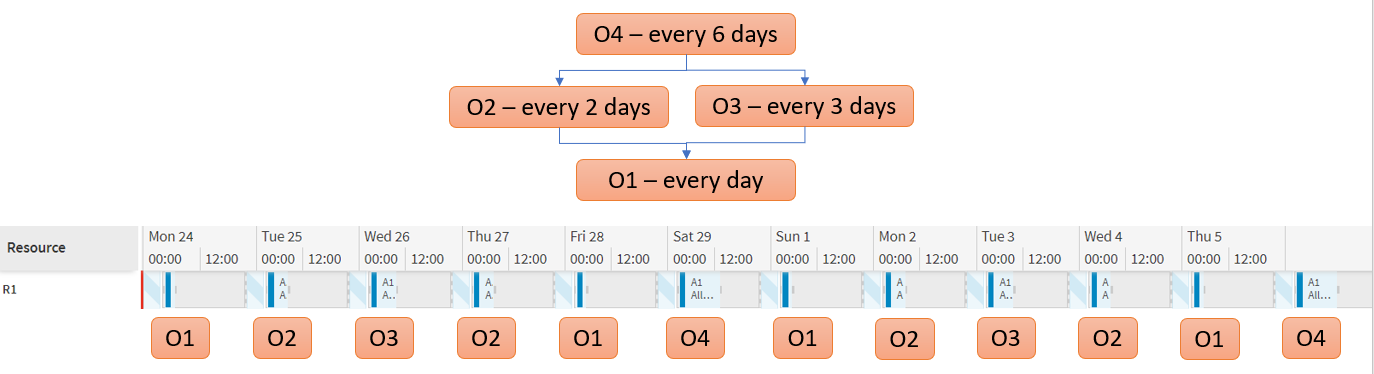
The image below shows a schedule with an activity requiring 4 operations placed in a hierarchy. Operation 1 needs to be carried out every day and is a child of both operation 2 (every other day) and operation 3 (every 3 days). These in turn are both children of operation 4, which needs to be carried out every 6 days. The operation being performed on each day is shown below the schedule.
Fixing Visits and Operations
Fixing a visit within a schedule means that the DSE will not be able to reallocate it. The visit will be allocated at the fixed time and to the fixed resource. Operations can be assigned to a fixed visit, which notifies the DSE of operations to be performed during the duration of the visit. The DSE will schedule around and or during a fixed visit.
To fix a visit the repeatable call must have an activity status, the activity status provides information such as the time this visit is to be allocated and the resource that performs the visit. To allocate operations to a fix visit a visit operation is required, the visit operation informs what operations are performed during the visit. See section Visit_Operation in the Scheduling Schema Guide for examples.
Note
The DSE can schedule additional operations to a fixed visit if valid to do so.
This would be useful when wanting to partially reschedule a previously complete schedule. An example may be if you wanted to add an additional repeatable activity with operations or operation into a existing schedule. Instead of having the DSE reprocess the full schedule with the new changes, the existing schedule data can be used to fix what has already been allocated. The DSE will then only allocate the new non-fixed changes within the schedule. This allows for minor changes to be made to a schedule without the need to reprocess the whole schedule.
Warning
The DSE does not validate fixed operations, meaning it is possible to fix operations outside of the desired usage. A fixed operation will always be scheduled regardless of its validity.
Using Cyclic Scheduling
Basic Schedule Data
Cyclic scheduling uses a special algorithm within the DSE, which analyses the various modelling patterns and / or operations in the input in order to produce a schedule in the most effective way. As such, it is necessary to signify that cyclic scheduling is required via the 'process type' attribute on the Input Reference of the input data.
When using modelling patterns is it also recommended that the schedule duration is set to an exact multiple of each of the modelling pattern intervals, as far as this is possible. For example, if all modelling patterns have intervals of 1, 2, 3 or 4 weeks, then a 12 week schedule duration could be used (or 24 weeks if a longer duration is required).
<Input_Reference>
    <id>1</id>
    <datetime>2018-01-01T00:00:00</datetime>
    <schedule_end_datetime>2018-03-26T00:00:00</schedule_end_datetime>
    <input_type>LOAD</input_type>
    <process_type>CYCLIC</process_type>
    <dataset_id>CyclicSchedule</dataset_id>
</Input_Reference>
Note
The DSE initially breaks the problem down into time periods based on the intervals defined in the modelling patterns and / or operations in the input. For example if most modelling patterns have an interval of one week then it is likely that the schedule will be broken down into weekly periods. Once the DSE has been through and created schedules for these smaller time periods it will then have a final attempt at scheduling the problem as a whole, before returning this final schedule.
Note
Modelling patterns and operations are ignored by the DSE when any of the standard process types are set (static, dynamic, appointment, reactive, etc.). They will only be handled when the process type is set to CYCLIC, or alternatively when using the WISE (which uses process type 'PLAN').
Warning
Cyclic scheduling is a form of static scheduling, so it is not possible to send changes to the input data. If you wish for the DSE to reschedule with altered data then a new full load should be sent.
Modelling Data
The structures required for cyclic scheduling are set up on the data management screens in the Planning workspace of the Scheduling Workbench, under Activity Data.
The 'Activity Modelling' screen defines modelling patterns. The 'Activity Templates' screen defines repeatable activities linked to modelling patterns or operations. The 'Operations' screen defines operations. The 'Usage Classes' and 'Usage Models' screens define usage rules.
This data will all be pulled through to the scheduling input data via the usual 'Source Data' mechanism, provided the process type for the scheduling problem is 'CYCLIC'.