Distributed Scheduling
The Schedule Distribution Service can be used to handle 'DISTRIBUTED' or 'DISTRIBUTED_STATIC' scheduling problems. These are special process types primarily intended to allow for capacity planning over a long period of time. In the 'DISTRIBUTED' case, this would be alongside dynamic scheduling of the current daily work.
The 'DISTRIBUTED' process works by allowing multiple child datasets to be linked to a parent dataset. One of these child datasets will be the 'dynamic' child dataset, which holds the current dynamic plan, and handles updates, appointment requests etc. in a very similar way to a standard dynamic schedule. The others will be static datasets which will cover a much longer period of time and are only updated occasionally.
For 'DISTRIBUTED_STATIC' all of the child datasets would be static and a plan would only be produced for each dataset one time, when the load is sent in, rather than being updated as with the 'DISTRIBUTED' process type.
Importantly the input data to the system is simply fed into the parent dataset, and the Schedule Distribution Service will then automatically filter the input from the parent dataset into the child datasets as required. This means that the system will automatically determine which data should be considered for the dynamic schedule, and the external system does not need to carry out this filtering.
Note
The Architecture and Sizing Guide — Performance Metrics appendix includes a section on distributed scheduling, where the use of the distributed process type is compared with other approaches.
Using Distributed Scheduling
As mentioned above, when using the distributed scheduling process, all input data is sent to the parent dataset. In order to use the process, a few changes are required to the initial load input data:
- The process_type attribute on the Input_Reference should be set to 'DISTRIBUTED' or 'DISTRIBUTED_STATIC'.
- For each required child schedule, a Child_Schedule row should be added defining the settings to use for this dataset.
In addition at least one Schedule Distribution Service instance must be running on the system (along with at least one DSE instance), and the DSE parameter 'DatasetTypesToProcess' should be set to 'SEGMENT'. See the Architecture and Sizing Guide — Schedule Distribution Service for further details.
The rules for defining child schedules are as follows:
- For 'DISTRIBUTED' there should be exactly one 'dynamic' child schedule. The 'process_type' attribute for this dataset can be set to 'DYNAMIC', 'REACTIVE' or 'APPOINTMENT'.
- There can be 'STATIC' schedules which must all have process_type set to 'STATIC'. For 'DISTRIBUTED' there can be any number of static schedules (including zero). For 'DISTRIBUTED_STATIC' there must be at least one static schedule.
- Each child schedule can define an override schedule start time and/or schedule end time. If specified these will override the value from the parent dataset input reference. Usually, the dynamic schedule will have a schedule end time override to limit the dynamic scheduling window, but no start time override (since this should update with the live updates).
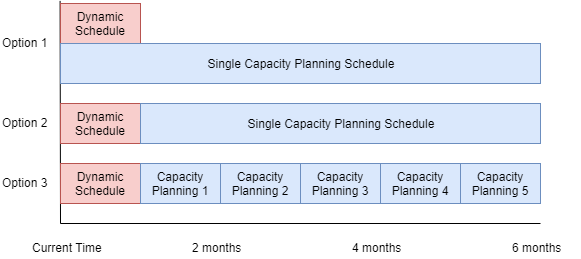
- The windows for the child schedules are allowed to overlap. For example, a common use of 'DISTRIBUTED' would be to have a single dynamic schedule covering a single week, and a single static schedule covering a six month period, including the first week covered by the dynamic schedule.
When data is sent to the system with the process_type set to 'DISTRIBUTED' or 'DISTRIBUTED_STATIC', the input manager will validate the data to ensure that the above conditions are met, and if not the data will be rejected.
Note
Note that no plans are ever saved against the parent dataset itself, but only against the defined child datasets. This means for example that the broadcast plans will be for the child datasets, not for the parent dataset, and it is the child datasets that can be viewed on the Scheduling Workbench.
Note
Auxiliary components such as the Appointment Booking Engine and Schedule Dispatch Service will run against the dynamic child schedule in the normal way, and produce plan updates for this dataset.
Note
As mentioned above, child schedules are allowed to overlap and multiple child static schedules can be defined. Suppose for example that capacity planning was required over a 6 month period, with a one month dynamic window. The diagram below shows several options for setting up the child schedules:
Warning
Please be aware that since the dynamic dataset is run independently of the static datasets, it is not possible for linked activities (such as pre-requisites) to be scheduled across the dataset boundary. Therefore if the scheduling problem contains linked activities, care should be taken when defining the start and end times on the child schedules to prevent this causing any issues.
The same also applies to splittable activities. These cannot be scheduled so that visits are split across the end of the dynamic child scheduling window (i.e. with some visits in the dynamic child scheduling window and some only in the static child schedules).
It is recommended that these boundaries are set up in such a way that linked and splittable activities will always be scheduled within the same dataset (dynamic or static). For example, if linked and/or splittable activities have restrictions that mean they are always scheduled within a single week, then any dataset boundaries could be placed at weekends.
Distributed Scheduling Process Flow
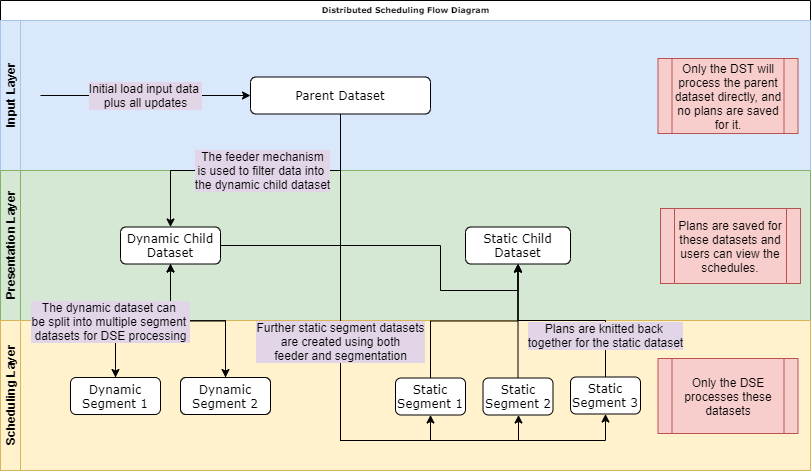
There are 3 layers of dataset used in the distributed scheduling process:
- Input layer: This consists of the parent dataset only. Input data is sent to the system for this dataset but no plans are saved against it. Only the Schedule Distribution Service will process this dataset directly.
- Presentation layer: This consists of the child schedule datasets defined as part of the initial load input. These datasets will have plans saved against them and can be viewed on the workbench. However the input data for them is never set or updated directly, but only via the parent dataset and the Schedule Distribution Service. The datasets at this layer are used by all components except the Dynamic Scheduling Engine.
- Scheduling layer: This consists of the datasets used by the Dynamic Scheduling Engine. These datasets are internal to the system and only for DSE use. The plans saved against them are handled by the Schedule Distribution Service in order to update the plans of the datasets in the presentation layer.
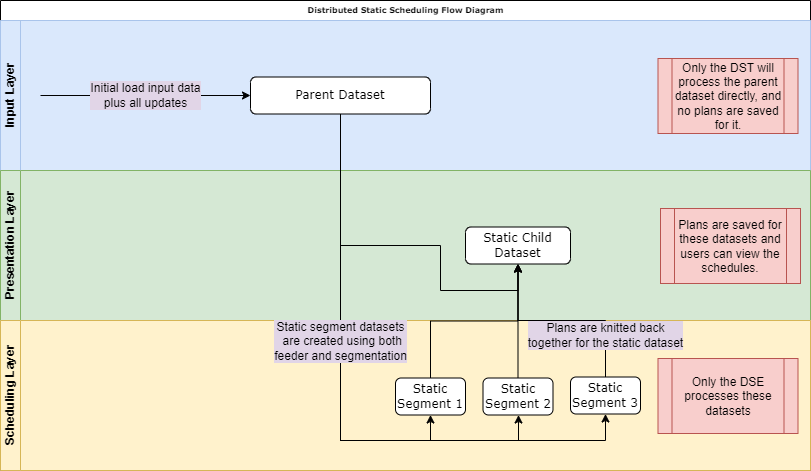
The process for distributed static is very similar but without the processing of the dynamic child dataset:
Dynamic Dataset Feed
When a new load is sent for a distributed scheduling dataset, this will be picked up by the Schedule Distribution Service, which will immediately apply the feeder mechanism to the input data to determine which activities should be included in the dynamic child schedule.
Note
For details of both the feeder and segmentation mechanisms used by the Schedule Distribution Service, please see the Architecture and Sizing Guide — Schedule Distribution Service.
Note
The feeder mechanism will always be used in this case, regardless of the DST parameter 'FeedDynamicDatasetOption'.
The Schedule Distribution Service will then create a new initial load input for the dynamic child dataset based on the results of this feed.
Note
This is stored in the database using 'Dataset_Segment_Mappings' to filter the data from the parent dataset.
The Schedule Distribution Service will then create one or more datasets for the DSE(s) to process. If the segmentation option is enabled, and the dynamic child dataset is large enough to warrant being split into several internal segments, then the Schedule Distribution Service will create these 'SEGMENT' datasets for the DSE to run against. If not, it will create a single 'ATOMIC' dataset (which effectively allows the DSE to process the dynamic child dataset directly).
Once plans have started to be produced against the dynamic dataset the Schedule Distribution Service will update the feed accordingly, as described in the Architecture and Sizing Guide — Feeder Mode.
Updating the Dynamic Dataset
Whenever any input changes are sent against the parent dataset, the DST will pick these up straight away and update the feed to the dynamic dataset accordingly. This is carried out with minimal overhead so that updates are processed in a timely manner. This allows, for example, the Appointment Booking Engine to return offers for requests with only a small additional delay (of less than one second) compared to running the dynamic dataset directly.
Generating Plans for Static Schedules
For 'DISTRIBUTED', once the load has been sent for the dynamic child dataset, the Schedule Distribution Service will look to start processing any defined static child schedules. However, this process will not actually be started until the feed to the dynamic schedule has been allowed to 'settle' - i.e. once the Schedule Distribution Service determines that it no longer needs to change the feed based on the last saved plan.
If one or more static child schedules overlap the dynamic schedule, then the plan from the dynamic schedule will be used directly for this part of the static schedule(s). For any parts not covered by the dynamic window, the DST will create one or more static segment datasets for the DSE to run. These will be created using whatever combination of feeder and segmentation mechanisms has been permitted.
For 'DISTRIBUTED_STATIC', the static child datasets will start processing immediately, using one or more static segment datasets for the DSE, created based on the feeder and segmentation settings.
For both process types, the Schedule Distribution Service will then wait until plans have been produced for all the segment datasets, before updating the output for the static child datasets based on the results.
Note
Any activities that are not allocated in any child schedule will be shown as unallocated activities. For each of these unallocated activities we determine a 'base time' for the activity as follows:
- If the activity has a fixed date time we use this.
- If not, we use the activity SLA deadline, i.e. the end of the first SLA period where the corresponding SLA Type is set to generate jeopardy exceptions.
- If there is no SLA deadline we use the end of the final SLA period for the activity.
The unallocated activity will then be shown in any dataset overlapping this base time.
Activities which can be carried out in the dynamic dataset window may also appear in this dataset.
Note
Since these are static datasets they will use the 'WAITING' running state. This means that they do not need to be run in parallel by the DSE(s), which prevents the instances being overloaded.
Note
The segment datasets may not correspond directly to the static child datasets set up in the input data. However the DST will ensure that the plans for the static child datasets are updated correctly once all segment dataset plans have been produced.
Note
If the DST parameter 'SegmentDatasetOption' is switched off, the DST will only ever create a single static child dataset for the DSE to process, plus a single dynamic child dataset in the 'DISTRIBUTED' case. If this parameter is switched on then the DST may create multiple DSE child datasets (for both dynamic and static). The number of datasets, and the choice of how to segment the datasets, will be based on the other standard DST segmentation settings. See the Architecture and Sizing Guide — Schedule Distribution Service for further details of this process.
Static Schedule Updates
By default, the static child schedules will be produced once for each new initial load of the parent dataset. However, it is also possible to request that the Schedule Distribution Service updates the static datasets periodically. This is defined via the attribute 'maximum_refresh_frequency' on the Child_Schedule row. For example, setting this to 8 hours would mean that a new updated static schedule would be produced every 8 hours.
Note
The refresh functionality is only available for the 'DISTRIBUTED' process type, not 'DISTRIBUTED_STATIC'.