Capacity
Resource Capacity
We have already encountered examples where a resource starts the day with a limited number of parts of a certain type, and when these are used up, they must seek out a depot to replenish their part stock.
As well as starting with a fixed number of parts, it may be that the resource's vehicle is limited in how many of a certain part it may carry. It is possible to specify these limitations using a Capacity record.
For example, assume that a van cannot carry more than four items of equipment at one time, so the van would need to return to the depot to stock up for the next four activities. Here is how the schedule might look:

And on the map:
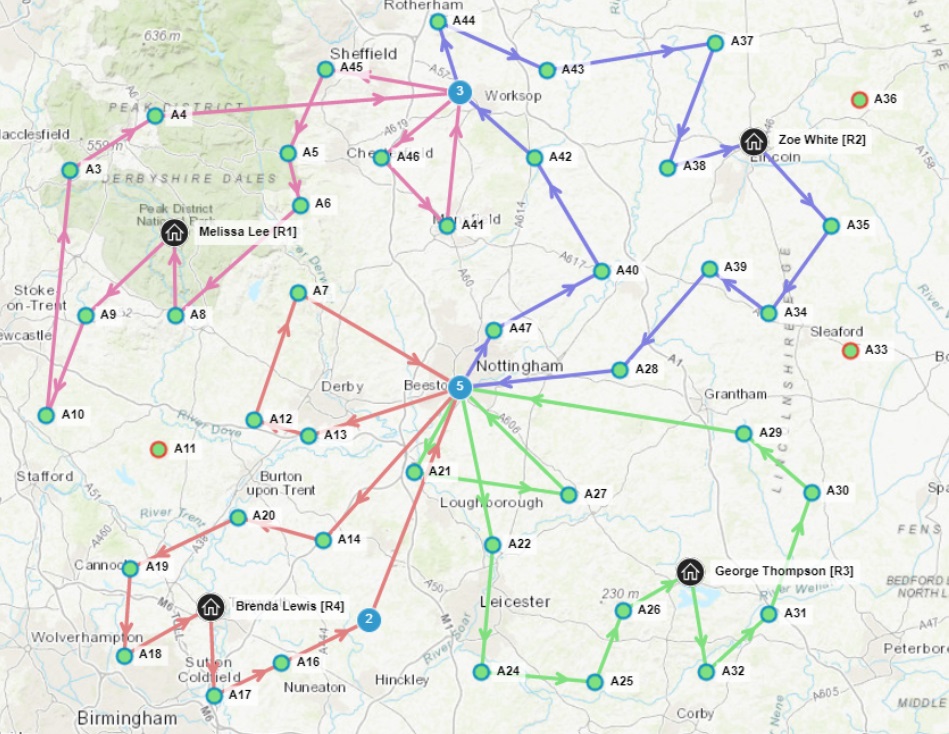
As you can see there is no point at which a resource is doing more than four activities before returning to the depot. Here is how it is done:
<Resource_Capacity>
      <resource_id>R1</resource_id>
      <capacity_id>C1</capacity_id>
    </Resource_Capacity>

    <Capacity_Part>
      <capacity_id>C1</capacity_id>
      <part_id>Item</part_id>
      <maximum_quantity>4</maximum_quantity>
      <exclusivity_required>false</exclusivity_required>
    </Capacity_Part>
A resource may have multiple capacities, for instance, if there is a van with a refrigerated section and an ambient temperature section. In this case, there is a capacity for goods of each type, and the appropriate capacities may be modelled.
It is also possible to specify that a resource may carry a certain amount of one part, or another, but not a mixture of both. A typical example would be a tanker, which can contain various liquids, but only one at a time. The attribute exclusivity_required is used to define this.
Note
It is possible to exceed the capacity limits, for example by specifying part stock records that exceed the capacity value. However, the DSE will not schedule a resource to collect stock that exceeds the resource capacity.
Volume and Weight Constraints
As well as limiting capacity by quantity, as above, it is also possible to limit a resource's capacity by volume or weight. Volume and weight cover all parts that are in use. A part may be defined to have given volume (or weight) and the resources may then specify a maximum volume (or weight), in their Capacity records. Weight and volume operate independently of each other, so a resource may be limited by volume at one time, but by weight at another. Here is an example:
<Resource_Capacity>
      <resource_id>R1</resource_id>
      <capacity_id>C1</capacity_id>
    </Resource_Capacity>

    <Capacity>
      <id>C1</id>
      <maximum_volume>5</maximum_volume>
    </Capacity>

    <Part>
      <id>S</id>
      <description>Small box</description>
      <volume>1</volume>
    </Part>

    <Part>
      <id>M</id>
      <description>Medium box</description>
      <volume>2</volume>
    </Part>

    <Part>
      <id>L</id>
      <description>Large box</description>
      <volume>3</volume>
    </Part>
Refill to Capacity
Refill to capacity allows for a resource to refill its part stock to capacity from a designated activity. The 'Activity_Part' entity allows for an activity part to be set to 'refill_to_capacity'. When visiting that activity the resource can refill that part to capacity. As this activity does not consume the part the 'part_usage' value should be negative, showing the maximum number of parts are available for a resource when refilling.
Refill to capacity will not allow the resource to pick up more parts than its capacity. This is also limited to how many parts the activity from which the resource will be refilling has. After a resource has visited one of these activities and refilled its parts, activities that require those parts can now be allocated.
Note
If an activity part has a negative quantity with refill to capacity set to false, the activity will only be scheduled if a resource can collect the all of the parts without exceeding its capacity.
Refills and Part Capacities
A capacity requirement for a resource can be explicit where it tells exactly how many of each part that resource can hold. An example of this would be if a resource could hold 20 of 'PartA' and 10 of 'PartB'. If a capacity requirement is explicit a resource will always refill to the maximum capacity, when visiting an activity that contains parts which refill to capacity, since the DSE knows how many of each part the resource can refill to.
It can also be implicit, where it does not tell how many of each part the resource can hold but rather what the maximum total weight or volume is. Depending on how the capacity requirement has been configured changes how the resource refills to capacity. An example would be if a resource has a weight capacity of 100. The resource can hold any number of parts as long as it does not exceed the weight. If 'PartA' weighed 20 and 'PartB' weighed 5 we can hold 5x 'PartA' and none of 'PartB', or 1x 'PartA' and 16x 'PartB', plus many more possibilities. With an implicit capacity requirement, the DSE will only refill the resource's parts to the required level for the schedule (rather than the maximum capacity) since there is no way of knowing how many of each part to collect (beyond what is required). This is due to the fact that the capacity limit is shared across multiple parts.
When a resource has completed the activity a 'Visit_Part' entity can be sent into the DSE. This informs the DSE of how many parts were collected during the visit. The DSE can then schedule accordingly.
Unlimited Supply Refills
In some cases there may be no practical limit on the number of parts that can be supplied by an activity, and the only limiting factor is the resource capacity. This would be true for example when using parts to represent the charge in an electric vehicle, and recharging the vehicle at a charging station.
In this case the attribute 'unlimited_supply' can be set on the Activity_Part record. The 'part_usage' on the Activity_Part record will then be ignored, and the resource will always be able to collect as many parts as they have capacity for.