Collecting and Using Parts
Parts may be collected and used in various ways. The following sections show this.
Stock
Some businesses operate a system of Van Stock, where the resources return their vans to the base each night, and somebody replenishes the parts in the van to a known level, ready for use the following day.
This example shows a van stock of 5 for a particular part, which limits the number of jobs per day to five.

<Part_Stock>
            <id>PS1</id>
            <part_id>Widget</part_id>
            <resource_type_id>Plumber</resource_type_id>
            <available_datetime>2016-06-29T08:00:00+01:00</available_datetime>
            <stock>5</stock>
            <override_existing>true</override_existing>
        </Part_Stock>
Note how the override_existing option may be used to add to existing stock, or reset the level to a given quantity.
Pick-Up Activities
If specific items must be collected from a given location, on a one-off basis, then a Pick-Up Activity is a good solution. Essentially this is just a normal activity, but instead of consuming parts, it gives them to the resource. This is achieved merely by setting the number of parts required to a negative value. If the resource uses -1 of a part, then it effectively adds one part to its stock.
A good use of this would be in a parcel delivery company, where some parcels need to be collected from one place and delivered to another place: the collection activity would have a part requirement of -1, whilst the delivery would have a part requirement of 1. The only way to get the part for the delivery is to schedule the collection activity first, and this is what the Dynamic Scheduling Engine would do.
The following snippet shows how to specify a negative part usage for an activity:
<Activity_Part>
            <part_id>Widget</part_id>
            <activity_id>92734</activity_id>
            <part_usage>-1</part_usage>
        </Activity_Part>
Depots
Where there are lots of pick-up activities, or repeated ones, it is best to use a Depot. Depots allow parts to be collected as needed in order to perform later activities in the route. The Dynamic Scheduling Engine will collect just the number of parts required.
Depots are a special type of Activity (with activity_class_id=DEPOT) and they can generate many visits: for instance, there may be just one depot activity, but it may be used by several resources, and each of those may use it more than once.
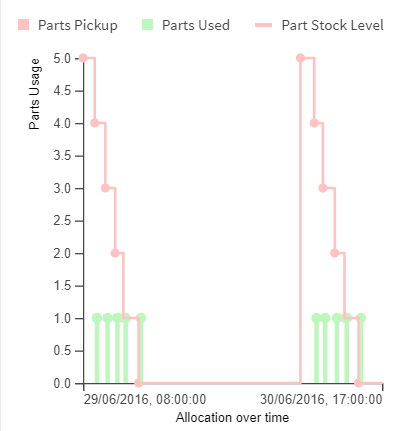
In the following example, resources each start the day with four "Widgets" in their vans, but if they require more, they can visit the depot to pick up more parts. In the example, R1 and R2 need to visit the depot, and the other resources don't need to.
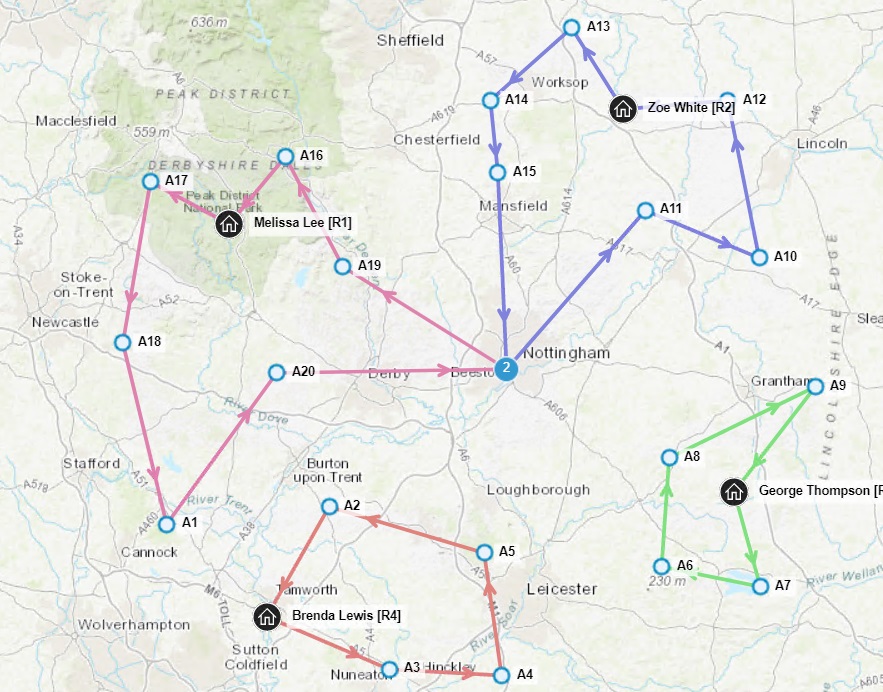
This graph shows how resource R2's part level varies during the day:
More details about depots are provided in a later section.
Scheduled Replenishment
A business may have a scheduled replenishment of a resource's part stock, e.g. they know that on a certain date and at a certain time, a resource will receive some new parts. This sort of requirement may be met with a Part_Stock record, in the same way as in the Van Stock example above.
Reusable Parts
A reusable part is one which is not consumed by doing an activity that requires it. On the Part record it is possible to indicate that a part is reusable.
An activity can still require any amount of a reusable part, and the resource must have this quantity in stock to carry out the activity. However, the part will not be consumed, so the resource will have the same quantity of parts available for later activities.
Note
If a reusable part is stored in a depot, then the resource can also return the part to the depot after it has used it, so that other resources may use it. To deter a resource from keeping the part for too long a cost per hour may be specified on the Part record, so that it returns it to the depot as soon as possible, in order to maximise the schedule score.
Reusable parts cannot be transferred between depots.