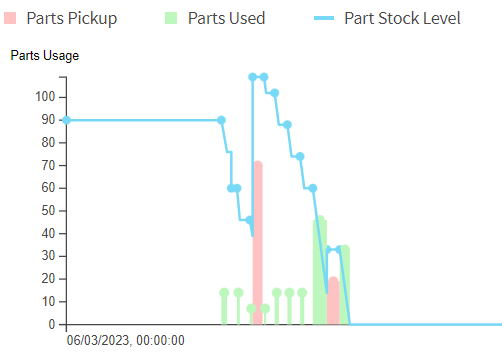
Vehicle Parts
It is also possible to associate parts with vehicles, instead of directly linking them to resources. There are three potential advantages to this:
- Resources can use different vehicles on different days, with different stock and capacities.
- Vehicles can be used by multiple resources at different times. Parts collected by one resource would be available to the subsequent resource.
- Vehicles can use parts while travelling, for example to represent the remaining range of an electric vehicle.
Using Vehicle Parts
In order for a part to be used as a vehicle part, it must be marked as such on the 'Part' row, via the attribute 'is_vehicle_part'. Note that a part cannot be treated as both vehicle stock and standard resource stock - it must be defined as one or the other. Similarly, it cannot be both a vehicle part and also a global or shared part.
The stock held in a vehicle can be updated using Part_Stock records. In this case the 'vehicle_id' attribute should be populated instead of the 'resource_id' attribute.
Capacity can be associated with either the vehicle or the vehicle model, via the Vehicle_Capacity and Vehicle_Model_Capacity tables.
A resource can be linked to a vehicle via the vehicle_id attribute on the 'Resources' row. Alternatively, a shift can be linked via the same attribute on the shift row, allowing resources to use different vehicles in different shifts.
Warning
A vehicle may only be used by one resource at any one time. If the scheduling engine detects that multiple resources have been linked to a vehicle at the same time, only one of the resource usages will be processed and the rest ignored.
Vehicle parts can be required by activities in the same way as resource parts. They can also be supplied by depot or regular activities. The refill to capacity option can be used, and the parts themselves can be reusable.
Travel Part Usage
One key difference between vehicle and resource parts is that for vehicle parts it is possible to specify that the part is consumed while the vehicle is travelling.
This is specified via the 'Vehicle_Part_Usage' table (or 'Vehicle_Model_Part_Usage' table), with the usage_per_km attribute set to the quantity of stock used up for each kilometre travelled.
Note
The calculated usage for each journey will then be calculated as the estimated distance in km multiplied by the usage per km, and then rounded up to the nearest whole number.
For example, if the usage_per_km is 0.6 and the resource travels 13.1 kilometres, the usage would be 0.6 x 13.1 = 7.86, which is then rounded up to 8.
Electric Vehicle Charging
One expected use for this is to allow for the range of an electric vehicle to be monitored, and for scheduled visits to charging stations to be included in the schedule.
In this case Part_Stock can be used to provide the current remaining range of the vehicle, and this could be updated throughout the day to ensure the scheduling engine uses accurate data.
Note
The simplest approach is to set the 'stock' to the current range in kilometres, and set the vehicle part usage to 1. Alternatively, the stock could be given in miles, with the usage adjusted accordingly (there are approximately 0.62 miles in a kilometre), or the stock could be a percentage of the total range, with the usage set as the expected percentage used per kilometre.
The maximum range of the vehicle should be set as the vehicle capacity for this part.
To allow the vehicle to recharge, depot activities would need to be added for each available charging station. Since the depot will have unlimited supply of the part, it is recommended to use an 'Activity_Part' to link the depot to the part, with the 'refill_to_capacity' and 'unlimited_supply' options set.
Recharging may also be possible at some activities the resource is visiting. In this case these activities can also be set to supply the part (again using the 'refill_to_capacity' option).