Categories
Categories can be assigned to activities as a way of defining activities that have meaningful similarities to each other. Collections of categories are grouped under a categorisation, and each activity can only belong to one category within each categorisation.
Categories can be used to apply limits to the number of categories scheduled concurrently for a parallel resource. They can also be used for filtering and display purposes in the Scheduling Workbench.
Note
Resources can also be assigned categories. This has no impact on any scheduling of any activities, but can be used in the same way as activities in the Workbench when filtering and viewing the data.
For example, suppose a parallel resource represents a painting machine in a factory, which can paint many items at the same time provided they are all to be painted the same colour. A categorisation called 'Colour' could be created. Activities for painting items in red can be given a category of 'Red' within this categorisation, and so on. A PARALLEL_CATEGORIES_COUNT rule can then be created to limit the number of colours to one, to ensure there is only ever one colour being processed in the machine at any one time.
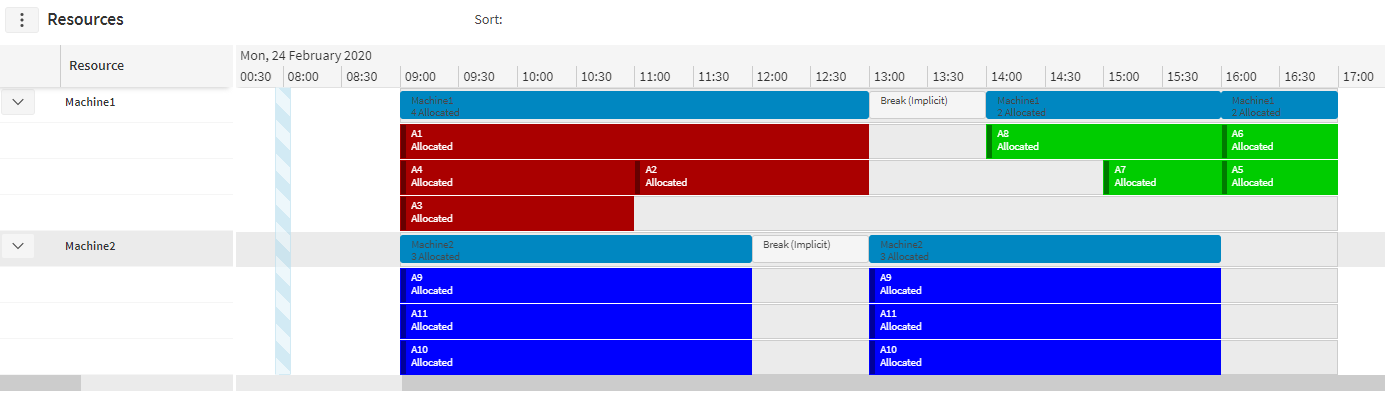
As another example, suppose PSO is being used for aviation purposes, with activities representing maintenance on a plane and parallel resources representing the hangars in which the maintenance is to be carried out. A hangar may only be to hold three planes at a time, but many maintenance activities can be carried out at once on the same plane.
This can be achieved by creating a categorisation called 'Plane' and then assigning each activity a category within this categorisation to say which plane the activity belongs to (so the category would be the plane's serial number). A parallel category rule can be created to assign a limit of three under the plane categorisation. This would allow many activities to be scheduled to the hangar, as long as the number of planes these activities are collectively working on does not exceed three.
Note
Activities do not need to have a category specified within a categorisation. Any rules that are set up against a categorisation can be configured through the rule parameters to specify whether having no category should be counted against the limit.
Using the aviation example above, an activity could represent general maintenance of the hangar. This activity would not have an associated plane, and should in no way interfere with the limits for the number of planes in the hangar. In this case, uncategorised activities can be ignored from the rule.
With the paint machine example, an activity could represent cleaning the machine. This would not have an associated colour, but should not be carried out while the machine is actively painting. The rule can be configured to count this uncategorised activity towards the limit (essentially treating no category as its own category), meaning that it could not be scheduled at the same time as any painting activities.
Displaying By Category
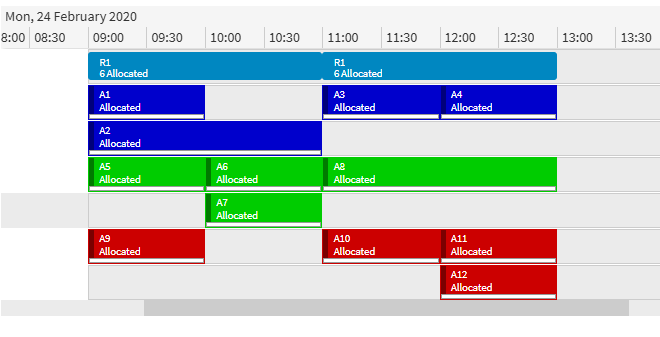
The parallel_index_categorisation can be specified on a Resource or Resource_Type. This will ensure that activities belonging to the same category within the specified categorisation will be shown on the same rows as each other when viewing the resource in the Scheduling Workbench.
The example below shows how a schedule looks with a parallel_index_categorisation specified.
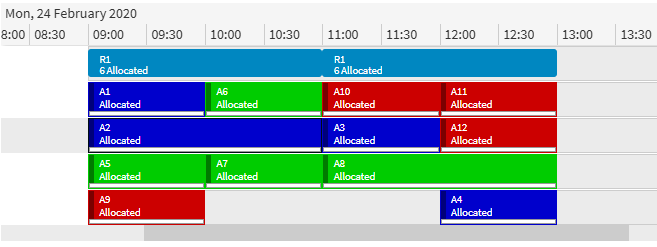
The next example is how the same schedule would be displayed without a parallel_index_categorisation.
Category Custom Metrics
Custom metrics can be linked to a categorisation. Each category can have its own values for the custom metric assigned to it. A PARALLEL_CATEGORIES_METRIC rule can then be set up to limit against the custom metric. Each distinct category occurring at any time will contribute its custom metric value towards the limit (but only once, regardless of how many activities belonging to that category are scheduled at that time).
With the aviation example described previously, this kind of rule could be used to set a limit in the hangar not against the number of planes, but against the overall size of the planes. This means that the hangar could have the capacity for a large plane, or two small planes, for example. Each individual plane within the 'Plane' categorisation could have a size defined against the custom metric.
Note
Activities that do not have any category within the categorisation would use the custom metric's default value if uncategorised activities are included for the rule. This would only apply once, even if there are multiple uncategorised activities.
Category Persistence
A feature called category persistence allows categories to be combined with availability windows (see the section on availability windows in this guide). With category persistence enabled for an availability set, a category will count towards any parallel limit for the entire duration from its first occurrence within the availability window until its last.
Suppose an activity of a particular category exists from 9:00-10:00, and later on in the same availability window and for the same resource, there is an activity for the same category from 16:00-17:00. Without persistence of the category, the category will only apply during the times when these activities occur, whereas with persistence the category will apply from 09:00-17:00.
Combining the aviation scenarios described earlier in this section and in the Availability Windows section of this guide, categories can be used to limit the number of planes in a hangar, and availability windows can be used to define when the plane is available in the hangar. Persistence can then be used to model the plane remaining in the hangar even while no work is actively being carried out on it.
The schedule below shows how maintenance for two planes would be scheduled without any persistence of the 'Plane' category being applied.

With persistence enabled, PLANE001 still exists for the Hangar resource between the two maintenance activities, and so PLANE002 cannot be scheduled to the Hangar resource until the next day.
