Parallel Resources
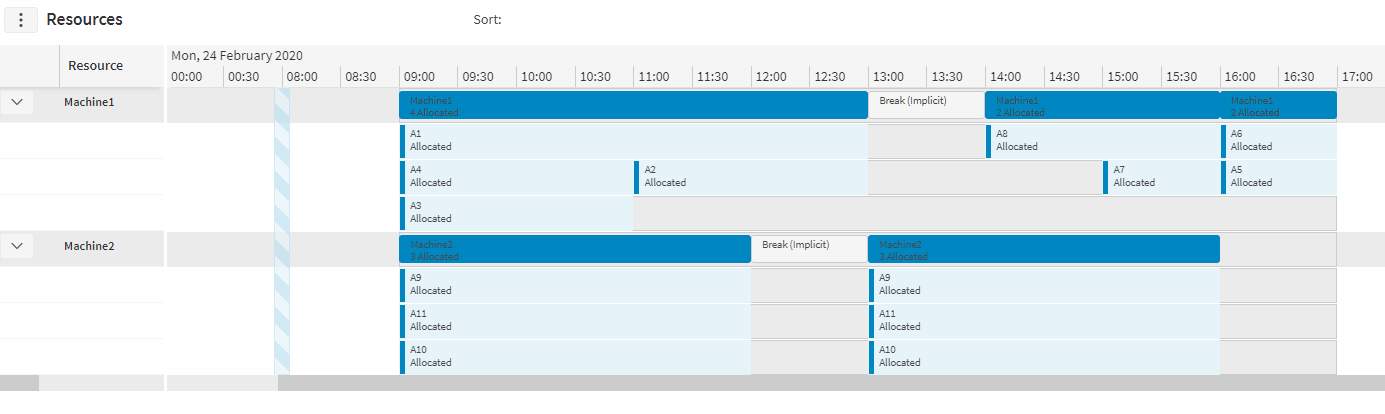
Parallel resources are resources which can carry out multiple activities at the same time as each other. Rules can be defined to place limitations on the number of activities being carried out at once, or on which activities can be processed at the same time as each other by the same resource.
An example of a potential use for parallel resources would be in a manufacturing scenario where there are machines that are capable of processing multiple jobs simultaneously. Rules can be used to define capacity limitations for how much work can be carried out at any given time, with each activity able to have its own contribution to the capacity.
Note
Parallel resources do not support travel between activities, so all activities scheduled to a parallel resource must either be locationless or at the same location as the resource.
Note
Parallel resources are defined by setting the resource_class_id on the Resources or Resource_Type to 'PARALLEL'.
Note
Breaks and private activities will not have any activities scheduled in parallel with them to the same resource.
Parallel Rules
Rules can be defined against a parallel resource to limit the number of activities that can be carried out simultaneously by the parallel resource.
A resource or resource type may be given a collection of rules. One of the categories of rules that can be defined is PARALLEL (see the Scheduling Schema for further details on rule categories).
There are four types of parallel rules:
- PARALLEL_ACTIVITY_COUNT: This rule limits the number of activities that can be allocated at the same time as each other at any given time for a parallel resource.
- PARALLEL_CUSTOM_METRIC: This rule uses an activity's custom metric value as the limiting factor at any given time for the parallel resource. Custom metrics can be defined in the Custom_Metric table and applied to activities or activity types. They define values for activities that are not used in any scoring calculations when scheduling the activity, so a higher custom metric value does not give an activity a higher scheduling incentive, but the higher value could limit whether the activity can be scheduled according to the PARALLEL_CUSTOM_METRIC rule.
- PARALLEL_CATEGORIES_COUNT: This rule limits the number of distinct categories within a specified categorisation that can be allocated at the same time as each other at any given time for a parallel resource. See the 'Categories' section within this guide for further details on categories.
- PARALLEL_CATEGORIES_METRIC: This rule works in a similar way to PARALLEL_CUSTOM_METRIC, but where the metric value comes from an activity's category for a specified categorisation. The metric value is only applied once at any given time for each distinct category (i.e. if two activities are allocated in parallel with the same category, the custom metric is not applied twice). See the 'Categories' section within this guide for further details on categories.
Note
There is no limit to the number of rules that can apply to a single resource, so rules of different rule types can be created, or even multiple rules of the same type (e.g. two custom metric rules could be created for different custom metrics). This could be used to set separate weight and volume limitations against a machine, with the weight and volume able to be defined uniquely for each activity, if necessary, via custom metrics.
Note
Utilisation calculations can be carried out for parallel resources using the rule limits to figure out how utilised any shift for the resource is. This calculation can only be done for PARALLEL_ACTIVITY_COUNT and PARALLEL_CUSTOM_METRIC rules and cannot be calculated for parallel category rules.
Rule Override
A parallel resource rule set directly against a resource can be overridden by another parallel resource rule with a matching rule type, set at the resource's shift. For example, if a rule is set at resource level with a maximum activity count to be scheduled in parallel as one and another rule is set for the resource’s second shift with a maximum activity count of two, this would produce an output with only one activity at a time in the first shift and two activities scheduled in parallel throughout the second shift.

Rule Parameter Override
A rule parameter override can be applied to parallel rule sets to change the capacity of a resource for a period of time. This period of time can be represented by either a specific period (4th April 2025 12:00:00 - 4th April 2025 17:00:00), or for an offset into every shift of the applicable resource (between hours 2 and 5).
Note
Rule parameter overrides are only compatible with parallel rules: PARALLEL_ACTIVITY_COUNT, PARALLEL_CUSTOM_METRIC, PARALLEL_CATEGORIES_COUNT, and PARALLEL_CATEGORIES_METRIC.
Note
Rule parameter overrides are only compatible with rule type parameters: MaximumCount and MaximumTotalValue.
These changes of capacity can be represented as an absolute or relative change. For example, if the default capacity for a particular resource is 2, setting the absolute value to 6 would result in the capacity changing to 6 for the duration of the override. Setting the relative value to +3 would instead result in the capacity changing to 5.
Note
Relative values can be negative as well as positive, but cannot be 0. Absolute values can be 0, but not negative.
In the event of multiple rule parameter overrides, the override priority parameter will be used, where the highest override priority at any given time will be used in capacity calculations.
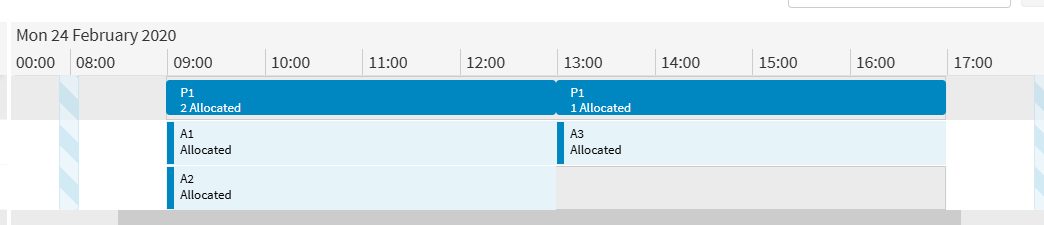
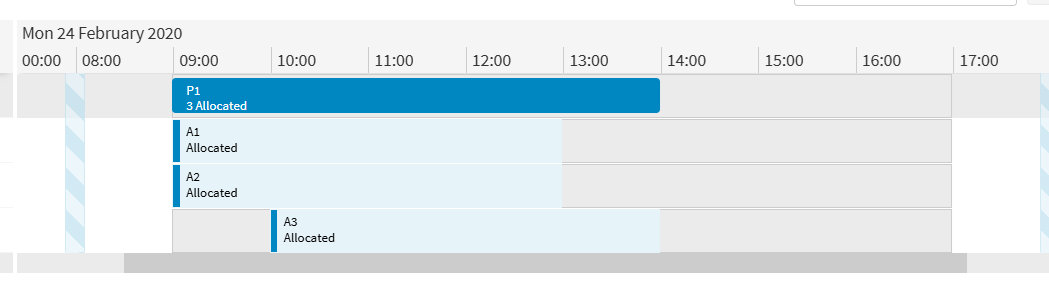
In the above example, there is one resource with a maximum capacity count of 2, and three activities. The second image below is the result of adding a rule parameter override increasing that count to 3 from 10:00-14:00 in this shift.
Note
Utilisation calculations will not be performed for a rule that has rule parameter overrides.
Status Handling for Parallel Resources
Schedulable activities may be scheduled in parallel with the last committed activity in a shift by default. This can be seen in the example below where activity A6 is scheduled in parallel with the committed activities A2 and A3. The DSE will not permit it to be scheduled any earlier than this though.

The parameter 'AllowAllocateWithParallelCommits' can be used to alter this behaviour, so that schedulable activities cannot be scheduled in parallel with committed activities and must be scheduled strictly afterwards. With 'AllowAllocateWithParallelCommits' set to false, the same data would produce the following schedule:
