Resource Buckets
Resource buckets represent a collection of resources where the number of, and the details of, the resources are not known, such as with an external contractor. Activities may be scheduled to resource buckets, but the precise timing of each allocation is unknown.
This section will cover an introduction to resource buckets and how resource buckets behave differently to standard resources when handling parts, linked activities and committed calls.
Schedules with Resource Buckets
Resource buckets are treated by the DSE as resources that do not have routes - i.e. there is no set ordering to the activities within a shift or any expected start times. All activities that are scheduled to a resource bucket shift can be carried out by the external contractor in whatever order they choose and by whichever of their own resources they choose.
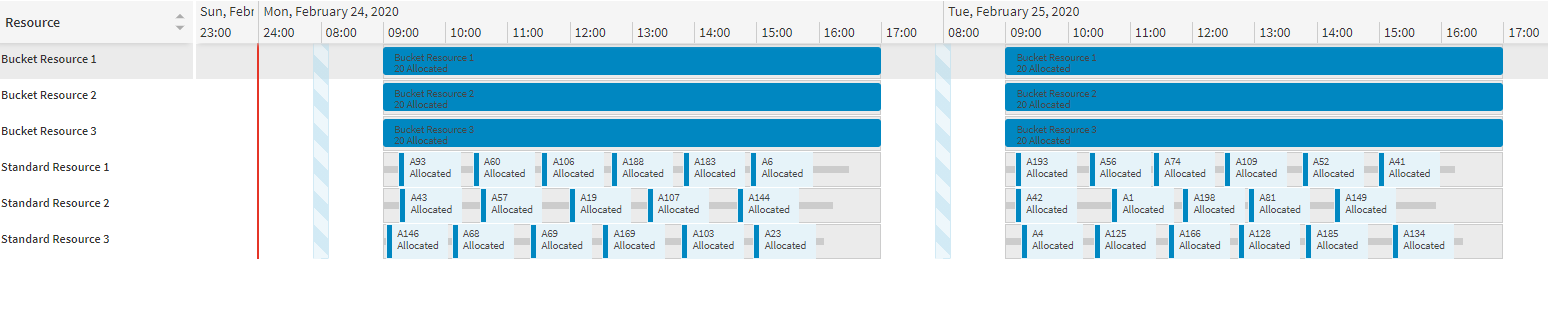
For example, a resource bucket could represent an external contractor with the capacity to carry out twenty activities per day, with the jobs spread out amongst their own workers. The DSE can then schedule twenty activities to each bucket shift, without working out at what time of day the jobs will be carried out or which specific contractor resource is going to complete them.
Defining a Resource Bucket
Resource buckets are defined using the Resources table, with the resource_class_id set to 'BUCKET' on either the resource or the resource type.
Shifts must be created for resource buckets, as with standard resources. When the DSE allocates activities to a resource bucket, it will make the allocation to the shift, with no further timing details of the allocation being made.
Each resource bucket must have a location associated with it. This is defined by setting the location_id_start for the resource. Any value provided for location_id_end will be ignored. This does not need to be a physical location associated with the external contractors (like their headquarters or any of their workers' home addresses). Instead, it may just represent the centre of the catchment area for any work that they are able to carry out. This way the resource may be given a max travel value to limit the activities that may be assigned to the bucket.
Note
Setting a maximum travel for the resource is recommended, since travel costs are not considered when assigning activities to resource buckets. Without a limit on the travel, the DSE could assign activities from anywhere to the bucket.
Note
Travel barriers and weightings will only apply when evaluating the maximum travel to a bucket resource if they are available for the entire duration of the shift.
Shift capacity rules (see Section 2 of this guide) should be defined for bucket resources to limit the number of activities assigned to a bucket shift in some way. Without this a single bucket shift may be filled with an unlimited number of activities.
It is strongly recommended that resource preferences be set up for resource buckets to discourage bucket resources from being chosen over standard resources (i.e. with a preference value that is less than 0.5). With no travel costs being calculated for the activities in a bucket shift, allocating calls to a resource bucket would be preferable to allocating the call to a standard resource if no resource preferences are set up.
Note
Skills and regions may be set up in just the same way as with standard resources and they will both act as constraints for which activities may be allocated to the bucket resource.
Note
Proficiencies may be set up for bucket resources as with standard resources.
Note
Any values specified for cost_km, cost_ph or cost_phot will be ignored for bucket resources.
Warning
Activities cannot be split between bucket resource shifts. An activity will only be allocated to a bucket resource shift if it is expected to finish within the shift.
Warning
Utilisation does not apply to bucket resources and a utilisation value specified in the Resources row will be ignored.
Warning
Separation models do not apply to bucket resources. Any activities with a separation group will not be allocated to a bucket resource.
Allocations to Resource Buckets
Only activities of type 'CALL' are permitted to be scheduled to bucket resources.
An activity may be allocated to a resource bucket shift provided it satisfies validity constraints (such as having required skills, or being within the maximum travel limit of the resource bucket's location) and as long as the activity can fit into the shift at some point. Part constraints and linked call constraints will also be applied (see sections below).
The DSE will evaluate the score for allocating to a bucket shift in a similar way to standard resource allocations, considering things like the SLA and the resource preference. The SLA value used will be the activity's SLA value at the start of the selected shift. Shift costs and shift visit costs will be applied, but no travel costs will be applied whatsoever.
Note
Private activities may not be allocated to a bucket resource. To indicate that a bucket resource is not available, the unavailable shift should be deleted. Note that reducing the length of a bucket shift will not reduce the number of allocations that can be made to that shift.
Note
Activities may be committed on a fixed datetime to a bucket resource.
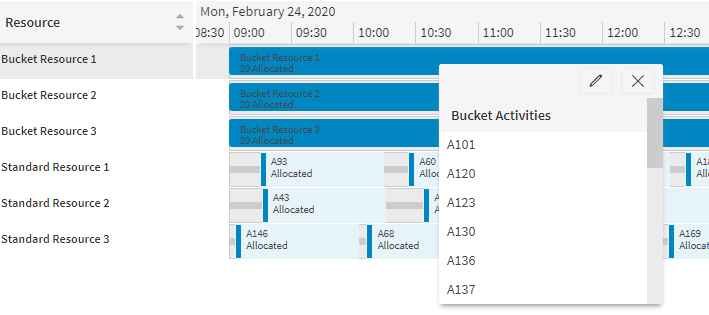
In the workbench when viewing the resources screen, if a bucket shift contains any allocations, a single shift-spanning Gantt item will be displayed, showing the number of activities and their statuses. Clicking on this item will bring up a list of the activities scheduled within the bucket shift. From here, the usual activity details panel can be accessed.
In the plan returned by the DSE, allocations made to resource buckets will not have any associated times in the activity_start or activity_end columns in the Allocation table. Instead, the shift_id and shift_start_datetime can be used to determine which bucket shift the activity has been allocated to.
There will be no Plan_Travel rows associated with activities allocated to bucket resources.
Parts
Bucket resources may be given a part stock so that activities requiring parts may be carried out. Since the order that an external contractor will actually carry out the activities in is not known, stock increases in the middle of shifts will not occur. As such, a part stock entry will only affect a bucket shift if the stock change happened at or before the shift's start time.
For example, if a shift runs from 09:00 to 18:00 and an activity requires a part, but the part stock is available from 12:00, then the activity will not be scheduled into this shift. The activity could be scheduled into the next day's shift.
Part increases will not occur in the middle of the shift. If an activity can refill a part to capacity, or has a negative part usage, then the activity is permitted to be scheduled in the bucket resource, but the resource will not gain any parts by completing it. This is because it is not possible to properly maintain a stock level throughout the shift when the activities could occur in any order.
Note
Activities with a global part requirement are not permitted to be scheduled to bucket resources.
Note
Capacity constraints will be ignored for bucket resources.
Linked Activities
Linked activities may be scheduled to bucket resources (see the Scheduling Concepts - Linking Activities guide for more information). In the case of a pre-requisite link, one of the activities may be allocated to a bucket shift while the other is allocated to a standard resource. Since the activities in bucket shifts have no expected start time, all permitted times of the activity must be evaluated to determine how to satisfy time constraints between linked activities.
Co-requisites and Combined Calls
If two activities are co-requisites or combined calls then they may both be scheduled to the same bucket shift.
It is not permitted to schedule one of the activities to a bucket shift and the other to a different shift (standard or bucket).
Pre-requisites
If both activities (pre-requisite and dependent activity) are scheduled to the same bucket resource (though not necessarily the same shift), then this is considered valid as long as there are possible start times within this bucket resource's shifts that can satisfy the link condition.
If the pre-requisite is scheduled to a bucket and the dependent call is scheduled to a standard resource (or to a different bucket resource), when checking time constraints the "worst case" must be used to ensure that whenever the activity is actually carried out by the external contractor, the scheduled time for the dependent call would still be valid.
For example, if shifts run from 09:00 to 18:00 each day, two activities have a minimum delay of 18 hours and the pre-requisite is allocated to a bucket resource, then the earliest time that the dependent activity could then be scheduled to the standard resource would then be 12:00 the next day. This is because the bucket resource could carry out the pre-requisite activity at any time within the shift. In the "worst case", it is completed at the end of the shift, and an 18 hour delay from the end of the shift results in 12:00 the next day at the earliest time that is guaranteed to satisfy the minimum delay constraint.
For an example with a maximum delay, with shifts from 09:00 to 18:00 each day, a maximum delay of 30 hours and the pre-requisite allocated to the bucket resource, then the latest time for the dependent activity would be 15:00 on the second day. This is because in the most restrictive case, the bucket resource carries out the pre-requisite at 09:00. Since the dependent must be carried out after the pre-requisite, the earliest time for allocation is 18:00 on the first day (in case the pre-requisite is completed at the end of the shift), thus ruling out the first shift entirely.
The "worst case" or most restrictive time need not be used if status updates are received for activities. If a status of 60 is received to indicate that work has started on a job from the bucket, then this time can be used for validation of activity group constraints.
Committed Calls
Activities can be committed or fixed to buckets just as with standard resources. The usual activity status codes may be used, though the travelling status code will have no impact on the scheduling of the activity. For example, an activity in a bucket with a travelling status will be scheduled in the same way as a committed activity, since no travel information is known within the bucket, so there are no travels to be adjusted by the travelling status.
It need not be assumed that detailed status changes are received as resources carry out work throughout the day. For buckets, the only status changes needed are to indicate when an activity is committed to a bucket and a status change to indicate that the activity has been completed.
The DSE has two behaviours that may be selected between for the handling of a bucket that has had activities committed to it. The behaviour used is determined by the parameter AllowPartiallyCommittedBucketRoutes, which is a boolean value with default 'false'. The behaviours are as follows:
- The default behaviour, with AllowPartiallyCommittedBucketRoutes set to false, will not permit any uncommitted calls to be scheduled into a bucket shift that already contains at least one committed activity. This allows the activities in a bucket to be committed so that the jobs can be sent off to the external contractor without risk of the DSE adding more activities at a later point in time.
The alternative behaviour, with AllowPartiallyCommittedBucketRoutes set to true, will allow more activities to be scheduled into a bucket shift that already has committed activities, allowing the route to contain a mix of committed and uncommitted activities. This means that if a bucket route still has capacity for more work, the DSE can still use it for scheduling.
Note
A scheduling exception for a 'Partially Committed Bucket Route' will be raised to indicate the existence of a bucket shift that contains both committed and uncommitted activities.
The shift-spanning Gantt item for the bucket shift will change colour depending on the statuses of the activities allocated to it. The colours may be set via the parameters PSWBucketDefaultColour PSWBucketCommittedColour and PSWBucketCompletedColour. The Gantt item colour is set as follows:
- The default colour will be used if all of the activities in the shift are allocated.

- The committed colour will be used if all of the activities in the shift are of status committed or higher.

- A mix of the default and committed colours will be used if the shift contains a mix of activities that are uncommitted and committed (or higher). Activities will only be scheduled this way by the DSE if AllowPartiallyCommittedBucketRoutes is set to true.

- The completed colour will be used once all of the activities in the shift are of status completed.

Activities may be committed to or removed from a bucket via the workbench, in either the resources or activities workspace. When committing with AllowPartiallyCommittedBucketRoutes set to false, it is recommended to allocate all of the activities in a bucket shift at once from the resources workspace (since, if an activity is committed individually, the other activities will then be removed from that bucket shift by the DSE). When removing activities it is safe to do this for individual activities.
To commit activities to a bucket via the resources workspace, simply click on the desired bucket shift and then click on 'Make Bulk Changes' at the top of the resulting pop-up. This will bring up the standard 'Bulk Activity Change' menu.