Functionality
What is a split activity?
In general it is expected that activities that require scheduling will be completed by a single resource in a single visit. The resource will arrive at the location for the activity, carry out any work that is required and once the visit is complete the activity should also have been completed.
However there may be some activities for which it is expected that a significant amount of time will be required and it is therefore expected that the resource will need to visit the activity multiple times to complete the work. Any such activity, which is expected to be split into multiple visits, is defined as a 'splittable' activity. This can be applied to any activity of class 'CALL'.
The exact number of visits required will depend on a number of factors, for example:
- The expected working time required to complete the activity.
- The length of the resource's shifts.
- The travel time to and from the activity.
- The time of day that the resource starts working on the activity.
For this reason the DSE will calculate itself how many visits are required based on the input data supplied and the current working schedule. Of course, even if an activity is splittable, the DSE may be able to schedule it in a single visit. Where more than one visit is scheduled the activity is defined as a 'split' activity.
Warning
If a resource attends an activity and is unable to complete the work for any reason (for example due to not having a required part), it is recommended to mark the activity as 'Incomplete' and submit a new activity for the re-visit. This allows much more flexibility in setting the requirements for the re-visit than by using split activities.
Warning
Activities that require more than one resource to be present are known as co-requisite activities, and the details for this functionality can be found in the Scheduling Concepts - Linking Activities guide. Split activities are used where a single resource may need to visit an activity multiple times.
Warning
An activity should not be marked as splittable if it has different start and end locations, since in this case it is undefined where the resource would be when the split occurs.
Reasons for splitting.
There are two basic methods of splitting an activity:
- If the activity cannot be completed before the end of a shift it is split into the following shift.
- The activity can be interrupted to allow the resource to carry out another activity, for example:
- A break activity, such as a lunch break.
- An appointment that must be attended within a short timeframe.
- An urgent activity that must be attended as soon as possible.
The behaviour that determines when an activity can be split is controlled by a variety of conditions defined via the input data. Some of these are hard constraints, and others are preference options to encourage the DSE to schedule in a certain way.
All normal constraints that apply to non-splittable activities can also be applied to splittable activities. This includes skills, regions, availabilities, SLAs and pre- and co-requisite constraints. The status of a visit to a split activity can also be updated to reflect the current dynamic state of the visit.
A call may have a duration overhead linked to it via its location (e.g. for meet and greet, site entrance delays, preparation etc). If the call is split, for each split visit that has a start location that is different to the previous location of the resource, a duration overhead is added to the split visit duration. This means that the expected duration of all the split visits will be longer than the initial expected duration if one or more split visits have longer durations due to duration overhead.
Simple Example
As a simple example we can consider an activity with an expected duration of 6 hours. If the activity is not splittable the DSE chooses to schedule it on the second day, since there is not enough time remaining on the current day to complete it. 
If the activity is instead allowed to be split across shifts, the DSE is able to schedule it earlier, starting immediately after the break on the current day. However it is not scheduled to start before the break because at present the break is not allowed to interrupt the activity. 
If the break is also allowed to interrupt the activity the DSE then schedules the resource to start travelling to the activity immediately, and the activity is split into a total of 3 visits. 
Note
All output data relating to allocations or visits will include a visit_id to ensure that it is clear which visit is being referred to. This includes dispatch suggestions sent by the Schedule Dispatch Service.
Note
The expected total duration of a splittable activity is defined and updated in the same way as for a non-splittable activity. Similarly, skills, availabilities and other attributes are defined in the normal way.
Controlling behaviour
There are a rich variety of options to control how the DSE will schedule a splittable activity. These constraints can all be specified by individual activity in the schedule input data.
Note
All constraints and settings relating to splittable activities can also be specified at the Activity type level. Activity types can optionally be maintained in the data management section of the Planning workspace within the Scheduling Workbench.
Basic Constraints
The DSE will always schedule every visit to a splittable activity such that the total duration of all visits is at least the expected total duration required to complete the activity. By default, these visits will all be scheduled to the same resource. In addition there are three basic constraints:
- In order for the DSE to consider splitting an activity it must be marked as splittable, so by default the DSE will only ever schedule a single visit for an activity.
- In order for the DSE to consider splitting an activity into a later shift, the shift must be marked as splittable. Therefore if a resource has Monday-Friday shifts, and the Monday shift is not splittable, the DSE would not be able to split an activity across the weekend.
- In order for the DSE to interrupt a splittable activity with another activity, the second activity must be marked as interrupting.
Note
By default, once an activity is committed the DSE will continue to apply time restrictions to it. You can choose to not apply time restrictions by setting the parameter 'CommittedActivitiesConstraintsOption' to 0, this may affect the scheduling of interrupting activities.
When splitting across shifts, the DSE will only do this if the schedule would otherwise be invalid. If the remainder of the activity can be completed within the remaining shift time (including any overtime), and the travel home can also be completed within the allowed time, then the DSE will not attempt to split the activity into the next shift.
Note
Overtime will only be used for the final visit to a split activity. If the DSE decides to split an activity across two shifts where the earlier shift has an overtime period, the DSE will assume that the overtime period on this shift will not be used. This is a change to earlier versions of the software where overtime was always used for split activities.
When interrupting a split activity, the DSE will do this if either
- The interrupting activity cannot be validly scheduled after the splittable activity, or
- The loss in the value of the interrupting activity by scheduling it after the split activity exceeds the 'cost of split' of the splittable activity. This allows urgent activities to interrupt a split activity even if they could validly be scheduled after the splittable activity.
Note
The second condition here is not applied when the interrupting activity has pre-requisite or co-requisite links to other activities.
There is no restriction on the number of activities that can be scheduled to interrupt between two visits to a split activity, but the DSE will not schedule one split activity within another split activity.
Warning
It is not recommended to limit the shift utilisation when scheduling splittable activities over multiple days as the split activity will use up the remaining time in the shift, which could break the utilisation constraint.
Minimum Visit Duration
Each visit to a split activity must be of at least a minimum length, which is again configurable by activity. This applies to every visit to the split activity including the last visit, which may mean that the total scheduled duration of the activity is greater than the expected duration.
For example, suppose an activity is expected to take 8 hours with a minimum visit duration of 2 hours. If the DSE can only schedule 7 hours in the first visit, it will schedule a 2 hour visit the next day, making a total visit duration of 9 hours.
Note
This is a change to earlier versions of the software where the minimum visit duration was not applied on the final visit to the activity.
Note
A visit to a split activity may have a longer minimum visit duration due to location duration overhead. This applies when the activity is interrupted by an activity(or resource start location if the activity is split over two shifts) at a different location or locality. See Further Technical Notes below for more detail about location duration overhead.
Applying a Split Cost
Each time the DSE splits an activity it will apply an additional cost to the total value of the schedule. This is used to encourage the DSE to use fewer visits where possible. If there is no preference the cost of split can of course be set to zero so that no penalty is applied. Furthermore, any costs applied will be balanced against the other values and costs which apply in the schedule, as the DSE tries to maximise the total value of the schedule.
For example suppose an activity is expected to take 7 hours to complete, so can be completed within a single day provided it is started first thing in the morning. The DSE can validly schedule the activity either in the afternoon of the current day (so split over two days) or as a single visit starting first thing the morning after. The DSE will simply choose whichever option results in the highest value schedule, which will depend upon:
- The cost of splitting the activity into two visits.
- The cost of travelling to and from the activity.
- The value loss in not scheduling the activity until the morning of the second day.
Therefore if the SLA deadline for the activity was on the first day, the DSE may well choose to split the activity into two visits in order to meet the deadline. However if the deadline was not until the second day it may choose to schedule it as a single visit and so avoid the cost of split and extra travel costs that would be incurred.
Note
Note that SLA deadlines can either be applied based upon the start time of an activity or on the end time. For split activities this is the start time of the first visit, or the end time of the final visit. Applying an end time based SLA can be particularly useful for splittable activities, since the scheduled end time of the activity is not solely based upon the scheduled start time.
Split Priority
There may be occasions where finer control is required over when an activity may be split. For example a schedule may include some activities which must be scheduled within a single week, and others that are allowed to span multiple weeks. This is achieved by using split priority. Any splittable activity can be assigned a minimum split priority. It will then only be split into a later shift if the split priority of the shift is at least the minimum priority.
In our example the Monday shifts can all be assigned a split priority of 1, while the other weekday shifts have a split priority of 2. Activities that must be completed within a single week are then given a minimum split priority of 2, and so cannot be split over the weekend and into the Monday shift. Meanwhile the other splittable activities have a split priority of 1, so can be split over the weekend.
Similarly activities which are allowed to interrupt can be given an interrupt priority, and will only be allowed to interrupt a split activity if the interrupt priority at least matches the minimum required split priority.
Split Multiplier
It is also possible to exercise finer control on the cost that is applied when an activity is interrupted by another activity. This is achieved using a multiplier on the cost of split which depends on the interrupting activity. The value defaults to 1, but can be set to any non-negative value.
For example, suppose we apply a cost of 100 when an activity is split over shifts, however we do not wish to apply any penalty if the activity is interrupted by a break activity. We can set the split multiplier on the break activity to 0 to achieve this.
Suppose we also have an appointment activity which is allowed to interrupt, but we only want to do this if there is no other alternative. We can therefore set the split multiplier on the appointment activity to perhaps 2.5 and a cost of 250 will be applied if the appointment activity is scheduled to interrupt.
Note
If two or more interrupting activities are scheduled between the same two visits to a split activity, the highest multiplier will be applied. In our example if the break and the appointment both interrupt at the same point a multiplier of 2.5 would be applied.
Note
When splitting across shifts the default split cost will be used. If two visits to a split activity are separated both by shift and by one or more interrupting activities, the highest multiplier rule will apply, but with a minimum multiplier of 1 (due to the shift split).
Splitting Across Multiple Resources
There may be cases where an activity should be allowed to be split across multiple resources. For example, supervision work may require another resource to take over when the initial worker goes off shift.
When a follow on visit is required and this option is enabled (by setting the maximum number of resources for the activity), the DSE will attempt to schedule it to the best resource from the ones that are available to be split to.
Note
Splits will only occur at the times when they normally would - i.e. at the end of a shift, or due to an interrupting activity/break. An activity will not split because another resource has just become available, even if they are a better option.
Warning
The maximum number of resources that the DSE can split any one activity to must be set, and it is recommended that this be set to a low number.
Note
When an activity is split between multiple resources, the individual proficiency of those resources will be applied to each visit.

The above image shows a single activity spread to three resources.
By default, the DSE will only consider resources with its next shift being earliest, so as to immediately resume the work if possible. For example, if there are two resources with the first having a shift at 9:00am, and the second at 9:30am, the second resource will not be considered for a future visit. Changing the resource leeway time will allow the DSE to account for small differences like this. In this example, setting that value to 30 minutes would allow both resources to be potential candidates for future visits.
If it is preferable to keep the work with the same resource, it is possible to set a penalty to the scoring to disincentivise the DSE from scheduling to multiple resources where possible.
Note
This penalty applies to the number of resources used, not how many splits there are between those resources. If there are two resources, and an activity switches from resource 1, to resource 2, to resource 1 again, the penalty will only be applied once.
An activity can have a maximum delay set on it, such that the split visits may only happen if the time between the first visit and second visit is less than this delay. Specifying this amount as 0 will ensure that the activity must be uninterrupted and that the DSE will only schedule the split across multiple resources if there is availability immediately with another resource.
In addition, a delay cost per hour can be set, resulting in the DSE applying a penalty for the time where an activity is waiting for a visit. This will encourage the DSE to schedule other visits as soon as possible, without enforcing a maximum delay period.
Handover time can be specified to allow an overlap period where one resource can hand over the activity to the second. This time will be in addition to the required time for the visit. For example, if an activity has 3 hours remaining, and a handover time of an hour, the visit for the second resource will be 4 hours in length, with the first hour of the visit overlapping with the visit of the first resource.

Note
Handover time can be set as either preferred or minimum. Preferred handover time sets the maximum amount of handover time for the split visit. Minimum handover time is the guaranteed amount of time that must be set for the split visit. Both can be set, though minimum handover time must be smaller or equal to preferred handover time.
Note
Handover time is unaffected by proficiency.
Warning
Splitting to multiple resources is not supported for: activities that belong to an activity block; activities that are in a group with a suggested order constraint (i.e. ORDER_ONE_WAY or ORDER_TWO_WAY); activities with shared skills; activities in a modelling pattern with a same resource requirement.
Warning
Handover time is not supported for activities with co-requisites.
Dynamic Updates
The DSE is by nature a dynamic scheduling engine, and when running schedules dynamically it is expected that the latest status of each activity will be fed into the system and the DSE will adjust its current schedule accordingly. Dynamic updates are also fully supported for splittable activities, where the status of each visit to the activity can be updated individually.
Warning
The DSE will always order visits to splittable activities chronologically, with the earliest visit numbered 1. It is expected that this ordering is maintained when updating the status of visits to split activities. If this is not the case some visits may not be scheduled.
Note
The Scheduling Workbench will only allow basic committing and uncommitting of all visits to split activities except for the first visit. All other status updates need to be sent through the external interface.
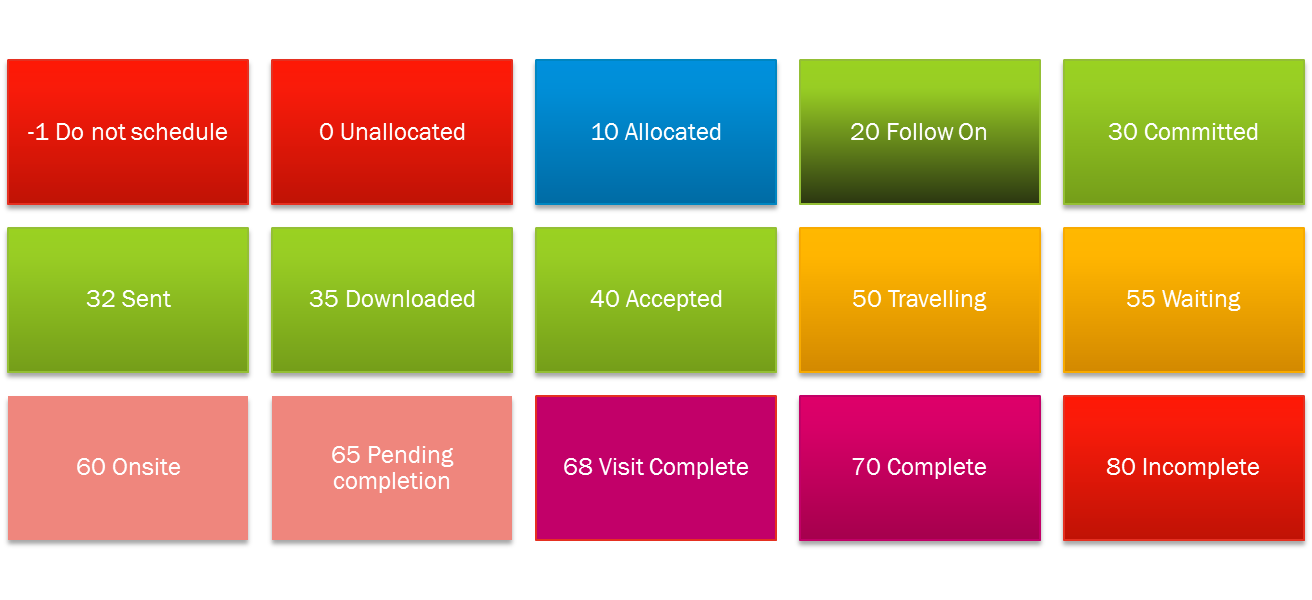
The diagram below shows all valid statuses for an activity. Two of these relate specifically to splittable activities. These are the status of 'Follow On' (status 20) and the status of 'Visit Complete' (status 68).
Note
For a split activity, an activity status of 'Do Not Schedule' (status -1) will be ignored if sent to a visit other than the first visit.
Follow On Status
The status of 'Follow On' is used by the DSE once at least one visit to a splittable activity has been committed (i.e. is at a status of at least Committed). The DSE will determine the start time for the committed visit following the normal rules for committed activities. For example the start time of a visit at status travelling will be calculated based on the travel start time and the estimated journey time.
However, for a splittable activity it is not necessary to complete the entire activity in this one visit, and the DSE will continue to apply the constraints and preference options described in the previous section in determining when the committed visit should end. This includes both splitting the activity into another shift and interrupting the activity with another activity (which may or may not be committed).
Any future visits scheduled for the activity are not themselves committed, but there are restrictions on how the DSE is able to schedule these visits as a result of the committed visit. The DSE must use the same resource as is used for the committed visit and can only split or interrupt visits where the constraints allow. For this reason all future visits are returned with a status of 'Follow On'.

Note
The 'Follow On' status is an output only status, and it is not necessary to send any input data to update the status of a visit to 'Follow On'.
Since the DSE is still able to interrupt committed visits to splittable activities, the duration of the committed visit may change as a result of updates to the schedule. For example if a new urgent activity is entered, the DSE may choose to interrupt the committed visit with this urgent activity, and so shorten the length of the committed visit. The minimum visit length will still apply, so in the example below the urgent activity is scheduled to start once the resource has completed one hour's work on the splittable activity.

There are now two later visits to the split activity, and both are given a status of 'Follow On'.
Visit Complete Status
The status of 'Visit Complete' is used to indicate that a visit to an activity has been completed, but the activity itself is not yet complete. In this case a follow on visit will always be scheduled with a duration of at least the minimum visit duration. This applies even if the total time spent on the activity already exceeds the expected duration.
Note
While this status is principally designed for use with splittable activities, it is possible to use it with non-splittable activities. In this case the DSE will schedule a single follow on visit for the work to be completed, of length at least the minimum visit duration for the activity.
Once the activity is itself completed the status of the final visit should be updated to 'Complete', and then no further visits will be scheduled. Any future visits that had been scheduled will be removed. For example, an activity may originally be split into two visits since it is expected to take two days to complete.

If the resource is able to complete the activity by the end of the first day, the status of this visit is updated to 'Complete', and the visit on the second day is then removed by the DSE.

As an alternative example, suppose an activity is originally scheduled to be completed in a single visit. The schedule below shows that the resource is already running over slightly on the activity and is approaching the end of his shift.

If he is unable to complete the activity in this visit, the visit status is updated to 'Visit Complete'. The DSE then schedules another visit to the activity on the second day, with length the minimum visit duration of one hour.

Updating Multiple Visits
The status of each visit can be updated individually and combined with status updates to other interrupting activities. In the example below the first visit is completed and the resource has now started a break. The second visit is downloaded to his PDA and there are third and fourth follow on visits scheduled for the second day.

Note
If the latest status for any visit is set to 'Complete' or 'Incomplete' then the statuses for any follow on visits from this point will be ignored. 'Visit Complete' should be used instead.
Invalid Fixed or Committed Split Visits
Once an activity has one or more committed or fixed time and resource visits, it is possible that the follow on visits for this activity cannot be scheduled validly. If this situation arises, the DSE will attempt to schedule as many visits as can validly be scheduled. If it cannot validly place another visit, it will place the remaining time at the end of the last valid visit. Note that this will result in an invalid schedule, and the schedule exceptions list will be populated accordingly.
As a simple example of this, consider one activity with a duration of 20 hours, with two shifts of 8 hours each available. We then fix the start of this activity to be the start of the first shift. The DSE will first split this activity across the two shifts, and will be unable to schedule the final 4 hours. Rather than cancel the split completely, it will instead merge these 4 hours with the final valid visit. Overall there will be two visits of this activity, one for 8 hours in the first shift, and one for 12 hours in the second. This is demonstrated in the image below.
