Merge Deliveries
Overview
This guide provides an overview of Merged Deliveries for Use Place Environments, allowing customers to combine multiple approved deliveries into a single deployment unit. This replaces sequential individual deployments, reducing deployment frequency, eliminating repeated downtime, and speeding up access to new functionality in both production and non-production environments.
Key Requirements and Compatibility
- A minimum of 2 deliveries should be selected.
- The Merge Deliveries feature is available in Release Update Studio and Build Studio for releases 25R2 and higher. All selected delivery versions should be 25R2 and higher. (25R1 and below are not compatible)
- All selected deliveries should be approved.
- The deliveries should all be of the same release track.
- The artifacts should be of the same deployment type (Online or Offline).
- Initial deliveries cannot be merged. Only subsequent deliveries created after the initial delivery are eligible for merging.
- Deliveries that were previously selected to be bundled together, cannot be selected again.
- The Merge Deliveries feature is available only to users with the Build Place Technician role.
Navigation
To begin, log in to your Lifecycle Experience Centre (LEC) account.
From the LEC homepage, navigate to Build Studio in the left main sidebar.
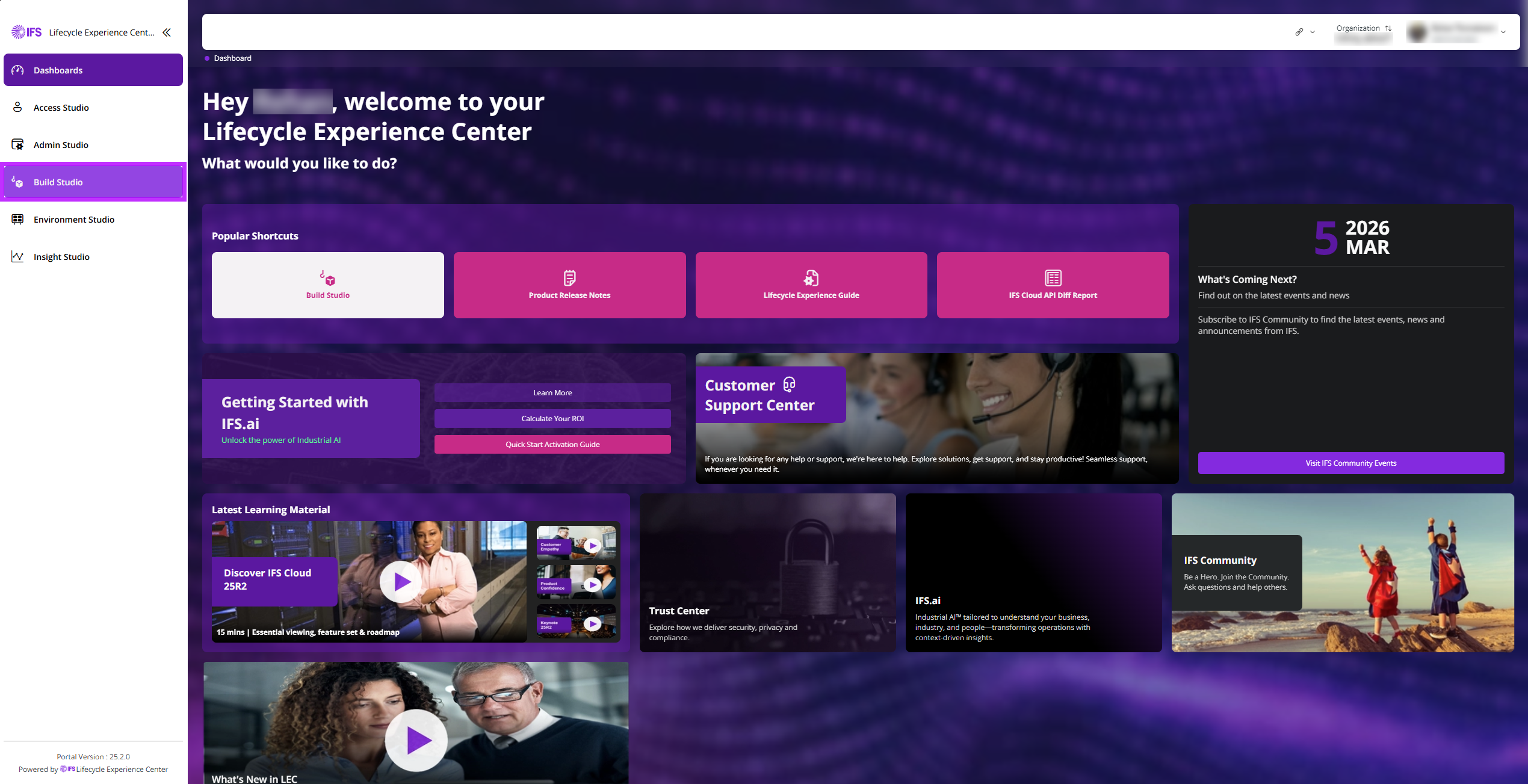 |
|---|
| Figure 1: LEC Homepage |
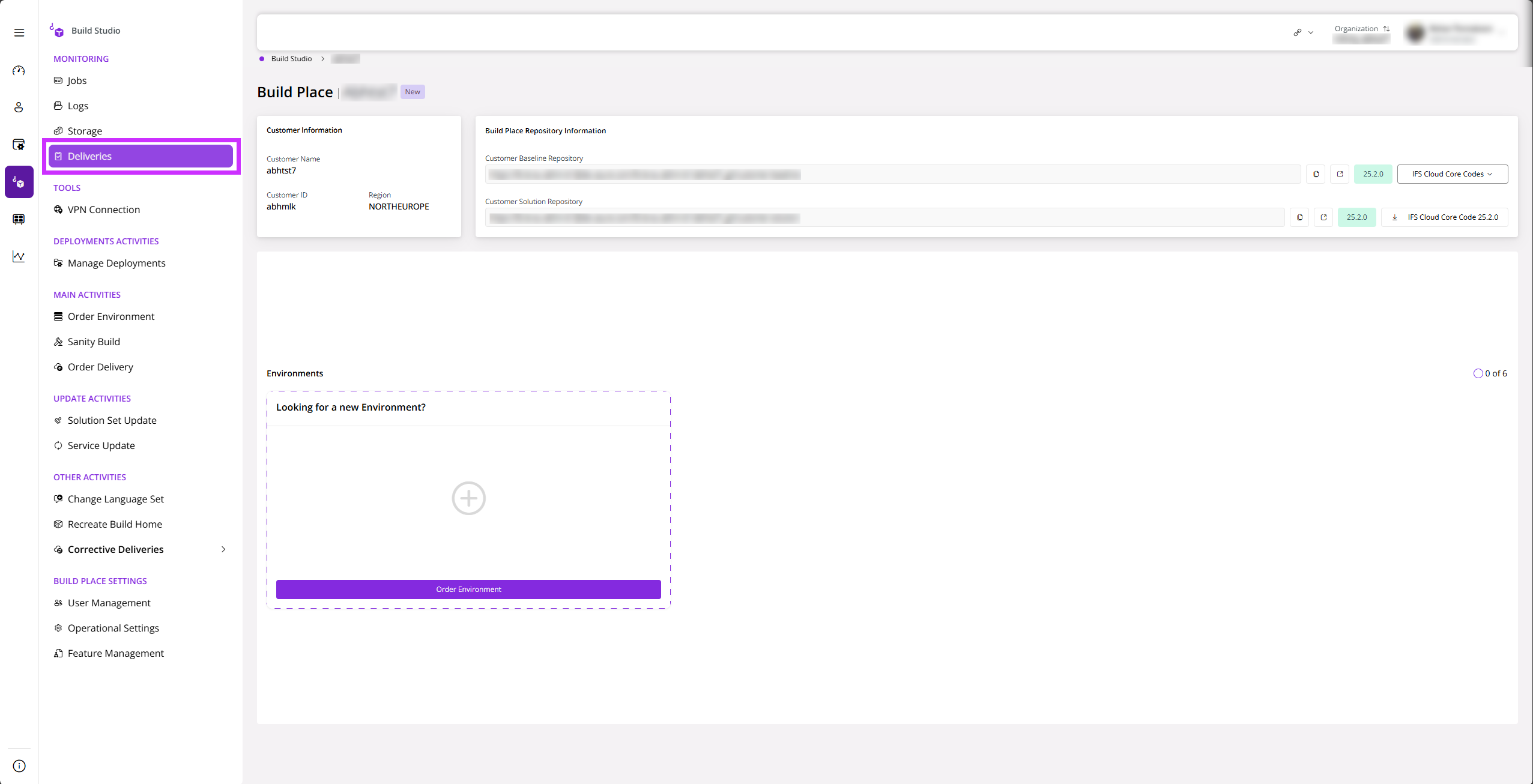
Once navigated to Build Studio, click Deliveries on the left sidebar.
 |
|---|
| Figure 2 : Select Deliveries in Build Studio |
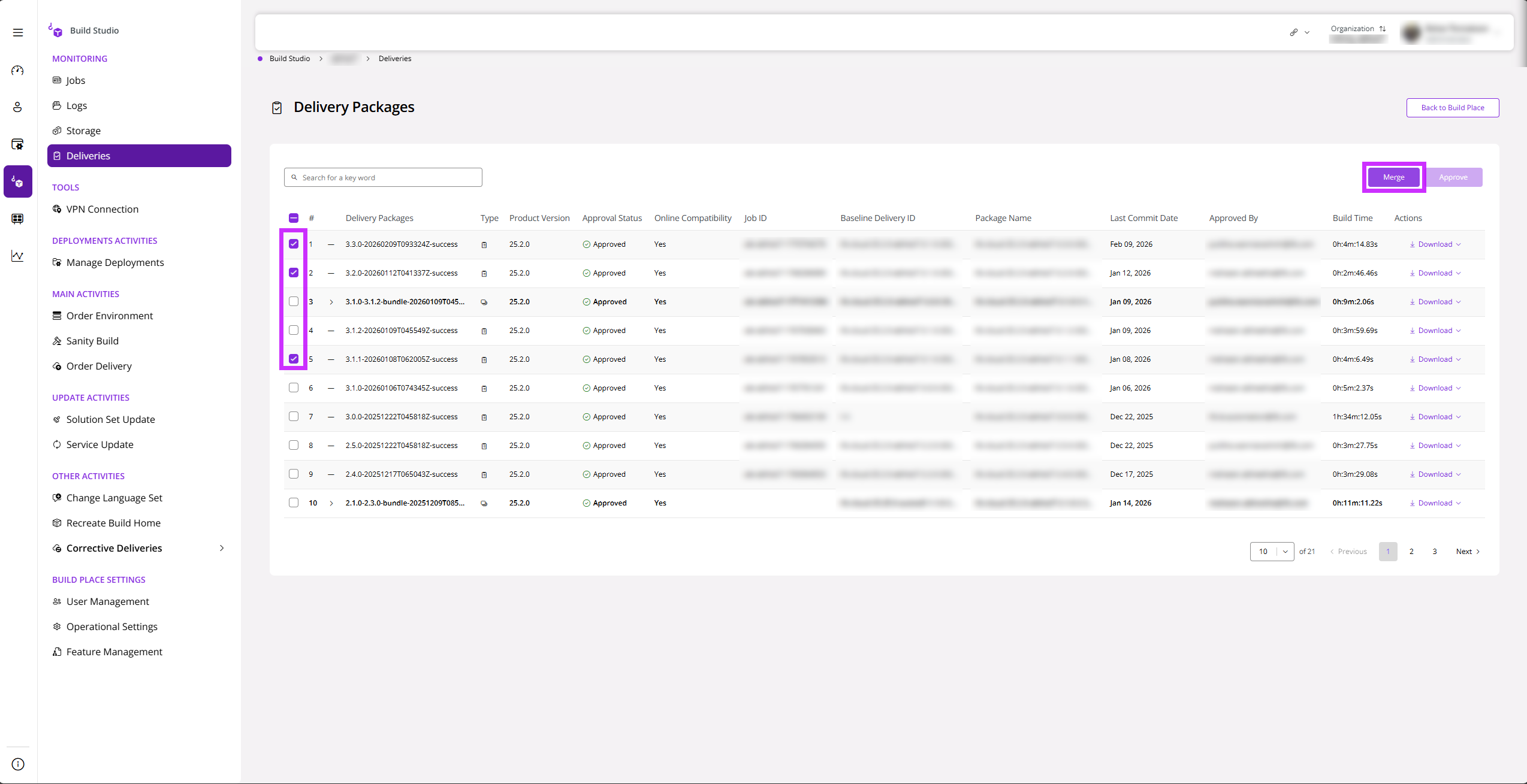
Once you view the Delivery Packages Page, you will be able to select the desired number of delivery packages that you wish to merge. Click Merge once you have selected relevant deliveries.
 |
|---|
| Figure 3 : Selecting Delivery Packages and Clicking Merge Button |
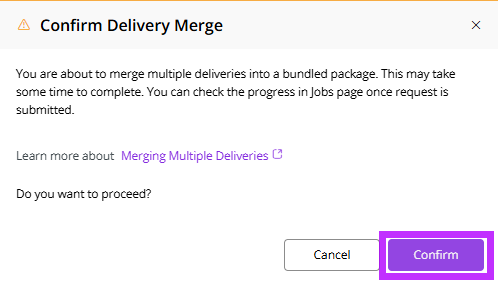
After selecting the deliveries and clicking Merge, you will receive a confirmation message. Click Confirm to proceed with the Merge Deliveries Request.
 |
|---|
| Figure 4 : Confirmation of Merge Delivery Request |
If the request is successful, you receive a success TOAST message.
 |
|---|
| Figure 5 : Merge Delivery Request Success Toast Message |
Criteria to be considered before selecting Delivery Packages
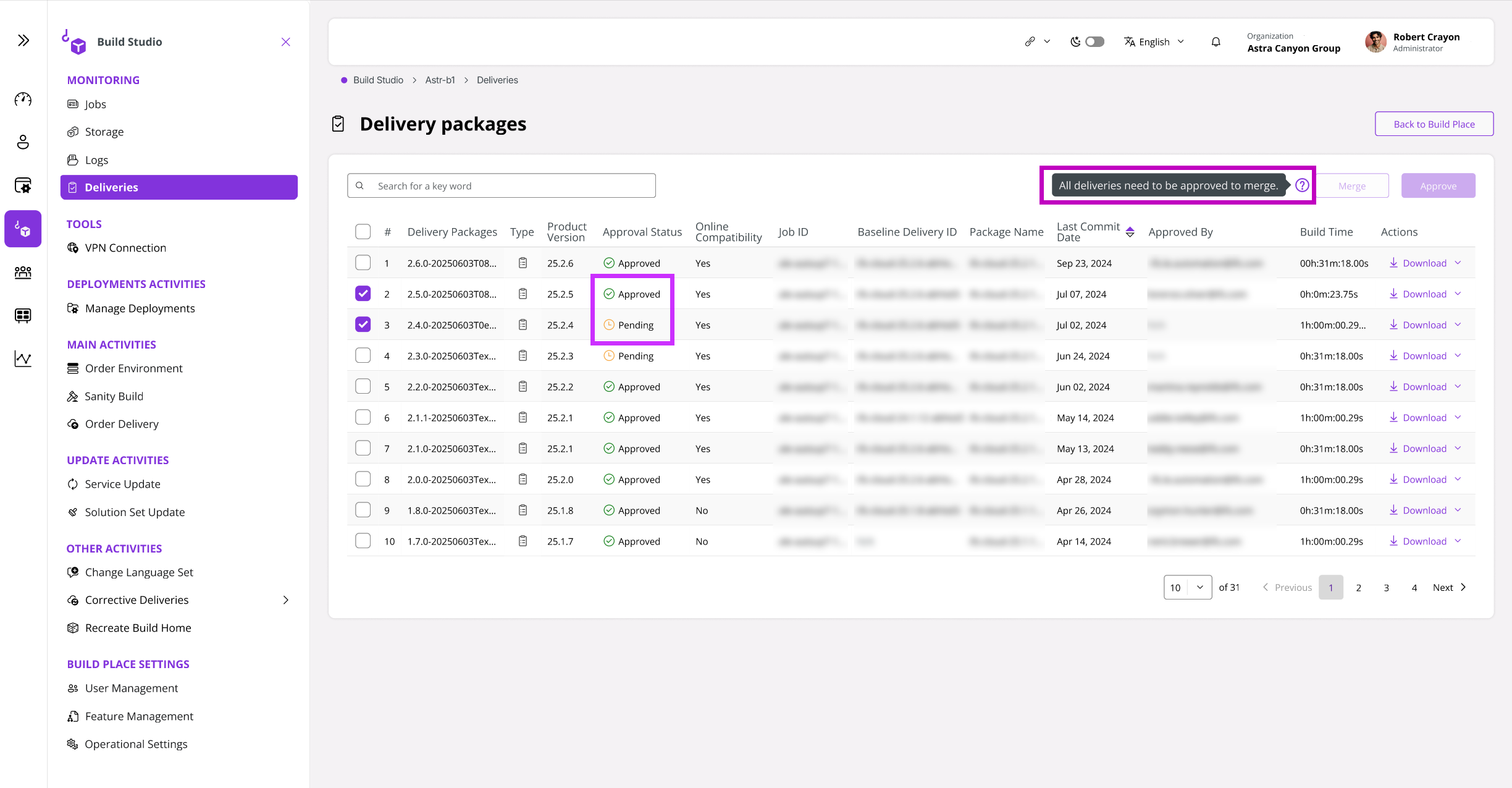
- The approval status of all single deliveries must be Approved. If not, you will not be able to proceed. A notification will appear stating that the selected deliveries cannot be merged.
 |
|---|
| Figure 6 : Cannot Merge Deliveries that are not approved |
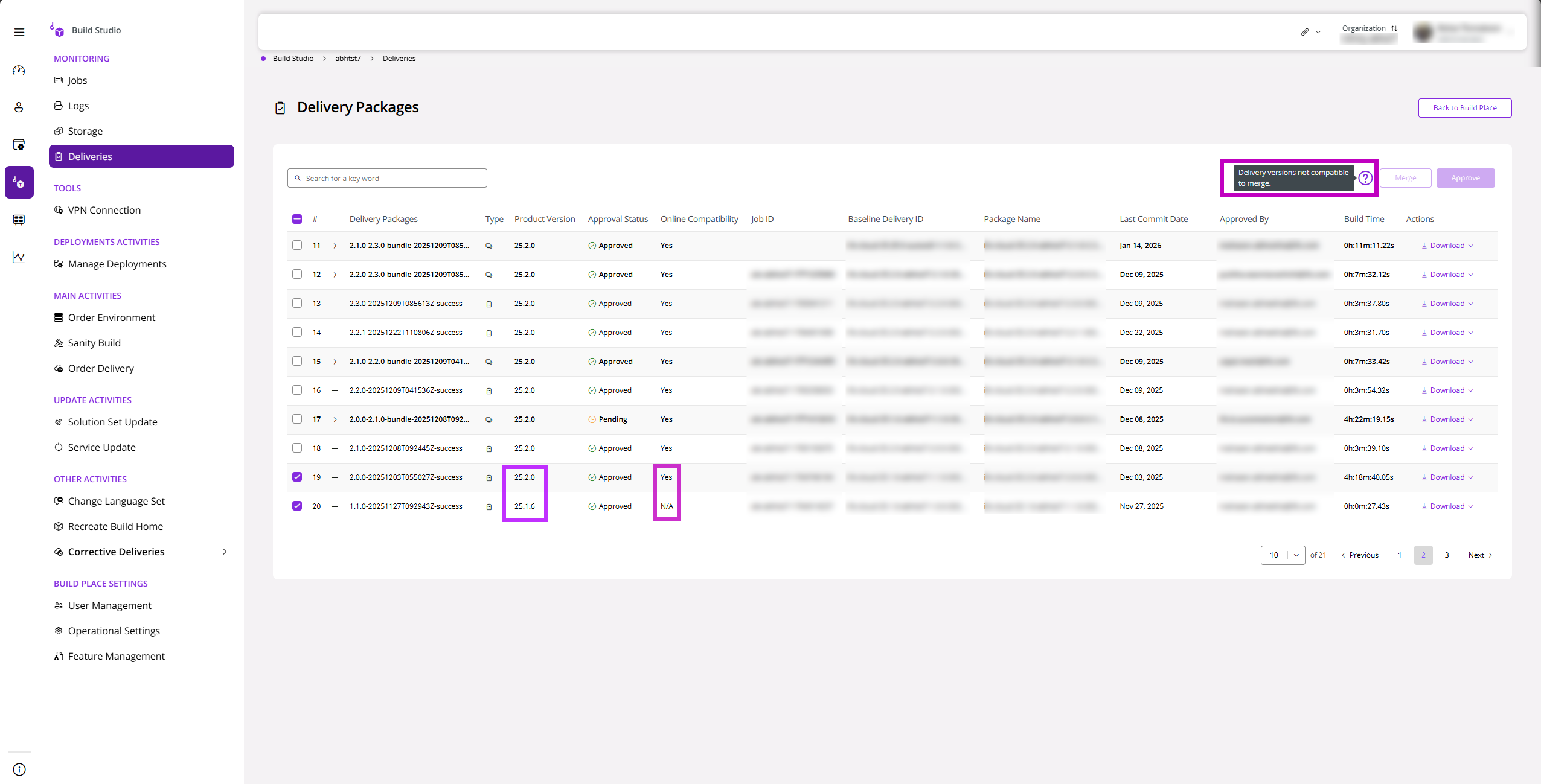
- The Online Compatibility must be the same for all deliveries. If the deployment types (Online/Offline) differ, you are not able to proceed, and you receive a notification stating this.
 |
|---|
| Figure 7 : Cannot Merge Deliveries With Different Deployment Types |
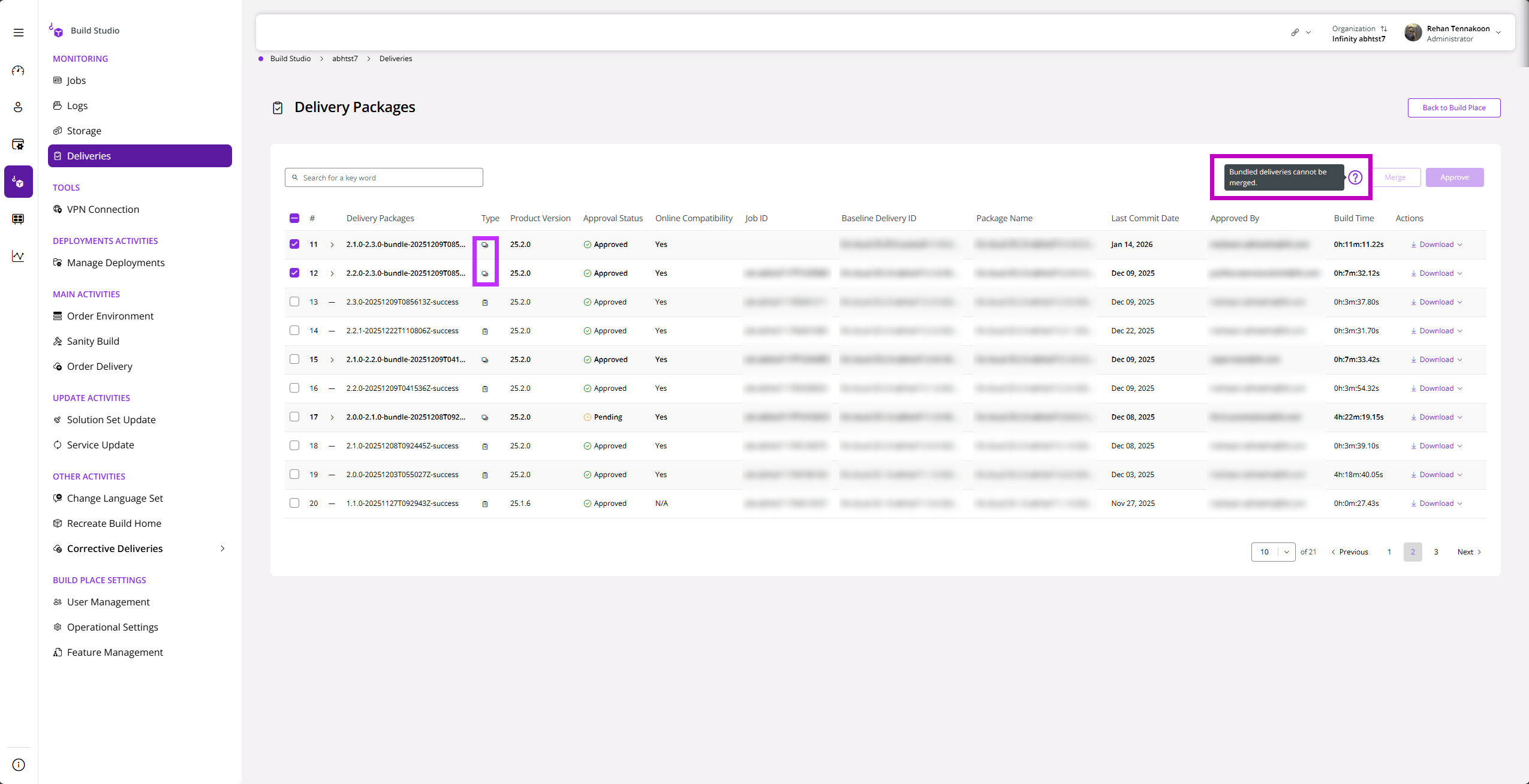
- If the merge request is currently in progress or if the merge request has already been completed successfully (Bundled), you will not be able to proceed. You will receive the following notification.
 |
|---|
| Figure 8 : Merging Already Bundled Deliveries |
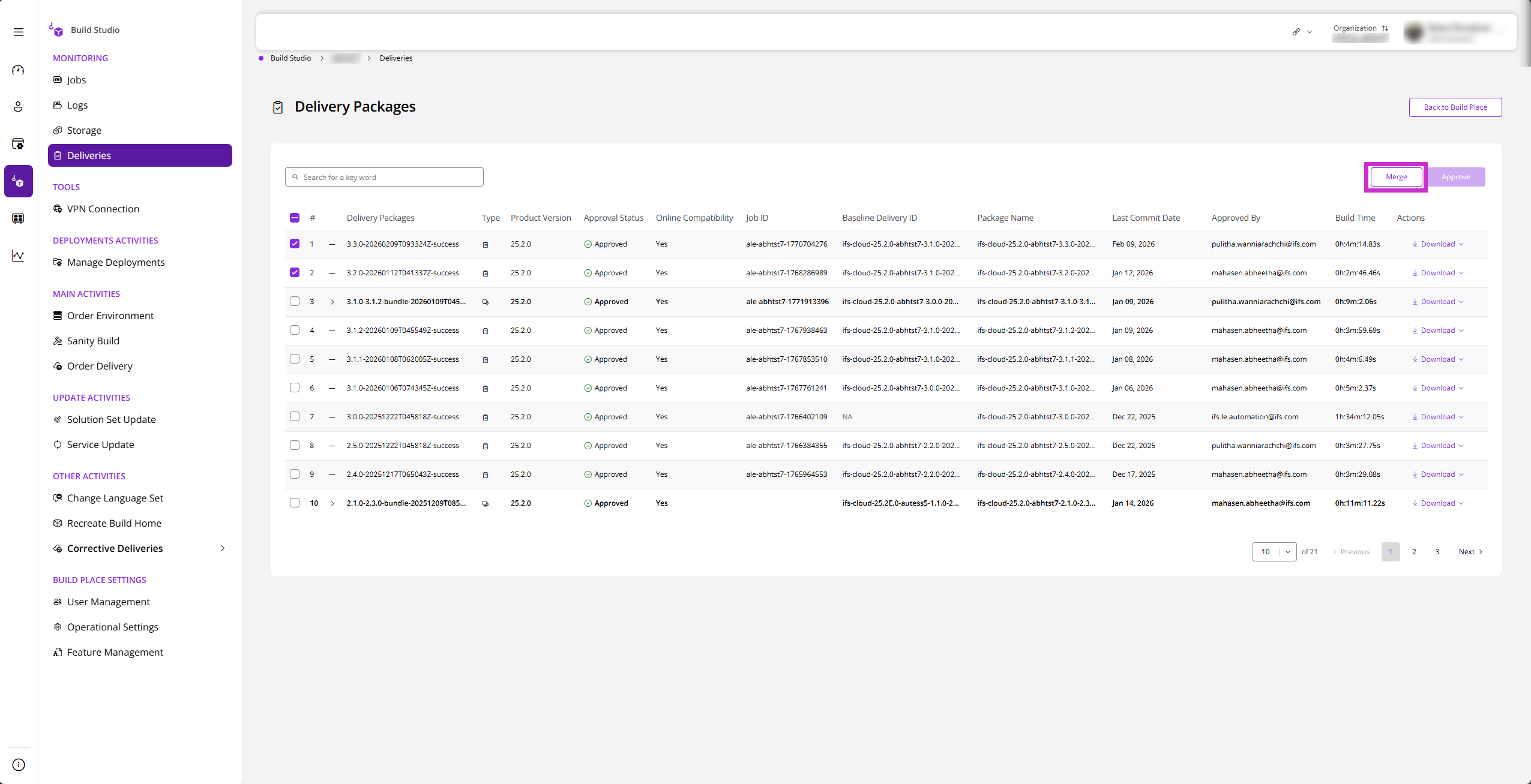
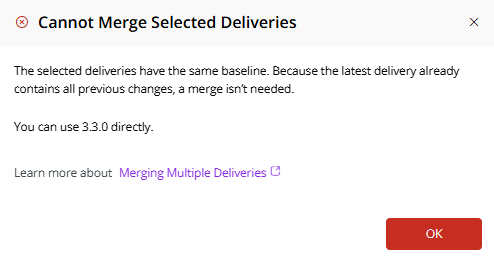
- If the selected deliveries share the same baseline, a merge is unnecessary because the latest delivery already contains all previous changes. In this case, the system will prompt you to use the latest version directly.
 |
|---|
| Figure 9 : Merging Deliveries with the same Baseline |
 |
|---|
| Figure 10 : Error message stating Merging not allowed due to deliveries being in the same baseline |
Approving a Merged Delivery Request
After successfully creating a Merge Delivery Request, users with the following roles have permission to approve the request:
- Build Place Technician
- Build Place User Admin
- Build Place Customer Solution Consultant
- IFS Product Support Consultant
- Build Place Customer Solution Dev
- IFS Product Support Dev
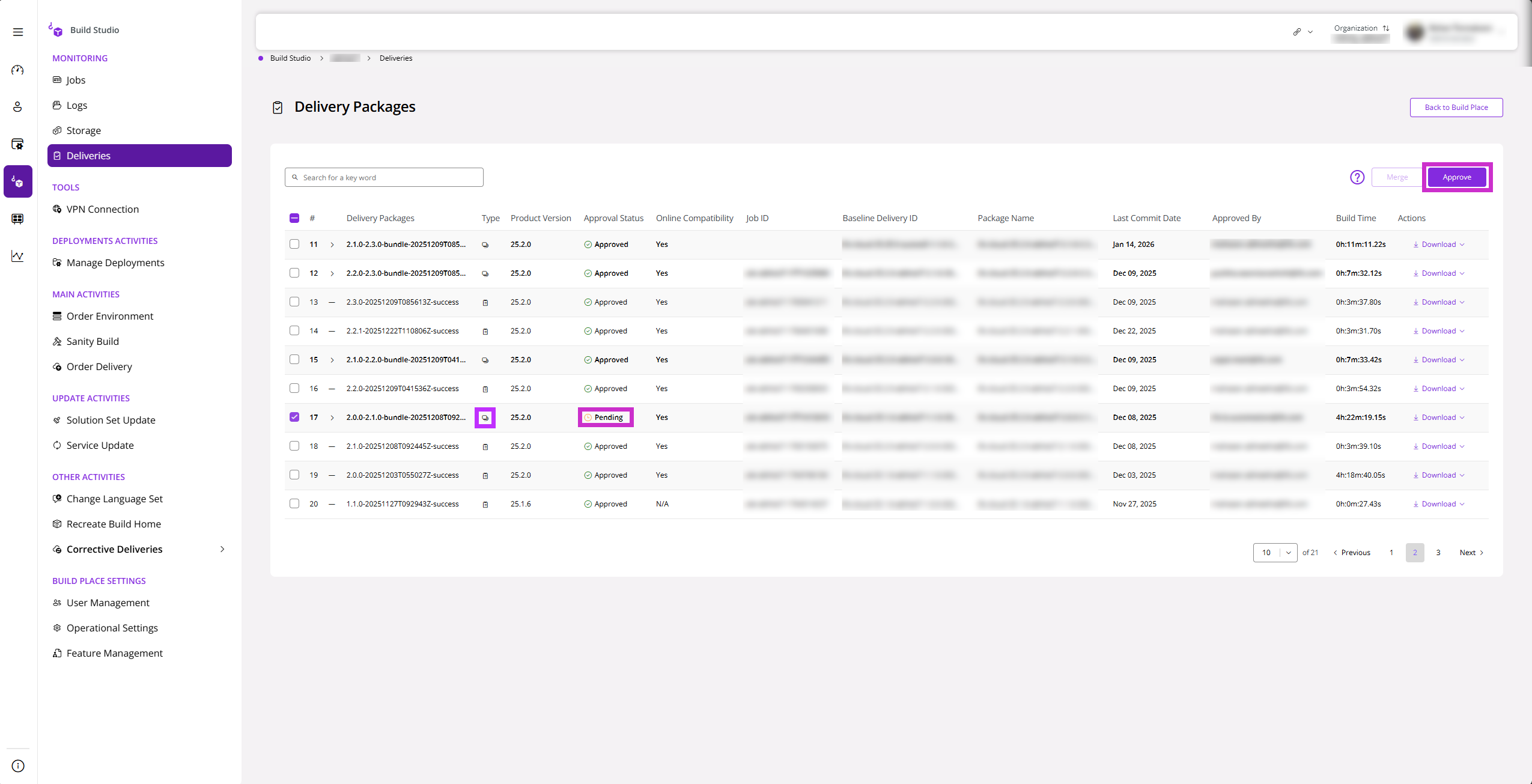
After accessing the Delivery Packages, the user will be able to identify the Merge Delivery Request because it will appear as a Bundled type.
 |
|---|
| Figure 11 : Bundled Delivery Type |
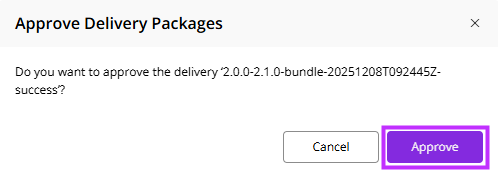
After selecting the package, the user will be able to approve it by clicking Approve.
 |
|---|
| Figure 12 : Approving a Delivery Package |
Validation Scenarios
Sequence Validation
To explain Sequence Validation, consider a hypothetical scenario where 3 delivery packages are selected to be bundled.
The selected delivery packages are first sorted in ascending order based on their current delivery versions.
After sorting:
- The baseline version of the first package is ignored.
- The baseline version of the second package must match the current delivery version of the first package.
- The baseline version of the third package must match the current delivery version of the second package.
An example of a valid sequence is shown below.
| Current Delivery Version | Baseline Delivery Version | |
|---|---|---|
| 1 | 1.1.0 | 1.1.0 |
| 2 | 1.2.0 | 1.1.0 (Matches the first package's current delivery version) |
| 3 | 1.3.0 | 1.2.0 (Matches the second package's current delivery version) |
In the above example, each delivery package correctly references the previous delivery as its baseline, forming a valid sequence.
A scenario where Sequence Validation fails is shown below.
| Current Delivery Version | Baseline Delivery Version | |
|---|---|---|
| 1 | 1.1.0 | 1.1.0 |
| 2 | 1.3.0 | 1.2.0 (Does not match the first package's current delivery version) |
| 3 | 1.5.0 | 1.4.0 (Does not match the second package's current delivery version) |
In the above case, the sequence is invalid because the baseline delivery versions do not match the expected previous delivery version in the sorted sequence. As a result, the system cannot confirm a continuous delivery chain, and the merge operation will fail.
Inclusion of Unapproved Deliveries
If the selected set of deliveries contains at least one unapproved delivery, the merge operation is not permitted. All selected deliveries must be in Approved status for the merge to proceed.
The following table illustrates how this works by taking 3 example deliveries.
| Package 1 Approval Status | Package 2 Approval Status | Package 3 Approval Status | Result | |
|---|---|---|---|---|
| 1 | Approved | Not Approved | Not Approved | Merge Delivery Request Failed |
| 2 | Not Approved | Approved | Approved | Merge Delivery Request Failed |
| 3 | Approved | Approved | Approved | Merge Delivery Request Successful |
Inclusion of Already Merged Deliveries
If the user selects one or more deliveries that have already been successfully merged into a delivery package, the merge operation will be blocked. Already merged deliveries cannot be included in a new merge request.
The following table illustrates how this works by taking 3 example delivery packages.
| Package 1 Merge Status | Package 2 Merge Status | Package 3 Merge Status | Result | |
|---|---|---|---|---|
| 1 | Not Merged | Already Merged | Not Merged | Merge Delivery Request Failed |
| 2 | Already Merged | Already Merged | Not Merged | Merge Delivery Request Failed |
| 3 | Not Merged | Not Merged | Not Merged | Merge Delivery Request Successful |
Mixing Online and Offline Deliveries
The system does not allow merging of online and offline deliveries in the same operation.
Users must select deliveries that are either all online or all offline. Selecting a combination of both types will prevent the merge from proceeding.
The following table illustrates how this works by taking 3 example delivery packages.
| Package 1 Implementation Type | Package 2 Implementation Type | Package 3 Implementation Type | Result | |
|---|---|---|---|---|
| 1 | Online | Offline | Online | Merge Delivery Request Failed |
| 2 | Offline | Offline | Online | Merge Delivery Request Failed |
| 3 | Online | Online | Online | Merge Delivery Request Successful |
| 4 | Offline | Offline | Offline | Merge Delivery Request Successful |
Inclusion of Excluded Delivery Types
The following delivery types are excluded from the Merge Deliveries feature:
- Recreate Build Home deliveries
- Corrective Delivery packages
Any attempt to include these delivery types together with other eligible deliveries will result in the merge operation being rejected.
The following table illustrates how this works by taking 3 example delivery packages.
| Package 1 Type | Package 2 Type | Package 3 Type | Result | |
|---|---|---|---|---|
| 1 | Normal Delivery | Recreate Build Home | Normal Delivery | Merge Delivery Request Failed |
| 2 | Corrective Delivery | Normal Delivery | Normal Delivery | Merge Delivery Request Failed |
| 3 | Normal Delivery | Normal Delivery | Normal Delivery | Merge Delivery Request Successful |
Packages excluded from Merging
- Recreate Build Home Packages : The Recreate Build Home operation cannot be included in bundle deliveries because it is specifically designed for creating a fresh Build Home or upgrading from an older IFS version to the latest baseline; not for incremental or layered customizations. Bundling it would serve no practical purpose and conflicts with standard delivery workflows that rely on existing Build Homes. For more information regarding Recreate Build Home refer; Documentation on Recreate Build Home
- Corrective Delivery Packages : Corrective deliveries in IFS Cloud are intended for ad-hoc, targeted fixes such as data repairs or out-of-the-box (OOB) issue resolutions. They must be small, independent changes with no dependencies on other custom work, allowing standalone installation on a specific deployed delivery. Only commits from the master branch are considered for merge delivery features; changes in separate branches (if best practices for corrective deliveries are not followed) will not be included. Follow IFS best practices by creating corrective deliveries from a topic branch based on the relevant baseline delivery tag, keeping them minimal and isolated. For more information regarding Corrective Deliveries refer; Documentation on Corrective Deliveries
Delivery Merge Failure Notification
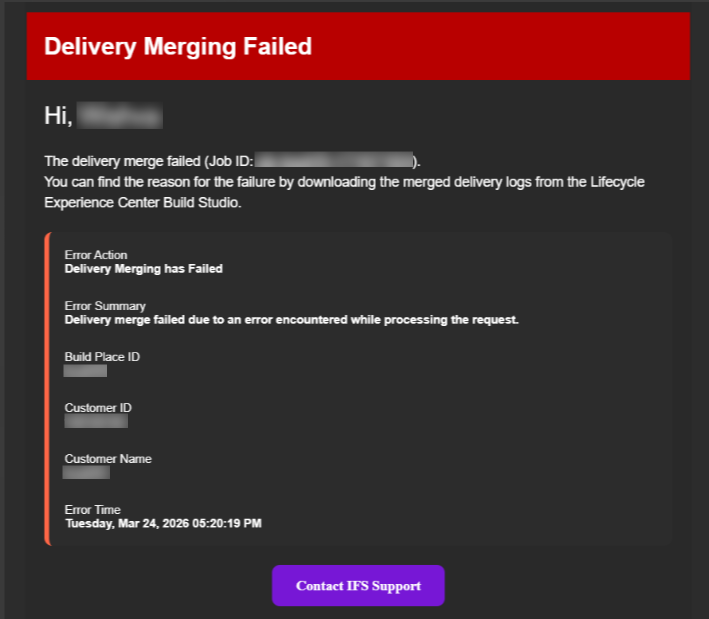
In the event of a delivery merge failure, an automated email notification will be sent to the relevant user account(s). The email will include the following details:
- Error Action
- Error Summary
- Build Place ID
- Customer ID
- Customer Name
- Error Time
 |
|---|
| Figure 13 : Email Notification in case of failure |