Page Toolbar
Within IFS Cloud, record pages encompass a Page Toolbar, equipped with unique controls specifically designed for the respective page. The range of options available in the Page Toolbar is decided by the system administrator, with some commonly featured choices highlighted below.

| Label | Name | Description |
| A | Show / Hide Record Selector | Toggle the visibility of the record selector using this option. |
| B | Attachments | Check the Attachments section for more information. |
| C | Add Record | Check the Using Record Page: Add Record section for more information. |
| D | Duplicate Record | Check the Using Record Page: Duplicate Record section for more information. |
| E | Edit Record | Check the Using Record Page: Edit Record section for more information. |
| F | Notifications | Check the Using Record Page: Edit Record section for more information. |
| G | Commands | The Commands section encompasses operations
that can be executed on the record. Each drop down menu within the
Commands section serves to categorize similar command types. Example: To generate a Pro Forma invoice, click on the Share button, as shown in the diagram below. Click on the Print Pro Forma Invoice button and complete the required information in the Report Format & Output slide-out menu to obtain the Pro Forma invoice. 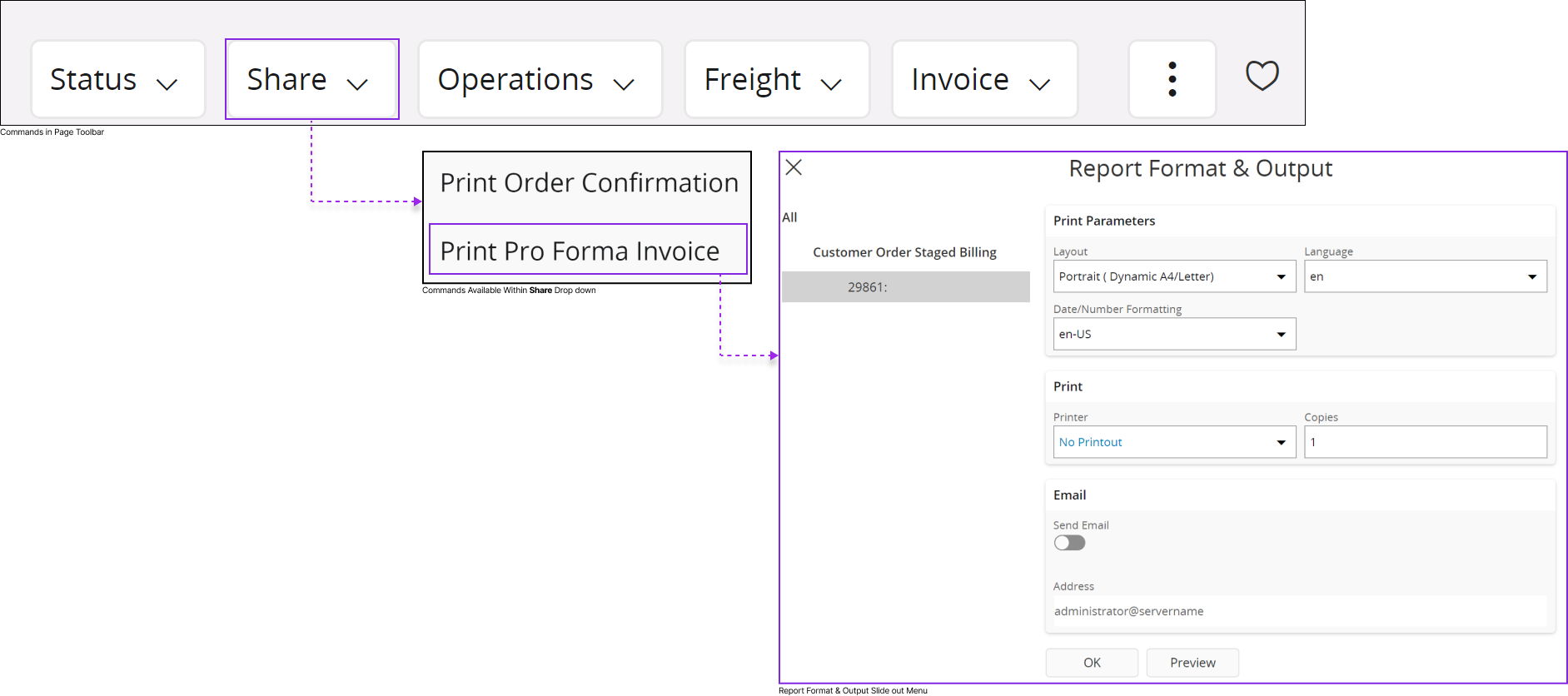 |
| H | Status Indicator | Within IFS Cloud's record pages, a status
indicator feature is available, allowing users to grasp the status of
the current process associated with the record. System administrators
possess the capability to configure the status indicator, assigning
distinct colors to represent various statuses.  |
| I | 3 Dot Menu | Depending on the screen size you use to access
the IFS Cloud web, any additional commands that couldn't fit into your
current screen will be consolidated within the
three-dot menu for easy access.  |
| J | Favorites | You can add the record to your
favorites list by using this option. You can filter all your favorite
records using page search pane filters. Check the Page Search Pane
section to learn more about how to use page search pane filters. |