Notification Types
In IFS Cloud Web, there are seven types of notifications. You can select the types of notifications you wish to receive from the Notification Panel.
 Navigate to the Notification Panel and click on the
cogwheel button located at the bottom left corner.
Navigate to the Notification Panel and click on the
cogwheel button located at the bottom left corner.
- This will display a menu with the notification types within IFS Cloud Web.
- Tick the box next to each notification type you wish to view in the Notification Panel.
 Click the 3 dot button at the bottom left corner of the Notification
Panel to direct access to message overview pages – Notifications,
Tasks, Scheduled Reports, Report Archive and Subscriptions.
Click the 3 dot button at the bottom left corner of the Notification
Panel to direct access to message overview pages – Notifications,
Tasks, Scheduled Reports, Report Archive and Subscriptions.
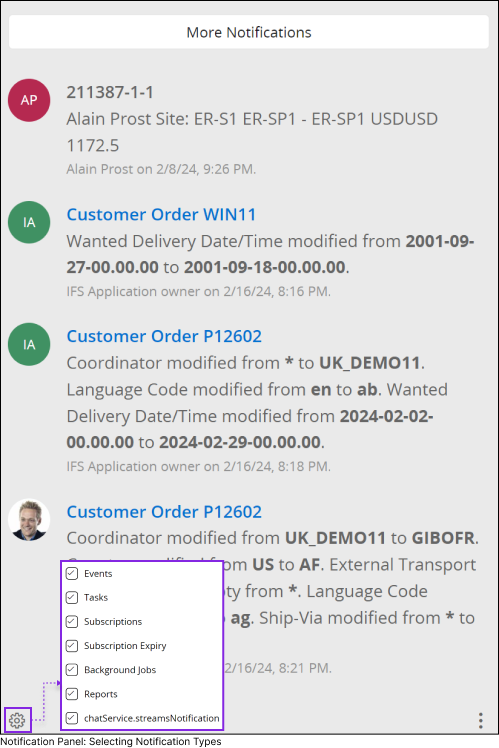
Types of Notifications in IFS Cloud Web
- Events: There are two types of events within IFS Cloud Web known as Application Defined Events and Custom Events.
- Application Defined Events: Depending on the business needs, IFS Application Groups may make changes to specific records at the database level. These changes are captured by functions within the business logic and then made accessible to external users via events(Application Defined Events). System administrators are able to enable/disable data base triggers for these exposed events via solution manager.
- Custom Events: System administrators can create events based on their requirement and define event action triggers for IFS Cloud Web pages.
As an end user, if you have access to record pages where your system administrator has enabled Event Triggers, and if you've enabled the notification trigger for Events, you'll receive notifications for any field changes made to that specific IFS Cloud web page.
- Tasks: If you're subscribed to a task, whether it's assigned to you or by you, you'll receive notifications in the notification panel for any updates made to the subscribed fields within the task. Go to Tasks Page to learn more about how to subscribe to a tasks.
- Subscriptions: If you are subscribed to a field within an IFS Cloud web page, you'll receive notifications in the notification panel for any changes made to the field, based on your configurations made during the subscription phase. Go to Subscriptions Page to learn more about how to subscribe to a field.
- Subscription Expiry: If your subscription within IFS Cloud Web is nearing its expiration date, you will receive a notification informing you of the expiration date for the subscribed field. Go to Subscriptions Page to learn more about how to subscribe to a field.
- Background Jobs: Administrators have the ability to schedule notifications for database tasks and configure scheduled tasks to run in the background. If you are subscribed to any of these tasks or scheduled background jobs, you will receive notifications in the Notification Panel.
- Reports: If you request a report or schedule a report from the Order Report page within IFS Cloud Web, you will receive a notification in the notification panel once the system finish generating the report. Go to Generating Reports Page to learn more about how to create /schedule reports.
- Streams Notifications: If there are any changes at the application level linked to the current business flows you are working with, you will automatically receive notifications about such changes. This notification type is embedded in the business logic within the application and cannot be configured like other notification types.