Task definition life cycle
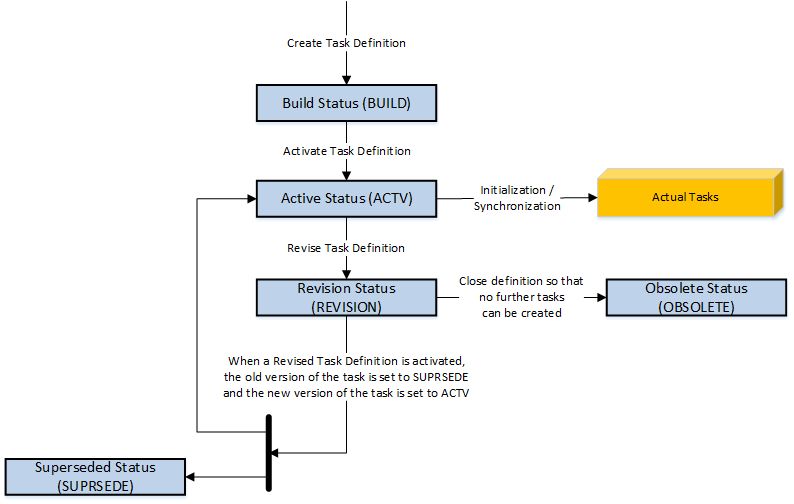
When you first create a task definition in Maintenix, it has the Build status. While it remains in the Build status, you can make modifications to the task definition, no actual tasks can be created from the definition.
When the task definition is complete, and has received the approval required by your organization, you activate the task definition, which changes its status from Build to Active. Active task definitions can be used to create actual tasks against inventory. In Maintenix, you can define the approval process for task definitions to suit the needs of your organization. For example, you can decide that multiple approvers review and approve a task definition prior to the activation. At a high level, the process is that the user who creates or revises a task definition requests its approval; approvers review the task definition, and they approve it or reject it.
Initializing a task definition creates actual tasks for the inventory to which the task definition applies. Only the active revision of a task definition can be initialized, unless the task definition is assigned to a maintenance program. Initialization can occur automatically or be done manually. For example, most blocks and requirements are initialized automatically by Maintenix; however, block and requirement definitions that are designated as being on-condition must be initialized manually. Active job cards are automatically initialized when their parent requirement is initialized.
When you create and activate a task definition for the first time, it is considered Revision 1 in Maintenix. When you need to change an active task definition, you create a revision of the task definition. There are now two revisions (versions) of the same definition, one in ACTIVE status which continues as the basis for actual tasks and one in REVISION status which you can change. When your changes are done and approved, you activate the version that's in REVISION status. It becomes REV 2 ACTIVE. REV 1 ACTIVE changes to SUPERSEDE status and actual tasks are now based on REV 2 ACTIVE.
- Delete Requirement: If a requirement is still in BUILD status, you can delete it from the requirement's Details page.
- Obsolete Task Definition: If a task definition is in REVISION status, you can make it obsolete (its status changes to OBSOLETE). You can obsolete multiple definitions at the same time from the Task Definition Search page.
The following diagram illustrates the various status transitions for task definitions.
Figure: Task definition life cycle
Task definitions can be revised many times, but only one revision can be active at any time. When you create and activate a new revision of a task definition, the status of the previous revision is changed to Superseded, as shown in the following diagram.
Figure: Task definition revisions
