Organizations and organization hierarchies
Organizations and sub-organizations are top-level entities that represent the structure of your organization.
When you first install Maintenix, a default organization is created automatically. This default organization is the administrative organization, and has the ADMIN organization type. The default organization represents the top level of your company, the parent company, or the service provider.
Under the ADMIN organization, you can create organizations to represent divisions of your company and other sub-organizations to represent departments and crews. Creating sub-organizations under the ADMIN organization is optional. If you have a relatively simple structure, using the default administrative organization to represent the company might suffice. But if you need to group together locations, users, and assembly configurations - and segregate groupings from each other, you create sub-organizations.
You might create sub-organizations to represent different divisions of one company, such as fleet operations or repair and maintenance. You can also use organizations to represent different companies that share the same Maintenix system. Companies might share a Maintenix system because they all belong to the same parent company, or because they each use the maintenance management services provided by another company.
- MRO
- Maintenance, repair and overhaul companies that perform aircraft maintenance activities. MRO organizations must be nested immediately below the administrative organization.
- Operator
- Airlines that are responsible for a fleet of aircraft. Operator organizations must be nested immediately below the administrative organization.
- Crew
- A group of people with particular skills who carry out a particular type of work.
- Department
- A distinct area of your operations, such as a fleet, supply organization, or maintenance area.
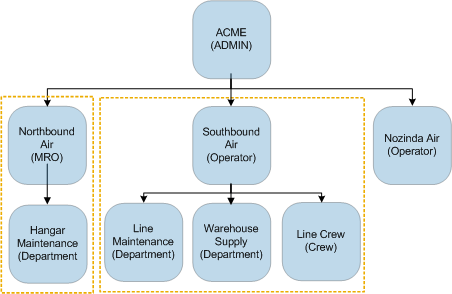
Organization hierarchies provide basic filtering for users. In the diagram below for example, a user who belongs to the sub-organization Southbound Air sees only the departments, crew, and users below Southbound Air. Also, when adding required skills to a maintenance task, users that belong only to the Southbound Air organization, can select only those skills that belong to Southbound Air.
Figure: Organization hierarchy
Primary organization for users
Every user you create in Maintenix must belong to at least one organization. When a user belongs to several organizations, you identify the user's primary organization. The primary organization is then automatically added as the user's organization to orders that the user creates. At any time, administrators can change the organizations associated with a user and can change the user's primary organization. To remove a user from a primary organization, you must first designate another organization as the user's primary organization.Externally-controlled option for operators
If your organization performs maintenance work on the aircraft of operators who supply the parts required for the work, you create that operator as an organization of type Operator and select the Externally Controlled check box. The externally-controlled option indicates that some or all of the parts needed to perform maintenance on the aircraft are supplied by the operator, not your organization.