Time Zone Support In IFS Cloud Web
IFS Cloud Web, Times Zone support is provided for our customers who operates in a global context where they need to see data accurately according to the location / country / region they intent. This page will guide you through the areas where IFS Cloud Web allows Time Zone support and the process of making pages and controls time zone aware, ensuring customers have a consistent and seamless experience. For a better understanding of the background of this feature, go to Time Zone Aware Development.
IFS Cloud Web, Time Zone feature is designed to work across web and mobile platforms and time zone badge on the UI will lets the end users to easily identify their selected time zone.
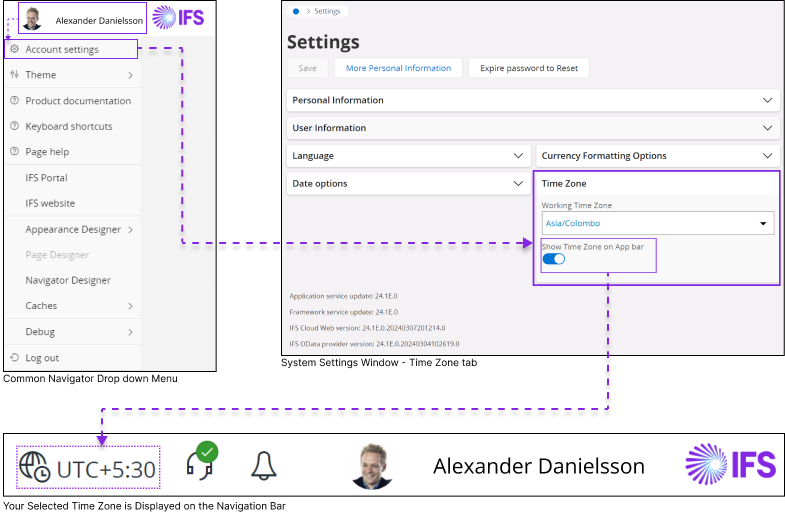
Example – Displaying Client Time Zone Badge in the Navigation Bar
Important: The user-selected working time zone does not guarantee uniform display of all timestamps across the application. How a timestamp is displayed depends on the time zone annotation of the underlying entity.
- Server-annotated entities (
TimestampTZRef "server"): Timestamps are stored relative to the server’s time zone (set via a System Parameter) and displayed according to the user selected working time zone. - Site-annotated entities (
TimestampTZRef "site(contract)"): Timestamps are stored relative to the site's configured time zone and displayed according to the site's time zone. A time zone badge is shown when the site time zone differs from the user's working time zone.
Note: To determine whether an entity is annotated as a Site or a Server, navigate to the following page in IFS Cloud:
Solution Manager > System Information and Utilities > Entities > Entity
Within the Entity Details section, look for the Time Zone Reference attribute, which indicates entity annotation.
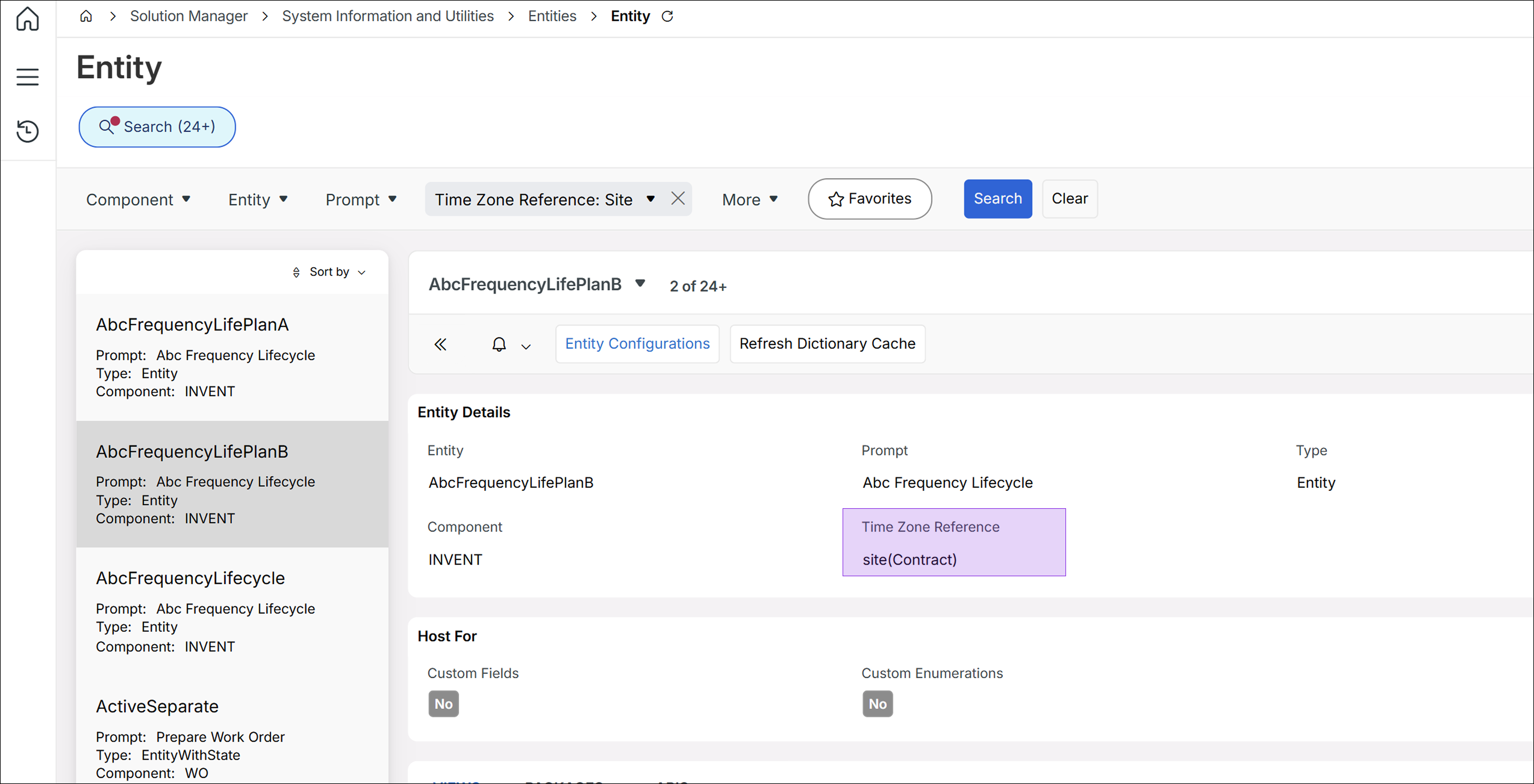
Configuration
To understand the Time Zone support and the process to make it work on each area of IFS Cloud please refer below,
Client Configuration:
- Standard attribute to Display Additional Time Zone
- Commands : clientinfo | stringify
Entity Configuration:
Time Zone Annotation Types
Entities in IFS Cloud can be annotated with one of two time zone reference modes using the TimestampTZRef code generation property:
TimestampTZRef "server"— Introduced in 24R1. All timestamp attributes on the entity are interpreted relative to the application server's time zone. The OData provider converts between UTC (used in API exchange) and the server time zone.TimestampTZRef "site"— Introduced in 24R2. All timestamp attributes on the entity are interpreted relative to the site's configured time zone (derived from the contract/site). The OData provider converts between UTC and the site time zone.
Note: An entity can be associated with only one time zone annotation. Bound actions, functions, and queries automatically inherit the entity's timezone annotation. References, however, use the timezone annotation of the referenced entity. Unbound actions, functions, structures, and virtuals require manual annotation.
Impact on UI display: Pages backed by server-annotated entities display timestamps relative to the user's working time zone. Pages backed by site-annotated entities display timestamps relative to the site's time zone. When these differ, a time zone badge is displayed.
Go to Time Zone Aware Development technical documentation for more information
- Making a Standard Entity time zone aware (Timestamptzref)
- Making a Custom Entity time zone aware (Server / Site : Time Zone Support)
- Time zone support for Custom Attributes
- Time zone support for Custom Actions (Server / Site : Time Zone Support)
- Time zone support for Query Designer (Server / Site : Time Zone Support)
Lobby Configuration (Datasource Creation): (Server / Site : Time Zone Support)
- Creating time zone aware Lobby Elements :
- SQL DataSource
- Projection DataSource
Date/Time Fields:
By default, a time zone badge will not be displayed next to Date/Time fields if the Working Time Zone and the Displayed Record Time Zone are both equal. If you still wish to display the time zone badge next to the date/time field when the two time zones are equal, you can configure the settings in the following areas:
General Features
Date/Time Picker:
Today/Now values selection in Date/Time Picker for time zone aware and unaware Entities.
Converting Date/Time values from different time zones to Client time zone in Date/time Picker for time zone aware Entities.
Calendar:
- Display events created by one user in a different time zone according to the client's time zone for the second user in the Calendar.
Gantt:
- Displaying Date/Time values according to Client Time zone in Gantt Chart timeline.
Search Context Pane:
- Displaying a time zone badge in Date/Time fields in Search Context Pane.
LOV:
- Displaying a time zone Badge next to Date/Time fields in the LOV.
Record Selector
- Displaying a time zone Badge next to Date/Time fields in the Record Selector.
Working TIme Zone:
Selecting a working time zone for the client, in IFS Cloud Web application is shown in the above image.
Additional Information
Time Zone Support for Mobile Applications:
- Documentation related to implementing time zone support for IFS Cloud Web Mobile Application.
Time Zone Support for APIs:
- How to enable time zone awareness in APIs
Time Zone Support for Workflows:
- You may refer to the Q&A page to understand how Workflow Handles Time Zone awareness in IFS Cloud.
Site Time Zone Cache:
- For details on the Site Time Zone Cache and configuration of the cache refresh interval, refer to Site Time Zone Cache