Content for Analysis Models - Power BI
This page enables you to access the Analysis Models - Power BI IFS Core models (including a sample report) which are required to be included in the Golden Workspace, and also the relevant Data Source Definitions for each Core Model. They are categorized based on the released IFS Version/ Service Update. These are designed to facilitate the Publishing and Downloading functions of Analysis Models - Power BI.
Refer the step-by-step guide below on how to use these samples: Quick Start Guide.
IMPORTANT:
- Please refer to the relevant release/ Service Update topic under the Version History section for release notes prior to downloading the models and the Data Source Definition files.
- How to determine which release version to download?
- This depends on the Application service update version you are currently on. For example, if you are on 24.2.7 (24R2 SU07), you can use the latest version available for that release and prior releases; for CRM model, download the files released for SU05, but for Inventory or Sales models, use the files released for SU07.
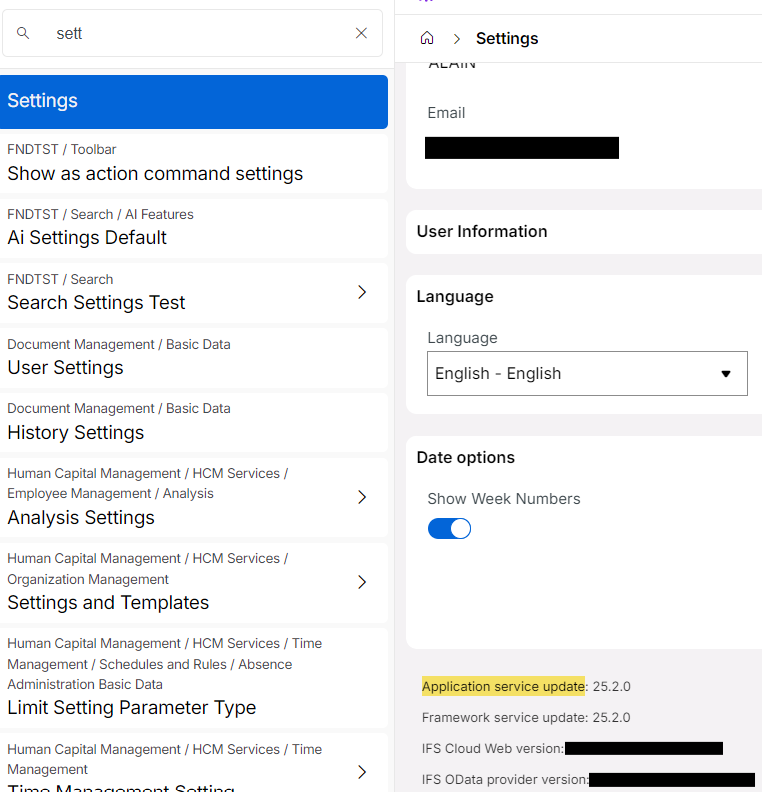
- The Application service update version can be found by navigating to the "Settings" page in IFS Cloud and scrolling to the end.
- Note that the "Framework service update" version is also available there, and it can be of a later release than the Application service update version. However, it should not be considered when determining the release version of Analysis Models - Power BI files to download.
IFS Core Models
Refer the Knowledge base resources to view and download all released Models based on the IFS Version/ Service Update.
Below are the new/ updated Models that were released.
New/ updated Models released in 24R1
| Area | Model | Release Version |
|---|---|---|
| CRM | CRM | SU06 SU11 |
| Finance | General Ledger | SU04 SU11 |
| HCM | Employee Analysis | SU04 SU11 |
New/ updated Models released in 24R2
| Area | Model | Release Version |
|---|---|---|
| CRM | CRM | GA SU05 SU12 SU18 |
| Finance | Cash Planning Group Reporting General Ledger |
GA, SU05 SU05 SU09 SU10 |
| HCM | Incident Analysis Salary Review Analysis |
GA, SU05 |
| Inventory | Inventory | GA SU05 SU07 SU08 |
| Maintenance | Asset Health Maintenance |
GA SU05 SU12 GA SU05 |
| Procurement | Spend Analysis Supplier Performance |
GA, SU05 |
| Production Performance | Production Performance | GA SU05 |
| Project | Project | GA SU05 SU14 |
| Sales | Sales | GA SU05 SU07 SU08 SU12 |
New/ updated Models released in 25R1
| Area | Model | Release Version |
|---|---|---|
| CRM | CRM | EA GA SU06 SU12 |
| Finance | Cash Planning Revenue Recognition General Ledger |
EA EA SU03 SU04 |
| Project | Project | EA SU08 |
New/ updated Models released in 25R2
| Area | Model | Release Version |
|---|---|---|
| CRM | CRM | GA SU06 |
| Finance | General Ledger | EA |
| Inventory | Inventory | EA |
| Maintenance | Asset Health Maintenance |
GA |
| Project | Project | SU02 |
| Sales | Sales | EA GA |
Data Source Definitions
Refer the Knowledge base resources to view and download all Data Source Definitions related to each of the above Model that are available based on the IFS Version/ Service Update.
Version History
26R1 GA Release / 25R2 SU06 / 25R1 SU12 / 24R2 SU18
CRM
DIM_SITE_DISCOM_INFO, a dimension used only in the CRM model, was initially an add-on to the DIM_SITE dimension. It was removed as an add-on in 24R2 SU16 / 25R1 SU10 / 25R2 SU04 Service Updates and 26R1 EA which causes an error when generating Access Views for DIM_SITE_DISCOM_INFO. This mainly affects Analysis Models - Tabular customers of the CRM model and since the dimension is not functionally required for the CRM model, it has been removed from the Tabular Model. To maintain consistency across the two Analysis Models solutions, the DIM_SITE_DISCOM_INFO table has been removed from the latest and future versions of the CRM Analysis Models - Power BI reports.
- These models have been made available as "24R2_V4", "25R1_V4", and "25R2_V2" along with the respective Data Source Definition file.
- Customers on all tracks can continue to use their current model version without updating since the DIM_SITE_DISCOM_INFO Access View is not required for the CRM Analysis Models - Power BI report.
- Customers of 26R1 GA can use the Analysis Models - Power BI 25R2_V2 report; no new version of CRM has been released exclusively for 26R1.
25R2 SU02 / 25R1 SU08 / 24R2 SU14
Projects
Implemented Incremental Loading in FACT_PROJECT_HISTORY_LOG_PQ which included adding two new columns to the Information Source. The model ("25R2_V1", 25R1_V2", and "24R2_V3") and Data Source Definition file have been updated accordingly to support Incremental Loading, which includes adding new columns and modifying m-queries of the aforementioned Facts, and have been made available. Note that,
- The sample report is configured for partitioning by month and configuring the model and data sources for other partitioning formats should be done by the customer.
- Similar to the other incremental loading-enabled models, the curly brackets fix has been implemented for the 25R2 version. Please refer to Incremental Loading Models - Curly Brackets Fix under the 25R2 EA Release section for more information on this.
25R2 GA Release
CRM
Implemented Incremental Loading in FACT_CUSTOMER_INVOICE_PQ and FACT_CUSTOMER_ORDER_LINE_PQ. The model ("25R2_V1") and Data Source Definition file have been updated accordingly to support Incremental Loading, which includes adding new columns and modifying m-queries of the aforementioned Facts, and have been made available. Note that,
- The sample report is configured for partitioning by month and configuring the model and data sources for other partitioning formats should be done by the customer.
- Similar to the other incremental loading-enabled models, the curly brackets fix has been implemented for this version. Please refer to Incremental Loading Models - Curly Brackets Fix under the 25R2 EA Release section for more information on this.
Asset Health
Added a new data source to the model, MAINTENANCE_ENV_PATH, to handle navigating to IFS Cloud pages from the model. In addition to that, the Asset Parent ID column was added to FACT_ASSET_HEALTH, and the source columns names of Service Contract Connection Type and Service Contract Invoice Type columns were changed in DIM_SERVICE_CONTRACT_LINE. The model ("25R2_V1") and Data Source Definition file have been updated accordingly to reflect these changes and have been made available.
With the above changes, the Asset Health Dashboard was also enhanced by incorporating asset hierarchy and highlighting specific serial objects in poor condition that are primarily responsible for the current asset state by introducing the "Structure Health" field.
Maintenance
The Asset Parent ID column was added to FACT_ASSET_HEALTH as a hidden field, and the source columns names of Service Contract Connection Type and Service Contract Invoice Type columns were changed in DIM_SERVICE_CONTRACT_LINE. The model ("25R2_V1") and Data Source Definition file have been updated accordingly to reflect the above changes.
Sales
Implemented Incremental Loading in FACT_RETURN_MAT_CHARGE_PQ that was previously unavailable. The model ("25R2_V2") and Data Source Definition file have been updated accordingly to support Incremental Loading, which includes adding new columns and modifying m-queries of the aforementioned Facts, and have been made available. Note that sample report is configured for partitioning by month and configuring the model and data sources for other partitioning formats should be done by the customer.
25R1 SU06 / 24R2 SU12
Asset Health
Added a new data source to the model, MAINTENANCE_ENV_PATH, to handle navigating to IFS Cloud pages from the model. The model ("24R2_V3") and Data Source Definition file have been updated accordingly and have been made available.
CRM
Implemented Incremental Loading in FACT_CUSTOMER_INVOICE_PQ and FACT_CUSTOMER_ORDER_LINE_PQ. The model ("24R2_V3" and "25R1_V3") and Data Source Definition file have been updated accordingly to support Incremental Loading, which includes adding new columns and modifying m-queries of the aforementioned Facts, and have been made available. Note that sample report is configured for partitioning by month and configuring the model and data sources for other partitioning formats should be done by the customer.
Sales
Implemented Incremental Loading in FACT_RETURN_MAT_CHARGE_PQ that was previously unavailable. The model ("24R2_V5") and Data Source Definition file have been updated accordingly to support Incremental Loading, which includes adding new columns and modifying m-queries of the aforementioned Facts, and have been made available. Note that sample report is configured for partitioning by month and configuring the model and data sources for other partitioning formats should be done by the customer.
25R2 EA Release
Incremental Loading Models - Curly Brackets Fix
Incremental loading was implemented for the General Ledger, Inventory, and Sales models under 24R2 and 25R1 Service Updates. In this release, a fix was made to the framework. In previous releases, when a Fact data source is converted from Load Type ‘Full’ to ‘Incremental’ in Parquet Data Sources, a curly bracket was appended to the Parquet File Path field. Because of this, the folder in the Data Lake is created with this curly bracket. This issue was fixed in 25R2 EA and the curly bracket no longer appears when the converting Load Types.
- For customers starting with 25R2 EA, we recommend downloading the Analysis Model and Data Source Definition files without the curly bracket to begin with. These files have been made available as "25R2_V1".
- For customers upgrading from a previous track who are already using incremental loading, it is possible to continue using your Parquet Data Sources and models without an issue. However, note that to begin using the Analysis Model and Data Source Definition files without the curly bracket means that the first load would be similar to a “Full” refresh of the data source as new partitioned Parquet Files will be created in the data lake since the Parquet File Path is now different to what it was previously.
Note that the curly brackets fix is applied to the latest model release prior to the 25R2 release, i.e., 24R2_V4 versions of Inventory and Sales models and the 25R1_V3 version of the General Ledger model. Future 25R2 versions published will also not include the curly bracket in the m-query of Incremental type Parquet Data Sources.
Update:- CRM_25R2_V1 model supporting incremental loading has been released with the above fix for 25R2 GA release.
25R1 SU04 / 24R2 SU10
General Ledger
Implemented Incremental Loading in FACT_PLAN_TRANS_VALID_PQ to include partitioning by date. These models have been made available as "24R2_V4" and "25R1_V3" along with the respective Data Source Definition file.
25R1 SU03 / 24R2 SU09
General Ledger
Implemented Incremental Loading in FACT_GL_ANALYSIS_PQ,FACT_IL_ANALYSIS_PQ and FACT_PLAN_TRANS_VALID_PQ. The model ("24R2_V3" and "25R1_V2") and Data Source Definition file have been updated accordingly to support Incremental Loading, which includes adding new columns and modifying m-queries of the aforementioned Facts, and have been made available. Partitioning by date for the FACT_PLAN_TRANS_VALID_PQ information source will be implemented in a future release. Note that sample report is configured for partitioning by month and configuring the model and data sources for other partitioning formats should be done by the customer.
25R1 SU02 / 24R2 SU08
Inventory
Implemented Incremental Loading in FACT_INVENTORY_TURNOVER_PQ, FACT_INVENTORY_VALUE_PQ, and FACT_INVENT_TRANS_HIST_PQ. The model ("24R2_V4") and Data Source Definition file have been updated accordingly to support Incremental Loading, which includes adding new columns and modifying m-queries of the aforementioned Facts, and have been made available. Note that sample report is configured for partitioning by month and configuring the model and data sources for other partitioning formats should be done by the customer.
Sales
Implemented Incremental Loading in FACT_CUSTOMER_INVOICE_PQ, FACT_CUSTOMER_ORD_CHARGE_PQ, and FACT_CUSTOMER_ORDER_LINE_PQ. The model ("24R2_V4") and Data Source Definition file have been updated accordingly to support Incremental Loading, which includes adding new columns and modifying m-queries of the aforementioned Facts, and have been made available. Note that sample report is configured for partitioning by month and configuring the model and data sources for other partitioning formats should be done by the customer.
25R1 SU01 / 24R2 SU07
Inventory
Implemented Row Level Security (RLS) for Company and Site in the Inventory model. The model ("24R2_V3") and Data Source Definition file have been updated accordingly to include RLS tables and filters and have been made available.
Sales
Implemented Row Level Security (RLS) for Company and Site in the Sales model. The model ("24R2_V3") and Data Source Definition file have been updated accordingly to include RLS tables and filters and have been made available. In addition, Net Amount Cust Inv RC and Net Amount CO Credit RC measures were corrected, replacing the reference to REP_CURR_RATE column with Currency Rates measure in the measure expressions.
25R1 GA Release
CRM
Added Revision State and Revision State Desc columns to FACT_BUSINESS_OPP_LINE PQ Data Source, and to the CRM model. "V2" of the CRM model and the Data Source Definition file have been made available.
25R1 EA Release
CRM
Use_Pre_Ship_Del_Note and Use_Pre_Ship_Del_Note_Desc columns were made obsolete in the DIM_SITE_DISCOM_INFO_OL view. Hence, the two columns were removed from the DIM_SITE_DISCOM_INFO PQ Data Source and the CRM model.
Also note that the DIM_CUSTOMER_CONTACT column in BUSINESS OPP LINE table that was previously hidden in the IFS_CRM_24R2_V2 report has been removed; the FACT_BUSINESS_OPP_LINE PQ data source also has been updated accordingly in the CRM model Data Source Definition file.
Cash Planning
DIM_ACCOUNTING_PROJECT table was modified as follows: Updated COMPANY_CODE_DESCR column, removed Accounting Project Type Code column, renamed Accounting Project Group column to Accounting Project Group Desc and Project Origin Desc column to Project Original, and added new columns (which was added to the DIM_ACCOUNTING_PROJECT PQ Data Source as well).
General Ledger
The General Ledger model was updated to reflect the below mentioned changes.
- Credit and debit columns were added to GL ANALYSIS and IL ANALYSIS tables via the respective PQ Data Sources FACT_GL_ANALYSIS_PQ and FACT_IL_ANALYSIS_PQ.
- DIM_ACCOUNTING_PROJECT table was modified as follows: Updated COMPANY_CODE_DESCR column, removed Accounting Project Type Code column, renamed Accounting Project Group column to Accounting Project Group Desc and Project Origin Desc column to Project Original, and added new columns (which was added to the DIM_ACCOUNTING_PROJECT PQ Data Source as well).
- RLS implementation of Code Part Combinations was updated.
In addition, many measures were modified or added to the model as well.
Projects
In FACT_PROJECT_TRANS_PQ_OL view, the OBJID column was renamed as "ID" reflecting the change made to FACT_PROJECT_TRANS_OL view. Hence, the FACT_PROJECT_TRANS_PQ PQ Data Source and the Project model were also updated.
Revenue Recognition
The Revenue Recognition was newly released. It belongs to the Finance area.
24R2 Release
April 2025: All models were updated to apply the "Remove Empty” filter which clears null values for the columns being used on the “one” side of the “many-to-one” relationship. Hence, "V2" of all 24R1 and 24R2 are now published. The Data Source Definitions remain unchanged, except for the Cash Planning model (see below). Customers are recommended to download and publish the latest version of the 24R2 models and Data Source Definition files.
Cash Planning
In addition to the above, the Parquet File Path of the DIM_PROJ_PROGRAM PQ Data Source and DIM_SUB_PROJECT PQ Data Source were changed to be in "Finance" and "Shared" folders respectively. This change is reflected in the model as well as in the Data Source Definition file.
November 2024: The following models and respective Data Source Definition files were newly released for Analysis Models - Power BI as V1:
- Cash Planning
- Group Reporting
- Incident Analysis
- Inventory
- Maintenance - Asset Health and Maintenance
- Procurement - Spend Analysis and Supplier Performance
- Production Performance
- Project
- Sales
The CRM and General Ledger models were updated as follows:
CRM
Previously, DIM_REPORTING_PERIOD_CRM_PQ Information Source was used to ensure CRM-model specific filtering for Reporting Periods. In 24R2, this Information Source was replaced with DIM_REPORTING_PERIOD_PQ Information Source that can be used by multiple models (CRM, Asset Health/Maintenance, Production Performance, Projects, and Sales). Hence, the new DIM_REPORTING_PERIOD_PQ PQ Data Source was connected to the CRM model.
General Ledger
- A new Fact - FACT INTERNAL LEDGER ANALYSIS - was added to the model creating new relationships and measures based on the new Fact. RLS was implemented for the new Fact including an option to generate access for IL Code Combinations in the AD User Mappings page. New tables created:- CODE COMP COMBINATION IL and CODESTRING COMBINATION IL RLS
- Accounting Period table hierarchies were updated.
Other changes include applying/modifying format strings for columns and measures, applying sort-by columns for columns, making visible/hiding columns/measures, modifications to GL Analysis Measures table measures.