Counting inventory
You can perform counts of on-hand inventory to ensure that inventory records in Maintenix are accurate.
Counting inventory is important to ensure that the inventory records match the physical inventory that you actually have in your warehouse or storage facility, and to resolve any discrepancies so that the risk of going out-of-stock is minimized.
After the inventory count results are recorded, you can see whether there are any differences (discrepancies) between the actual quantities and the quantities that are expected based on the current inventory records. After you have analyzed your count results, you can recount inventory items as requested.
- Counting (can be performed on a mobile scanning device)
- Reviewing discrepancies
- Recounting for discrepancies (can be performed on a mobile scanning device)
- Resolving discrepancies
You can perform the following type of inventory counts:
- Cycle counts
- A cycle count is typically a scheduled count based on a part's ABC
classification, where the system automatically calculates the next count
date using the last count date and the count interval of the part's ABC
classification.
The cycle count is scheduled after the first count is performed. Once the first count is recorded in the system, the counting cycle is initiated and scheduled based on the part's last count date.
- Ad hoc counts
- An ad hoc count is an unscheduled inventory count for an aisle or a bin location.
- Recounts
-
A recount is an inventory count that is requested for a specific part number at a bin location to help resolve a difference in quantity.
Recounts are applicable to cycle counts and ad hoc counts.
Expected inventory
When counting inventory, you can expect specific part numbers for a bin location if there are bin levels or inventory assigned.
Figure: Expected and unexpected inventory
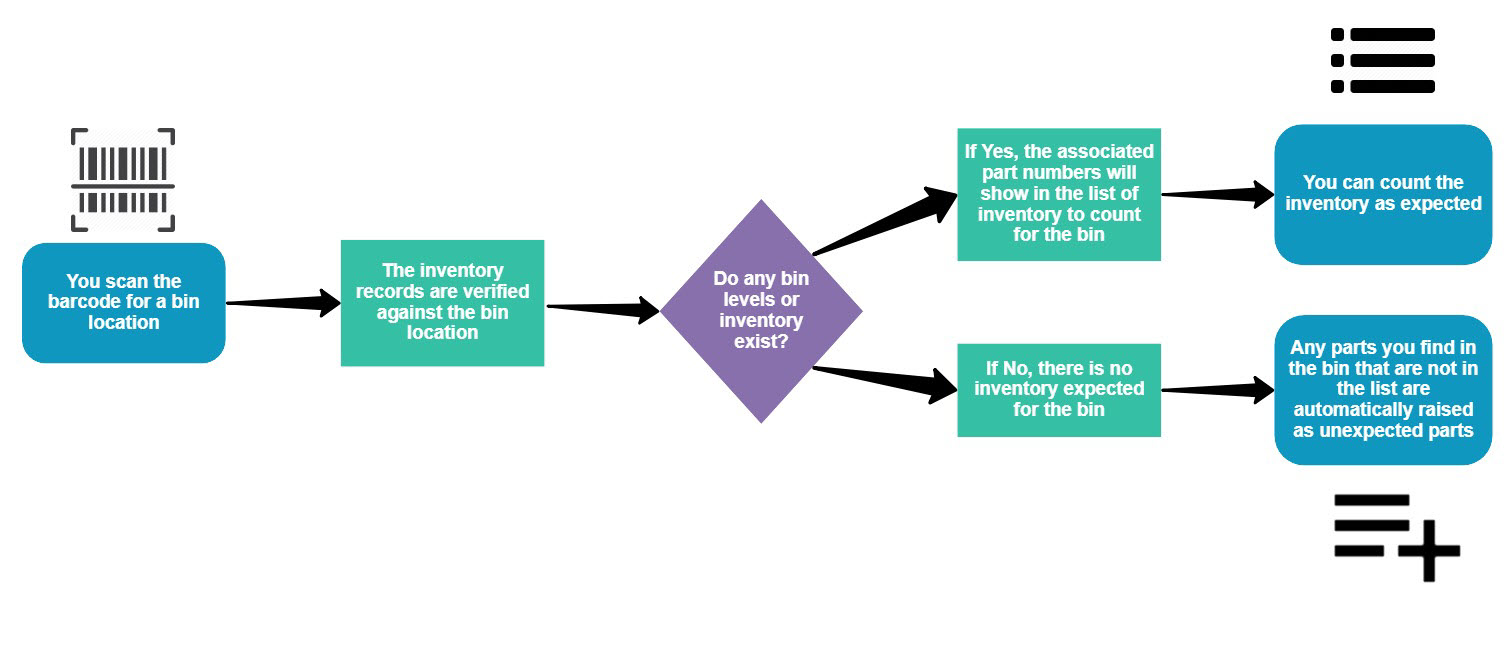
For each inventory item expected to be stored in a bin, you can see the part number, the manufacturer, the unit of measure, and an input field for the count. By default, the input field shows a count of 0.
To optimize the counting process, the list of bins with inventory to count is ordered as follow:
- By next count date (for cycle counts)
- Alphanumerically by location code for the bin's parent location
- By bin route order, if defined
- Alphanumerically by bin location code