How to obsolete Customization files in IFS Cloud
When obsoleting or removing customization files there are different steps that can be taken depending on when the files are obsoleted/removed and depending on if the file exists in Core as well or not.
Warning: It is important to follow these steps as deleted files are not picked up in regular delivery builds which can otherwise lead to obsolete files remaining in the build home causing issues on future deliveries!
Scenario 1: Removal of a file in the customer solution code that does not exist in Core
Common Examples
- Any Cust layer file handled in IFS Developer Studio, e. g. CustomerOrder-Cust.plsql
- A .cdb or .ins file that was introduced by a modification
Removal Process
These can only be physically deleted from the customer solution code when applying a Release Update and only before running the first successful Sanity-RU.
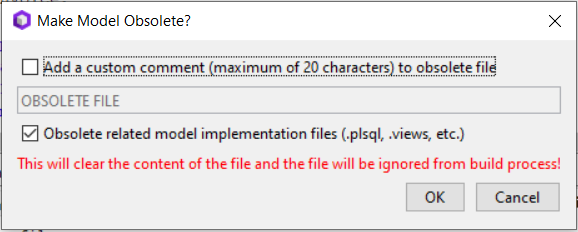
If the Sanity-RU has already run or when having to remove the file in any other situation outside of the RU process the file has to be emptied out instead. This can either be done by emptying the files manually using a text editor or by using the "Make Model Obsolete..." or "Make File Obsolete..." RMB options in the IFS Developer Studio navigator:
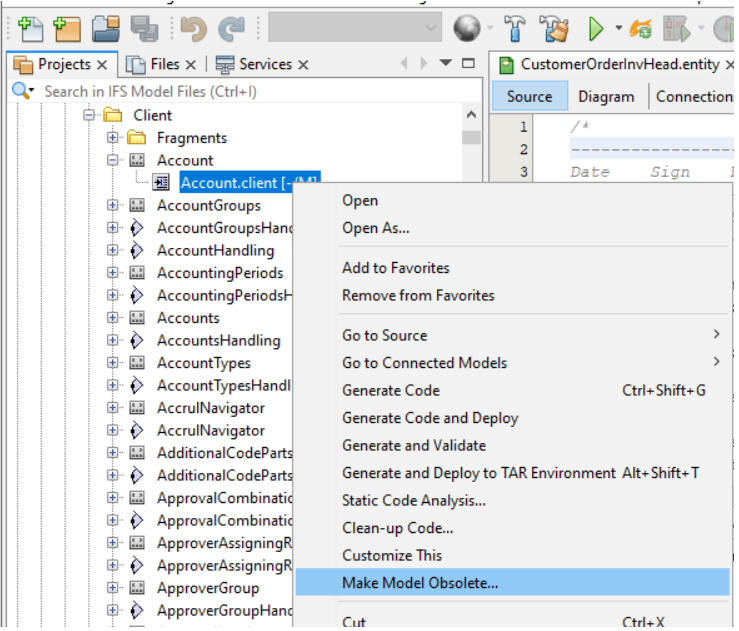
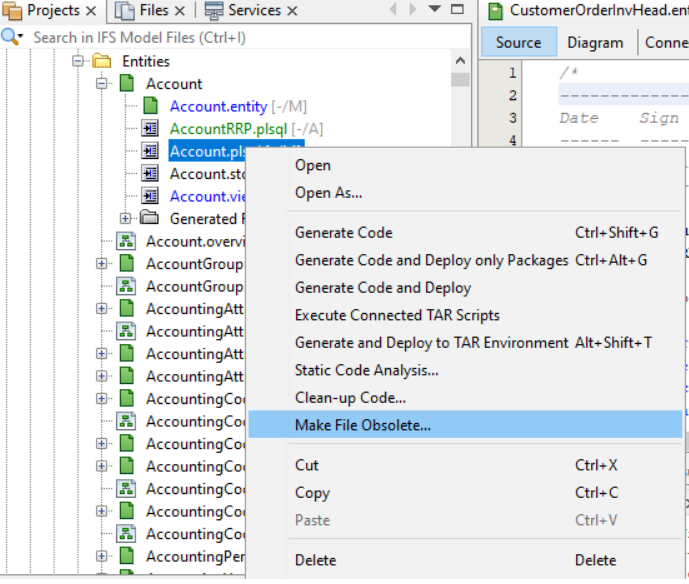
Additional Considerations:
- When obsoleting a model file it is recommended to also obsolete the respective implementation files (.views, .storage, .plsql, .plsvc, etc...) to avoid unnecessary implications.
- When obsoleteing a java projection model file, you should obsolete the respective java implementation files as well to avoid build errors. When obsoleting java impl files, instead of completely removing the content of java files, remove the methods and keep the main class only.
- If the file is a database script file (cre, upg, cdb, ins, sql, etc.) you will also have to add the file to the [IgnoreDeployFiles] section in the deploy.ini.
- If any database objects have been created from the obsoleted file these have to be cleaned up by creating a corresponding script with calls to
Database_SYS.Obsolete_Table#to remove modificatoin tablesDatabase_SYS.Obsolete_Column#to remove modification columns in Core tablesDatabase_SYS.Remove_<ObjectType>#to remove other modification objects like views, packages, sequences, materialized views, etc.
Scenario 2: Removal of files in the customer solution code that replace a file in Core
Common Examples
- Report .rdf and .xsd files
- Changes to Core .ins files
- Out of Band Support fixes of other Core files like .java or .plsql
Removal Process
These can be deleted from the customer solution code under two circumstances:
- When applying a Release Update before running the first Sanity-RU
- When applying a Service Update and the file is also touched by that Service Update
In any other situation you have to replace the file in the customer solution code with the Core version from the appropriate RU & SU and keep the file in the customer solution code until it can be removed as part of one of the above two circumstances.
Special Case: Removal of a whole component
When removing a whole modification component some extra steps are necessary:
- Remove the component from the custom: section in the solutionset.yaml - actually remove them, not just set them to false!
- Before deleting or emptying the files (see restrictions which to choose in Scenario 1 a drop script should be generated via the "Generate Drop Script..." RMB on the component in IFS Developer Studio. This drop script then has to be placed into the PRIFS component.
- Afterwards the files can be either deleted or emptied out as described in Scenario 1.
- The deploy.ini file also has to be obsoleted