Data Cleanup Task Schedulers
Five different system defined Database Task Schedulers have been configured in IFS Cloud to cleanup Workflow related historical data from the database.
You could modify the schedule options and data retention period default values in each scheduler. But it is highly recommended to keep the default values without changing them since some of the historical data needs to keep as per the data retention policy.
Note:
- Changing the default configuration, might lead to losing the data that requires for auditing.
- If the data retention period is significantly reduced, the subsequent execution of the cleanup task may take longer due to the volume of data being larger than normal. To avoid performance issues, consider reducing the data retention period in several steps, in smaller time intervals.
- The scheduled time can be configured to avoid overlapping with other resource-intensive jobs, thereby preventing performance setbacks.
Cleanup Workflow Process Instances
This scheduler is used to clear the old Workflow execution data from Workflow engine tables. It runs daily at 1.00 AM and clear the Workflow execution data older than the given month. Default is 3 months and can be reduced up to 1 month.
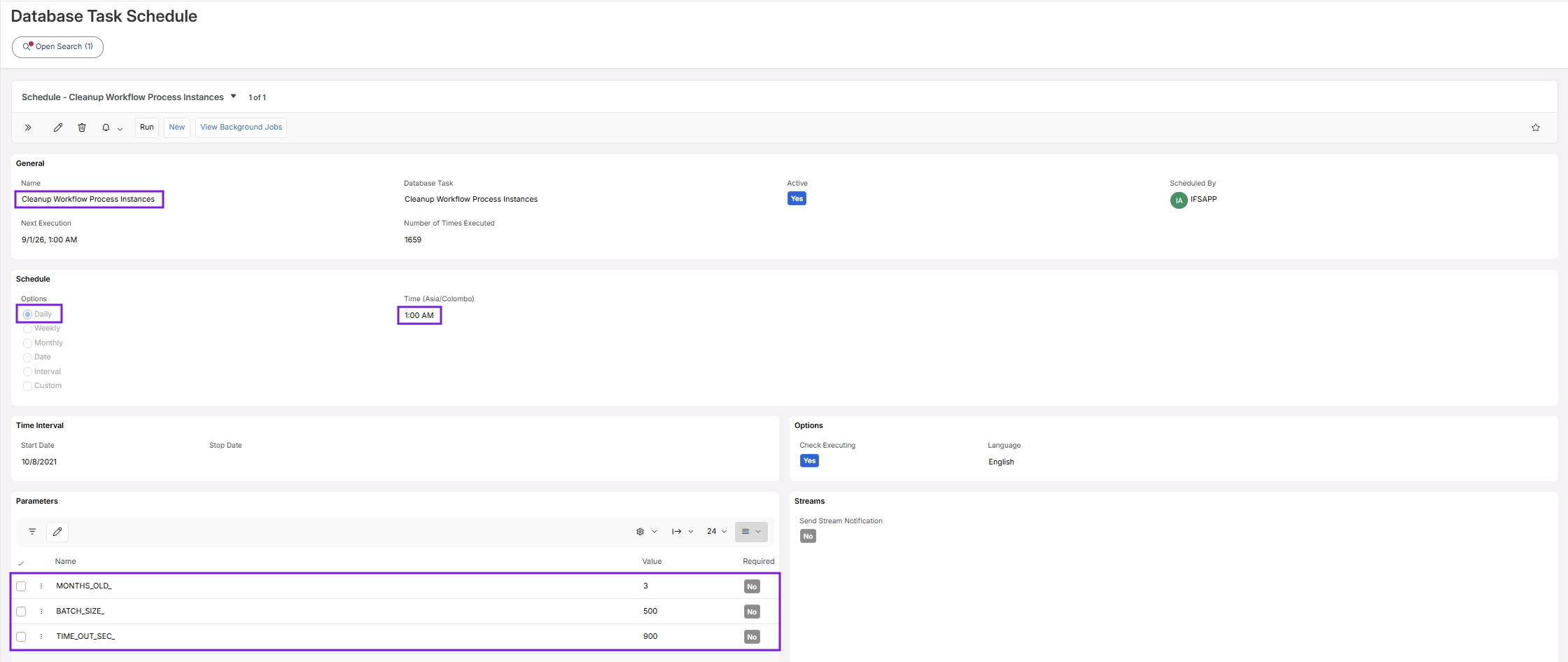
Schedule parameters highlighted above can be customized as per the requirement.
| Parameter Name | Description |
|---|---|
| MONTHS_OLD_ | Data retention period in months. Default is 3 months and can be reduced up to 1 month. |
| BATCH_SIZE_ | The data cleanup job is executed in batches, with the cleared data committed at the end of each batch. This parameter determines the batch size. default is 500. |
| TIME_OUT_SEC_ | Time out period in second. Default is 900 (15 minutes). This parameter determines the maximum duration the scheduler should run. If the scheduler job reaches this timeout period, it is automatically stopped. |
When the Workflow Process Instances cleanup runs, qualifying historical data is removed mainly from the Workflow engine tables that persist process instances and execution history for the embedded Workflow engine.
- History tables, such as
ACT_HI_PROCINST,ACT_HI_TASKINST,ACT_HI_ACTINST, andACT_GE_BYTEARRAY(rows used for historic detail, historic variables, job-log exception stacks, and attachment content), and etc.. - Runtime tables, such as
ACT_RU_TASK,ACT_RU_VARIABLE,ACT_RU_EXECUTION, andACT_GE_BYTEARRAY(blobs for runtime variables that are removed when variable rows are deleted), and etc..
When the Workflow Process Instances cleanup runs, it also removes qualifying failed activity log records from BPA_FAILED_ACTIVITY_LOG_TAB based on the configured retention settings.
Cleanup Workflow Observation Data
This scheduler is used to clear old Workflow Observation data. It runs daily at 1.00 AM and clear the Workflow Observation data older than the given hours. Default is 1 hour.
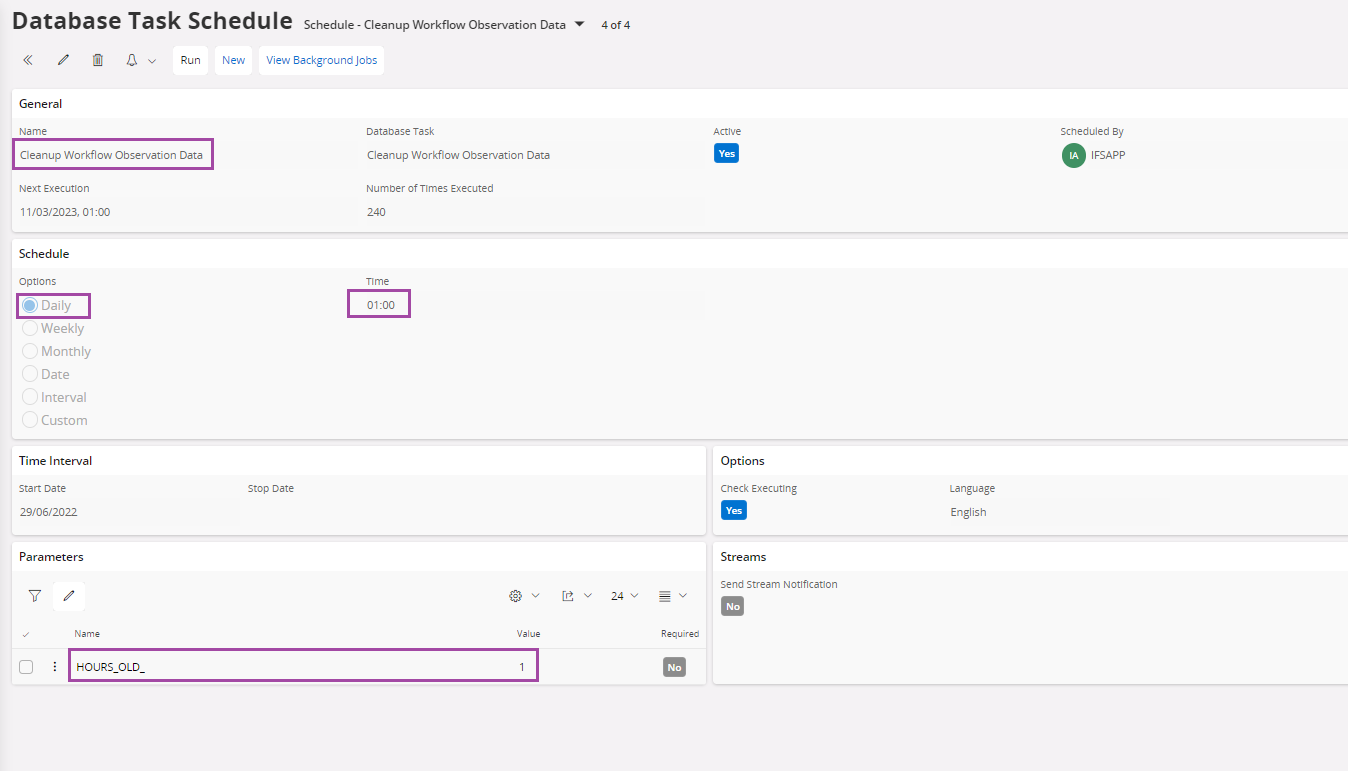
Schedule parameters highlighted above can be customized as per the requirement.
| Parameter Name | Description |
|---|---|
| HOURS_OLD_ | Data retention period in hours. Default is 1 hour; 1 hour is also the minimum configurable value. |
When the Workflow Observation Data Cleanup runs, qualifying historical data is removed from the following table:
BPMN_OBSERVATION_TABBPMN_WATCH_REQUEST_TAB
Cleanup Asynchronous Workflow Audit Data
This scheduler is used to clear the asynchronous Workflow execution audit data from BPA_ASYNC_SYS_AUDIT_TAB table. It runs daily at 1.00 AM and clear the already processed asynchronous Workflow’s data older than the given retention period. Default is 1 month (30 days) and can be reduced up to 1 day.
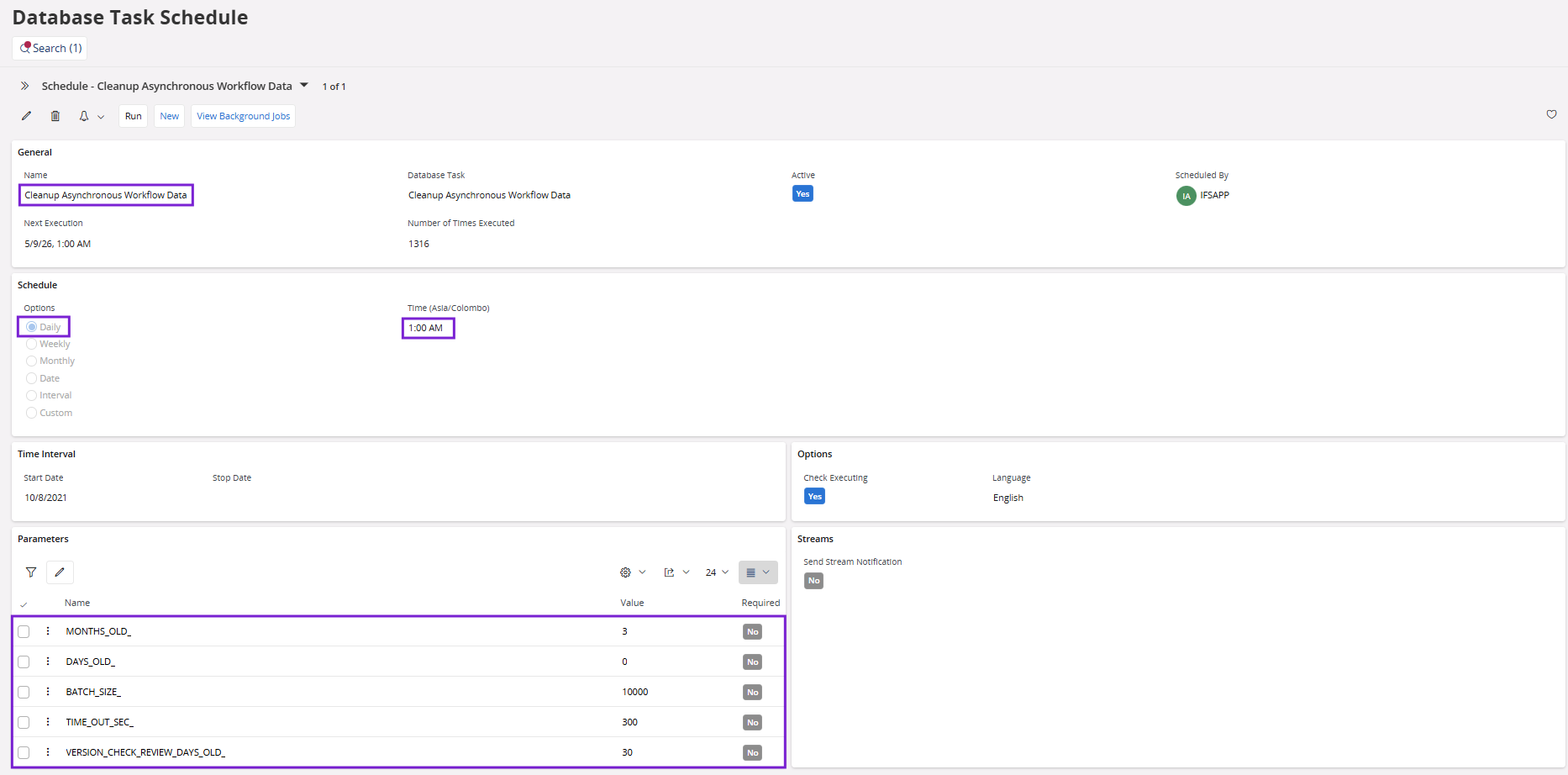
Schedule parameters highlighted above can be customized as per the requirement.
| Parameter Name | Description |
|---|---|
| MONTHS_OLD_ | Data retention period in months. Default is 1 month. Here, 1 month is equal to 30 days |
| DAYS_OLD_ | Data retention period in days. Default is 0. Both MONTHS_OLD_ and DAYS_OLD_ parameters can be specified same time, and the retention period will be calculated based on the aggregation of these two values accordingly. |
| BATCH_SIZE_ | The data cleanup job is executed in batches, with the cleared data committed at the end of each batch. This parameter determines the batch size. default is 10,000. |
| TIME_OUT_SEC_ | Time out period in second. Default is 300 (5 minutes). This parameter determines the maximum duration the scheduler should run. If the scheduler job reaches this timeout period, it is automatically stopped. |
| VERSION_CHECK_REVIEW_DAYS_OLD_ | This parameter controls the cleanup of records in the BPA_ASYNC_SYS_TAB table that have a Version Check Review Status of STOPPED. These are jobs that the admin was expected to manually review and execute but have remained in the system for an extended period. During the asynchronous cleanup process, any such records older than the specified number of days will be migrated to the BPA_ASYNC_SYS_AUDIT_TAB. Subsequently, they will be removed from the system as part of the standard asynchronous cleanup flow. |
When the Asynchronous Workflow Audit Data Cleanup runs, the following occurs:
- Migrates rows from
BPA_ASYNC_SYS_TABtoBPA_ASYNC_SYS_AUDIT_TABwhenSTATUSisDONE, or whenSTATUSisIPandRETRY_COUNTis greater than or equal to3, if matching rows exist. - Migrates async records that were stopped pending administrative review and approval from
BPA_ASYNC_SYS_TABtoBPA_ASYNC_SYS_AUDIT_TAB. - Removes qualifying historical data from
BPA_ASYNC_SYS_AUDIT_TABandBPA_ASYNC_ERROR_HISTORY_TAB.
Cleanup Workflow Troubleshooting Data
This scheduler is used to clear the old Workflow Troubleshooting data. It runs daily at 1.00 AM and clear the Workflow Troubleshooting data older than the given days and hours. Default is 2 days and 0 hour.
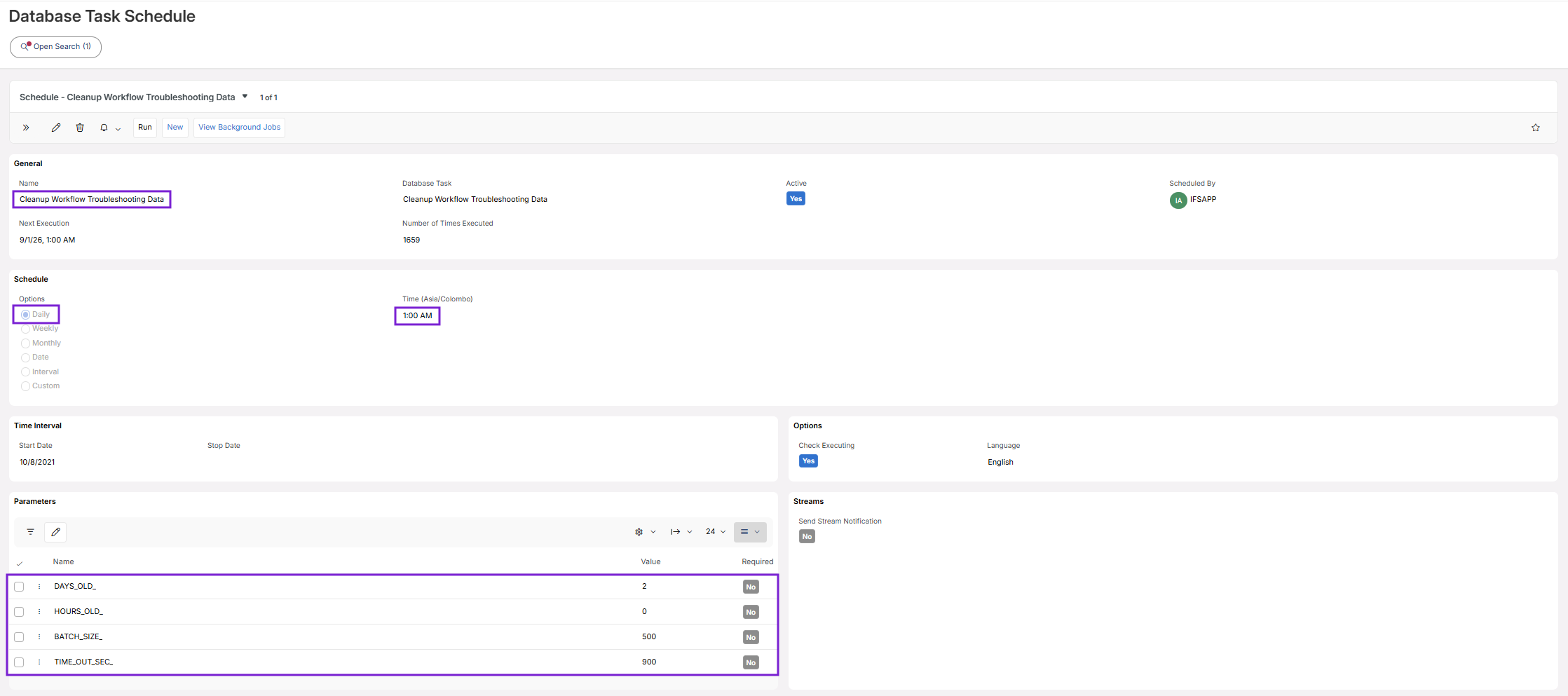
Schedule parameters highlighted above can be customized as per the requirement.
| Parameter Name | Description |
|---|---|
| DAYS_OLD_ | Data retention period in days. Default is 2 days. |
| HOURS_OLD_ | Data retention period in hourss. Default is 0. Both DAYS_OLD_ and HOURS_OLD_ parameters can be specified same time, and the retention period will be calculated based on the aggregation of these two values accordingly. |
| BATCH_SIZE_ | The data cleanup job is executed in batches, with the cleared data committed at the end of each batch. This parameter determines the batch size. default is 500. |
| TIME_OUT_SEC_ | Time out period in second. Default is 900 (15 minutes). This parameter determines the maximum duration the scheduler should run. If the scheduler job reaches this timeout period, it is automatically stopped. |
When the Workflow Troubleshooting Data Cleanup runs, qualifying historical data is removed from the following table:
BPMN_DEBUG_INSTANCE_TABBPMN_DEBUG_ACTIVITY_LOG_TABBPMN_DEBUG_USER_FORM_DATA_TAB- Workflow engine tables, such as
ACT_GE_BYTEARRAY,ACT_RE_DEPLOYMENT,ACT_RE_PROCDEF,ACT_HI_PROCINST,ACT_HI_ACTINST,ACT_HI_TASKINSTand etc..
Cleanup Workflow AI Invocation History Data
This scheduler is used to clear audit data related to ML service invocations by Workflows from the BPMN_INVOCATION_HISTORY_TAB table. It runs daily at 1.00 AM and clears data older than the given retention period. Default is 1 month (30 days) and can be reduced to 1 day.
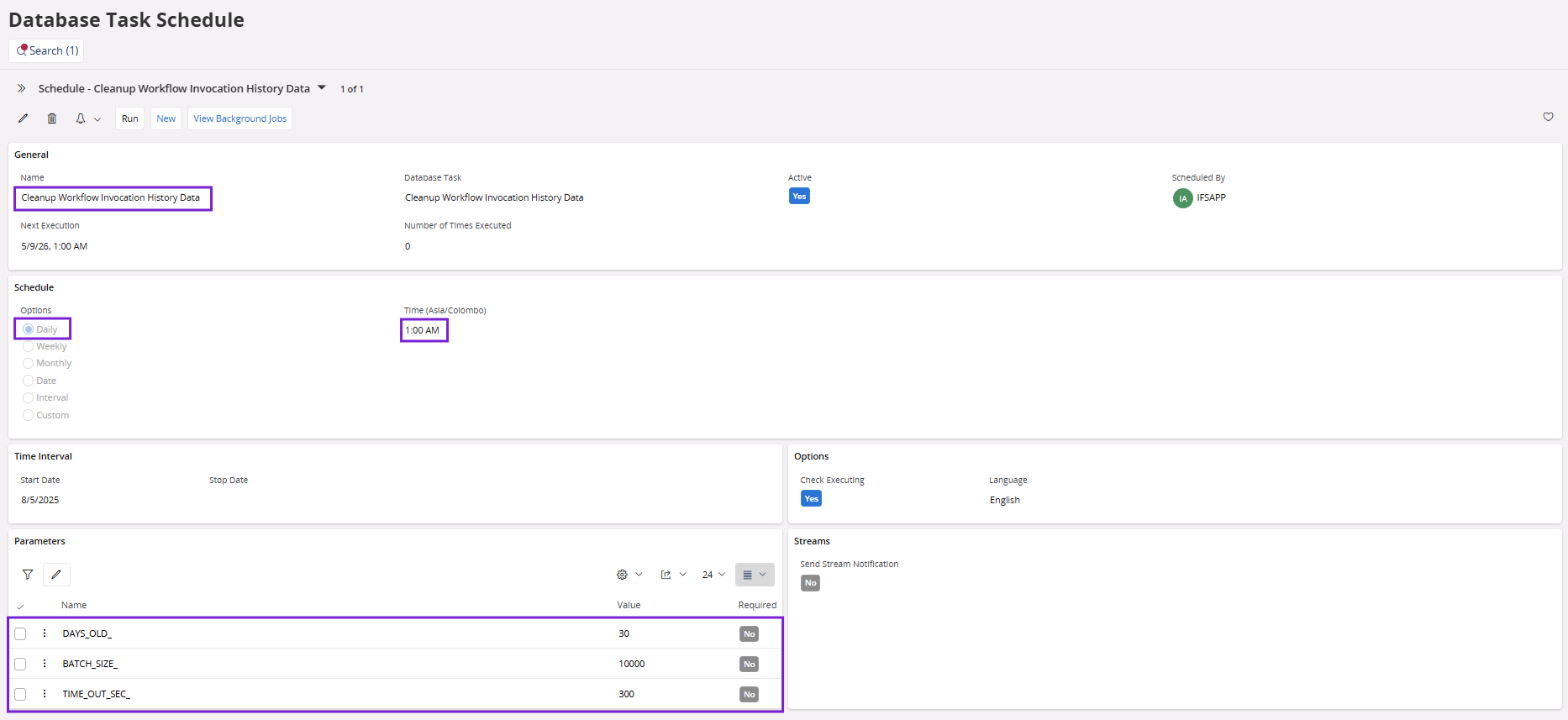
The schedule parameters highlighted above can be customized as per the requirement.
| Parameter Name | Description |
|---|---|
| DAYS_OLD_ | Data retention period in days. Default is 30. |
| BATCH_SIZE_ | The data cleanup job is executed in batches, with the cleared data committed at the end of each batch. This parameter determines the batch size. Default is 10,000. |
| TIME_OUT_SEC_ | Time out period in seconds. Default is 300 (5 minutes). This parameter determines the maximum duration the scheduler should run. If the scheduler job reaches this timeout period, it is automatically stopped. |
When the Workflow AI Invocation History Data Cleanup runs, qualifying historical data is removed from the following table:
BPMN_INVOCATION_HISTORY_TAB