History Log
The History functionality provides a way of logging all the interesting transactions in the database. It can be set to detect changes such as inserts, updates or deletes on the table level and then log the chosen attributes.
History Log
History Logis used for viewing the logs.
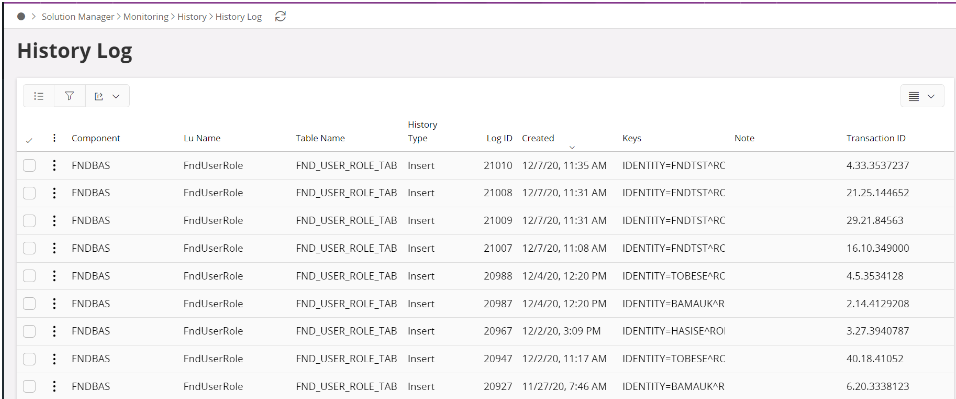
To view the details click on the link in a specific Log or right-click and select Details.
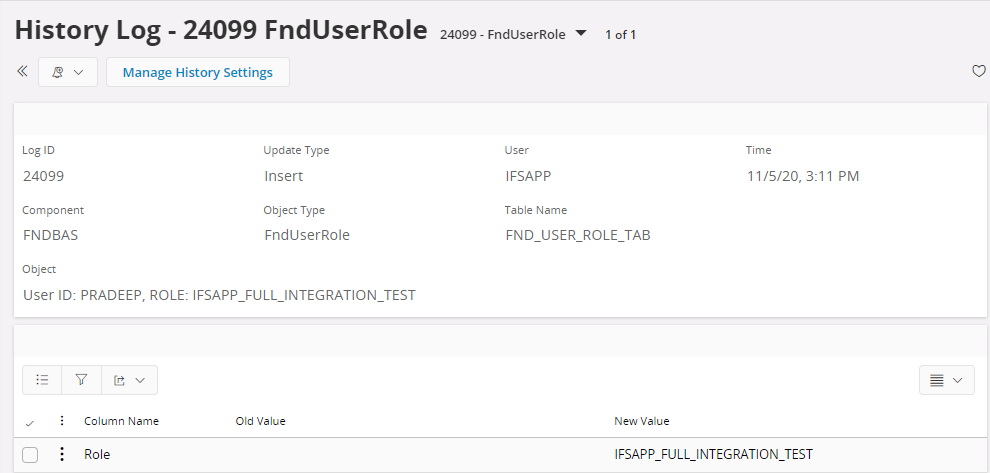
The log contains the following information:
| Column | Description |
|---|---|
| Log Id | A unique id identifying a log |
| Component | Component the logged information belongs to |
| Lu Name | Logical unit the log belongs to |
| Table name | Name of the logged table |
| Time stamp | Data and time when the logging occurred |
| Keys | Keys to the logical unit logged |
| History type | Insert, Update or Delete |
| Username | Foundation1 username |
| Transaction Id | Id that keeps history records created within the same transaction together |
Each log contains a number of attributes for storing the logged values. The attributes are constructed as follows:
| Column | Description |
|---|---|
| Column name | Name of the database column logged |
| Old value | The value of the column before an update or delete (empty at insert) |
| New value | The column’s new value after an insert or update (empty at delete) |
To view History Log, the user must have access to the HistoryLogHandling projection. See Security Administration how to grant permissions and manage Permission Sets.
By default, an end user can view only the History Log records created by that user.
To let auditors review the complete audit trail without the ADMINISTRATOR system privilege, grant HISTORY_LOG_AUDITOR together with read access to HistoryLogHandling. The predefined permission set FND_HISTORY_LOG_AUDITOR already contains these grants.
This access is read-only. An auditor can view all History Log records, but cannot change History Log data or History Log configuration. The Manage History Settings command is available only to users with the ADMINISTRATOR system privilege.