IFS.ai Copilot
How to Enable IFS.ai Copilot
For the user to have access to IFS.ai Copilot, these prerequisites need to be filled:
- The component FNDGPT needs to be installed.
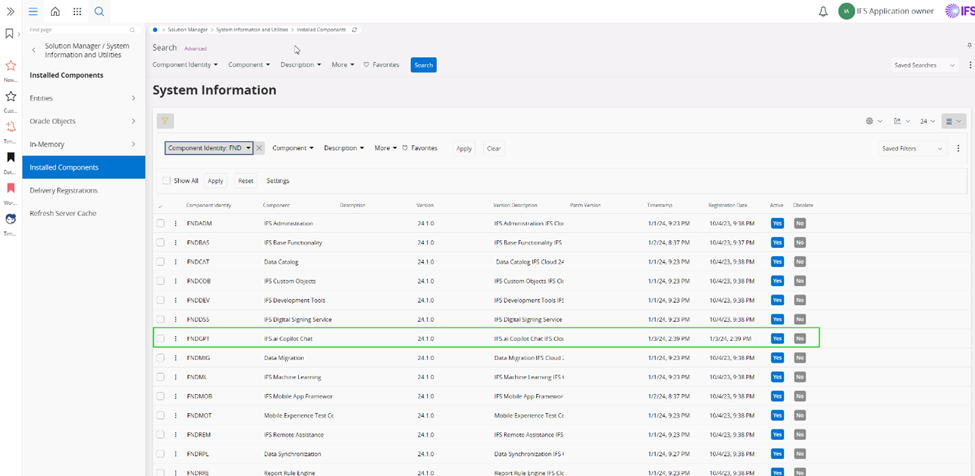
- The system parameter IFS.ai Copilot Chat needs to be ON (ON is the default value).

- The permission set FNDGPT_RUNTIME needs to be granted to the user.
Note: In 25R2 SU5, the projections “AllProjections” (this is the name of a specific projection, not a collective reference to all projections) and “PermissionSetHandling” must be manually assigned to the FNDGPT_RUNTIME permission set by an administrator.
In subsequent service updates, the required permissions will be included in the FNDGPT_RUNTIME permission set by default.
Note: To enable a user to administer and publish prompts within the organization, the following prerequisite must be met: The permission set FNDGPT_ADMIN must be granted to the user.
Note: If a user encounters an error while using the IFS.ai Copilot, navigate to the Copilot Error Logs page for the specific user. This page provides a detailed overview of the error message received, enabling faster troubleshooting and resolution.
Settings
1. Restricting User Access to IFS Documentation
To restrict user from accessing the content inside IFS public documentation (IFS User Docs, IFS Tech Docs, IFS ALE Docs, and IFS Community) using the Copilot chat, change the system parameter IFS.ai Copilot Access to IFS Public Documentation value from ON to OFF.

2. Links
Links to the IFS User docs and Tech docs are redirected by use of the system parameters:

If the Base address for HTML help is set to Default, the customer’s own documentation container will be used. This is the default setting. It is recommended because it will ensure that the links to the IFS pages from the documentation works for the users.
3. Enabling IFS.ai Copilot for different Product Areas
IFS.ai Copilot can access IFS‑published documentation to respond to general inquiries related to IFS Cloud. In addition, customer‑specific documentation uploaded through the Document Manager can be configured as a data source for Copilot interactions. Copilot can also retrieve insights directly from transactional and master data within IFS Cloud.
Beyond general conversational queries, IFS.ai Copilot provides context‑specific capabilities that are tailored to specific product areas and are available on selected pages, enabling more accurate and relevant responses based on the active operational context.
To be able to access the Copilot features for different product areas, relevant Permission set must be granted, IFS.ai Copilot provides insights only from IFS Cloud data that you are authorized to access, based on your assigned permissions; therefore, you must have the appropriate permission sets granted by your administrator to access the underlying data and receive relevant feedback.
When a user asks a question from one of the supported pages, the following is shared with the Machine Learning Service:
- Conversation history
- Page context (record or records selected by the user)
- For pages with lists: Up to five selected records per list are shared as context.
- For pages with multiple list tabs: Up to five selected records from each list are shared, regardless of the active tab.
- The Machine Learning Service considers this context when answering the user's question.
- Additional information may also come from function calls, providing data from the IFS Cloud database that isn't visible on the page.
Context Specific Capabilities and General Capabilities
Context-specific capabilities:
- Uses predefined prompts and tested queries
- Works in specific pages
General Capabilities:
Questions can be asked from any page
Can answer questions that are not too complex
Copilot first identifies a data source, and then converts the question into an OData query. The data source that is used is called a Business Object.
Read More: Business Objects Overview
Service Management
Context-specific capabilities:
IFS.ai Copilot for Service Managers
Permission set to be granted : COPILOT_SERVICE_MANAGER
Supported pages:
- Service Management -> Request Management -> Request Handling
- Requests
- Request Details
IFS.ai Copilot for Dispatchers
Permission set to be granted : COPILOT_DISPATCHER
Supported Pages:
- Service Management -> Request Management -> Scheduling and Allocation -> Dispatch Console
IFS.ai Copilot for Service Technicians
Permission set to be granted : COPILOT_SERVICE_TECHNICIAN
Supported pages:
Work Details
My Work
General Capabilities:
Users can ask questions from anywhere in IFS Cloud, about:
- Request - Scope, Contract, and Quotation
- SLA - Template and Commitment
- Contract Order and Payment Lines
- Location
- Call Centre Case
- Knowledge Articles
- Contractor Agreement
- Repair RMA
- Service Campaigns
- Invoice Previews
- Resource - Shifts, On Call Shifts, Relocations, Capacity, Activities, and Miscellaneous Allocations
Human Capital Management
Context Specific Capabilities:
IFS.ai Copilot for Self-services
Permission set to be granted : COPILOT_TIME_EMPLOYEE
Supported pages:
- Human Capital Management > My Self-Service > My Time and Attendance >
- My Time Registration
- My Absence Calendar
- My Absence Calendar - Year View
- My Absences > My Absence Requests
- Quick Absence
- My Time Card
- My Time Registration - Grid View
- My Time Card - Details
- My Intervals
- My Clockings
IFS.ai Copilot for Time Management
Permission set to be granted : COPILOT_TIME_MANAGER
Supported Pages:
- Human Capital Management > Manager Services > Time and Attendance >
- Time Registration
- Time Authorization > Time Authorization
- Absence Calendar
- Absence Calendar - Year View
- Absences > Absence Requests
- Absences > Absence Registrations
- Time Card
- Time Registration - Grid View
- Time Card - Details
- Intervals
- Clockings
IFS.ai Copilot for Employee Administration
Permission set to be granted : COPILOT_EMP_ADMINISTRATION
Supported pages:
- Human Capital Management > HCM Services > Employee Management >
Employee File
Employees
General Capabilities:
Users can ask questions from anywhere in IFS Cloud, about:
- Time Reporting, Absence limits, Absences and absence requests
- Expense sheets and Employee Payments
- Employee Information
As a general guideline, providing more precise and well‑scoped queries enables IFS.ai Copilot to return more accurate and relevant responses. Users are encouraged to refine their questions or request Copilot to re‑evaluate the query, validate the results, or explain how the underlying records were retrieved. This approach helps improve transparency, clarity, and confidence in the returned insights.
Relationship Management
Context Specific Capabilities:
IFS.ai Copilot for Sales Representatives
Permission set to be granted : COPILOT_SALES_REP_CRM
Supported Pages:
- Relationship Management -> Customer Relationship Management ->
- Business Opportunity -> Business Opportunity
- Business Activity -> Business Activity
IFS.ai Copilot for Supplier Performance Evaluation
Permission set to be granted : COPILOT_SUPP_PERFORMANCE_EVAL
Supported Pages:
- Relationship Management -> Supplier Relationship Management -> Supplier Performance Evaluation and Rating -> Supplier Performance Evaluation Lines
General Capabilities:
Users can ask questions about Business Opportunities and Business Activities.
Procurement
Context Specific Capabilities:
IFS.ai Copilot for Supplier Quotation Evaluation
Permission set to be granted : COPILOT_SUPP_QUOTATION_EVAL
Supported Pages:
- Procurement > Quotation > Order >
- Order Quotation Approval
- Order Quotation Approvals
IFS.ai Copilot for Supplier Performance Evaluation
Permission set to be granted : COPILOT_SUPP_PERFORMANCE_EVAL
Supported Pages:
- Relationship Management > Supplier Relationship Management > Supplier Performance Evaluation and Rating > Supplier Performance Evaluation Lines
IFS.ai Copilot for Purchase Order
Permission set to be granted: COPILOT_PURCHASE_ORDER
Supported pages:
- Procurement > Order >
- Purchase Order
- Purchase Orders
IFS.ai Copilot for Purchase Requisition
Permission set to be granted : COPILOT_PURCHASE_REQUISITION
Supported Pages:
- Procurement > Requisition > Purchase Requisition
IFS.ai Copilot for Request for Quotation Supplier Selection
Permission set to be granted : COPILOT_RQST_FOR_PURCH_QUOTE
Supported Pages:
- Procurement > Quotation > Order > Request for Order Quotation
General Capabilities:
Users can ask questions about Purchase Order(s) from anywhere in IFS Cloud.
Sales Management
Context Specific Capabilities:
IFS.ai Copilot for Customer Order
Permission set to be granted: COPILOT_CUSTOMER_ORDER
Supported pages:
- Sales > Order >
- Customer Order
- Customer Orders
Capabilities:
- Recommend the most suitable ship code for Customer Order(s).
- Recommend products to order by:
- Quickly access the customer's most recent orders.
- Identify and suggest items the customer frequently orders.
- Highlight popular items among other customers.
- Suggest relevant items from ongoing campaigns.
- Recommend additional items that complement the customer's order.
IFS.ai Copilot for Sales Quotation
Permission set to be granted: COPILOT_SALES_QUOTATION
Supported pages:
- Sales > Quotation >
- Sales Quotation
- Sales Quotations
Capabilities:
- Recommend the optimal ship code for Sales Quotations.
- Access the primary reasons for Sales Quotation rejections.
- Identify top-selling competitor products for a given Sales Part.
- Highlight Sales Parts with the highest number of won Sales Quotations.
- Suggest items from active campaigns relevant to the customer.
- Recommend complementary items for the Sales Part in the Sales Quotation line.
General Capabilities:
Users can ask general questions about Customer Orders from anywhere in IFS Cloud.
Questions can cover order status, prices and amounts, delivery and shipping details, order line information, rental specifics, and more.
Maintenance
Context Specific Capabilities:
IFS.ai Copilot for Work Order Execution
Permission set to be granted: COPILOT_WORK_ORDER_EXECUTION
Supported pages:
Maintenance > Equipment >
Functional Object > Functional Object
Serial Object > Serial Object
Maintenance > Work Management >
Preparation and Planning > Work Task
Preparation and Planning > Work Tasks
Execution > Execute Work Task
Service > Work Management > Execution > Execute Work Task
Maintenance > Work Management > Execution > Work Task Demands
Maintenance > Work Management > Initation > Fault Report
Maintenance > Preventive Maintenance > Pm Action > Pm Action
Technician Portal > Maintenance Engineer >
Unassigned Tasks
- My Assignments - Assigned
- My Assignments - Ongoing
- My Assignments - Ongoing > Work Details
IFS.ai Copilot for FMECA (Failure Modes, Effects, and Criticality Analysis)
Permission set to be granted: COPILOT_FMECA
Supported pages:
- Maintenance > Failure Modes Effects and Criticality Analysis >
- Prepare FMECA
- Perform FMECA
General Capabilities:
Users can ask general questions about Work Order, Equipment Object, Linear Asset, Permit, Isolation Order, Isolation Template, FMECA, PM Program, Work Task Template, PM Action, Heavy Maintenance Contract, Task Card, Serial Structure Template, Serial Structure, Serial Maintenance, Subtask, Maintenance Program, Maintenance Plan, Serial Fault, Maintenance Order, Resource, Miscellaneous Resource Allocations, Resource On-Call Shifts, Resource Shifts, Resource Relocations, Resource Capacity, and Resource Activities from anywhere in IFS Cloud.
Aviation Maintenance
Context Specific Capabilities:
IFS.ai Copilot for IPC Search
Permission set to be granted: NA
Supported Pages:
- Aviation Maintenance > Aviation Engineering > Aviation Technical Content Manager > Aviation Configuration Viewer >
- IPC
- Chapter
- Sub Chapter
- Unit
- Figure
Shipment Management
Context Specific Capabilities:
IFS.ai Copilot for Shipment Order
Permission set to be granted: COPILOT_SHIPMENT_ORDER
Supported Pages:
- Shipment Management> Shipment Order>
- Shipment Order
- Shipment Orders
Warehouse Management
Context Specific Capabilities:
IFS.ai Copilot for Inventory Part
Permission set to be granted: COPILOT_INVENTORY_PART
Supported Pages:
- Warehouse Management> Part> Inventory Part
When a user submits a query from any of the above pages, the conversation history and the context of the page are relayed to IFS.ai Copilot. Specifically, the page context shared includes the record or records selected by the user.
When a page contains multiple lists, IFS.ai Copilot receives context from up to five selected records per list, irrespective of the active tab at the time of the query. This context is considered by IFS.ai Copilot when responding to user inquiries. Additionally, IFS.ai Copilot may obtain further information through function calls, accessing data from the IFS Cloud database
Business Objects Overview
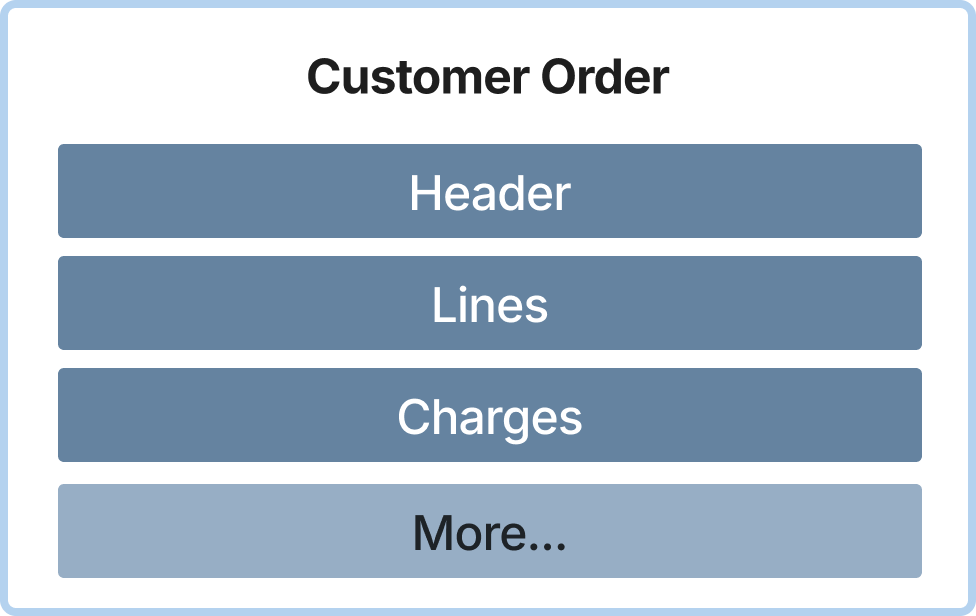
A Business Object represents a logical grouping of related data within a specific functional area of the product. Business Objects are used to define and reference distinct data domains, enabling IFS.ai Copilot to identify the appropriate data scope when processing user queries. By structuring access around Business Objects, Copilot can more effectively interpret questions and retrieve accurate, context‑relevant information from IFS Cloud data sources.
Example: A Business Object may represent a specific functional entity within IFS Cloud, such as a Request, Work Order, Employee, or Customer Order.
Read More: Business Object - Technical Documentation For IFS Cloud
To view the complete list of available Business Objects along with their functional summaries, refer to the Business Objects Summary section in this document.
Business Objects Summary
In order for users to be able to ask questions on the business objects, they need to be granted access to the following projections:
| Business Object | Description | Available from |
|---|---|---|
| AbsenceBusinessObject | Covers all employee absence records managed by the manager, including leave registrations and history. Used when a manager queries for absence details of employees. If the company is not specified, use the user's default company. | 25R2 SU5 |
| AbsenceEmployeeBusinessObject | Covers all absences registered by the employee, including current and past leaves. Used when an employee queries their own absence details or history. If the company is not specified, use the user's default company. | 25R2 SU5 |
| AbsenceLimitBusinessObject | Used by managers to view employees' absence entitlements, including total, used, and remaining balances. Defaults to the manager's company when not specified. | 25R2 SU5 |
| AbsenceLimitEmployeeBusinessObject | Used by employees to view their own absence limits, including entitlement, usage, and remaining balance. Defaults to the employee's company when not specified. | 25R2 SU5 |
| AbsenceRequestBusinessObject | Provides managers with access to all employee absence requests under their supervision across Registered, Confirmed, Approved, and Authorized statuses. Defaults to the manager's company when not specified. Used for managerial review, approval, or tracking. | 25R2 SU5 |
| AbsenceRequestEmployeeBusinessObject | Provides employees with access to their own absence requests across Registered, Confirmed, Approved, and Authorized statuses. Defaults to the employee's company when not specified. Used for creating, viewing, or modifying personal requests. | 25R2 SU5 |
| AuditBusinessObject | A quality audit is a systematic, independent, and documented, periodic process used to assess the effectiveness of a quality management system (QMS), processes, or products. The goal is to determine whether established quality activities and results comply with planned arrangements, such as internal procedures, industry standards, contractual requirements, or regulatory guidelines and whether these arrangements are implemented effectively and are suitable for achieving quality objectives. | 25R2 SU5 |
| BusinessActivityBusinessObject | This contains business activity details related to account, lead or supplier. | 25R2 SU5 |
| BusinessLeadBusinessObject | Manages leads within the CRM system by tracking potential customers from initial contact through qualification and conversion. Supports lead scoring, duplicate detection and merging, and conversion of leads into customer accounts. | 25R2 SU5 |
| BusinessLeadContactBusinessObject | Manages contact persons associated with leads in the CRM system, capturing key information about individuals including their roles, communication details, and customer account associations. | 25R2 SU7 |
| BusinessMailBusinessObject | This is the central repository for all business mail correspondence. This ensures that CRM, sales, and other business processes have access to tracked email communications with customers, suppliers, and contacts. | 25R2 SU7 |
| BusinessObjStructItemBusinessObject | Manages CRM Business Object structure items used to model hierarchical sales objects. Supports ownership, sales territory, address, and parent and child hierarchy. Also exposes linked business opportunities, customer orders, sales quotations, change history, and related parties including contacts, sales representatives, customer accounts, and competitors. | 25R2 SU9 |
| BusinessOpportunityBusinessObject | The Business Opportunity business object is used to capture, track, and manage potential sales deals from the early stage through closure. It helps sales teams monitor progress, forecast revenue, record customer interactions, and analyze win/loss outcomes, ensuring a structured and efficient sales process. | 25R2 SU5 |
| CashAccountBalanceBusinessObject | Cash Account Balance Analysis business object projection | 25R2 SU5 |
| CcCaseBusObject | Call Center Case represents an individual Call Center Case raised by or on behalf of a customer. It captures who reported the issue, when it was reported, what the problem is, and which organization and agent are responsible for handling it. The business object provides a structured view of key case details such as severity, priority, category, support keys, queues, and solution references, so that Copilot and other applications can retrieve, present, and analyze Call Center Case information through natural language queries and standard APIs. | 25R2 SU5 |
| CompanyBusinessObject | Use this API to work with the company business object copilot use cases | 25R2 SU5 |
| ConfigurationSpecificationBusinessObject | Use this API to work with the configuration specifications business object use cases. | 25R2 SU5 |
| ConfigurationStructureBusinessObject | Configuration structure alternate data: alternate identity, status, packing instruction, cost distribution usage, header context, generated multilevel structure, and alternate-level configuration rules. | 25R2 SU10 |
| ConfigurationStructureComponentBusinessObject | Configuration structure component lines: direct child components with component part, quantity per assembly, scrap, reserve/issue method, operation link, sublevel structure discovery, and component-level configuration rules. Use for component lines and component-level rules, not alternate-level rules or work guideline retrieval. | 25R2 SU10 |
| ContractorOrderBusinessObject | A Contractor Order represents a scope of work that is to be performed by an external contractor, the order can in some cases be under a contractor agreement. It defines the work to be performed, planned payments or fixed prices, not to exceed limits, and related administrative information needed to manage subcontracted tasks | 25R2 SU5 |
| CrmCustomerBusinessObject | Use this projection for any question about a customer's CRM data, sales data, relationship data, or activity history.CrmCustInfoArray provides the CRM record (CrmCustInfo entity) for each customer, containing:turnover, annual revenue, currency, fiscal year-end period, key account status, source of acquisition, business potential,loyalty classification, employee count, competitor, main representative assignment, notes, parent company, parent category,corporate hierarchy, business lead conversion history, account type classification, account status (active or expired),duplicate detection, sales market, default visit address, country code, and lead name.CustomerBusActivities array contains all CRM activities tied to the customer, including scheduled and completed tasks, meetings, phone calls, and emails.CustomerBusOpportunities array contains sales opportunities and potential deals linked to the customer, tracking pipeline and revenue forecasts.CustomerConnectedMails array contains business mail correspondence exchanged with or about the customer.CustomerLeads array contains business leads that originated from or are associated with the customer.CustomerSalesInfoArray array contains sales order related customer information.CommMethods array contains the customer's registered communication methods such as phone numbers, email addresses, fax numbers, and websites. | 25R2 SU7 |
| CrmCustomerContactBusinessObject | Use this projection for any question about a customer contact's CRM data, sales data, relationship data, or activity history.Covers contact personal details (name, title, job title, phone, mobile, email, country, preferred language),role within the customer organization, department, decision-making authority (decision power), campaign interests, personal interests,and key account status, customer acquisition source, and assigned CRM main representative for the contact's customer.ContactConnectedActivities array contains business activities linked to the contact (tasks, meetings, calls, mails, emails).ContactConnectedOpportunities array contains business opportunities and sales pipeline data linked to the contact.ContactConnectedReferences array contains sales quotations linked to the contact.CustomerContactConnectedMails array contains business mail correspondence connected to the contact.ConnectedMarketingCampaignArray array contains marketing campaigns the contact is associated with.CustomerContactLeads array contains business leads linked to the contact.BusinessContactReps array contains sales representatives assigned to the contact.Includes references to the customer address and the main sales representative. | 25R2 SU7 |
| CustomerAgingAnalysisBusinessObject | Customer Aging Analysis business object projection | 25R2 SU10 |
| CustomerBusinessObject | Use this API to work with the customer business object copilot use cases | 25R2 SU5 |
| CustomerCheckBusinessObject | Projection for Customer Check Business Object | 25R2 SU10 |
| CustomerContactBusinessObject | This is the central repository for all contact persons associated with a customer | 25R2 SU7 |
| CustomerOrderBusinessObject | Use this API to work with the customer order business object copilot use cases | 25R2 SU5 |
| DelimitationBusinessObject | Business object representing an isolation template (Delimitation) used for planning and managing isolation/delimitation activities, including revision details, site, responsible persons, and safety conditions. | 25R2 SU5 |
| DelimitationOrderBusinessObject | Core business object representing information on isolation orders. It contains isolation planned dates, isolated objects, isolation execution information including establishment and reestablishment instructions, safety conditions, connected permits and work tasks and relevant sign off requirements. | 25R2 SU5 |
| DepotRmaBusinessObject | Repair RMA (Return Material Authorization) represents the process and details for returning materials or products to a depot for repair, replacement, or credit. It captures all relevant information about the customer, shipment, categorization, and processing of the Repair RMA | 25R2 SU5 |
| DopHeadBusinessObject | DOP (Dynamic Order Processing) Header business object projection for Copilot and discovery queries. Exposes DOP header details, multilevel DOP structure lines, routing operations, customer order demands, and DOP alarms. | 25R2 SU10 |
| DopOrderBusinessObject | Use this projection to work with the DopOrder business object. | 25R2 SU10 |
| EmpEmployeeAbsenceSchemeBusinessObject | Employee self-service view of own CompAbsSchemeAssignment records. | 25R2 SU6 |
| EmpEmployeeAddressBusinessObject | Employee self-service view of own PersonInfoAddress records. | 25R2 SU6 |
| EmpEmployeeBusinessObject | Employee self-service view of own employee record. | 25R2 SU6 |
| EmpEmployeeCommunicationBusinessObject | Employee self-service view of own PersonComms records. | 25R2 SU6 |
| EmpEmployeeCompetencyBusinessObject | Employee self-service view of own PersCompetencyProfile records. | 25R2 SU6 |
| EmpEmployeeDependentsBusinessObject | Employee self-service view of own RelatedPerson records. | 25R2 SU6 |
| EmpEmployeeDisciplinaryBusinessObject | Employee self-service view of own DisciplinaryAndGrievance records. | 25R2 SU6 |
| EmpEmployeeDocumentBusinessObject | Employee self-service view of own PersDocument records. | 25R2 SU6 |
| EmpEmployeeEducationBusinessObject | Employee self-service view of own PersEducationProfile records. | 25R2 SU6 |
| EmpEmployeeFederalTaxStatusBusinessObject | Employee self-service view of own FederalTaxStatus records. | 25R2 SU6 |
| EmpEmployeeIdentifierBusinessObject | Employee self-service view of own PersonIdentifier records. | 25R2 SU6 |
| EmpEmployeeJobAssignmentBusinessObject | Employee self-service view of own EmpJobAssign records. | 25R2 SU6 |
| EmpEmployeeLaborUnionBusinessObject | Employee self-service view of own EmployeeLaborUnion records. | 25R2 SU6 |
| EmpEmployeeLicenseBusinessObject | Employee self-service view of own PersLicenseProfile records. | 25R2 SU6 |
| EmpEmployeeMeritBusinessObject | Employee self-service view of own PersMerit records. | 25R2 SU6 |
| EmpEmployeeOrgAssignmentBusinessObject | Employee self-service view of own CompanyPersAssign records. | 25R2 SU6 |
| EmpEmployeePaymentInfoBusinessObject | Employee self-service view of own EmpPaymentInfo records. | 25R2 SU6 |
| EmpEmployeePayrollProviderBusinessObject | Employee self-service view of own EmpPayrollProvider records. | 25R2 SU6 |
| EmpEmployeePersonJobAssignmentBusinessObject | Employee self-service view of own PersonJobAssignment records. | 25R2 SU6 |
| EmpEmployeeProbationBusinessObject | Employee self-service view of own PersonProbation records. | 25R2 SU6 |
| EmpEmployeePropertyBusinessObject | Employee self-service view of own CompanyEmployeeProperty records. | 25R2 SU6 |
| EmpEmployeePropertyFieldBusinessObject | Employee self-service view of own CompanyEmpPropertyField records. | 25R2 SU6 |
| EmpEmployeeRateAgreementBusinessObject | Employee self-service view of own EmployeeRateAgreement records. | 25R2 SU6 |
| EmpEmployeeSalaryBusinessObject | Employee self-service view of own EmpSalaryInfo records. | 25R2 SU6 |
| EmpEmployeeScheduleBusinessObject | Employee self-service view of own WorkSchedAssign records. | 25R2 SU6 |
| EmpEmployeeTrainingBusinessObject | Employee self-service view of own EmpTrainingHistory records. | 25R2 SU6 |
| EmpEmployeeWorkHistoryBusinessObject | Employee self-service view of own PersWorkExperience records. | 25R2 SU6 |
| EmpEmployeeWorkLocationBusinessObject | Employee self-service view of own EmployeeWorkLocation records. | 25R2 SU6 |
| EmpEmploymentPeriodBusinessObject | Employee self-service view of own EmpEmployedTime records. | 25R2 SU6 |
| EmpEmploymentReductionBusinessObject | Employee self-service view of own EmploymentReduction records. | 25R2 SU6 |
| EmployeeAbsenceSchemeBusinessObject | Manager/Admin view of CompAbsSchemeAssignment across employees. | 25R2 SU6 |
| EmployeeAddressBusinessObject | Manager/Admin view of PersonInfoAddress across employees. | 25R2 SU6 |
| EmployeeBusinessObject | Manager/Admin comprehensive employee view with links to all employee business objects. | 25R2 SU6 |
| EmployeeCommunicationBusinessObject | Manager/Admin view of PersonComms across employees. | 25R2 SU6 |
| EmployeeCompetencyBusinessObject | Manager/Admin view of PersCompetencyProfile across employees. | 25R2 SU6 |
| EmployeeDependentsBusinessObject | Manager/Admin view of RelatedPerson across employees. | 25R2 SU6 |
| EmployeeDisciplinaryBusinessObject | Manager/Admin view of DisciplinaryAndGrievance across employees. | 25R2 SU6 |
| EmployeeDocumentBusinessObject | Manager/Admin view of PersDocument across employees. | 25R2 SU6 |
| EmployeeEducationBusinessObject | Manager/Admin view of PersEducationProfile across employees. | 25R2 SU6 |
| EmployeeFederalTaxStatusBusinessObject | Manager/Admin view of FederalTaxStatus across employees. | 25R2 SU6 |
| EmployeeIdentifierBusinessObject | Manager/Admin view of PersonIdentifier across employees. | 25R2 SU6 |
| EmployeeJobAssignmentBusinessObject | Manager/Admin view of EmpJobAssign across employees. | 25R2 SU6 |
| EmployeeLaborUnionBusinessObject | Manager/Admin view of EmployeeLaborUnion across employees. | 25R2 SU6 |
| EmployeeLicenseBusinessObject | Manager/Admin view of PersLicenseProfile across employees. | 25R2 SU6 |
| EmployeeMeritBusinessObject | Manager/Admin view of PersMerit across employees. | 25R2 SU6 |
| EmployeeOrgAssignmentBusinessObject | Manager/Admin view of CompanyPersAssign across employees. | 25R2 SU6 |
| EmployeePaymentBusinessObject | Manages employee payment processing and payment-related operations as a HR Administrator or Finance user. Correctly handle financial data recorded in multiple currencies by ensuring that all summaries, averages, and totals are calculated per currency, rather than combining amounts across different currencies. Else that behaviour results in inaccurate outputs when mixed-currency records were aggregated. To address this, the Business Object for employee payment should group values by currency, preserves the currency-amount relationship, and returns clearly separated results for each currency to provide accurate, meaningful financial insights. | 25R2 SU5 |
| EmployeePaymentInfoBusinessObject | Manager/Admin view of EmpPaymentInfo across employees. | 25R2 SU6 |
| EmployeePayrollProviderBusinessObject | Manager/Admin view of EmpPayrollProvider across employees. | 25R2 SU6 |
| EmployeePersonJobAssignmentBusinessObject | Manager/Admin view of PersonJobAssignment across persons. | 25R2 SU6 |
| EmployeeProbationBusinessObject | Manager/Admin view of PersonProbation across employees. | 25R2 SU6 |
| EmployeePropertyBusinessObject | Manager/Admin view of CompanyEmployeeProperty across employees. | 25R2 SU6 |
| EmployeePropertyFieldBusinessObject | Manager/Admin view of CompanyEmpPropertyField across employees. | 25R2 SU6 |
| EmployeeRateAgreementBusinessObject | Manager/Admin view of EmployeeRateAgreement across employees. | 25R2 SU6 |
| EmployeeSalaryBusinessObject | Manager/Admin view of EmpSalaryInfo across employees. | 25R2 SU6 |
| EmployeeScheduleBusinessObject | Manager/Admin view of WorkSchedAssign across employees. | 25R2 SU6 |
| EmployeeTrainingBusinessObject | Manager/Admin view of EmpTrainingHistory across employees. | 25R2 SU6 |
| EmployeeWorkHistoryBusinessObject | Manager/Admin view of PersWorkExperience across employees. | 25R2 SU6 |
| EmployeeWorkLocationBusinessObject | Manager/Admin view of EmployeeWorkLocation across employees. | 25R2 SU6 |
| EmploymentPeriodBusinessObject | Manager/Admin view of EmpEmployedTime across employees. | 25R2 SU6 |
| EmploymentReductionBusinessObject | Manager/Admin view of EmploymentReduction across employees. | 25R2 SU6 |
| EmpWorkplaceIncidentBusinessObject | Employee self-service view of own InjuryIllness records. | 25R2 SU6 |
| EquipmentObjectBusinessObject | Represents a serviceable physical asset tracked and maintained throughout its lifecycle. Equipment can be fixed (installed in a structure or facility) or movable (reassigned between sites or positions). It holds key data such as warranties, usage, test points, parameters, measurements, SBOM structures, and spares. It can be connected to a model. Used as the core serviceable unit across domains like service and asset management, supporting both preventive and corrective maintenance. Equipment is managed as a point asset, with a defined position in a maintenance structure or a location in a service area, ensuring full traceability from installation to decommissioning. | 25R2 SU5 |
| ExpenseSheetBusinessObject | Manage Expense Sheets including creation, reading, updating, and changing status. Also allows adding expenses to expense sheets as a Manager or Admin. When returning any aggregate functionalities based responses like sum, average of expenses etc., make sure to refer to 'Amount in payment currency' and show all the amounts/currency based on that amount and currency to so we can avoid showing incorrect/mixed up amounts in different currencies. | 25R2 SU5 |
| ExpenseSheetEmployeeBusinessObject | Manage Expense Sheets including creation, reading, updating, and changing status. Also allows adding expenses to expense sheets as an Employee. When returning any aggregate functionalities based responses like sum, average of expenses etc., make sure to refer to 'Amount in payment currency' and show all the amounts/currency based on that amount and currency to so we can avoid showing incorrect/mixed up amounts in different currencies. | 25R2 SU5 |
| FmecaAnalysisBusinessObject | This is the projection for the business object defines a FMECA. FMECA stands for Failure Modes, Effects, and Criticality Analysis. It's a structured approach used primarily in engineering, manufacturing, aerospace, and defense industries to identify and evaluate potential failures in a system, product, or process. | 25R2 SU5 |
| HeavyMaintenanceContractBusinessObject | Heavy Maintenance Contract Business Object Projection which manages comprehensive maintenance agreements with hierarchical structure | 25R2 SU5 |
| InventoryPartBusinessObject | Use this API to work with the inventory part business object copilot use cases | 25R2 SU10 |
| InventoryPartInStockBusinessObject | Use this API to work with the inventory part in stock business object copilot use cases | 25R2 SU10 |
| KbKnowledgeArticleBusinessObject | Knowledge Article represents a single knowledge article in the knowledge base, used to capture, structure, and share solutions, how to guides, troubleshooting steps, and reference information. It holds the core identity, version, authorship, approval data, visibility rules, and content of the article, enabling users and support organizations to create, maintain, and consume reusable knowledge across channels and processes. | 25R2 SU5 |
| LinearAssetBusinessObject | Represents a linear asset such as a road, pipeline, or railway that is defined by length and segmented structure. Supports life-cycle management, visualization, classification, and integration with maintenance and isolation processes. | 25R2 SU5 |
| LocationBusinessObject | Location represents a physical or logical place used in the application for planning, execution, and reporting of activities. It can describe warehouses, service sites, pickup points, offices, or other operational locations, and provides identifiers, categorization, and scheduling relevant details such as time zone and locality. The business object enables Copilot and other applications to reference, search, and reason over locations when scheduling work, routing resources, or integrating with external systems. | 25R2 SU5 |
| LocationPartyAddressBusObject | Location Party Address represents an address entry associated with a specific Location, capturing how and where the location can be visited, delivered to, or contacted. It supports multiple address usages such as visiting, delivery, or position addresses, party context, and validity periods so that planning, logistics, and communication processes can reliably use the correct address details over time. | 25R2 SU5 |
| MaintenanceOrderBusinessObject | Defines Maintenance Orders for handling maintenance orders Business Object Projection which manages comprehensive maintenance orders with hierarchical structure | 25R2 SU5 |
| MaintenancePlanBusinessObject | Business object for managing maintenance plans in Fleet and Asset Management. Covers maintenance plan intervals with operational parameter and calendar-based schedules, secondary operational parameter intervals, convenience tasks, and planned events for serials. Integrates with maintenance codes, time units, post maintenance check definitions, maintenance groups, and vehicle serial data. Aligns with the Maintenance Plan page scope for Copilot and other consumers. | 25R2 SU5 |
| MaintenanceProgramBusinessObject | Business object for defining and managing maintenance programs in Fleet and Asset Management. Covers maintenance program identity and revisions, assigned parts and part revisions, maintenance groups, access control, journal entries, and serials assigned to each program. Aligns with the Define Maintenance Program scope for Copilot and other consumers. | 25R2 SU5 |
| MarketingCampaignActionBusinessObject | Manages actions within marketing campaigns, defining the activities, schedules, representatives, and response tracking for each step of a campaign execution. | 25R2 SU7 |
| MarketingCampaignBusinessObject | Manages marketing campaigns within the CRM system by tracking campaign planning, execution, and results. Measures campaign effectiveness and ROI through opportunity tracking, lead generation, and response analysis. | 25R2 SU7 |
| MarketingCampaignTargetBusinessObject | Manages targets within marketing campaigns, tracking customer contacts, lead contacts, and account communication methods that are recipients of campaign actions and activities. | 25R2 SU7 |
| MiscellaneousResourceAllocationsBusinessObject | Miscellaneous Resource Allocations (misc. allocations) are used to manage planned absences and non-available time for individual resources such as persons, tools, equipment, machines, and crews.These allocations are categorized as either Absence or Non-Absence, which is a mandatory classification during the creation process.Miscellaneous Resource Allocations can include location data, which is utilized by the Dynamic Scheduling engine and Dispatch Console to optimize scheduling and routing capabilities.In terms of resource demand, Miscellaneous Resource Allocations are reflected in the Resource Analysis page; those in 'Pending Approval' status are treated as Preliminary demand, while 'Approved' allocations are considered Committed demand.A key feature is the 'Align with Schedule' option, which ensures that the allocation only covers actual working time by creating Resource Activities for each shift, preventing over-allocation (more than 100 percent (100%) capacity) that might otherwise occur if breaks are not accounted for.When the 'Align with Schedule' option is active, allocations are visible in the Resource Shift Gantt, Dispatch Console, and various Resource Shift Calendars, with load records created specifically for working periods.Importantly, Miscellaneous Resource Allocations are part of the Resource Management solution and operate independently of the Human Capital Management (HCM) module.This means absences recorded here do not synchronize (sync) with Human Capital Management (HCM) and are tracked as a distinct demand type.Additionally, these allocations can be created without requiring specific company or site connections, offering flexibility in resource planning. | 25R2 SU5 |
| MixedPaymentBusinessObject | Mixed Payment Main Business Object Projection. | 25R2 SU5 |
| MrpPartActionBusinessObject | Business Object projection used to get information on MRP Action Proposals | 25R2 SU5 |
| MrpPartBusinessObject | Business Object projection used to get information on MRP Parts | 25R2 SU5 |
| MrpPartSupplyDemandBusinessObject | Business Object projection used to get information on MRP supply and demand | 25R2 SU5 |
| NonSupplierPaymentBusinessObject | Non-Supplier payments business object projection | 25R2 SU5 |
| PaymentsPerCustomerAnalysisBusinessObject | Payments per Customer Analysis is used to query the open balance of a customer, total due amount as of the current date and all the payments made by the customer. | 25R2 SU10 |
| PermitBusinessObject | Core business object representing a permit entity within the PERISO component. It encapsulates all attributes and logic for managing permit life cycle, including creation, validation, and association with site and company data. | 25R2 SU5 |
| PmActionBusinessObject | This is the projection for the business object defines a PM Action. A PM Action is a core element of preventive maintenance planning. It defines the specific maintenance work to be performed on an asset (such as equipment object, linear assets or tool/equipment) and includes details such as operational status, responsible maintenance organization, required materials, resources, and work instructions. PM Actions can be calendar-based, event-based, or condition-based, enabling flexible scheduling based on time intervals, triggered events, or asset condition parameters. PM Actions may have one or several Work Task Templates connected to it, which will create work lists and resource and material requirements. Each PM Action generates work orders and work tasks when due, ensuring systematic maintenance execution, improved asset reliability, and optimized resource utilization within the Enterprise Asset Management framework. | 25R2 SU5 |
| PmProgramBusinessObject | This is the projection for the business object defines a PM Program. This business object defines a PM Program. A PM Program in IFS is a reusable set of work task templates that defines how a certain type of equipment should be maintained. Instead of planning each preventive maintenance activity from scratch, the PM Program lets you reuse the same maintenance setup when creating new PM actions, saving time and ensuring consistency. The PM Program is linked to Item Classes, allowing groups of similar equipment to share the same maintenance tasks. When PM actions are generated, they automatically inherit details such as Work order generation rules, Material needs, Work lists, Tools and facilities | 25R2 SU5 |
| ProductStructureBusinessObject | Product structure alternate BOM configurations: alternate identity, status, min lot quantity, packing instruction, and header context. | 25R2 SU10 |
| ProductStructureComponentBusinessObject | Product structure component lines and work guidelines: BOM material lines with component part, quantity per assembly, scrap, reserve/issue method, operation link, and structure work guidelines per component. Use for questions about BOM components, material list, child parts, produced parts, quantities, and work guidelines. Not for alternate BOM status or multilevel structure. | 25R2 SU10 |
| PurchaseOrderBusinessObject | Use this API to work with the purchase order business object copilot use cases | 25R2 SU5 |
| ResourceActivitiesBusinessObject | Manages resource activities, tracking work assignments, scheduling, and activity origins for resources. | 25R2 SU5 |
| ResourceBusinessObject | A resource refers to a unit - such as a person, machine, tool, or crew, that can be scheduled, assigned tasks, or managed across modules like Service Management, Project Management, or Human Capital Management.Resources are central to task assignment and workload balancing, supporting real-time decision-making through integration with calendars, dispatch consoles, and optimization engines like PSO.Resources can be linked to multiple companies and sites and can be used in various domains, such as projects, maintenance, services, and manufacturing.Resources can have parent-child relationships with other resources, which helps in organizing and managing complex resource structures.Each resource includes metadata such as connections, attributes, skills, and requirements, enabling precise matching to job specifications and operational needs, making it possible to match resources effectively to specific jobs and tasks.Synonyms: Tool, Crew, Team, Operator, Worker, Specialist, Engineer, Technician, Bucket Resource, Contractor. | 25R2 SU5 |
| ResourceCapacityBusinessObject | Manages resource capacity calculations, tracking available time periods for resources based on shifts, calendars, and utilization factors. This business object supports capacity planning and resource availability analysis across different time periods (day, week, month, quarter, year). | 25R2 SU5 |
| ResourceOnCallShiftBusinessObject | An on-call shift represents a period during which a resource is not necessarily working but is available to be called in if needed.Commonly used in service and maintenance industries, on-call shifts allow organizations to maintain standby coverage for urgent or unexpected tasks without scheduling full-time shifts for all staff.On-call shifts are distinct from regular working shifts and can have specific attributes and compensation rules associated with them. | 25R2 SU5 |
| ResourceRelocationBusinessObject | Handles resource relocation information, defining temporary assignments or movements of resources to different locations or schedules. This object manages the lifecycle and details of resource moves. | 25R2 SU5 |
| ResourceShiftBusinessObject | A resource shift defines a specific period of time during which a resource - such as a person, crew, or tool - is available to perform work.Shifts are foundational for capacity planning, task scheduling, and real-time operations, ensuring that activities are assigned to resources within their valid working hours.Resource shifts can be generated automatically based on calendars and shift patterns or entered manually to account for deviations. They are linked to a specific date, company, and site, and include metadata such as start and end times, time zones, and reference to the resource. | 25R2 SU5 |
| RoutingBusinessObject | Business-object projection for routing alternates: lead time, lot sizing, phase effectivity, part context, serial ranges, and alternate-level configuration rules for configurable parts. | 25R2 SU10 |
| RoutingOperationBusinessObject | Business-object projection for routing operations: work centers, machine/labor times, crews, scheduling, required tools, work guidelines, and operation-level configuration rules for configurable parts. | 25R2 SU10 |
| ScServiceContractBusinessObject | Request Contract represents a formal service agreement between the company and a customer that defines what service is provided, for how long, and under which commercial and logistical conditions. It captures key information such as contract identification, validity and coverage dates, currency, customer, responsible organization, invoicing rules, and periodic allocation settings. The business object provides a structured view of the request contract so that Copilot and other applications can retrieve, present, and analyze contract details, follow up renewals, and support financial and operational processes through natural language queries and standard APIs. | 25R2 SU5 |
| SerialFaultBusinessObject | Serial Fault Business Object Projection representing a comprehensive view of a fault, defect, or discrepancy reported against a serialized part or component within Vehicle Information Management (VIM) for Maintenance, Repair and Overhaul (MRO) operations. Covers the complete fault lifecycle including discovery, diagnosis, corrective action tracking, deferral management, task card assignments, additional parts fault history, non-routine approvals, operational parameters, and linkage to maintenance events, work orders, and flight logs. | 25R2 SU5 |
| SerialMaintenanceBusinessObject | Serial Maintenance Business Object Projection representing a comprehensive view of a serialized part or component within Vehicle Information Management (VIM) for Maintenance, Repair and Overhaul (MRO) operations. Covers the complete maintenance lifecycle including planned events, last maintenance, modifications, life limits, post-maintenance checks, total usage, operational parameters, faults, and condition monitoring. | 25R2 SU5 |
| SerialStructureBusinessObject | Business object for Managing serial structures in Fleet and Asset Management. Represents both serialized and non-serialized engineering parts organized in parent-child relationships, forming hierarchical serial structures. Includes template-based configuration, structure alternates, and minimum configuration validation. Integrates with engineering master and revision data, and links to vehicle and maintenance program information. Tracks serial identity, manufacturer, ownership, operational status, operational condition, and life-cycle state. Enables access control, maintenance planning, stress and wear tracking, and location management. Provides full audit trail for creation and changes, and supports structure change approvals and operational log recording information throughout the serial structure life-cycle. | 25R2 SU5 |
| SerialStructureTemplateBusinessObject | Business object for managing template structures, which define the hierarchical part relationships and configurations for serial-tracked equipment. | 25R2 SU5 |
| ServiceCampaignBusinessObject | ServiceCampaign represents a service campaign definition used to plan, control, and follow up structured service activities for a set of products, assets, or customers. It holds the core information about what the campaign is about, which items or models it targets, and when it is valid, as well as who owns it and which organization or service delivery unit is responsible. The entity also captures financial and operational settings such as currency, estimated cost, and whether notes or attachments should be copied to derived service objects. | 25R2 SU5 |
| ServiceInvoiceBusinessObject | Service Invoice represents the financial document generated for service-related transactions that should be invoiced to the customer. It includes details such as customer information, invoice grouping, pricing, currency, and approval status. This entity ensures accurate billing and reporting for service operations. | 25R2 SU5 |
| ShipmentBusinessObject | Use this API to work with the shipment business object copilot use cases | 25R2 SU10 |
| ShopOrderBusinessObject | Business-object projection for shop-order header context, produced parts, and the shop order history. | 25R2 SU5 |
| ShopOrderMaterialBusinessObject | Business-object projection for shop order material lines, their current shortage and availability status, their planning alerts, and their work guidelines. | 25R2 SU10 |
| ShopOrderOperationBusinessObject | Business-object projection for shop order operation execution details: tools, guidelines, clockings, and transaction reports. | 25R2 SU10 |
| SlaCommitmentBusinessObject | SLA Commitments define specific obligations within a Service Level Agreement (SLA). They capture all details necessary to monitor and enforce service performance standards, including when the commitment starts, what triggers it, how fulfillment is tracked, and what visibility rules apply for customers and contractors. These commitments ensure compliance with contractual agreements and operational targets, providing transparency and accountability across service delivery processes. | 25R2 SU5 |
| SlaTemplateBusinessObject | SLA Template defines the reusable set of Service Level Agreement (SLA) parameters, including validity periods, revision control, and descriptive metadata. It enables organizations to standardize and manage SLA definitions that can be associated with various service offerings, ensuring consistent performance expectations and compliance tracking. | 25R2 SU5 |
| SrvRequestBusinessObject | A service request is a formal record used to report a need for service or to address a fault related to an object, such as equipment or a system, that is associated with a customer | 25R2 SU5 |
| SrvRequestScopeBusinessObject | A service request scope defines the specific boundaries, details, and work elements associated with a service request. It outlines what is included or excluded in the request, such as tasks, resources, equipment, and responsibilities, ensuring clarity in the expected service delivery. | 25R2 SU5 |
| SubtaskBusinessObject | Business object projection for managing subtasks in Fleet and Asset Management. | 25R2 SU5 |
| SupplierBusinessObject | Use this API to work with the supplier business object copilot use cases | 25R2 SU5 |
| SupplierInvoiceBusinessObject | Use this API to work with the Supplier Invoice business object copilot use cases | 25R2 SU10 |
| SupplierInvoicePostingBusinessObject | Use this API to work with the Supplier Invoice Postings business object copilot use cases. | 25R2 SU10 |
| TaskCardBusinessObject | A Task Card projection provides discoverable and searchable metadata for maintenance instructions. Task Cards include work descriptions, duration, execution details, affected parts, associated models/functions, location, type, strategy, revision information, resource requirements, material lists, zone applicability, sign-off requirements, criticality assessments, condition measurements, and journal audit trails. They are used to plan, execute, and track maintenance and operational tasks across fleet and asset management modules. | 25R2 SU5 |
| TaxClearanceBusinessObject | Tax Clearance business object projection | 25R2 SU5 |
| TaxCodeBusinessObject | Tax codes business object projection | 25R2 SU5 |
| TimeReportingBusinessObject | Manage employee time reporting and tracking of work hours across projects and activities as a Manager or Admin. | 25R2 SU5 |
| TimeReportingEmployeeBusinessObject | Manage employee time reporting and tracking of work hours across projects and activities as an Employee. | 25R2 SU5 |
| VoucherBusinessObject | This projection uses Voucher business object which represents the general and control information associated with accounting vouchers which are not yet been posted, updated, or transferred to the General Ledger (GL). It includes key attributes such as Voucher Date, User Group, Voucher Type, Voucher Number, Accounting Year, Accounting Period, Entry Date, and Approved By User details. Vouchers may be initiated manually or generated automatically through integrated modules such as Supply Chain, Inventory, Manufacturing, Payments, Projects, and Invoicing. | 25R2 SU5 |
| VoucherRowsBusinessObject | This projection uses voucher rows which represents the detailed attributes of individual voucher lines within vouchers that have not yet been posted to the General Ledger. Each voucher row contains key financial and transactional attributes such as Account, Code Part Values, Currency Code, Currency Rate, Currency Debit/Credit Amounts, Accounting Currency Amounts, Parallel Currency Amounts, Text, Tax Code, and Transaction Code. Voucher Rows are included in vouchers that may be manually created or automatically generated through integrated IFS Cloud modules, such as Supply Chain, Inventory, Manufacturing, Payments, Projects, and Invoicing. Until the required validation and approval processes are completed, these vouchers remain unposted and are temporarily stored in the hold table, awaiting update to the General Ledger. | 25R2 SU5 |
| WorkOrderBusinessObject | Business object for managing work orders, which are the central entities for maintenance, repair, or service jobs. | 25R2 SU5 |
| WorkplaceIncidentBusinessObject | Manager/Admin view of InjuryIllness across employees. | 25R2 SU6 |
| WorkTaskTemplateBusinessObject | A work task template serves as a template for preventive maintenance (PM) actions, by simplifying the creation of the PM action. The difference between a work task template and a PM action is that the work task template as a template is not connected to an object but to the categories. Also, a PM plan will not be generated on the work task template even though generation criteria can be defined on the work task template. Work task templates can be categorized according to the object's object type, object category, type designation, item class and part number. They can also be categorized as mobilization or demobilization jobs, to be used in a rental business process. The categorization helps to group similar work task templates together. Another way of grouping work task templates is to connect the work task template types. Examples of work task template types are: Overhaul, General Maintenance, Inspection, Assemble, etc. PM actions can be directly generated from a work task template. When a PM action is generated, all the information included in the work task template will be copied to the PM action. Consequently the information will be copied to the work order generated from the PM action. Work task templates can also be connected to the work orders and service contracts. | 25R2 SU5 |
Prompts
Administrative users can view, add or manage IFS.ai Copilot prompts within IFS Cloud pages via Copilot Management > Copilot Prompts in Solution Manager
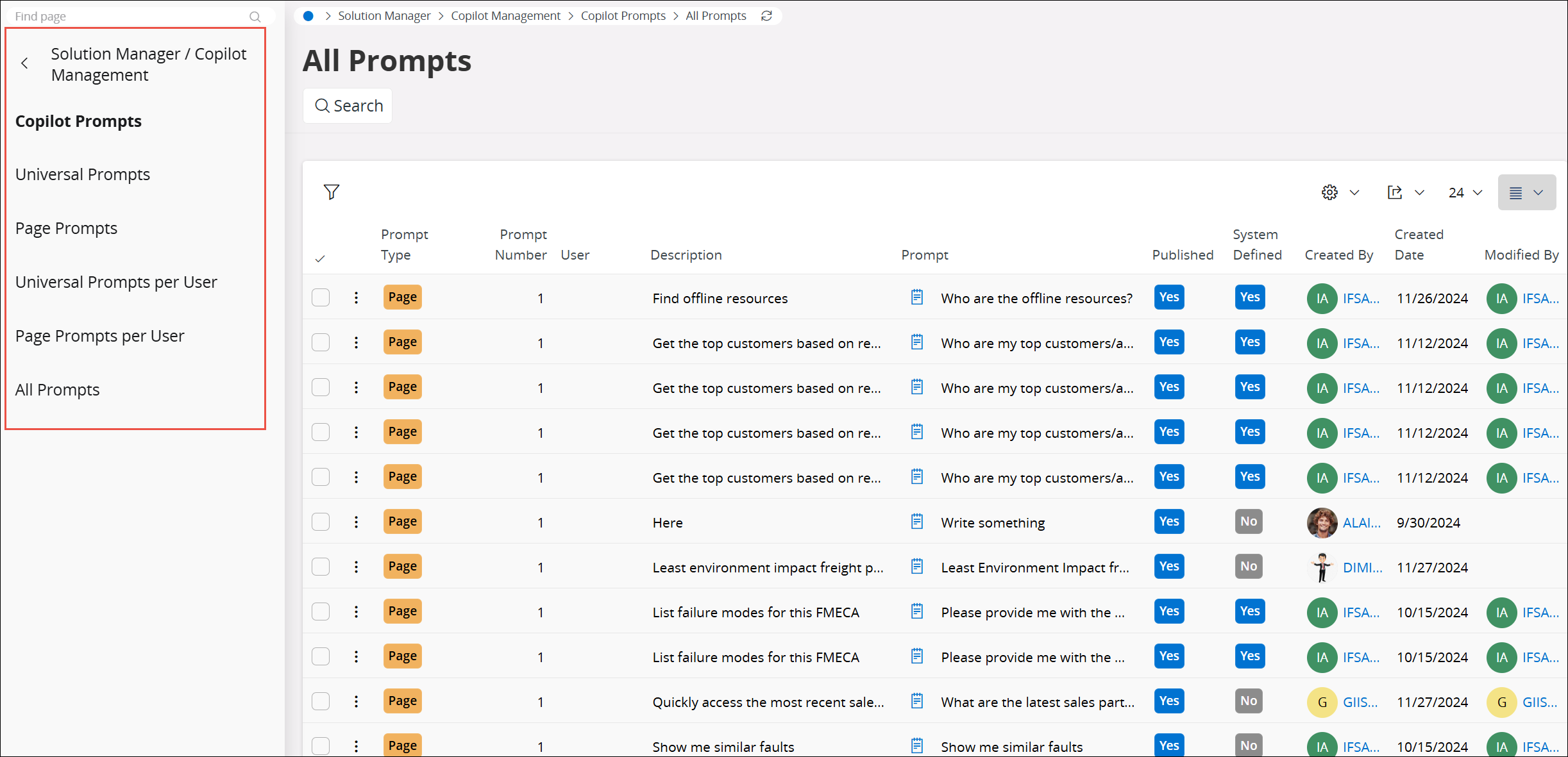
Figure : All Prompts Section in Copilot Prompts
Universal Prompts
Universal prompts are a type of prompt in IFS.ai Copilot that appear consistently across all pages within IFS Cloud, ensuring you have access to them no matter where you are in the system.
Use the Universal Prompts section to Add, Delete, Duplicate, or Publish universal prompts.
Page Prompts
Page prompts in IFS.ai Copilot are specific to the page you are currently using in IFS Cloud. They provide quick access to prompts tailored exclusively to the context of that page, ensuring relevant and focused assistance.
Use the Page Prompts section to Add, Delete, Duplicate or Publish page prompts.
Prompt Editor
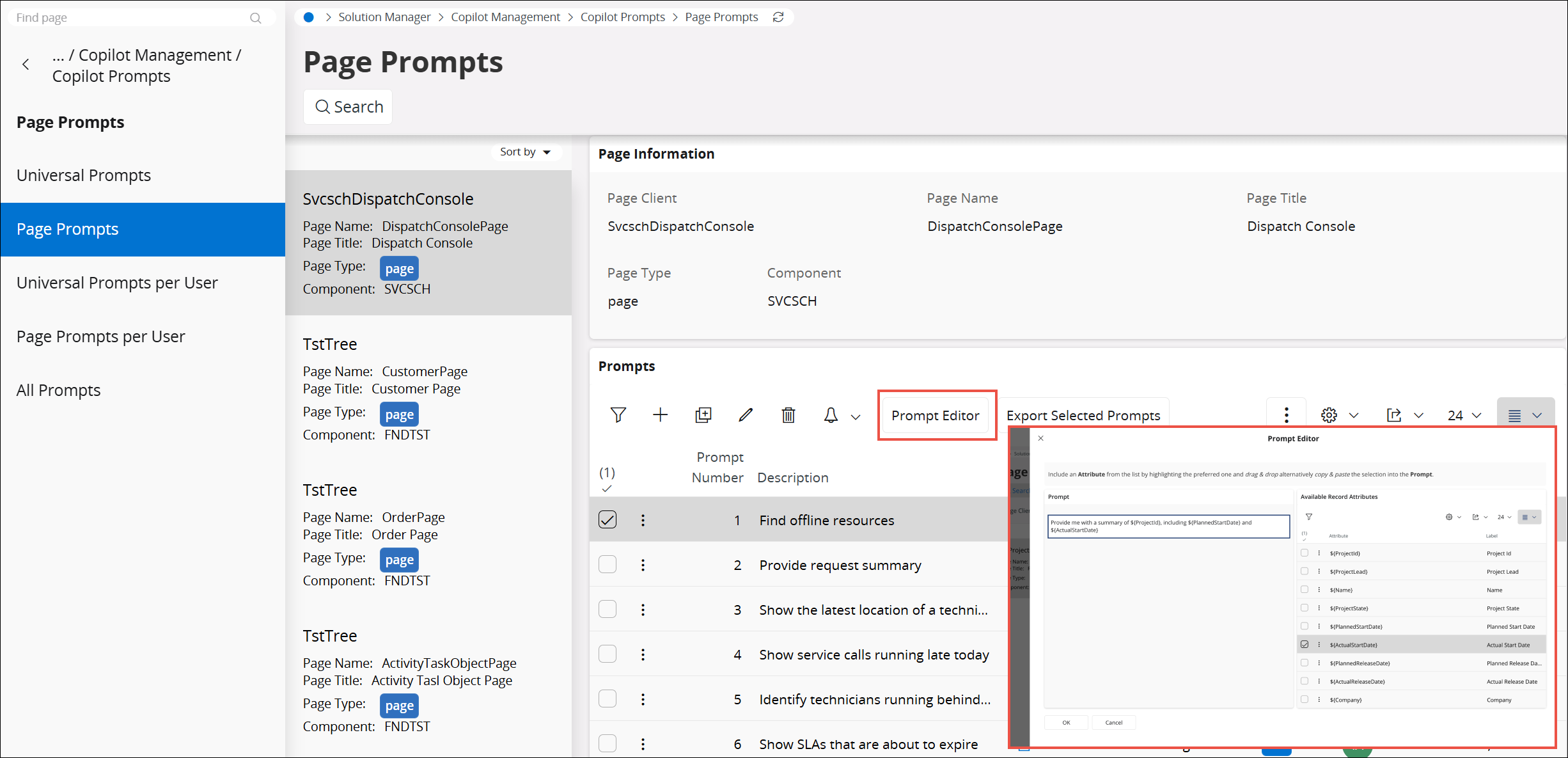
Prompt Editor functionality allows you to add page attributes to a prompt, that will be replaced with page values when used in context.
The Prompt Editor button will become visible after creating a page prompt and selecting the prompt line. On the Prompt Editor view, you will see the prompt you have selected, along with all the attributes for the page. Attributes can be sorted and filtered to help in the selection process.
Note : When adding an attribute, first select the attribute and then you can either copy and paste it into the prompt text editor or drag and drop it directly into the desired location within the editor.
Universal Prompts Per User
Use Universal Prompts Per User to view and manage prompts to view and manage prompts that are available only to a specific user. These are prompts that the user has created themselves, or that are set up specifically for the user by an administrator. Use the search to select a user and then view or manage any universal prompts they have created in the system.
Page Prompts Per User
Use Page Prompts Per User to view and manage prompts that are available only to a specific user. These are prompts that the user has created themselves, or that are set up specifically for the user by an administrator. Use the search to select a user and then view or manage any page prompts they have created in the system.
All Prompts
Use All Prompts to view and manage all the prompts within your organization. This page provides an overview of all the prompts created within the system. Selecting a prompt line will provide you with a button to link back to the relevant page.
Note : Individual users can manage their prompts through My Page Prompts and My Universal Prompts, which can be found under My Administration. The Copilot panel also allows individual users to create and delete their own prompts.
System Parameters Associated with IFS.ai Copilot
Checkout System Parameters documentation for more information
- IFS.ai Copilot Chat
- IFS.ai Copilot access to IFS public documentation
- IFS.ai Copilot Error Log retention policy