Report Substitution Fonts
Content
Overview
- Deprecation Notice: From 25R2 onwards, IFS no longer provides Monotype fonts such as Arial, Arial Narrow, Arial Courier, Times New Roman, etc. as part of Report Studio and Report Studio runtime. Existing Report Studio layouts that reference these fonts will use the configured font substitution mappings at runtime. Customers are recommended to migrate Report Studio layouts to the supported replacement fonts using the IFS Report Studio Migration Tool.
Report Substitution Fonts is a concept for runtime font substitution when formatting reports. Even if a report layout has been designed using a specific font, there's a possibility to have the framework use a different font when formatting the report. A typical scenario when this functionality is useful would be when the report layout has been designed using a font that is not capable of displaying all the glyphs used in the current translation/language you are formatting for. The report substitution font functionality will enable an administrator to define a substitution font to be used in runtime, replacing the design time defined font that's part of the report layout. This way a report layout designed using a font that only contains glyphs for Western European characters can still be used in for instance Chinese. Simply define a Chinese substitution font for the font used in the layout. This eliminates the need to have different layouts, depending on language. It also eliminates the need to try and find a font that both contain all glyphs for all languages you need to support and at the same time looks good in all languages (something that can be quite hard).
This functionality also enables you to adjust (increase or decrease) the font size - this in order to be able to compensate for undesirable layout effects caused by the fact that different fonts (of the same point size) take up different space.
Manage Substitution Fonts
This feature allows you to substitute fonts defined in design time with different fonts at the the time of printing or previewing the report.
Add new fonts in runtime
If the font being used as a substitute is not included in the standard installation of Report Designer Layout Tool (see below, for a list of standard fonts) or Report Studio - Designer tool, then you must add this new font into the runtime.
New fonts can be added using the Fonts tab in the Report Fonts page under Operational Reporting
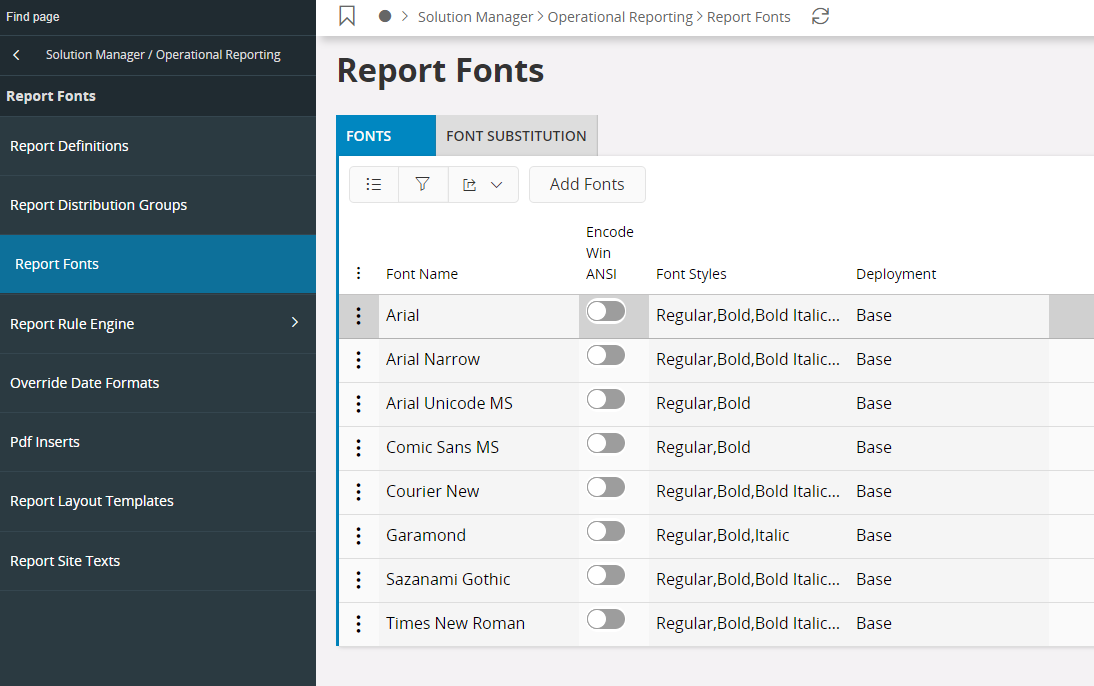
Select Add Fonts, in the dialog that opens either browse for the respective file or drag and drop. Finally, click Import. If you have a font family, all fonts in the font family should be added one by one. Also, if a particular font style is not available then the framework will default to the most suitable available font style. If e.g. Bold is not available but if Bold Italic is available, then the framework will select the Bold Italic font to show Bold fonts.
- Font Name: Installed font family name.
- Encode Win ANSI: The default font encoding is CDI, but you change this to encode in Win ANSI by selecting the checkbox.
- Font Styles: The available font styles for a font family.
- Deployment: This denotes if the font is a standards font or a custom added font. All standard fonts are denoted as Base fonts and all custom added font, that you add will be denoted as Database.
Font Substitution
Fonts can be substituted using the Font Substitution tab on the Report Fonts page under Operational Reporting
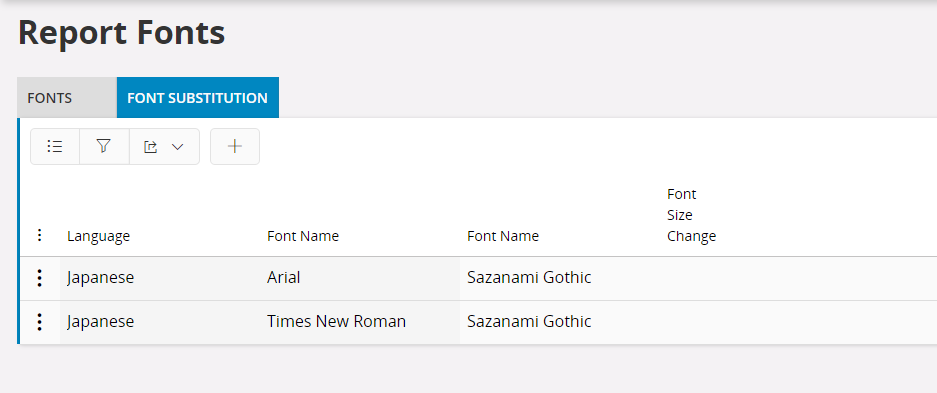
The idea behind substituting fonts is that, you can preview/print a report using a different font than what is defined in the layout at design time. That is, you can specify a font that matches the language in which the report is run.
- Language: language in which the report will be previewed or printed. This language should be selected from the print dialog before executing. Use the combo box drop down list, for selecting the language of your choice.
- Font Name: The design time font specified in the layout that needs to be replaced. Select the font name from the combo box drop-down list.
- Mapping Font Name: This is the substitute font to be used at runtime. Select the replace font name from the combo box drop-down list.
- Font size change: Indicates if the size of the font should be changed when the report is run. Setting the number to a negative number will decrease the size and using a positive value will increase the size. You can select the size from the combo box drop-down list or type your own value.
Following is a list of fonts that comes with the standard installation of the Report Designer framework.
| Font |
|---|
| Arial |
| Arial Narrow |
| Arial Unicode MS (if you have purchased UCFONT component) |
| Comic Sans MS |
| Courier New |
| Garamond |
| Sazanami Gothic (free Japanese font containing over 13,000 characters) |
| Times New Roman |
Note
From 25R2 onwards, Monotype fonts are no longer provided as part of Report Studio and Report Studio runtime. Existing layouts referencing these fonts rely on configured font substitution mappings or can be migrated using the IFS Report Studio Migration Tool.
For Report Studio layouts, customers upgrading to 25R2 or later are recommended to use the Convert REP Layout Monotype Fonts (REP → REP) option in the IFS Report Studio Migration Tool to update layout font references from Monotype fonts to their corresponding replacement fonts.