Time SYS API
To convert the date values related to time zones, a set of methods have been introduced in the Time utility package. (Time_SYS). This package is in FNDBAS component.
Please note that Timezone identifiers can be specified using the following formats
ISO standard (E.g. Asia/Colombo) – Recommended
Offset (+5:30)
UTC/GMT
The following methods are included.
- Get_Timezone :

This function takes in the UTC Offset as a parameter and optionally the country code, and returns a time zone that corresponds to the provided offset. If a country code is specified, the function retrieves the time zone that matches both the offset and the country. Time zones are ordered alphabetically, and in case of multiple matches, the function returns the one that appears first when sorted alphabetically.
- Convert_Timezone :

Converts a Date value in a given time zone (from_timezone_) to a different time zone (to_timezone).
- Convert_Utc_To_Timezone :

Converts a date value in UTC time zone to a different Timezone (to_timezone_).
- Convert_Timezone_To_Utc :

Converts a date in a given time zone (from_timezone_) to UTC.
- Convert_To_System_Timezone :

Converts a date in a given time zone (from_timezone_) to the time zone the database is running (NOTE: This is the time zone of the Database Server and not the DBTIMEZONE value).
- Get_Sysdate_In_Utc :

Get the current time in UTC.
- Get_Current_Time_In_Timezone :

Get’s the current time in a given time zone.
- Get_Current_Time_Difference :

Get the time difference between two time zones, if first_timezone is a head of second Timezone the value will be a positive number, otherwise it will be a negative number. This can be directly added/subtracted from date fields to do calculations.
- Get_Cur_Server_Time_Difference :

Get the time difference between the server time and a given time zone, if the server is a head of the given time zone the value will be a positive number, otherwise it will be a negative number. This can be directly added/subtracted from date fields to do calculations.
- Get_UTC_Offset :

Get the offset of the DB time to UTC. Returns the offset as a string. As an example if the offset is positive the return value is like "+02:00" and otherwise return value is like "-02:00".
- Get_UTC_Offset(time_zone) :

Get the current offset to UTC for a given time zone. Day light saving is applied to the output value. Return type and the format is same as Get_UTC_Offset function.
- Get_UTC_Offset(time_zone, date) :
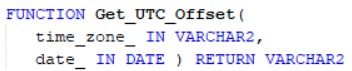
Get the offset to UTC for a given time zone and a given date.Day light saving is applied to the output value. Return type and the format is same as Get_UTC_Offset function.
- Convert_Server_Time_To_Utc :

Convert a time given in server time to UTC.
- Get_Offset_Date_Difference :

Get the days-difference for a given offset. As an example if the given offset is '+06:00', the output value is 0.25. If a negative offset is given the output value is a negative value. If the offset is invalid format, IOFERROR: Offset is in invalid format error is raised. Below formats are some examples for invalid format.
Ex: "06:00C", "ABC". "+6:00"
Daylight Saving Time (DST) Errors
The framework provides specific error methods for handling Daylight Saving Time transitions and time zone related issues arising from Get_UTC_Offset and Convert_Timezone methods.
Dst_Time_Not_Found (ORA-20102)
This error is raised when a supplied time value falls within a DST gap — the period when clocks spring forward and certain local times do not exist. For example, if a time zone transitions from 02:00 to 03:00, any time between 02:00 and 03:00 is invalid for that date.
Default message: The time ":P1" does not exist in time zone ":P2" because clocks skip forward during a Daylight Saving Time change. Please use a time outside the DST gap.
The corresponding public exception Err_Dst_Time_Not_Found can be used to trap this error:
BEGIN
   -- operation that may encounter a DST gap
EXCEPTION
   WHEN Error_SYS.Err_Dst_Time_Not_Found THEN
      -- handle the DST gap scenario
END;